Your Back Pays the Price for Every Hour You Sit — Here’s How to Stop It
The best chair to sit for long hours isn’t just about comfort — it’s about protecting your spine, your posture, and your productivity across an entire workday.
Quick answer — best chairs for long hours of sitting:
| Chair | Best For | Price Range | Warranty |
|---|---|---|---|
| Herman Miller Embody | Executives, serious back pain | ~$2,090 | 12 years |
| Steelcase Leap | All-day dynamic sitting | ~$1,399 | 12 years |
| Herman Miller Aeron | Breathability + adjustability | ~$2,095 | 12 years |
| Herman Miller Cosm | Minimal-adjustment users | ~$1,430+ | 12 years |
| Boulies OP180 | Home office, 8+ hour productivity | Mid-range | Multi-year |
| Branch Ergonomic Chair Pro | Budget-conscious users | ~$499 | 7 years |
Here’s the uncomfortable truth: most people don’t think about their chair until something hurts.
If you’re clocking 8+ hours a day at a desk — coding, editing, sitting through back-to-back meetings — your chair is doing as much work as you are. And if it’s not built for that, your lumbar spine is taking the hit.
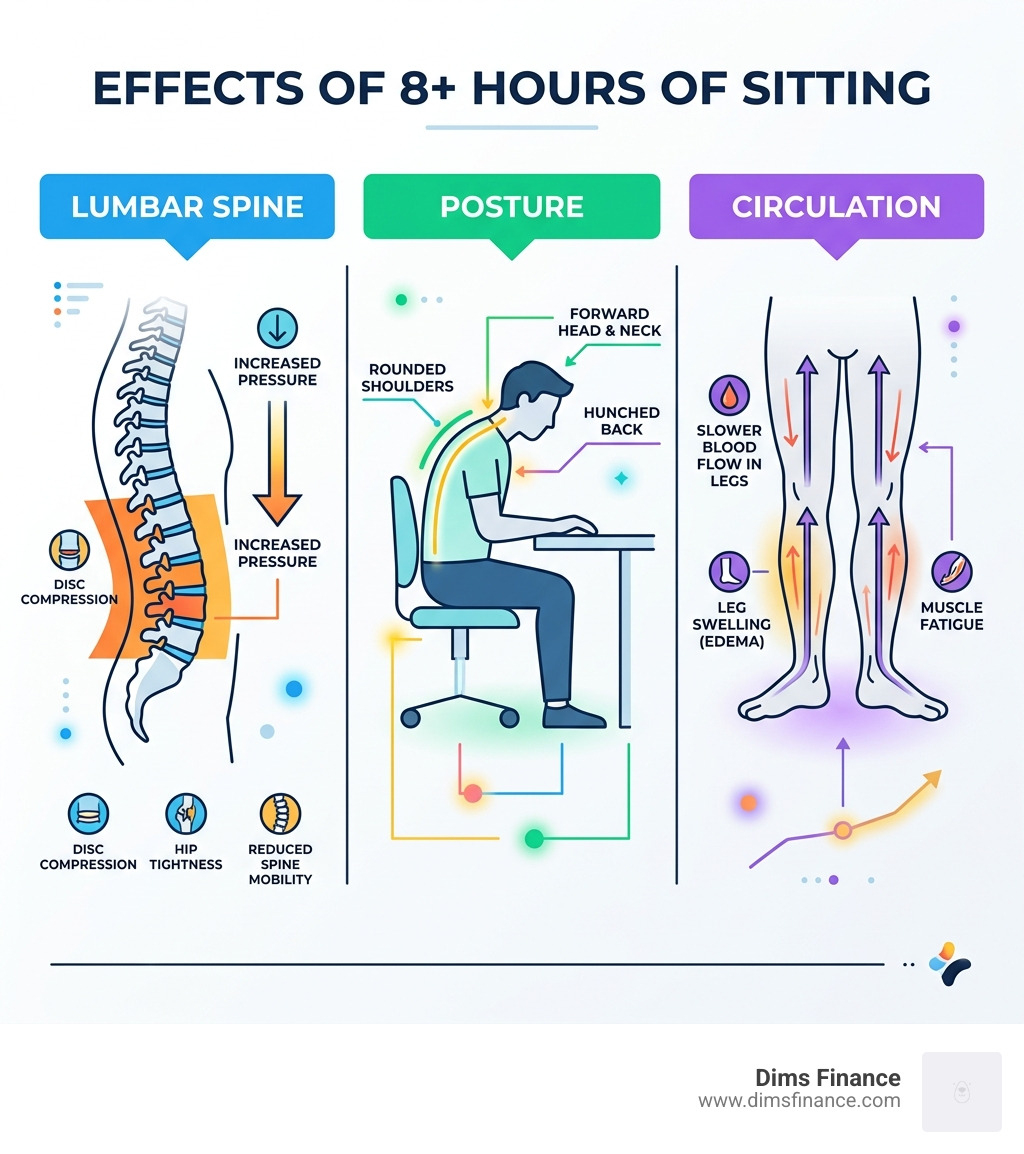
Prolonged sitting flattens the natural curve of your lower back. That puts pressure on your spinal discs, tightens your hips, and cuts off circulation in your legs. Over time, it leads to chronic back pain, neck stiffness, and repetitive strain injuries (RSI) — exactly the kind of damage that’s hard to undo once it sets in.
A good ergonomic chair doesn’t just make you more comfortable. It actively works against those effects.
This guide breaks down what to look for, which chairs actually deliver for long sessions, and how to set one up correctly for your body.
What Defines the Best Chair to Sit for Long Hours?
When we talk about the best chair to sit for long hours, we aren’t talking about a plush “executive” throne that feels like a sofa. In fact, those soft, sink-in chairs are often the worst for your back because they lack the structural integrity to keep your spine aligned. By April 2026, the science of ergonomics has moved toward “dynamic sitting”—the idea that the best chair is one that moves with you.
To find a chair that survives an 8-to-12-hour shift, we look for several non-negotiable features:
1. Robust Lumbar Support
The lumbar curve is the inward curve of your lower back. Without support, this curve flattens, leading to disc compression. Premium options like the Aeron Chair – Herman Miller Store use patented technologies like PostureFit SL to support the sacrum (the base of the spine) and the lumbar region simultaneously. This encourages a natural forward pelvic tilt, which is the “golden posture” for long-term health.
2. Forward-Tilt and Dynamic Movement
If you’ve ever found yourself leaning toward your monitor while typing, you need a chair with a forward-tilt mechanism. This feature allows the seat pan to dip slightly (often around 2 to 5 degrees), keeping your back in contact with the backrest even when you’re “in the zone.” This prevents the “C-shape” slouch that ruins your posture.
3. Seat Depth Adjustment
Your legs need love, too. A chair with adjustable seat depth ensures that the seat pan supports your full thigh span without pressing into the back of your knees. Proper depth prevents circulation issues and numbness, which are common complaints during marathon sessions.
4. 24-Hour Ratings and Build Quality
Most budget chairs are rated for 3–5 hours of use. If you sit for 8+ hours, you need a chair with a 24-hour rating. This usually comes from high-end Office Furniture brands that offer 12-year warranties. These chairs are built to withstand 15 years of heavy daily use, whereas a $150 “big box” chair might bottom out in just 18 months.
Top-Rated Ergonomic Chairs for Marathon Sessions
Choosing the right tool for the job depends on your budget and your body. High-end chairs are an investment in your health—much like a good mattress. If you spend 2,000 hours a year in a chair, the cost-per-hour over a 12-year lifespan is actually pennies.
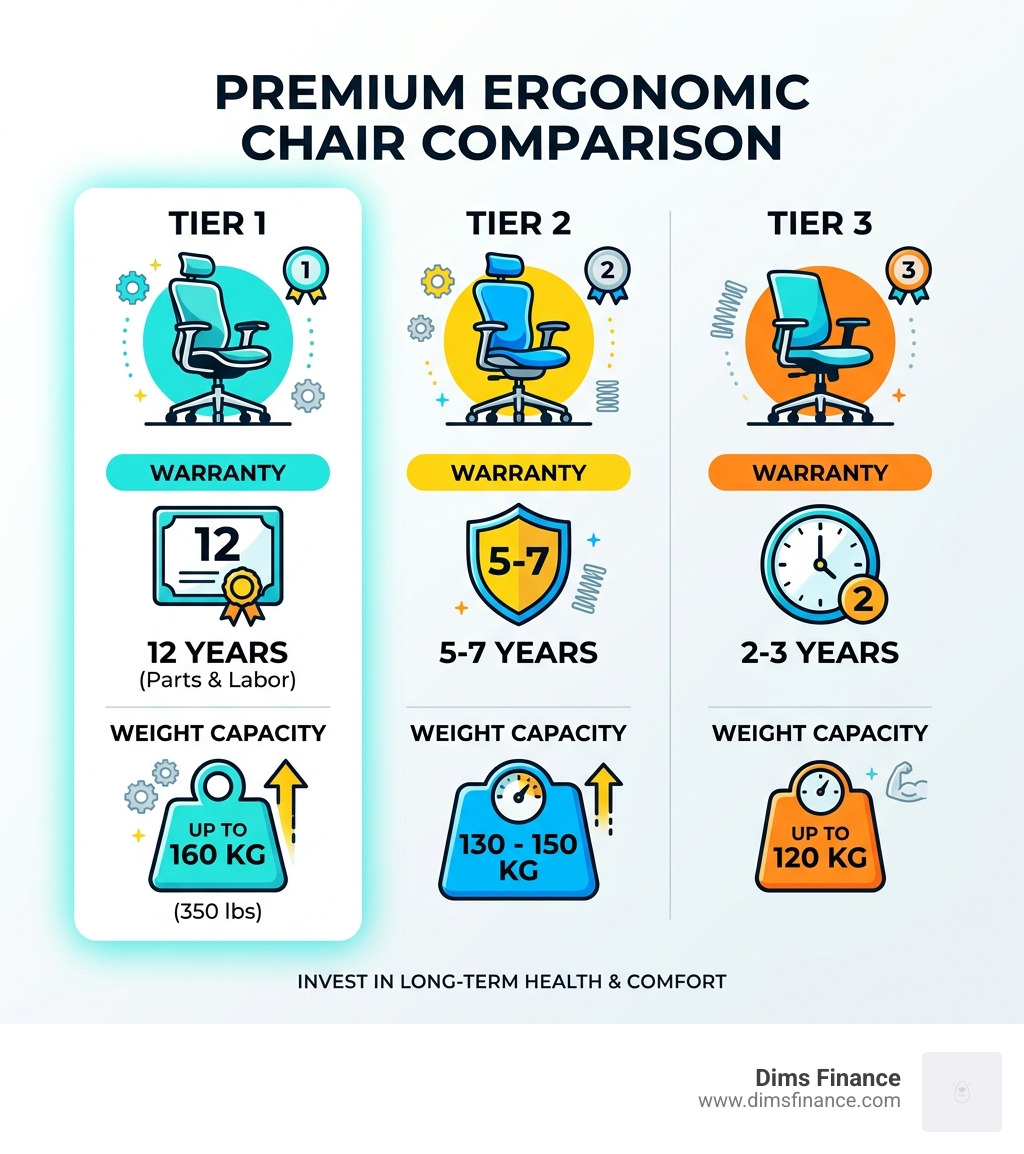
| Feature | Premium Chairs (Herman Miller/Steelcase) | Mid-Range Chairs (Boulies/Branch) |
|---|---|---|
| Warranty | 12 Years (Parts & Labor) | 2 to 7 Years |
| Weight Capacity | Up to 160kg (350 lbs) | 120kg to 160kg |
| Material | 8Z Pellicle Mesh / High-Performance Fabric | Cold-Cured Foam / Hybrid Leather |
| Lifespan | 12–15 Years | 3–7 Years |
Premium Performance: The Best Chair to Sit for Long Hours for Executives
For those who prioritize spinal health above all else, the Embody Chair, Ergonomic Office Seating – Herman Miller stands as the gold standard. It was designed by physicians and PhDs specifically to reduce stress and improve blood flow.
What makes it unique is its “pixelated support.” The seat and back are made of a matrix of pixels that conform to your smallest micro-movements. Instead of a rigid frame, the backrest mimics the human spine. This allows for “active ergonomics”—the chair doesn’t just sit there; it responds to you as you reach for a coffee or lean back to think.
Another heavyweight in this category is the Steelcase Gesture. It is widely praised for its incredibly adjustable armrests, which move like a human arm. This makes it a top choice for preventing keyboard wrist pain and RSI, as you can position the support exactly where your elbows naturally fall, regardless of your device.
Versatile Support: The Best Chair to Sit for Long Hours for Home Offices
You don’t always need to spend $2,000 to get 8-hour comfort. Mid-range champions like the Boulies OP180 have carved out a niche for “marathon sitters.” The OP180 is specifically engineered for productivity, featuring a 2-degree forward tilt and a weight capacity of up to 160kg. It uses cold-cure foam, which is much denser and more resilient than the cheap foam found in entry-level chairs, ensuring the seat doesn’t “bottom out” after a few months.
If you prefer a more flexible, breathable feel, the Mirra 2 Chair – Herman Miller Store is designed for people who don’t sit still. Its “Loop Spine” provides torsional flex, allowing you to twist and reach without losing lumbar support. It’s the perfect middle ground for someone who moves between multiple monitors or frequently shifts positions throughout the day.
Material Matters: Mesh vs. Leather vs. Fabric
The material of your chair dictates your “thermal comfort”—basically, whether you’ll end up with a sweaty back by 3:00 PM.

Mesh: The King of Breathability
Mesh is the best choice for warm climates or users who “run hot.” However, not all mesh is created equal. Cheap mesh can sag over time, losing its supportive tension. High-end mesh, like the Intercept suspension found on the Cosm High Back Chair – Herman Miller Store, is temperature-neutral and conforms to your body without stretching out. It provides a feeling of weightlessness that foam simply can’t match.
Leather and Hybrid Leather: The Plush Choice
Leather (and high-quality hybrid leathers used by brands like Boulies) offers a more traditional, cushioned feel. It’s excellent for pressure distribution, especially if you have a smaller frame and find mesh too “firm.” The downside is breathability; leather can trap heat. If you go this route, look for chairs that use cold-cured foam underneath, which maintains its shape for years of heavy use.
Fabric: The All-Rounder
Fabric provides the most variety in terms of aesthetics and “grip.” It’s less slippery than leather and warmer than mesh. Modern performance fabrics are moisture-wicking and highly durable, making them a great choice for a standard home office environment.
How to Adjust Your Chair for 8+ Hour Comfort
Even the best chair to sit for long hours will cause pain if it isn’t adjusted to your specific body measurements. Ergonomics is a “system,” not just a product.
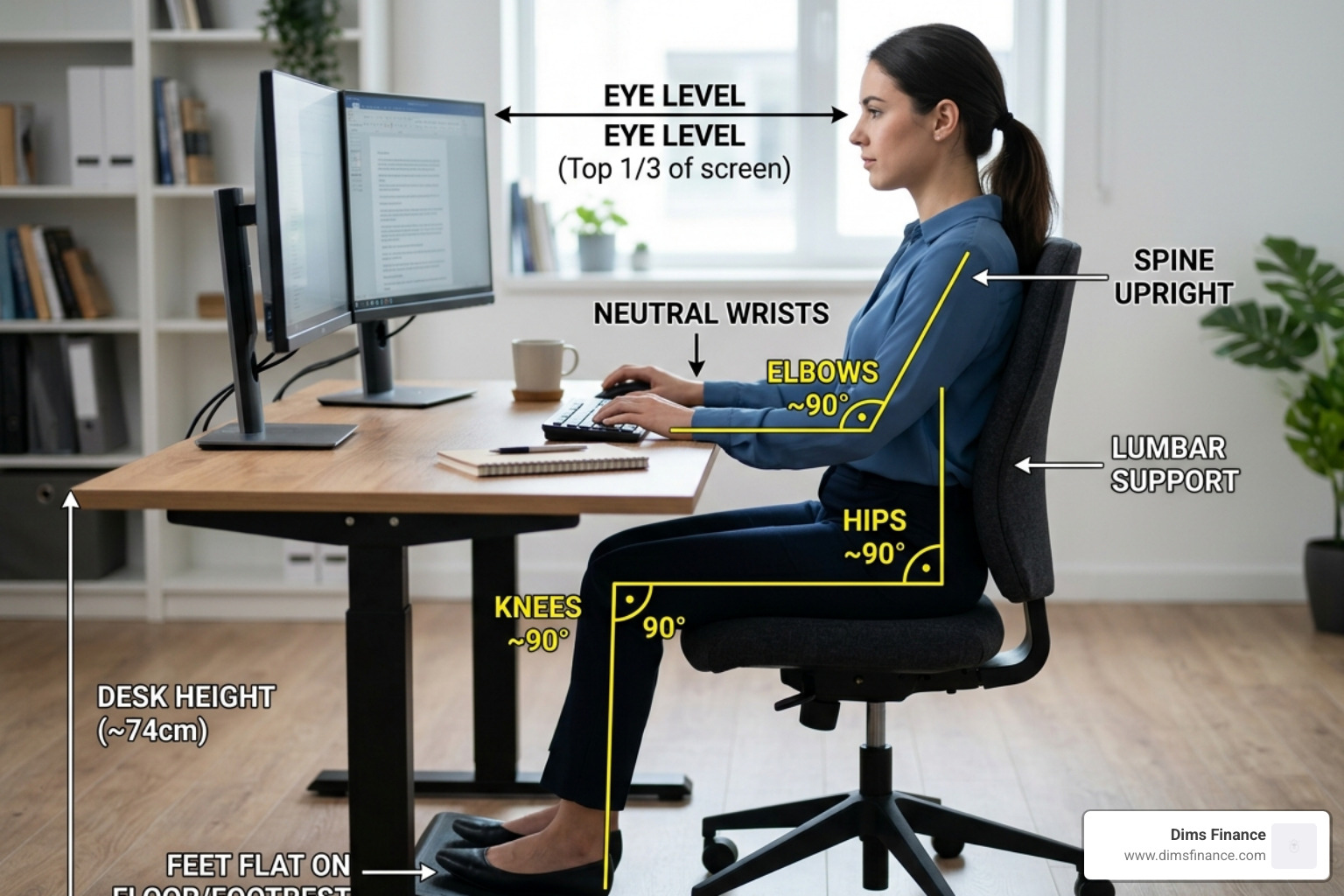
To set up your workspace for pain-free productivity, follow these steps:
- The 90-90-90 Rule: Your knees, hips, and elbows should all be at approximately 90-degree angles. Your feet must be flat on the floor. If they aren’t, you need a footrest to prevent strain on your lower back.
- Seat Height: Adjust your seat so your forearms are level with your desk. This prevents “shrugging” your shoulders, which leads to neck tension.
- Lumbar Placement: The “bump” of the lumbar support should fit into the natural curve of your lower back. In chairs like the Verus Task Chair – Herman Miller Store, this support is often integrated directly into the backrest for a seamless fit.
- Armrest Alignment: Your armrests should be at a height where your shoulders feel relaxed. If they are too high, you’ll get “desk neck.” If they are too low, you’ll lean to one side, misaligning your spine.
- Monitor Level: Your eyes should be level with the top third of your screen. This keeps your head balanced over your spine rather than leaning forward (the dreaded “tech neck”).
By optimizing these settings, you significantly reduce the risk of RSI and keyboard wrist pain, allowing you to focus on your work rather than your discomfort.
Conclusion
At Dims Finance, we believe that your workspace is an investment in your future earning potential. You cannot be productive if you are in pain. Choosing the best chair to sit for long hours is the first step toward a sustainable, healthy career. Whether you opt for the high-tech “pixelated” support of an Embody or the versatile, heavy-duty build of a Boulies, ensure you are prioritizing adjustability and build quality.
For more tips on optimizing your home office and protecting your health, explore our guides on Office Furniture and ergonomic wellness.
Are gaming chairs suitable for 8-hour workdays?
Generally, we recommend caution. Traditional “bucket-style” gaming chairs are modeled after race car seats, which are designed to hold you still during high-speed turns—not to support you while typing. The side bolsters can restrict leg movement and “roll” your shoulders forward. However, modern “office-style” gaming chairs (like the Boulies Master series) have flattened these bolsters, making them much more suitable for long workdays.
How long should a high-quality office chair last?
A premium ergonomic chair from a reputable manufacturer should last 12 to 15 years. This is why brands like Herman Miller and Steelcase offer 12-year warranties that cover everything from the gas lift to the fabric. In contrast, budget chairs ($100–$200) usually have a lifespan of 1 to 2 years before the foam compresses or the mechanism begins to squeak and wobble.
Does a firm or soft seat provide better long-term support?
Firmness is your friend. While a soft, plush chair feels great for the first 10 minutes, it allows your hips to sink, which tilts your pelvis backward and misaligns your spine. A firm seat (or a high-tension mesh) provides the “suspension” needed to keep your bones aligned and your muscles relaxed over an 8-hour session. Think of it like a firm mattress versus a beanbag—your back will always thank you for the support of the former.