
Why Your Wrists Are Screaming for Attention
Wrist extensor stretches are one of the simplest, most effective ways to relieve forearm tension and prevent repetitive strain injuries from typing, gaming, or daily hand use.
Here’s a quick-start summary:
- Extend your arm in front of you, palm facing down
- Use your other hand to gently pull your fingers toward the floor
- Hold for 15-30 seconds, feeling a mild stretch along your forearm
- Repeat 2-4 times per side, up to 3 times a day
- Stop immediately if you feel sharp or shooting pain
If you spend hours at a keyboard or mouse, your wrist extensor muscles — the ones running along the back of your forearm — take a constant beating. Over time, that repetitive load builds into stiffness, aching, and sometimes more serious conditions like tennis elbow or repetitive strain injury (RSI).
The numbers back this up. Roughly 2 million hand and wrist injuries occur every year in the US alone, and cases have been rising year over year.
The good news? A few minutes of targeted stretching each day can make a real difference — no equipment needed.
Understanding the Anatomy of Forearm Tension
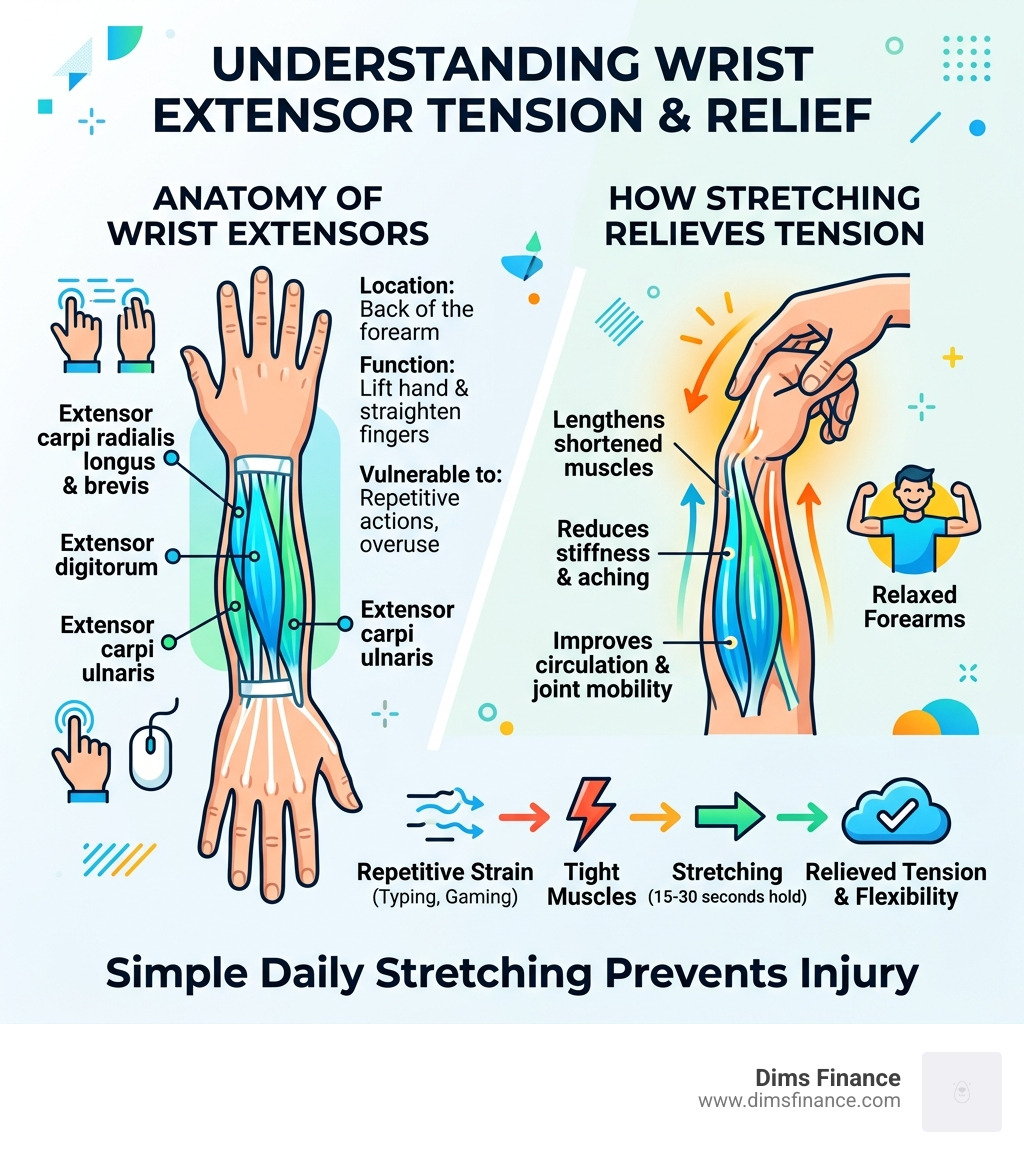
To understand why wrist extensor stretches feel so good, we first need to look at the “machinery” under the skin. Your forearms are packed with muscles that control the intricate movements of your hands and fingers. The extensors, located on the back (top) of your forearm, are the “unsung heroes” that allow you to lift your hand and straighten your fingers.
The primary players in this muscle group include the extensor carpi ulnaris, the extensor digitorum, and the extensor carpi radialis brevis. These muscles work together to provide stability and control during fine motor tasks. When they become tight or overworked, it doesn’t just stay in the wrist; the tension can radiate up toward the elbow or down into the knuckles.
According to research on how to Enhance Flexibility and Strength with Wrist Extensor Stretch, these muscles are essential for daily activities that require a strong grip and wrist stability. Interestingly, wrist resistance training improves motor control and strength, suggesting that a combination of stretching and strengthening is the gold standard for long-term joint health.
Common Causes of Extensor Tightness
In our modern world, we are constantly putting our extensors in a state of “static loading.” This happens most frequently during:
- Typing and Texting: Keeping your fingers poised over a keyboard or clutching a smartphone keeps these muscles in a state of constant contraction.
- Repetitive Tasks: Whether you are a musician playing scales, a factory worker on an assembly line, or an avid gardener, repetitive motion leads to micro-trauma.
- Tennis Elbow (Lateral Epicondylitis): This isn’t just for athletes. It’s a condition caused by the overuse of the extensor muscles where they attach to the bony bump on the outside of your elbow.
- Poor Ergonomics: If your setup is wrong, your hands are likely “reaching” for your keys, leading to a Keyboard Wrist Injury When Your Hands Go On Strike.
Why Stretching is Essential in April 2026
As we move through April 2026, the prevalence of remote work and digital interaction continues to climb. We’ve seen a significant trend in hand and wrist injury data: between 2009 and 2018, cases increased by 8.6%, and that trend hasn’t slowed down.
Regularly performing wrist extensor stretches is no longer a “nice-to-have”—it is a critical part of injury prevention. Stretching improves circulation, which brings oxygen-rich blood to tired tissues, and helps maintain the range of motion needed to perform tasks without pain. As noted by Wrist Extensor Stretch — Rehab Hero, proactive care is the best way to avoid the surgeon’s table later in life.
Step-by-Step Guide to Basic Wrist Extensor Stretches
Performing a wrist extensor stretch correctly is more about precision than power. You aren’t trying to snap a rubber band; you’re trying to gently lengthen a muscle.
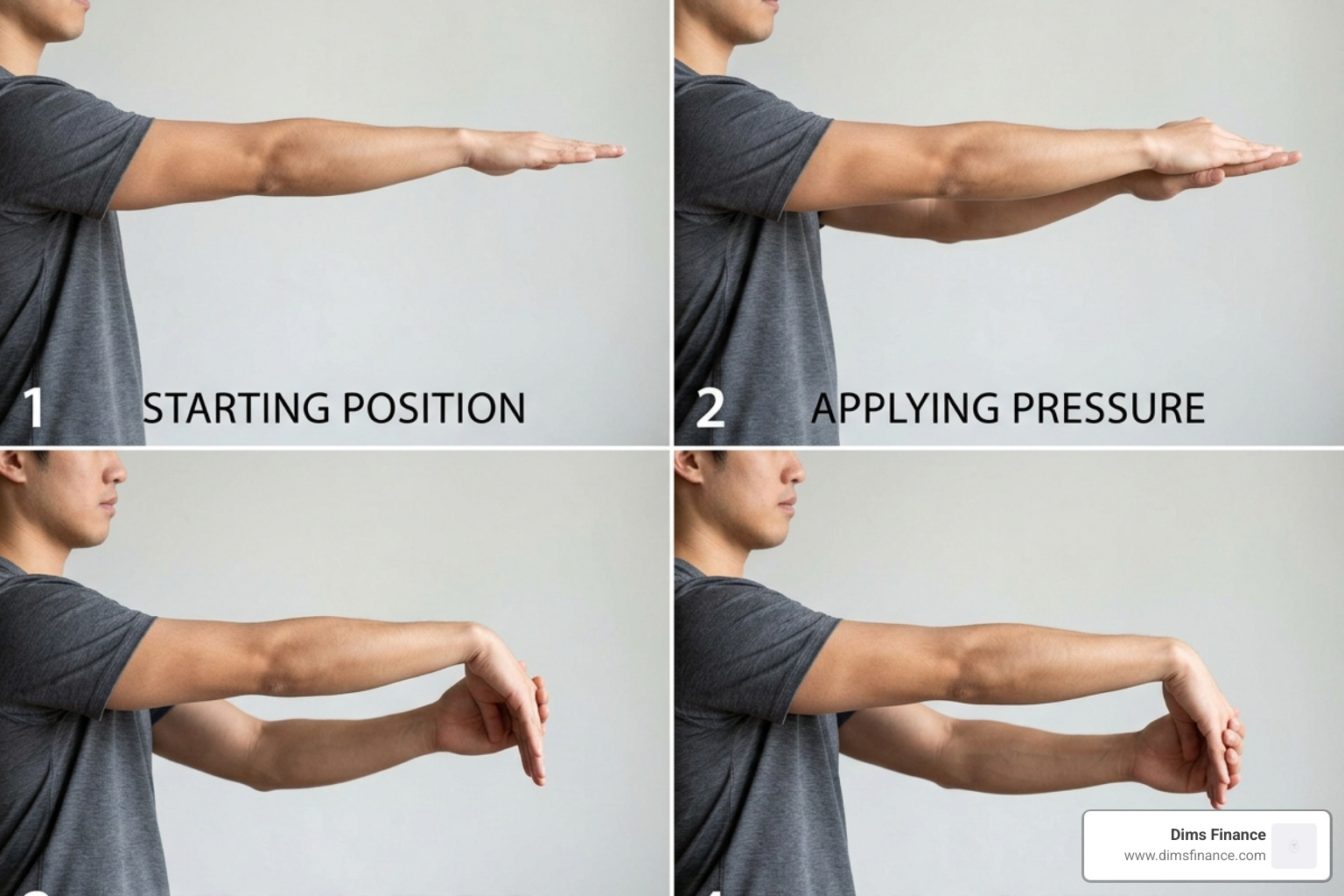
The Basic Technique:
- The Starting Position: Extend your right arm straight out in front of you at shoulder height. Keep your elbow straight but not “locked” into a painful position.
- The Orientation: Turn your hand so your palm is facing the floor (this is called pronation).
- The Assist: Use your left hand to grasp the back of your right hand.
- The Motion: Gently pull your right hand downward, bending the wrist so your fingers point toward the floor.
- The Hold: You should feel a stretch along the top of your forearm. Hold this for 15 to 30 seconds while breathing normally.
- The Release: Slowly let go and relax. Repeat the process on the other arm.
This method is widely recommended by medical libraries, such as the Wrist extensor stretch guide, for its simplicity and effectiveness.
Proper Form for Wrist Extensor Stretches
To get the most out of your wrist extensor stretches, keep these form cues in mind:
- Shoulders Down: Don’t let your shoulders creep up toward your ears. Keep them relaxed.
- Elbow Straight: If your elbow is bent, you won’t get a full stretch across the extensor muscles that cross the elbow joint.
- Neutral Alignment: Ensure you are Mastering The Neutral Wrist Position For Your Keyboard Setup throughout the day so that when you do stretch, you aren’t starting from a place of extreme irritation.
- Mild Tension Only: You should feel a “good” stretch, not a sharp “stop-it-now” pain.
Frequency and Repetitions for Wrist Extensor Stretches
Consistency is the secret sauce. One stretch a week won’t undo 40 hours of typing.
- Duration: Hold each stretch for 15-30 seconds.
- Repetitions: Perform 2 to 4 repetitions per arm.
- Daily Frequency: Aim for 3 sets throughout the day—ideally morning, lunch, and after work.
Following the advice from Wrist Extensor Stretch, building these into a “micro-break” routine every 60-90 minutes of computer work can significantly reduce cumulative strain.
Advanced Variations and Flexor Moves
Once you’ve mastered the basic wrist extensor stretches, you can incorporate variations to target different angles of the forearm and include the flexor muscles (the ones on the palm side) for total balance.
| Stretch Type | Primary Target | Key Benefit |
|---|---|---|
| Extensor Stretch | Back of forearm | Relieves Tennis Elbow / Keyboard strain |
| Flexor Stretch | Front of forearm | Counteracts heavy gripping / lifting |
| Prayer Stretch | Both (Flexor focus) | Improves overall wrist mobility |
| Fist Opener | Finger extensors | Relieves “claw hand” from mouse use |
To keep your hands healthy, we also recommend How To Master The Wrist Neutral Keyboard Position to minimize the need for “rescue” stretching.
Intensifying the Extensor Stretch
If you feel you’ve plateaued, you can increase the intensity of your wrist extensor stretches with these clinical tweaks:
- The Fist Version: Instead of keeping your fingers straight, make a gentle fist with the hand being stretched. This adds tension to the muscles that control the knuckles.
- Ulnar Deviation: While pulling your hand down, gently rotate your wrist toward your pinky finger. This targets the extensor carpi radialis muscles more specifically, which are often the culprits in lateral epicondylitis.
- The Small Finger Pull: For a deeper stretch, focus the pressure of your assisting hand on the pinky-side of the hand being stretched.
As noted in the Wrist extensor stretch resources, these advanced moves should only be attempted once the basic stretch is pain-free.
Complementary Flexor and Nerve Glides
Muscle balance is key. If you only stretch the extensors, the flexors on the other side can become tight and pull your wrist out of alignment.
- Wrist Flexor Stretch: Extend your arm palm up, and pull your fingers back toward your body.
- Median Nerve Glide: This involves moving your wrist and head in specific patterns to “floss” the nerve through the carpal tunnel. It’s a game-changer for those dealing with numbness or tingling.
- The Prayer Stretch: Place your palms together in front of your chest and slowly lower them toward your waist until you feel a stretch.
For those looking for total workspace transformation, check out Your Wrists New Best Friend Top Ergonomic Supports For 2026 to complement your new stretching routine.
Safety Precautions and Common Mistakes to Avoid
Stretching is generally safe, but doing it wrong can actually cause more harm than good.
Avoid these common pitfalls:
- The “Bounce”: Never bounce while stretching (ballistic stretching). This can cause micro-tears in the muscle. Use slow, steady pressure.
- Holding Your Breath: We often hold our breath when we feel tension. This tells your nervous system to “fight,” making the muscle tighter. Breathe deeply into your belly.
- Overstretching: If your hand starts to go numb or you feel a sharp, electrical sensation, you are pulling too hard or compressing a nerve. Back off immediately.
- Ignoring the Pain: As the Wrist extensor stretch guidelines state, if you feel pain that persists after the stretch, you must stop and consult a professional.
When to Consult a Healthcare Professional
While wrist extensor stretches are a powerful tool, they aren’t a cure-all for advanced medical conditions. You should seek help from a physical therapist or doctor if you experience:
- Persistent numbness or tingling in the thumb and first two fingers (common signs of carpal tunnel).
- Pain that keeps you awake at night.
- Swelling or redness around the wrist joint.
- A significant loss of grip strength.
The good news is that intervention works. Data shows that members of digital health programs can experience an average 68% reduction in pain within the first 12 weeks of a guided exercise program. Finding the right tools, such as understanding Why Your Wrist Hurts And The Best Ergonomic Mouse Types To Fix It, can also accelerate your recovery.
Frequently Asked Questions about Wrist Health
How often should I stretch my wrists at work?
We recommend a “micro-break” every hour. You don’t need a full 10-minute session; just one or two wrist extensor stretches held for 20 seconds can reset the tension in your forearms.
Can wrist extensor stretches fix tennis elbow?
They are a primary component of the recovery process. By lengthening the extensor muscles, you reduce the “tug” on the lateral epicondyle (the elbow bone), allowing the tendon to heal. However, they should be paired with eccentric strengthening for the best results.
What should I do if I feel a sharp pain while stretching?
Stop immediately. Sharp pain is a signal from your body that you are either overstretching a muscle or irritating a nerve. Relax the arm, shake it out gently, and try again later with much less intensity. If the sharp pain returns, consult a healthcare provider.
Conclusion
At Dims Finance, we believe that your physical health is the foundation of your productivity. You can have the best financial strategies in the world, but if your hands are too painful to type, your progress will stall.
Incorporating wrist extensor stretches into your daily ergonomic routine is a small investment that pays massive dividends in pain-free productivity. By understanding your anatomy, using proper form, and balancing your stretches with the right workspace tools, you can stay ahead of the “2 million injury” statistic.
Ready to take your office health to the next level? Dive into The Complete Office Ergonomics Guide To Stop RSI Before It Starts and ensure your workspace is working for you, not against you. Stay flexible, stay productive!