
Why Typing Wrist Pain Is More Common Than You Think
Typing wrist pain is discomfort, aching, or tingling in the wrist and hand caused by repetitive keyboard and mouse use — and it’s one of the most common complaints among desk workers today.
Common causes of typing wrist pain include:
| Cause | What’s Happening |
|---|---|
| Repetitive strain injury (RSI) | Hundreds of micro-traumas per hour add up over time |
| Poor wrist position | Bent wrists increase pressure on tendons and nerves |
| Carpal tunnel syndrome | Compression of the median nerve at the wrist |
| Tendonitis | Inflamed tendons from repetitive motion without rest |
| Static posture | Reduced blood flow and muscle fatigue from staying still |
| Underlying conditions | Arthritis or old injuries made worse by typing |
The good news? Most cases are preventable — and treatable.
Picture this: you’re powering through your inbox, knocking out report after report. Your fingers are flying. Then, somewhere around hour six, a dull ache starts creeping into your wrist. Sound familiar?
You’re not alone. Wrist pain is one of the most common complaints among people who spend long hours at a keyboard. And it’s not just about how much you type — it’s about how you type, where your wrists sit, and what’s already going on inside your body.
Here’s something worth knowing upfront: typing itself isn’t always the root cause. According to orthopaedic specialists, repetitive keystrokes often aggravate underlying issues — like old injuries, early-stage arthritis, or subtle changes in your posture — rather than creating problems from scratch. Think of your body as a connected system. A problem in your neck or shoulder can travel downstream and show up as wrist pain, much like a kink at one end of a garden hose causes pressure all the way through.
The pain is your body asking for a few small changes. And this guide will walk you through exactly what those changes look like.
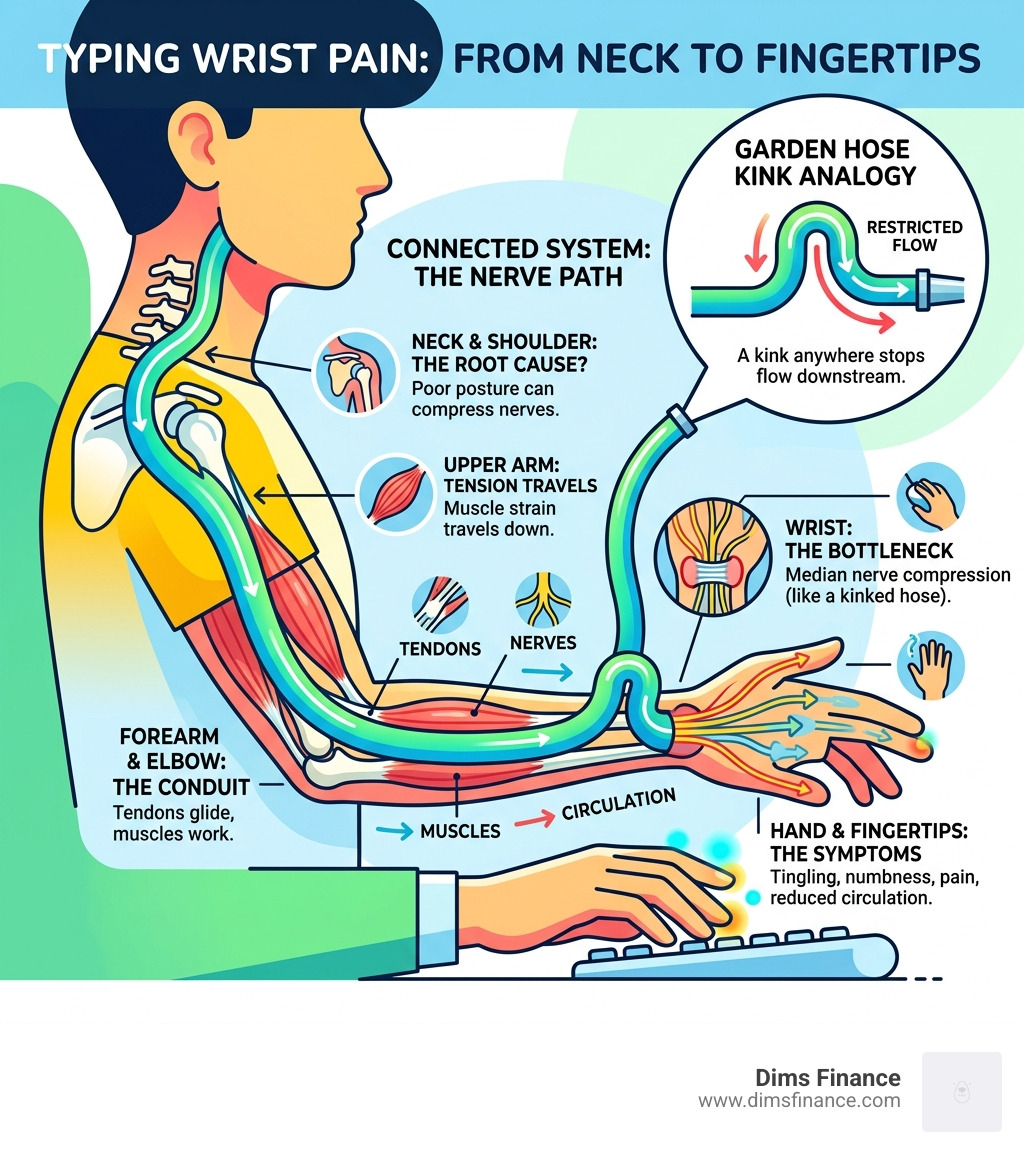
Understanding the Root Causes of Typing Wrist Pain
To fix the pain, we first have to understand why it happens. When we type, our hands perform thousands of repetitive movements. This leads to “micro-traumas”—tiny bits of wear and tear that occur every hour. If your workstation isn’t set up correctly, your tendons might rub against bone or ligaments, leading to painful inflammation.
Furthermore, staying in a static posture for too long is a major culprit. When your muscles stay in one position, blood flow decreases, leading to fatigue and that “heavy” feeling in your forearms. As we’ve explored in our guide on is your typing style cramping your style solving keyboard wrist pain, the way you approach the keys matters just as much as the keyboard itself.
Medical experts at the Cleveland Clinic note in Typing Troubles: How To Avoid Wrist Pain that your wrists are part of an interconnected framework. Pain doesn’t always start where you feel it; it can be “referred” from your neck or shoulders due to poor spinal alignment.
Carpal Tunnel and Typing Wrist Pain: Myths vs. Facts
When most people feel a zing in their wrist, they immediately shout, “Carpal Tunnel!” But here is a surprising fact: typing alone rarely causes Carpal Tunnel Syndrome (CTS).
CTS occurs when the median nerve—the nerve that runs from your forearm into the palm of your hand—becomes compressed at the wrist. While typing doesn’t usually create the condition from scratch, it can certainly make existing symptoms much more noticeable. Research suggests that lifestyle factors like obesity, hormonal changes (such as pregnancy or menopause), and even genetics play a much larger role in who develops CTS than keyboard use does.
According to the article Did Typing Cause My Carpal Tunnel Syndrome?, compelling data shows that using a keyboard isn’t the primary cause. However, if you already have a narrow carpal tunnel, typing for more than 28 hours a week can significantly increase your risk of a flare-up.
Common Conditions: RSI, Tendonitis, and Arthritis
If it’s not Carpal Tunnel, what is it? Often, it’s one of several other conditions:
- Repetitive Strain Injury (RSI): This is an umbrella term for pain caused by repetitive movement. It affects muscles, nerves, and tendons.
- Tendonitis: This is the inflammation of the tendons. If you feel a sharp pain over a specific area, it’s often tendonitis caused by tendons rubbing against bone without enough rest.
- Cubital Tunnel Syndrome: This involves the ulnar nerve (the “funny bone” nerve). It’s often caused by leaning on your elbows or keeping them bent too long, leading to numbness in your pinky and ring fingers.
- Arthritis: With over 100 types of arthritis, including osteoarthritis (wear and tear) and rheumatoid arthritis (autoimmune), typing can aggravate joints that are already sensitive.
Ergonomic Strategies for Pain-Free Productivity
We believe that your workspace should work for you, not against you. The goal is to achieve a neutral wrist position. This means your wrist should be a straight line from your forearm to your knuckles—no bending up (extension) and no bending down (flexion).
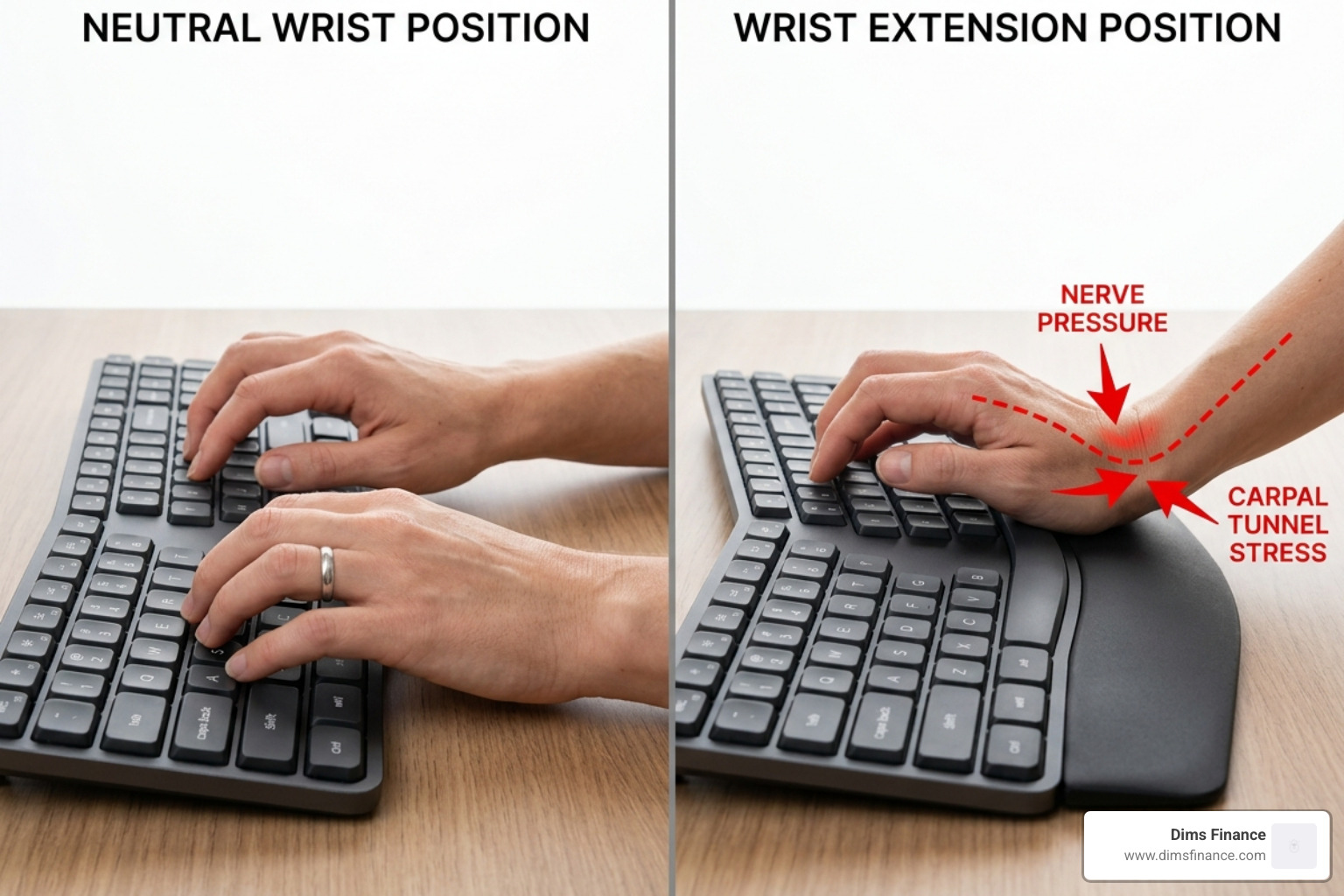
A common mistake is “floating” the wrists too high or resting them heavily on a hard desk edge. To prevent this, your elbows should be at a 90 to 110-degree angle, with your keyboard sitting slightly below elbow height. For more deep dives into this, check out our typing posture tips to prevent digital injuries.
Optimizing Your Workspace Setup
A pain-free day starts with the right foundation. Here is a quick checklist we recommend for April 2026 standards:
- Monitor Alignment: Your screen should be at eye level, about an arm’s length away. If you’re looking down at a laptop, you’re kinking that “garden hose” in your neck.
- Chair Support: Use a chair with proper lumbar support to maintain the natural curve of your spine. If your back is hunched, your wrists will pay the price.
- Footrests: Your feet should be flat on the floor. If they aren’t, use a footrest to stabilize your lower body.
- Sit-Stand Desks: Alternating your position every hour keeps blood flowing and prevents muscles from locking into static, fatiguing positions.
Ergonomic Tools and Accessories
Sometimes, your standard equipment is the problem. Standard keyboards force your wrists to angle outward (ulnar deviation), which is a recipe for typing wrist pain.
- Split Keyboards: These allow your hands to stay shoulder-width apart, keeping your wrists straight.
- Vertical Mice: These keep your hand in a “handshake” position, which reduces the twisting of the forearm bones.
- Wrist Rests and Gel Pads: Use these to support the palm of your hand, not the wrist itself. You should never put direct pressure on the carpal tunnel.
- Night Splints: Many people sleep with their wrists curled tight. Wearing a splint at night keeps the wrist neutral and gives the median nerve a chance to recover while you sleep.
Stretches and Home Remedies for Relief
If the sting has already set in, don’t panic. There are several home remedies that can provide immediate relief. We are huge fans of the 20-20-20 rule: every 20 minutes, look 20 feet away for 20 seconds, and use that time to gently shake out your hands.
For inflammation, ice therapy is your best friend. Apply ice to the wrist for 15 minutes after a long session to bring down swelling. If your muscles feel stiff and “tight” rather than sharp and “stinging,” heat application can help improve blood flow. Over-the-counter (OTC) anti-inflammatories can also help, provided you consult with a professional first. For more home-based fixes, see our 7 proven solutions for typing without the ouch.
Exercises to Prevent Typing Wrist Pain
Regular movement is the “oil” for your joints. Try these simple exercises during your breaks:
- Wrist Circles: Rotate your wrists 10 times in each direction to improve circulation.
- Finger Fans: Spread your fingers wide, then make a tight fist. Repeat 5 times.
- Nerve Glides: Gently tilt your head while extending your arm to “floss” the nerves through the arm’s anatomy.
- Wrist Flexor Stretch: Extend one arm in front of you, palm up, and use the other hand to gently pull your fingers back toward the floor.

When to Seek Professional Medical Help
We always tell our readers: pain is a defense mechanism. It is your body’s way of saying something is wrong. While a little soreness after an 8-hour sprint is normal, certain “red flags” mean it’s time to see a hand specialist or a physical therapist.
See a professional if you experience:
- Persistent Numbness: If your fingers feel “asleep” even when you aren’t typing.
- Grip Weakness: If you find yourself dropping your coffee mug or struggling to open jars.
- Night Pain: If the pain is severe enough to wake you up at 3:00 AM.
- No Improvement: If you’ve rested and used ergonomics for two weeks and the pain hasn’t budged.
How Physical Therapy Can Help
A physical therapist doesn’t just look at your wrist; they look at your whole “garden hose.” They will perform a movement assessment to see if your shoulder blade stability or neck posture is contributing to the problem.
Treatment often includes manual therapy (targeted massage and joint mobilization), activity modification, and personalized exercise plans. They can also provide ergonomic education tailored specifically to your body type, helping you build sustainable habits for the long haul.
Frequently Asked Questions about Wrist Pain
Why do my wrists hurt even when I’m not typing?
This often indicates that the inflammation has become chronic or that there is an underlying issue like a ganglion cyst or arthritis. It can also be a sign of “referred pain” from a compressed nerve in the neck or elbow that stays irritated regardless of your hand activity.
Can typing wrist pain go away on its own with rest?
Mild strain can resolve with rest, but if the underlying cause (like poor posture or a bad desk setup) isn’t fixed, the pain will return the moment you start typing again. Rest is a temporary fix; ergonomics is the permanent solution.
Is voice-to-text a viable solution for chronic pain?
Absolutely. Modern AI dictation is incredibly fast—often three times faster than typing. Using voice-to-text for long emails or drafts can reduce your daily keystrokes by thousands, giving your wrists the “micro-breaks” they need to heal.
Conclusion
As we move through 2026, the digital demands on our bodies aren’t slowing down—but that doesn’t mean we have to live in discomfort. By understanding that typing wrist pain is often a signal for better ergonomics rather than a permanent injury, you can take control of your workspace.
At Dims Finance, we are committed to helping you achieve pain-free productivity. Whether it’s switching to a vertical mouse, mastering the 20-20-20 rule, or finally adjusting that monitor height, small changes lead to big results. Don’t wait for the ache to become an injury. Start optimizing your workspace today with The complete office ergonomics guide to stop RSI before it starts.