Why the Best Desk Setup for Carpal Tunnel Can Save Your Wrists (and Your Productivity)
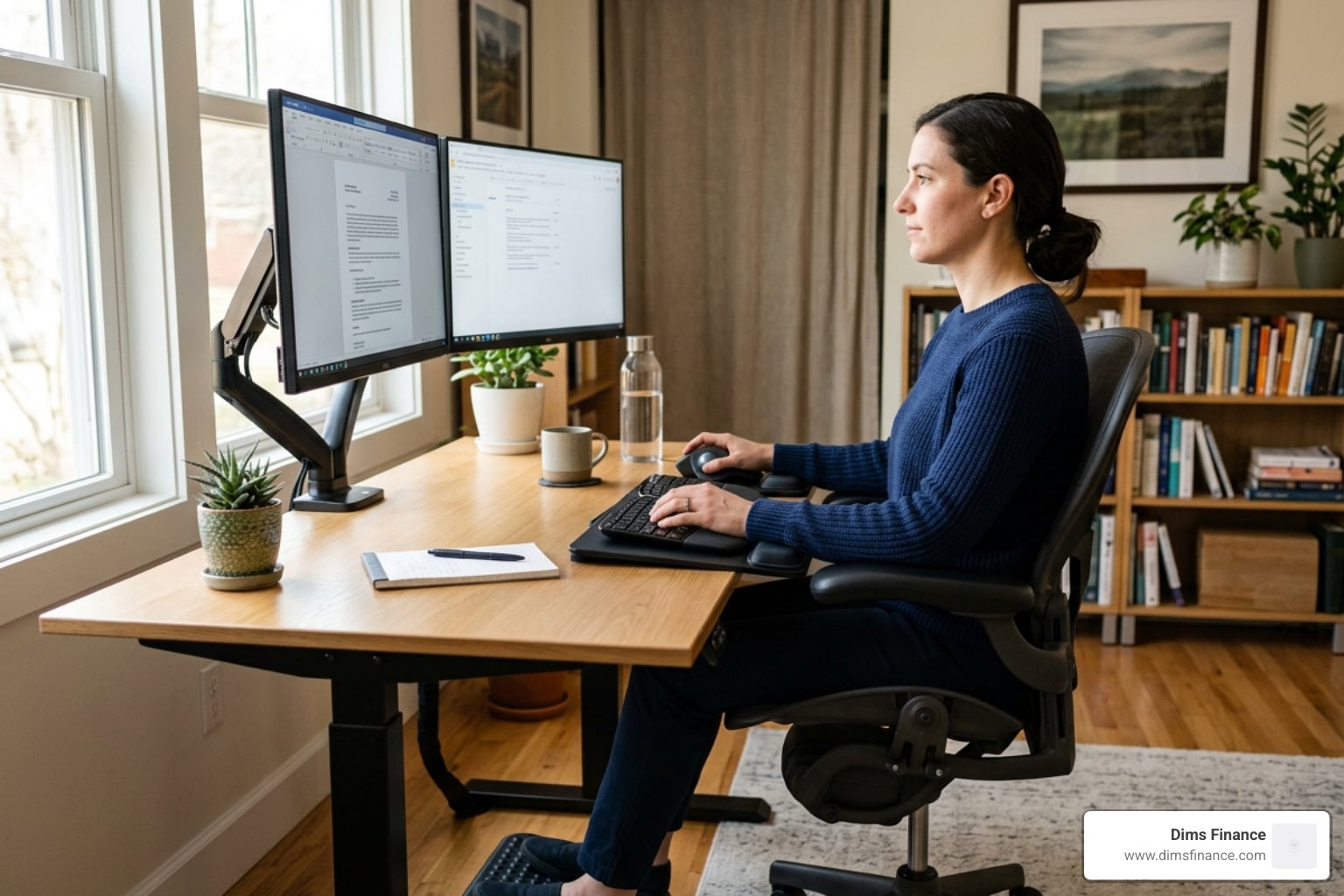
The best desk setup for carpal tunnel combines the following key adjustments:
- Chair height so elbows sit at 90 degrees and forearms are parallel to the floor
- Keyboard position that keeps wrists straight and flat, never bent up or sideways
- Mouse placement at the same height as the keyboard, ideally a vertical or trackball mouse
- Monitor at arm’s length with the top of the screen at or just below eye level
- Frequent breaks every 30–60 minutes to stretch and move your hands and wrists
That persistent tingling in your fingers after a long day of typing? It might be more than just tiredness.
Carpal tunnel syndrome (CTS) affects up to 6% of adults in the US — and for desk workers, the risk is very real. It happens when the median nerve, which runs through a narrow passage in your wrist, gets compressed from repetitive motion and poor posture. Left unchecked, it can lead to chronic pain, lost productivity, and surgery costs ranging from $5,000 to $15,000.
The good news? Most cases are preventable. Research shows that employees with ergonomic workstation setups report 40% less musculoskeletal discomfort and productivity gains of up to 25%. A few intentional changes to your desk layout can make a significant difference — no complete office overhaul required.
This guide walks you through everything: chair and desk alignment, the right keyboard and mouse, essential accessories, monitor placement, and daily habits that keep wrist pain at bay.
Understanding Carpal Tunnel and Ergonomic Risks
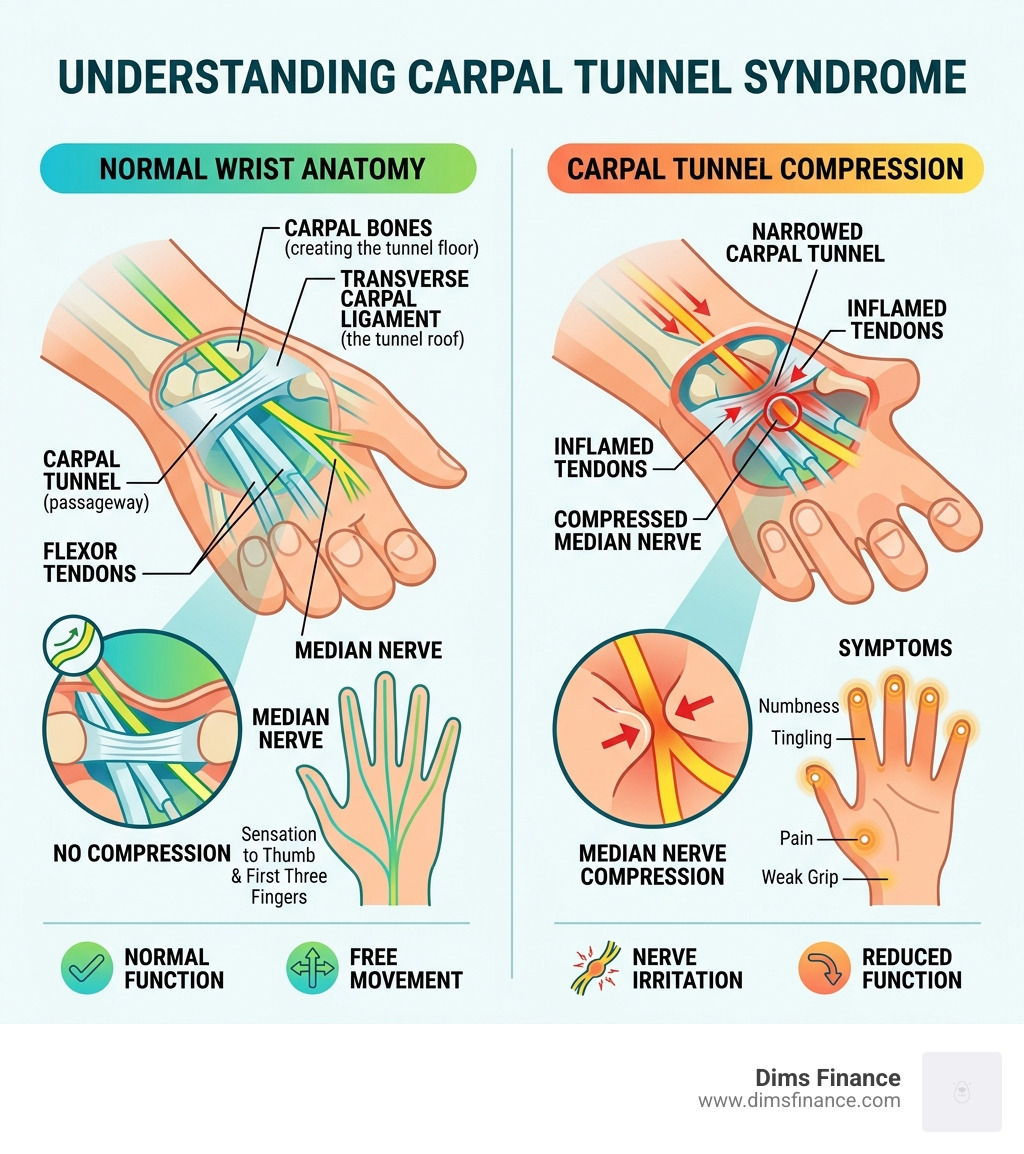
Before we dive into the furniture and gadgets, we need to understand the “why” behind the pain. Carpal tunnel syndrome isn’t just a vague ache; it’s a specific mechanical issue. The carpal tunnel is a narrow, rigid passageway of ligament and bones at the base of your hand. Inside this tunnel sits the median nerve, which provides sensation to your thumb and first three fingers.
When we spend eight hours a day with our wrists bent or resting on hard surfaces, that tunnel narrows. The tissues inside can swell, putting the squeeze on that poor median nerve. This leads to the classic symptoms: numbness, tingling (like “pins and needles”), and a weakened grip that makes opening a jar feel like a Herculean task.
According to scientific research on Carpal Tunnel Syndrome symptoms and causes, this condition is a progressive one. It often starts as a subtle twinge at night and can eventually lead to permanent nerve damage if the environment doesn’t change.
While we often think of this as an “office worker” problem, 2024 research showed that construction workers actually have an 11.7% prevalence rate due to heavy tool use. However, for those of us in the digital world, the risk comes from static, repetitive stress. In fact, it’s estimated that 10% of people will suffer from CTS at some point in their lives. To dive deeper into how these injuries start, check out The Science Backed Guide To Rsi Prevention/.
The Foundation: Chair and Desk Alignment
We like to think of ergonomics as a triangle: your chair, your desk, and your monitor. If one side is off, the whole structure collapses. When building the best desk setup for carpal tunnel, we always start with the chair.
The 90-Degree Rule
Your body loves right angles. To protect your wrists, your elbows should be bent at roughly 90 degrees, with your shoulders relaxed and your forearms parallel to the floor. If your chair is too low, you’ll end up “reaching up” to your keyboard, which forces your wrists into a painful upward bend (wrist extension). If the chair is too high, you’ll lean on your wrists, compressing the carpal tunnel against the desk edge.
Lumbar Support and Feet
A chair with adjustable lumbar support is non-negotiable. It helps maintain the natural curve of your spine, which prevents you from slouching. When you slouch, your shoulders roll forward, which eventually puts more pressure on your arms and wrists. Your feet should be flat on the floor; if they’re dangling, use a footrest to keep your thighs parallel to the ground.
Ideal Heights for Sitting and Standing
The best desk setup for carpal tunnel often involves an adjustable sit-stand desk. This allows you to change your posture throughout the day, preventing “static loading” where your muscles get tired and stiff from staying in one spot.
| User Height | Ideal Sitting Desk Height | Ideal Standing Desk Height |
|---|---|---|
| 5’0″ (152 cm) | 22″ (56 cm) | 36″ (91 cm) |
| 5’6″ (168 cm) | 25″ (63 cm) | 41″ (104 cm) |
| 6’0″ (183 cm) | 28″ (71 cm) | 46″ (117 cm) |
For more detailed steps on getting these measurements right, see The No Nonsense Way To Set Up Your Desk Ergonomically/ and The Definitive Standing Desk Ergonomics Guide For Beginners/.
Optimizing Your Best Desk Setup for Carpal Tunnel with Peripherals
Your keyboard and mouse are the primary tools of your trade, but they are also the biggest “ergonomic culprits.” Standard flat keyboards and traditional mice force our hands into unnatural positions.
There are three main movements we want to avoid:
- Wrist Extension: Bending your wrists upward.
- Wrist Deviation: Bending your wrists outward toward your pinky fingers (often caused by small, cramped keyboards).
- Forearm Pronation: Turning your palms flat against the desk, which twists the two bones in your forearm and puts pressure on the wrist.
To solve these, we recommend the “handshake grip” and a neutral wrist position. You can learn how to achieve this in Mastering The Neutral Wrist Position For Your Keyboard Setup/. For a broader look at equipment, The Complete Office Ergonomics Guide To Stop Rsi Before It Starts/ is an excellent resource.
Choosing the Best Desk Setup for Carpal Tunnel Keyboards
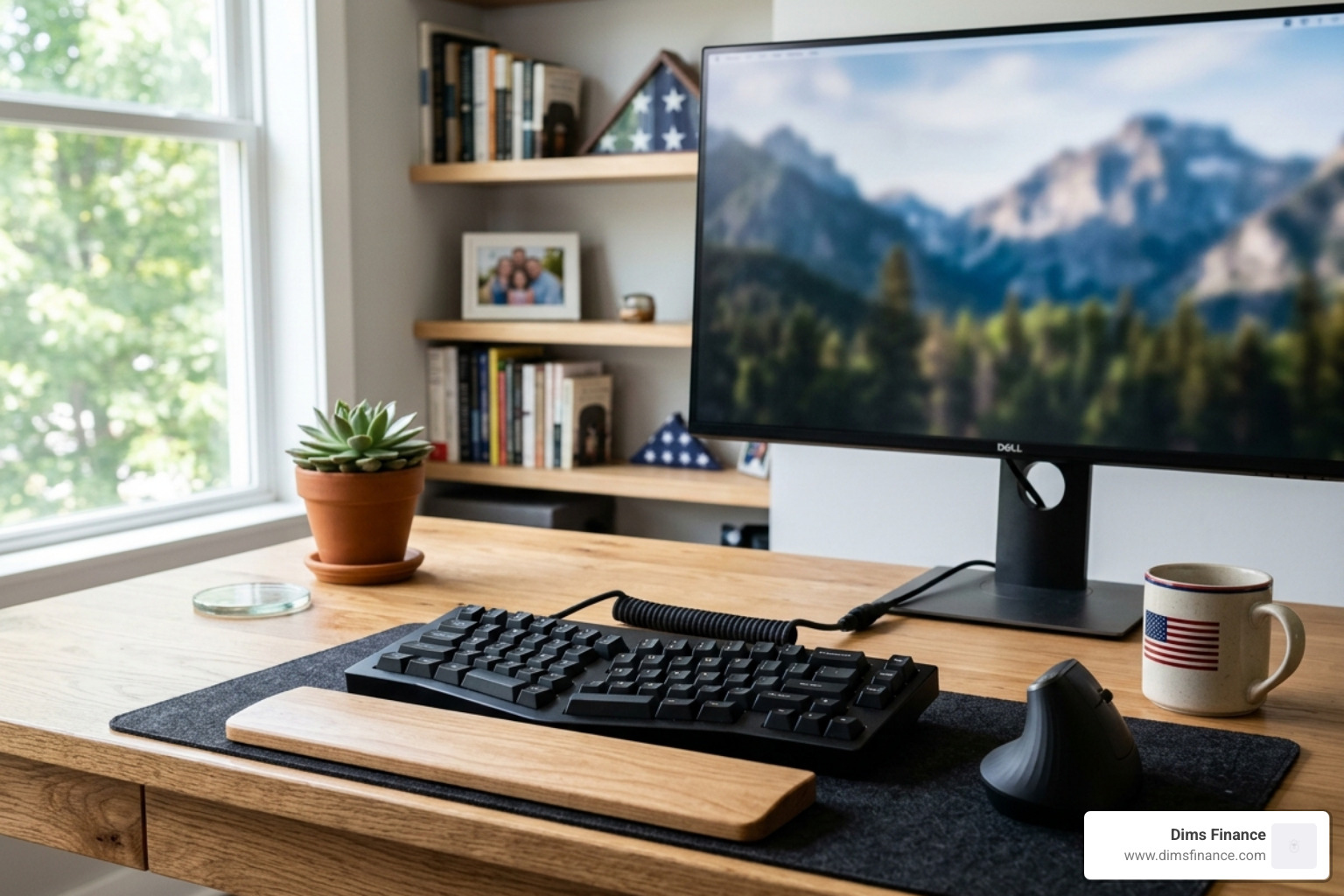
A split keyboard is the “gold standard” for carpal tunnel relief. By separating the keyboard into two halves, you can place them shoulder-width apart. This keeps your wrists straight rather than angled inward.
- Negative Tilt: Look for a keyboard tray or a keyboard that allows for a “negative tilt” (sloping away from you). This keeps your wrists in a neutral or slightly downward angle, which is much safer than the typical upward tilt found on most keyboards.
- Mechanical Switches: These require less force to register a keypress, reducing the “pounding” impact on your fingertips and joints.
- Tented Design: Some keyboards allow the middle to be raised (tented), which reduces forearm pronation.
If you’re a heavy typer, The Ultimate Guide To Rsi Recovery And Typing Fatigue Reduction/ offers more tips on reducing finger strain, while Stop The Carpal Tunnel With These Top Programmer Mice/ covers gear specifically for high-intensity users.
Selecting the Best Desk Setup for Carpal Tunnel Mice
Traditional mice are essentially “wrist-killers.” They force you to twist your forearm and use tiny, repetitive wrist flicks to move the cursor.
- Vertical Mice: These allow you to hold the mouse in a natural handshake position. This eliminates forearm twisting and encourages you to move the mouse with your whole arm rather than just your wrist.
- Trackball Mice: These stay stationary. You move the cursor with your thumb or fingers, which completely removes the need for wrist movement.
For our top picks, see Your Wrists New Best Friend Top Mice For Carpal Tunnel/. If you’re a lefty, don’t worry—we’ve got you covered with The Best Left Handed Vertical Mouse For Ergonomic Bliss/.
Essential Accessories and Monitor Placement
Once the big pieces are in place, we need to fine-tune the details. Even the best keyboard won’t help if you’re hunching over to see your screen.

Monitor Placement
Your monitor should be directly in front of you, about an arm’s length away. The top third of the screen should be at eye level. If it’s too low, you’ll drop your head, creating neck strain that radiates down into your shoulders and arms. If you use a laptop, please—for the sake of your wrists—use a laptop stand to elevate the screen and pair it with an external keyboard and mouse.
Wrist Rests: Friend or Foe?
Here is a “pro tip” that surprises many: Wrist rests are for resting, not for typing. If you rest your wrists on a gel pad while you type, you are actually increasing the pressure on the carpal tunnel. Instead, let your hands “float” above the keys while typing, and use the wrist rest only during breaks. For more on this, check out How To Set Up Workstation Ergonomically For Peak Comfort/.
Other Helpful Tools
- Document Holders: These keep papers at eye level so you aren’t constantly looking down and to the side.
- Anti-fatigue Mats: Essential if you use a standing desk, as they encourage micro-movements in your legs that improve overall circulation.
- Footrests: If your chair is at the right height for your desk but your feet don’t reach the floor, a footrest is a must to prevent pressure on the back of your thighs.
Daily Habits and Stretches for Long-Term Relief
Even the best desk setup for carpal tunnel can’t save you if you sit perfectly still for eight hours. Movement is medicine. Scientific research on the impact of ergonomic interventions on productivity shows that frequent, short breaks are more effective than one long break.
The 20-20-20 Rule
Every 20 minutes, look at something 20 feet away for 20 seconds. This saves your eyes, but we recommend using that 20 seconds to also “shake out” your hands and reset your posture.
Simple Desk Stretches
- The Prayer Stretch: Place your palms together in front of your chest. Slowly lower them toward your waist until you feel a stretch in your forearms. Hold for 15-30 seconds.
- Wrist Flexor Stretch: Extend one arm in front of you, palm up. Use your other hand to gently pull your fingers back toward the floor.
- Wrist Extensor Stretch: Same as above, but with your palm facing down. Gently pull your fingers toward your body.
- The “Shake”: Literally just shake your hands out like you’re trying to get water off them. It helps reset the muscles and improves blood flow.
Light Touch Typing
Many of us “bottom out” our keys, hitting them with way more force than necessary. Practice a light touch. It might feel weird at first, but your joints will thank you in April 2026 and beyond.
When to Seek Help
If you experience persistent numbness that doesn’t go away after a weekend off, or if the pain wakes you up at night, it’s time to see a professional. A hand therapist or orthopedic specialist can provide splints or treatments before the condition requires surgery.
Frequently Asked Questions about Carpal Tunnel Setups
What is the ideal desk height for carpal tunnel prevention?
The ideal height is one where your elbows are at a 90-degree angle and your forearms are parallel to the floor. For most people, this is between 25 and 30 inches when sitting. The key is that your wrists should remain neutral—not bent up or down—while typing.
Do wrist rests actually help or hurt carpal tunnel syndrome?
They can do both! They help if you use them to support the palm (not the wrist joint) during moments when you aren’t typing. They hurt if you rest your wrists on them while actively typing, as this creates “contact stress” directly over the carpal tunnel.
How can I adapt my laptop for a better ergonomic setup?
Laptops are an ergonomic nightmare because the screen and keyboard are attached. To fix this, use a laptop riser or a stack of books to get the screen to eye level. Then, connect an external ergonomic keyboard and a vertical mouse at desk level. This “splits” the device so your neck and wrists can both be happy.
Conclusion
Building the best desk setup for carpal tunnel is one of the smartest financial and health investments you can make. At Dims Finance, we’ve seen how a few ergonomic tweaks can transform a painful workday into a productive one. You don’t have to change everything at once. Start with your chair height, then move to a vertical mouse, and eventually consider a split keyboard.
By reducing musculoskeletal discomfort by 40% and boosting your productivity by 25%, you aren’t just saving your wrists—you’re future-proofing your career. Don’t wait for the tingling to become a “shooting pain.” Start building your ergonomic workspace today and give your wrists the relief they deserve.