
Why Your Keyboard Choice Affects Your Wrist Health and Productivity
Finding a comfortable keyboard for typing can make a real difference if you spend hours at a desk every day. Here are some of the top-rated options to know about right now:
Top Comfortable Keyboards for Typing (2026)
| Keyboard | Best For | Key Comfort Feature |
|---|---|---|
| Logitech MX Keys S | Office and productivity | Spherically-dished keys, quiet typing |
| Kinesis Freestyle2 | Wrist and shoulder pain | Split design, 5-15° tenting |
| Keychron V10 Max | Long typing sessions | Gasket mount, adjustable feet |
| Razer Pro Type Ultra | Fast typists | Linear switches, cushioned wrist rest |
| Cherry KC 200 MX | Budget-conscious users | Slim mechanical, MX2A switches |
Most people don’t think twice about their keyboard — until something starts to hurt.
Wrist aches. Finger fatigue. That dull ache that builds up after a long day of typing. These aren’t just annoyances. Over time, they can develop into repetitive strain injuries (RSI) or conditions like carpal tunnel syndrome that affect your ability to work.
The good news? The right keyboard can genuinely help.
Features like split designs, tenting angles, gasket mounts, and sculpted keycaps all play a role in reducing strain. And with hundreds of options on the market — mechanical, membrane, ergonomic, low-profile — it can be hard to know where to start.
This guide cuts through the noise and focuses on what actually matters for pain-free, productive typing.
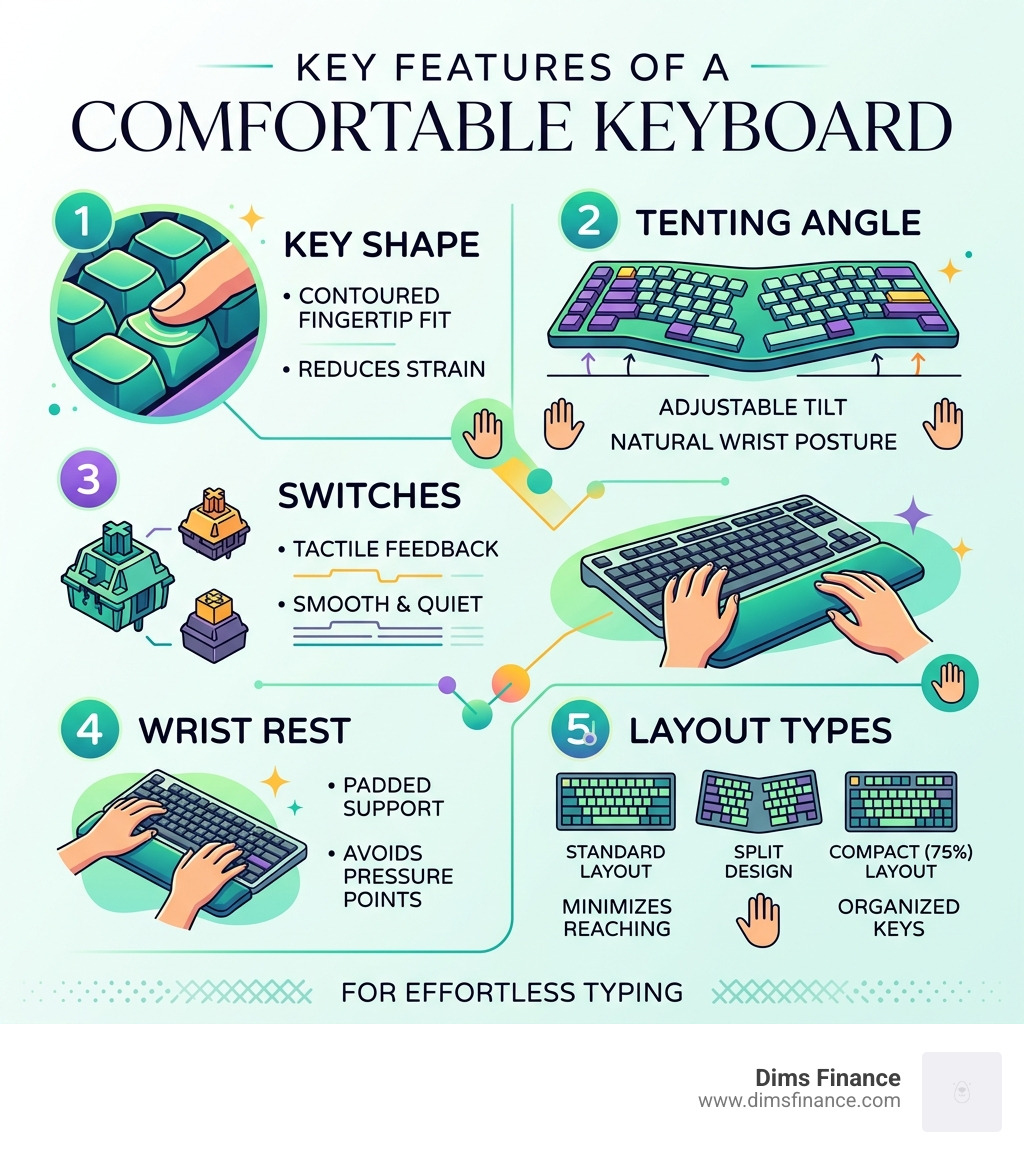
What Defines a Comfortable Keyboard for Typing?
When we talk about a comfortable keyboard for typing, we aren’t just talking about “mushy” keys or a soft wrist rest. True comfort is rooted in ergonomics—the science of designing equipment to fit the human body.
A comfortable keyboard is one that allows your hands, wrists, and shoulders to remain in a “neutral” position. This means your wrists aren’t bent upward or outward, and your shoulders aren’t hunched toward your ears. If you’ve ever felt a burning sensation in your forearms after a long email chain, you’ve experienced why why your current keyboard is a pain in the wrist.
Key factors that define comfort include:
- Low Actuation Force: How hard you have to press the keys.
- Tactile Feedback: Knowing a key has registered without having to “bottom out” (slam the key to the base).
- Physical Alignment: Whether the keyboard forces your arms together or lets them sit at shoulder width.
Understanding these factors is the first step in learning how to reduce typing related wrist strain before it becomes a problem.
Why You Need a Comfortable Keyboard for Typing
The stakes for choosing the right gear are higher than most people realize. In April 2026, as remote work remains a staple of our professional lives, the cumulative hours we spend typing are skyrocketing.
Using an ill-fitting keyboard can lead to joint stress and long-term health issues. Repetitive Strain Injury (RSI) is an umbrella term for various conditions, including carpal tunnel syndrome and tendonitis. These occur when we force our bodies into unnatural positions repeatedly. By switching to an ergonomic model, you can mitigate these risks and find 7 proven solutions for typing without the ouch.
Choosing the Right Comfortable Keyboard for Typing Size
Size matters—but bigger isn’t always better. The “best” size depends on your desk space and how you use your mouse.
- Full-Size: Includes a number pad. Great for data entry but forces your mouse further to the right, which can cause shoulder strain.
- TKL (Tenkeyless): Removes the number pad. This allows your mouse to be closer to your body, keeping your arms in a more natural position.
- 75% and 60% Layouts: These are ultra-compact. They are excellent for portability and saving desk space, providing compact comfort for users with smaller hands.
- Low-Profile: These keyboards (like the Apple Magic Keyboard or MX Keys) have shorter keys. This reduces the height your fingers need to travel, which can be faster and less fatiguing for some.
Ergonomic Layouts: Split, Alice, and Ortholinear
Standard keyboards were designed for typewriters, not human anatomy. Modern ergonomic layouts rethink the shape of the keyboard to fit you.
One of the most effective designs is the split keyboard. By separating the keyboard into two halves, you can place them shoulder-width apart. This prevents “ulnar deviation”—the painful outward bending of the wrists. Many users find that split keyboards might just be the best thing for your desk because they allow your chest to open up, improving posture.
An Alice-style keyboard is a “fixed” split. It angles the keys in a V-shape on a single board. It’s a great middle ground for those who want comfort without the cable clutter of two separate pieces. If you’re curious about the specific benefits of these designs, check out our guide to split keyboards.
Tenting and Incline for Neutral Posture
If you rest your hands on a table, they naturally tilt inward (palms facing each other) rather than lying flat. Standard keyboards force your hands to be “palms down,” which causes forearm pronation.
Tenting solves this by raising the inner edge of the keyboard halves. The Kinesis Freestyle2, for example, offers tenting angles of 5º, 10º, or 15º. This small adjustment can provide massive relief for neck and shoulder pain. Mastering the neutral wrist position is much easier when your keyboard supports your body’s natural resting state.
The Learning Curve of New Layouts
We won’t sugarcoat it: switching to a split or ortholinear (where keys are in straight columns rather than staggered) keyboard takes time. Your muscle memory is likely tuned to the standard QWERTY layout.
However, the adaptation period—usually a few days to a week—is a small price to pay for years of pain-free work. Some users even switch to the Dvorak layout for further efficiency. You can learn more about these transitions in the ergonomic guide to Dvorak and portable keyboards.
The Science of Switches and Keycap Shapes

What’s happening under the key is just as important as the shape of the board. The “switch” determines the feel, sound, and force required to type.
- Mechanical Switches: These use physical springs. Options like the MX Mechanical Wireless Keyboard allow you to choose between “Tactile Quiet” (a small bump when pressed), “Linear” (smooth all the way down), or “Clicky” (loud and satisfying).
- Hall Effect Switches: These use magnets to detect keypresses. They are incredibly durable and allow you to customize exactly how deep you have to press before the key registers.
- Membrane/Scissor Switches: Common in laptops and the Logitech MX Keys series. They are quiet and require very little finger travel.
Spherically-Dished Keys and Fingertip Fit
Have you ever looked closely at the keys on a high-end keyboard? Models like the MX Keys S feature spherically-dished keys. These are shaped like little bowls to match your fingertips. This design helps center your fingers, reducing mistypes and making the typing experience feel like a “hug for your fingertips.”
Gasket Mounts and Acoustic Dampening
For the mechanical keyboard enthusiasts, “comfort” also refers to the feel of the impact. Traditional keyboards are stiff. Modern comfortable keyboards use a gasket mount system.
The Alto Keys K98M, for instance, uses a “UniCushion” structure. This means the internal plate is suspended by gaskets, which absorb the vibration of your typing. It results in a softer, more flexible feel and a much more pleasant, marble-like sound.
Top-Rated Comfortable Keyboard for Typing Picks

Based on extensive testing through April 2026, here are the standouts for anyone seeking a comfortable keyboard for typing:
- Logitech MX Keys S: The gold standard for office work. It’s quiet, features smart backlighting that glows when your hands approach, and the matte coating allows fingers to glide effortlessly.
- Kinesis Freestyle2: The best choice for those already experiencing RSI. Its ability to split up to 20 inches apart allows for a perfectly natural shoulder position.
- Keychron V10 Max: A fantastic Alice-style mechanical board. It uses a gasket mount for a soft feel and is highly customizable for those who want to “tune” their typing experience.
- Keychron P6 Ultra 8K: A full-sized metal beast. It’s engineered for performance but includes multiple layers of acoustic foam (IXPE, PET, and Latex) to ensure the typing feel is cushioned and premium. You can find it here: Keychron P6 Ultra 8K.
Best for Office and Productivity
If you work in a shared space, “comfort” also means not annoying your coworkers. The Logitech MX Keys for Mac is an excellent choice here. It offers a familiar Mac layout with spherically-dished keys that are nearly silent. For more options that work across different operating systems, explore our list of the best ergonomic keyboards for Mac and PC.
Best for Specialized Ergonomic Needs
For those who need maximum support, a keyboard with a built-in or detachable palm rest is essential. The Razer Pro Type Ultra, for example, comes with a plush, cushioned wrist rest that keeps your hands level with the keys. These are the types of ergonomic keyboards that will save your spine by encouraging better overall sitting posture.
Maximizing Comfort: Adjustability and Setup
Even the best comfortable keyboard for typing won’t help if it’s placed at the wrong height. Your elbows should be at a 90-degree angle, and your wrists should be neutral (not tilted up).
| Feature | Ergonomic Benefit | Recommended Setting |
|---|---|---|
| Tenting | Reduces forearm twist | 5° to 15° |
| Incline | Reduces wrist extension | Flat or “Negative” tilt |
| Wrist Rest | Supports palms during breaks | Firm but cushioned |
| Keyboard Tray | Proper height alignment | Level with elbows |
Using adjustable keyboard trays can help you achieve the perfect height, especially if your desk is too tall. For a deep dive into height mechanics, see the ultimate guide to setting up your keyboard tray height.
Preventing RSI and Carpal Tunnel
Prevention is always better than a cure. Beyond buying a better keyboard, you should practice “the neutral zone.” This means keeping your most-used items within easy reach so you aren’t overextending your arms. We’ve compiled several RSI prevention keyboard techniques to help you stay healthy while you work.
Connectivity and Convenience
Modern comfort also means freedom from wires. Most top-tier keyboards now offer:
- Bluetooth 5.3: For low-latency connection to tablets and laptops.
- 2.4 GHz Wireless: Using a USB receiver for a rock-solid connection that feels wired.
- Multi-Device Pairing: The ability to switch from your PC to your phone with one button.
The Logitech MX Keys for Mac is a prime example of this, allowing seamless switching between an iMac and an iPad.
Frequently Asked Questions about Comfortable Keyboards
What is the best switch type for typing comfort?
For most people, a Tactile switch (like Cherry MX Brown or Logitech Tactile Quiet) is best. It provides a physical “bump” so you know the key has registered without needing to press hard, which reduces finger fatigue.
Do ergonomic keyboards really prevent carpal tunnel?
While they aren’t a medical cure-all, ergonomic keyboards are designed to reduce the risk factors that lead to carpal tunnel, such as wrist extension and ulnar deviation. They help you maintain the “neutral” posture recommended by ergonomic experts.
How do I choose between a split and a standard keyboard?
If you have shoulder pain or find yourself “hunching” over your desk, a split keyboard is likely the better choice. If you just want a more pleasant typing feel and don’t have existing pain, a high-quality standard-layout keyboard with a gasket mount (like the MX Keys S or Keychron V-series) is often sufficient.
Conclusion
At Dims Finance, we believe your workspace should work for you, not against you. Investing in a comfortable keyboard for typing is one of the smartest moves you can make for your long-term health and productivity. Whether you choose a high-tech split design or a refined mechanical board, your wrists will thank you.
Ready to transform your office? Check out our latest recommendations and upgrade your workspace today.