
Why Your Wrists Are Paying the Price at Work
Ergonomic mouse pads for work are specially designed mouse surfaces that support your wrist and hand during long computer sessions, helping to reduce pain, prevent repetitive strain injuries (RSIs), and keep you comfortable throughout the day.
Quick picks — best ergonomic mouse pads for work:
| Type | Best For |
|---|---|
| Gel wrist rest pad | General office use, pressure relief |
| Memory foam pad | Soft, contouring support for long hours |
| Full-surface cushioned pad | Unrestricted hand movement, even pressure distribution |
| Beaded wrist rest | Flexible, moldable support for varied hand positions |
| Hard surface desk mat | Easy cleaning, precise tracking |
If you spend 6, 8, or 10 hours a day at a desk, your mouse hand takes a beating. Every small, repeated movement adds up. Over time, that can mean wrist pain, numbness, or even carpal tunnel syndrome.
The right mouse pad does more than give your mouse a smooth surface to glide on. It protects the pressure points in your wrist and palm, supports healthy blood flow, and helps keep your joints in a neutral position.
Many people notice a red or sore patch on their wrist from resting it directly on a hard desk — a small sign of a bigger problem building up beneath the surface.
The good news? A well-chosen ergonomic mouse pad is one of the simplest and most affordable upgrades you can make to your workspace.
This guide covers everything you need to know: the different types available, what materials actually work, how to pick the right one, and which products are worth your money.

Why You Need an Ergonomic Mouse Pad for Work
When we sit down for a long day of spreadsheets or video editing, we rarely think about the physics of our wrists. However, resting your wrist directly on a hard desk surface creates significant pressure points. This localized pressure can lead to nerve compression—specifically the median nerve—which is a primary contributor to Carpal Tunnel Syndrome.
Beyond just nerves, resting on a hard surface can restrict blood flow to the small muscles in your hand. This leads to quicker fatigue and that nagging “heavy” feeling in your arm by 3:00 PM. At Dims Finance, we emphasize that wrist management and finding the best RSI mouse is a multi-step process, but it often starts with what’s under your palm.
Musculoskeletal health isn’t just a buzzword; it’s the foundation of a long career. Traditional mouse pads are often too thin to provide any real benefit. In contrast, scientific research on cushioned ergonomic support suggests that distributing pressure across the entire underside of the hand and forearm can significantly reduce the risk of injury.
An ergonomic mouse pad for work also improves your technical performance. High-quality surfaces ensure precision tracking for your mouse sensor, meaning you aren’t fighting your hardware to get the cursor where it needs to go. This reduces “micro-corrections”—those tiny, tense movements that cause strain over thousands of repetitions.
Types of Ergonomic Mouse Pads and Materials
Not all cushions are created equal. The material you choose dictates how much support you get and how long the pad will last.
Gel Support
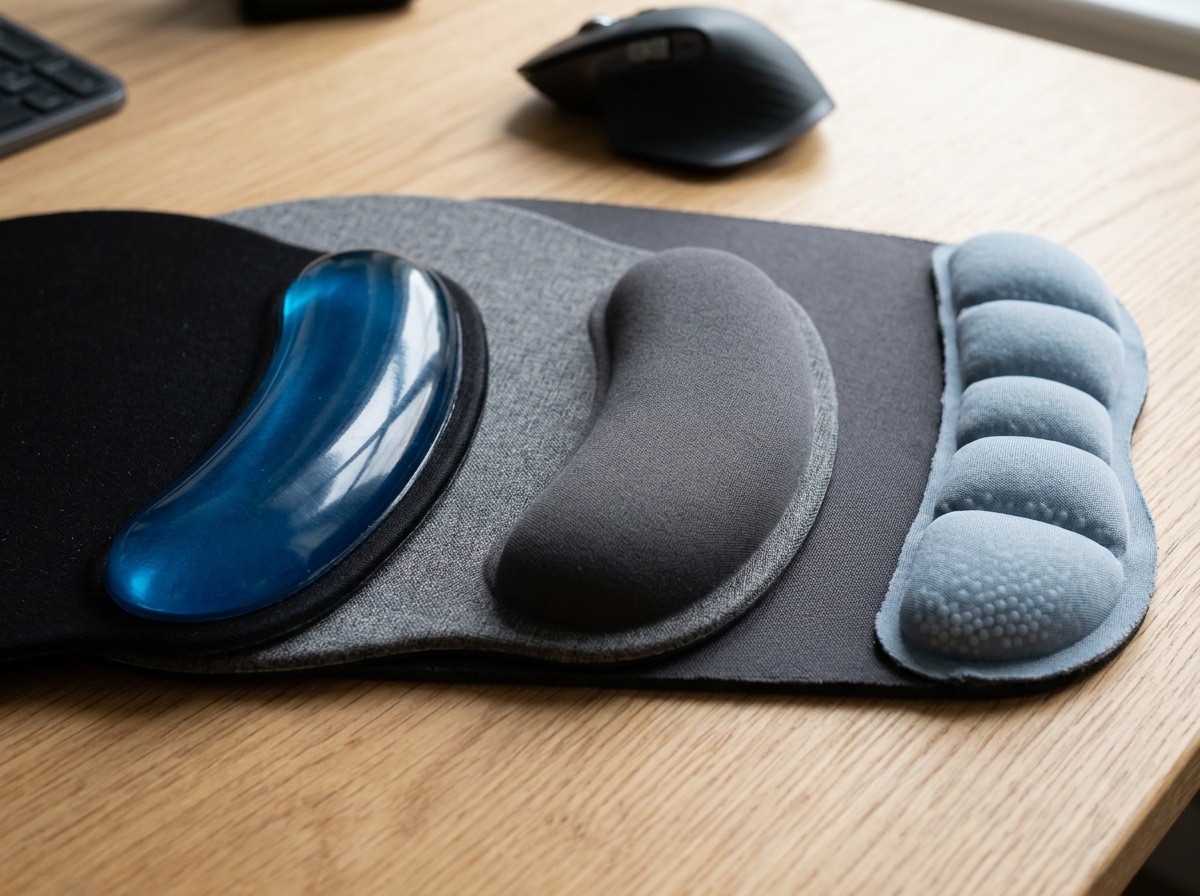
Gel is perhaps the most common material. It provides a “squishy” feel that many users find immediately comfortable. It’s excellent for pressure relief because it mimics the consistency of soft tissue. However, some lower-quality gel pads can feel cold or eventually leak if the outer fabric punctures.
Memory Foam
Memory foam is a favorite for those who want a custom fit. It contours to the specific shape of your wrist, providing a soft, cradling sensation. It’s great for long-term comfort, though it can sometimes retain heat.
Beaded Cushions
Often overlooked, beaded wrist rests (filled with tiny plastic beads) offer a “bean bag” feel. These are highly recommended by some users because they are incredibly flexible. You can mold them to any height or angle, which is perfect if you move your hand around a lot.
Full-Surface Cushioning
This is a newer, highly effective design philosophy. Instead of a single “hump” at the bottom of the pad, the entire surface is padded. Products like the Loftmat V2 Cushioned Mouse Pad provide edge-to-edge comfort. This allows for unrestricted movement because your wrist is supported no matter where you move the mouse.
Comparing Support Materials
| Material | Pros | Cons |
|---|---|---|
| Gel | High pressure relief, stays cool initially | Can feel “bottomed out” over time |
| Memory Foam | Contours to your shape, very soft | Can retain body heat, slower “bounce back” |
| Beaded | Extremely breathable, highly adjustable | Can feel “lumpy” to some users |
| Full-Surface Foam | Unrestricted movement, no wrist “cliff” | Takes up more vertical height on the desk |
Choosing the Best ergonomic mouse pad for work
Selecting the right ergonomic mouse pad for work requires looking at more than just the cushion. You need to consider how your mouse interacts with the surface.
Surface Glide and Sensor Tracking
A pad that is too “sticky” forces you to use more muscle power to move the mouse. Conversely, a surface that is too slick can make it hard to stop precisely. For most office tasks, a micro-weave cloth surface provides the best balance of speed and control. If you are looking for specific recommendations, check out our list of the best mouse pads for work from home.
Size and Space
If you have a large desk and use multiple monitors, you might need an “extended” or “XL” pad. The Higround Control Mousepad XL is a fantastic example of a pad that provides ample room for both your mouse and keyboard, creating a uniform height for your entire setup.
For those who prefer a more traditional footprint but still want high-end materials, the Large Mouse Pad for Gaming – Razer Gigantus V2 offers a thick, high-density foam that provides more cushioning than standard office pads without being overly bulky.
Durability and Aesthetics
Look for mouse pads with stitched edges. This prevents the top fabric from peeling away from the rubber base—a common issue with budget pads. Additionally, an anti-slip base is non-negotiable; you don’t want to be chasing your mouse pad across the desk during a busy afternoon.
Integrating Your Setup for Maximum Comfort
A mouse pad is just one piece of the ergonomic puzzle. To truly protect yourself, you need to look at your entire workstation.
The goal is to maintain a “neutral wrist” position. This means your wrist should be straight, not bent up, down, or to the side. We’ve written extensively about mastering the neutral wrist position to help users avoid the common “claw” grip that leads to strain.
Desk and Chair Height
If your desk is too high, you’ll likely find yourself resting your forearms on the sharp edge of the desk. This can cause “Contact Stress.” An ergonomic mouse pad helps, but you should also ensure your chair allows your elbows to be at a 90-degree angle. For a deep dive into alignment, see our guide on the ergonomic keyboard and mouse setup.
Movement Patterns
Try to move the mouse with your forearm rather than just flicking your wrist. Large desk mats, such as the G840 XL Gaming Mouse Pad, encourage this by providing a massive surface area that doesn’t “trap” your hand in one small square. For more tips, read our article on how to set up your workstation ergonomically.
Maintenance and Longevity of Workspace Accessories
An ergonomic mouse pad for work is an investment in your health, so it’s worth keeping it in good shape. Over time, cloth pads collect skin cells, oils, and the occasional coffee splash.
Cleaning Cloth Pads
Most cloth pads can be cleaned with a damp cloth and a drop of mild dish soap. Avoid submerging them entirely unless the manufacturer says it’s okay, as this can ruin the adhesive between the fabric and the foam. For daily maintenance, a lint roller is surprisingly effective at removing dust and crumbs.
Dealing with Spills
If you’re prone to accidents, consider desk mats for comfortable typing made of materials like PU leather or treated polyester. These are often spill-resistant and can be wiped clean in seconds.
When to Replace
If you notice the foam is no longer “springing back” or if the gel has developed permanent indentations, it’s time for a new one. Using a worn-out ergonomic pad can actually be worse than using none at all, as it may force your wrist into awkward angles. You might also want to pair your new pad with ergonomic wrist rests for typing to ensure both hands are equally supported.
Frequently Asked Questions about Ergonomic Mouse Pads
Are built-in wrist rests better than separate ones?
It depends on how you work. Built-in rests are convenient because they never slide away from the pad. However, separate wrist rests offer more positioning flexibility. If you find yourself frequently changing your seating position or moving the mouse across a very large area, a separate rest might be better. For more on this, explore our ergonomic keyboard and mouse setups for maximum comfort.
Can an ergonomic mouse pad for work prevent Carpal Tunnel?
While no single product can guarantee the prevention of a medical condition, ergonomic pads are designed to reduce the risk factors. By preventing extreme wrist flexion (bending) and relieving pressure on the carpal tunnel area, they help maintain neutral alignment. Check out our guide on the ergonomic keyboard and mouse setup for enhanced comfort for more preventive strategies.
How do I clean a gel-filled ergonomic mouse pad for work?
Most gel pads have a Lycra or fabric covering. Use a damp cloth with very mild soap and gently wipe the surface. Do not use harsh chemicals or scrub too hard, as you might damage the fabric bond. Always let it air dry completely before using it again—using a damp pad can trap moisture against your skin and the desk.
Conclusion
At Dims Finance, we believe that your workspace should work for you, not against you. Transitioning to an ergonomic mouse pad for work is a small change that yields massive dividends in comfort and productivity. By choosing the right materials—whether it’s the contouring support of memory foam or the unrestricted freedom of a fully cushioned surface—you are taking a science-based step toward a pain-free work life.
Don’t wait for the “red spot” on your wrist to become a chronic injury. Invest in your well-being today. If you’re ready to complete your office transformation, explore more ergonomic desk accessories and find the perfect tools to boost your health and focus.