Why Learning How to Prevent RSI Repetitive Strain Injury Could Save You Months of Pain
Knowing how to prevent rsi repetitive strain injury is one of the most valuable things a computer user can do for their long-term health. RSI is damage to muscles, tendons, or nerves caused by repetitive motions — and it affects millions of desk workers, assembly line employees, and athletes worldwide.
Quick answer — how to prevent RSI:
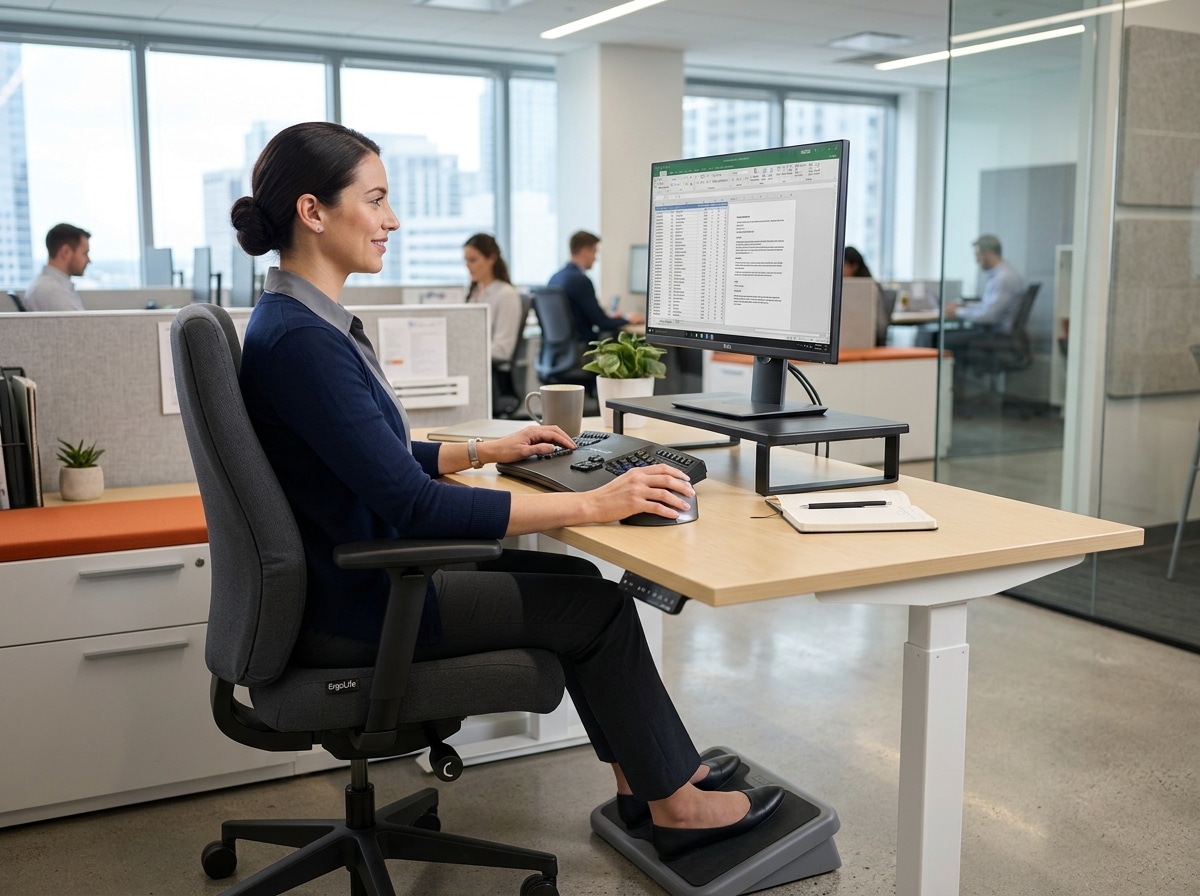
- Set up an ergonomic workstation — monitor at eye level, chair adjusted so forearms are parallel to the floor, feet flat
- Keep wrists neutral — avoid bending or twisting while typing
- Take frequent short breaks — aim for at least 10 minutes of rest per hour
- Stretch regularly — especially wrists, forearms, neck, and shoulders
- Use ergonomic equipment — split keyboards, vertical mice, forearm supports
- Strengthen supporting muscles — resistance training has strong evidence behind it
- Manage stress — muscle tension from stress is a real RSI risk factor
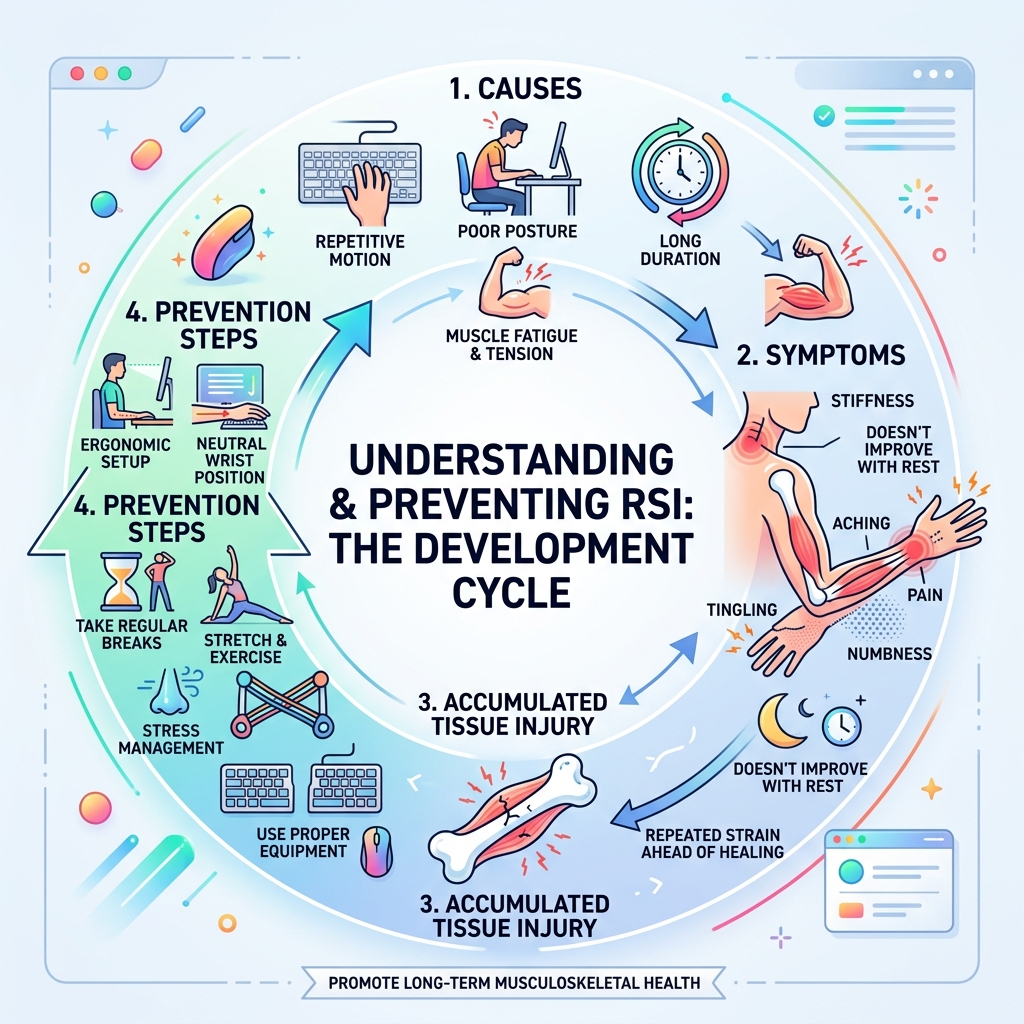
RSI most often strikes the shoulders, elbows, forearms, wrists, hands, and fingers. Symptoms range from a dull ache or stiffness to tingling, numbness, and weakness. The tricky part? They develop gradually — which means most people ignore the early warning signs until the injury is serious.
Once RSI sets in, recovery is often slow and frustrating. The good news is that a few smart changes to your setup and daily habits can dramatically reduce your risk — before it becomes a problem.
Understanding the Causes and Symptoms of Repetitive Strain Injury
To effectively master how to prevent rsi repetitive strain injury, we first need to understand what we are fighting against. RSI isn’t a single “event” like a broken bone; it is a cumulative disorder. Think of it like a “death by a thousand cuts” for your tendons and nerves.

What Exactly is RSI?
Repetitive Strain Injury is an umbrella term for various conditions caused by repetitive tasks, forceful exertions, vibrations, mechanical compression, or sustained awkward positions. According to the Cleveland Clinic, these injuries commonly lead to:
- Tendonitis: Inflammation of the tendons connecting muscle to bone.
- Carpal Tunnel Syndrome: Pressure on the median nerve in the wrist.
- Tennis Elbow (Lateral Epicondylitis): Strain on the outer part of the elbow.
- Trigger Finger: A finger that gets stuck in a bent position.
The Warning Signs
Symptoms usually creep up on us. You might start the day feeling fine, but by 3:00 PM, you notice a dull ache. Common symptoms include:
- Burning, aching, or throbbing pain: Often localized in the wrists or forearms.
- Tingling and numbness: That “pins and needles” feeling that doesn’t go away.
- Loss of grip strength: Finding it harder to open jars or hold a heavy mug.
- Stiffness and cramping: Especially in the fingers or thumbs.
If you’ve ever felt like your hands were “going on strike” after a long day of typing, you’ve likely experienced the early stages of muscle fatigue and inflammation. You can read more about this phenomenon in our guide on keyboard-wrist-injury-when-your-hands-go-on-strike/.
Environmental Risk Factors
It isn’t just about the movement; the environment matters too. Cold temperatures can restrict blood flow to the extremities, making muscles less flexible and more prone to injury. Furthermore, the use of vibrating equipment (like power tools or even heavy-duty gaming controllers) can accelerate nerve damage.
How to Prevent RSI Repetitive Strain Injury Through Ergonomics
The foundation of prevention is ergonomics—the science of fitting the workplace to the user, not the other way around. We believe that a proactive workstation assessment is the best investment you can make for your future self.
The Golden Rules of Desk Setup
According to guidelines from UCLA Ergonomics, your body should maintain a series of “right angles” and “neutrals”:
- Monitor Height: The top of your screen should be at or slightly below eye level. This prevents neck strain caused by looking up or down for hours. If your screen is too low, consider monitor-stands-that-promote-better-posture-and-comfort/ to bring it to the correct height.
- Chair Adjustment: Your chair should provide firm lumbar support. Adjust the height so your thighs are horizontal (or slightly angled down) and your feet are flat on the floor. If your feet dangle, use a footrest. For more on this, check out our office-chair-tips-for-posture-improvement/.
- Elbow Position: Your elbows should be bent at roughly 90 to 100 degrees, with your upper arms tucked close to your body. Reaching forward for your keyboard is a major cause of shoulder and neck tension.
Mastering the Neutral Wrist Position for RSI Prevention
The “neutral” position is the holy grail of how to prevent rsi repetitive strain injury. A neutral wrist is straight—not bent up (extension), down (flexion), or side-to-side (ulnar or radial deviation).
- The 15-Degree Safe Zone: Your wrist has a “safe zone” of about 15 degrees of movement in any direction. Once you exceed this, the pressure inside the carpal tunnel increases significantly.
- Floating Hands: One of the biggest mistakes we see is “planting” the wrists on the desk or a wrist rest while typing. This creates contact pressure on the delicate tissues of the wrist. Instead, your hands should “float” above the keyboard, with your arms moving your hands to reach the keys. We dive deeper into this technique in our article on mastering-the-neutral-wrist-position-for-your-keyboard-setup/.
- The Role of Wrist Rests: Contrary to popular belief, wrist rests are for resting, not for use while actively typing. They can help keep your wrists neutral during brief pauses. Learn more about their proper use at ergonomic-wrist-rests-for-typing/.
Choosing the Right Equipment to Prevent RSI Repetitive Strain Injury
Standard keyboards and mice are often designed for aesthetics or cost-efficiency rather than human anatomy. Upgrading your tools can make a world of difference.
- Vertical Mice: A standard mouse forces your forearm into “pronation” (palm down), which twists the two bones in your forearm. A vertical mouse allows you to hold your hand in a “handshake” position, which is much more natural. Find the right fit at wrist-management-finding-the-best-rsi-mouse-for-pain-free-scrolling/.
- Split Keyboards: These allow your hands to stay shoulder-width apart, preventing “ulnar deviation” (bending the wrists toward the pinky side). Check out our recommendations for ergonomic-keyboard-and-mouse-setups-for-maximum-comfort/.
- Negative Tilt Trays: Most keyboards have little feet at the back to tilt them up. This is actually the opposite of what you want! A negative tilt (front higher than back) helps keep the wrists straight.
- Speech Recognition: Sometimes the best way to prevent strain is to stop typing altogether. Modern software allows you to dictate emails and documents, giving your hands a much-needed break. You can find more setup tips at ergonomic-keyboard-and-mouse-setup/.
Science-Backed Habits: Breaks, Stretches, and Movement
Even with a perfect ergonomic setup, the human body wasn’t meant to be static for eight hours a day. Static posture causes muscles to fatigue faster because blood flow is restricted.
The Power of Microbreaks
Research suggests that frequent, short breaks are more effective than one long lunch break. We recommend following the 20-30 minute rule: every half hour, take a 30-second “microbreak” to drop your hands, shake them out, and look away from the screen.
| Break Type | Frequency | Duration | Purpose |
|---|---|---|---|
| Microbreak | Every 20-30 mins | 30-60 seconds | Restore blood flow, reduce static tension |
| Rest Break | Every 60 mins | 5-10 minutes | Stretch, walk, reset posture |
| Active Break | Twice daily | 15 minutes | Resistance training or full-body stretching |
The NHS emphasizes that these breaks are essential for “Live Well” workplace health.
Recommended Stretches
Stretching helps maintain flexibility and prevents the shortening of muscles that occurs with prolonged sitting.
- The Prayer Stretch: Place your palms together in front of your chest. Slowly lower your hands toward your waist while keeping your palms together until you feel a mild stretch in your undersides of the wrists. Hold for 15-30 seconds.
- Nerve Gliding: These are gentle movements that help the nerves “slide” through their pathways. (Consult a professional for the exact technique if you are already symptomatic).
- Shoulder Rolls: Pull your shoulders up to your ears, then back, then down. This releases the tension that accumulates in the trapezius muscles.
Studies mentioned in Health.com show that resistance training (using light weights or bands) has strong evidence for preventing upper extremity musculoskeletal disorders. A stronger muscle can handle more repetitive load before it starts to break down.
Holistic Strategies and Workplace Policies
Preventing RSI isn’t just a “you” problem; it’s a workplace culture issue. We encourage a “participative ergonomics” approach where employees and employers work together.
Stress and the Body
It sounds “woo-woo,” but stress is a physical risk factor for RSI. When you are stressed, your body produces cortisol and your muscles naturally tense up (especially in the neck and shoulders). This constant tension reduces blood flow and makes you more susceptible to injury.
- Breathing Exercises: Taking three deep, diaphragmatic breaths every hour can lower your heart rate and release physical tension.
- Hydration and Diet: An anti-inflammatory diet rich in Omega-3s and staying hydrated helps keep your tendons supple and promotes tissue repair.
Workplace Policies and Training
Employers should be proactive. Tools like the ErgoCAT online evaluation can help identify risks before they turn into claims. Furthermore, Harvard’s RSI Action suggests that education is the most powerful tool. If workers know how to type key combinations (using two hands for “Shift + A” instead of contorting one hand), injury rates drop.
In high-income countries, ergonomic equipment is the most common intervention, while middle-income countries often rely on stretching programs. Both are effective, but the best results come from a multi-component approach: equipment + training + habit change.
Frequently Asked Questions about RSI Prevention
When should I seek medical help for potential RSI symptoms?
You should see a GP if your symptoms are persistent, getting worse, or if they interfere with your daily life. Early intervention is critical. Once an RSI becomes chronic, it can lead to permanent mobility changes or nerve compression. A doctor may refer you to a physiotherapist who can provide targeted exercises and posture training.
Can I use a wrist rest while typing?
We strongly advise against it. Resting your wrists on a pad while typing creates “contact stress” on the carpal tunnel. It also encourages you to “flick” your wrists to reach keys, rather than moving your whole arm. Use the wrist rest only during breaks. For more details, see ergonomic-wrist-rests-for-typing/.
Does stress management really help prevent strain injuries?
Yes! Stress causes muscle guarding—a state where your muscles stay partially contracted. This leads to faster fatigue and higher pressure on your joints. By incorporating breathing techniques and regular microbreaks, you can lower your cortisol levels and reduce the physical load on your body.
Conclusion
At Dims Finance, we are dedicated to the idea that work shouldn’t hurt. Learning how to prevent rsi repetitive strain injury is a journey of small, consistent habits rather than one-off fixes. By combining an ergonomic workstation, proper typing techniques, and science-backed rest habits, you can protect your health and boost your long-term productivity.
Don’t wait for the pain to start. Be proactive today by checking out our comprehensive guide to ergonomic-desk-accessories-for-comfort/. Your wrists will thank you!