When Your Mouse Is Too Small: A Guide for Large Hands
If you’re looking for the best ergonomic mouse for large hands, here are the top options worth considering:
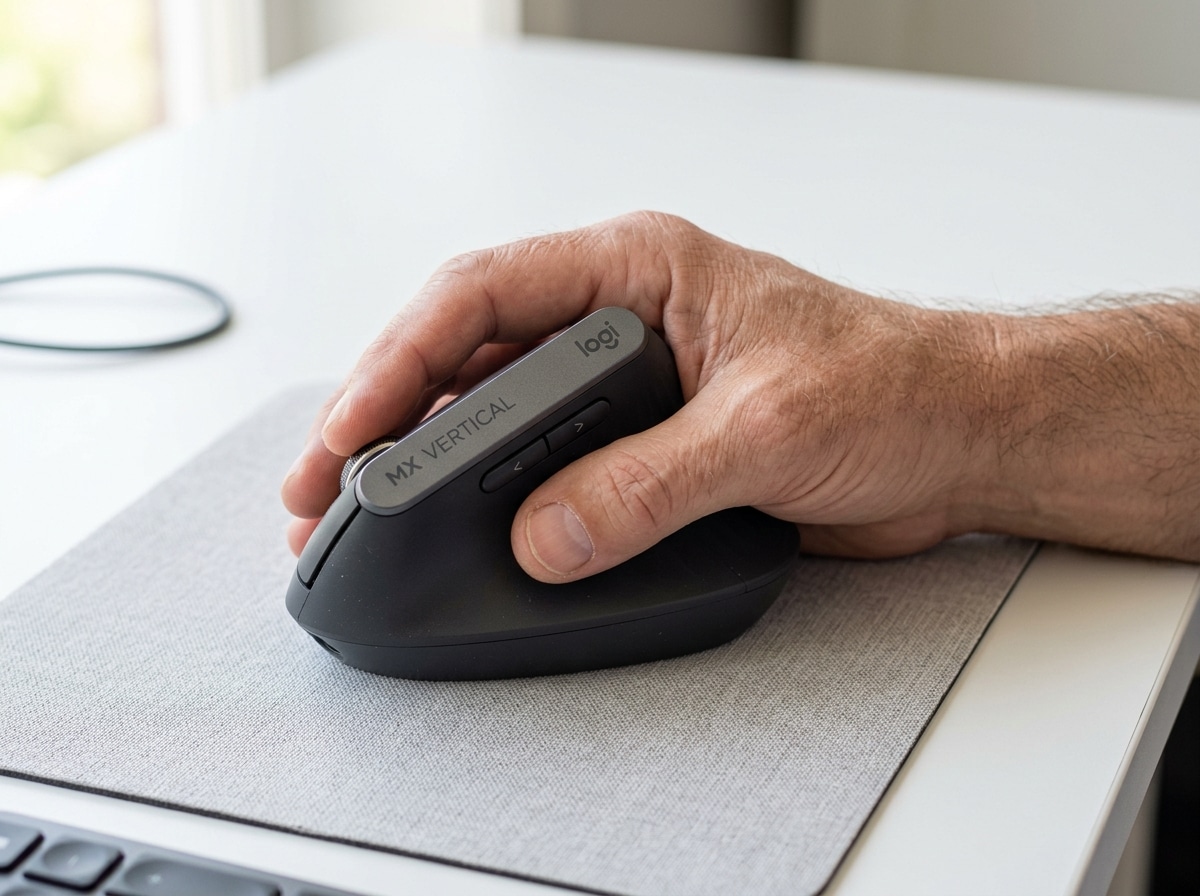
- Logitech MX Vertical – Vertical design with a natural handshake grip, reduces wrist pressure
- J-Tech Digital V628X – Adjustable tilt (53°-73°), designed specifically for large hands
- ELECOM HUGE Plus Trackball – 52mm ball, cushioned palm rest, 4.5 × 7.2 × 2.3 in dimensions
- Logitech Signature M650 L – Contoured shape sized for large hands, rubber side grips
- Logitech Signature Wired M520 L – Ambidextrous, 118.7mm height, 400-4000 DPI
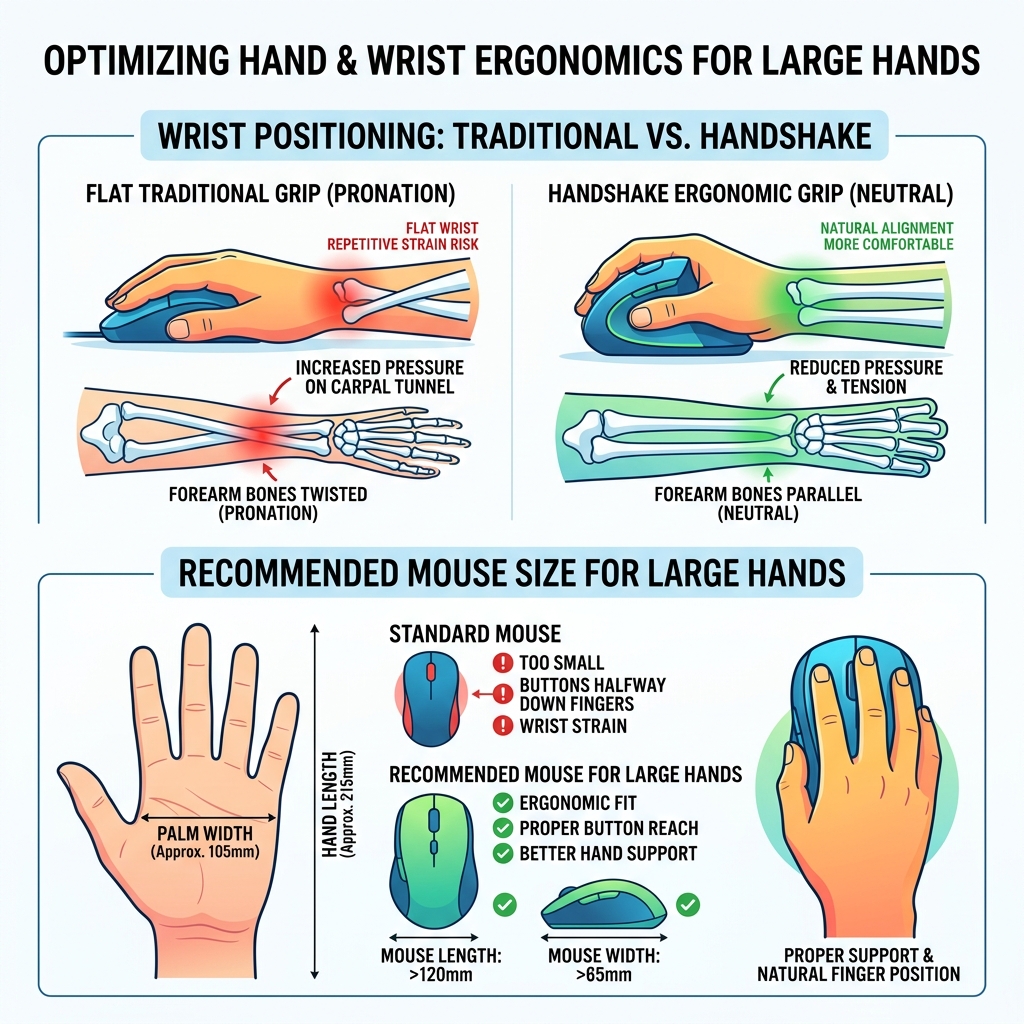
Most computer mice are built for average-sized hands. If your palm measures around 105mm wide and your hand spans roughly 215mm from wrist to middle fingertip, a standard mouse can feel almost comically small.
The problem is more than just comfort. When a mouse is too small, your buttons end up halfway down your fingers. Your wrist twists. Your forearm strains. Over time, that adds up to real pain — carpal tunnel syndrome, cubital tunnel syndrome, and other repetitive stress injuries that make daily computer use genuinely difficult.
The good news? There are mice built for bigger hands — and they make a meaningful difference.
This guide covers the best options available, how to measure your hand to find the right fit, and what features actually matter when you have large hands and wrist pain.
Understanding the Impact of Mouse Size on Wrist Health
When we talk about an ergonomic mouse for large hands, we aren’t just talking about luxury or preference; we are talking about injury prevention. For those of us with larger frames, using a standard-sized mouse is like a professional basketball player trying to drive a subcompact car. You can do it, but you’re going to be cramped, and eventually, something is going to hurt.
The primary culprits behind office-related hand pain are Carpal Tunnel Syndrome (CTS) and Cubital Tunnel Syndrome. CTS occurs when the median nerve, which runs from your forearm into the palm of your hand, becomes pressed or squeezed at the wrist. Standard mice force your hand into a “pronated” position—flat against the desk. This position requires your two forearm bones to cross, putting constant pressure on the carpal tunnel.
Cubital Tunnel Syndrome is similar but involves the ulnar nerve near the elbow. If your mouse is too small, you might find yourself resting your elbow or the “pinky side” of your hand heavily on the desk to gain stability. This localized pressure is a recipe for nerve compression.
Furthermore, repetitive strain often stems from “micro-movements.” When a mouse “disappears” inside a large hand, you can’t use your whole hand to move it. Instead, you use tense, claw-like finger movements to click and scroll. This leads to tendonitis and general forearm twisting. We have explored these issues deeply in our guide on wrist management and finding the best RSI mouse for pain-free scrolling.
If you’ve ever felt like your hand was “on strike” after a long day of spreadsheets, you’re likely dealing with a keyboard and wrist injury caused by an ill-fitting setup.
How to Measure Your Hand for an Ergonomic Mouse for Large Hands
Before you hit “buy” on a new device, you need to know exactly what “large” means for you. In ergonomics, we generally categorize hands based on the length from the base of the palm to the tip of the middle finger.
The Measuring Process
To find your size, follow these steps:
- Length: Measure from the first crease at your wrist to the very tip of your middle finger.
- Width: Measure across your palm at the widest point (usually where your fingers meet your palm).
What counts as “Large”?
- Standard/Medium: Under 190mm (approx. 7.5 inches) in length.
- Large: Over 190mm to 200mm.
- Extra Large: Over 210mm (approx. 8.3 inches).
Research shows that for users with a palm width of 105mm and a total length of 215mm, standard mice are completely inadequate. On a standard mouse, these users often find their index and middle fingers hanging off the front, forcing them to click with the middle of their fingers rather than the tips. This creates a “claw grip” that fatigues the hand quickly.

Using sizing guides is essential. Some manufacturers even offer 3D comparators or printable templates to help you visualize how your hand will drape over the device. Achieving a neutral wrist position is only possible if the mouse provides enough surface area to support your entire palm.
Top Recommendations: Finding the Best Ergonomic Mouse for Large Hands
Not all “big” mice are created equal. Some focus on height (vertical), while others focus on width and support (trackballs). Here is a quick comparison of the top contenders we’ve identified for those seeking an ergonomic mouse for large hands.
| Mouse Model | Type | Best For | Key Feature |
|---|---|---|---|
| Logitech MX Vertical | Vertical | CTS Relief | 57° Handshake Angle |
| J-Tech V628X | Vertical | Custom Comfort | 53°–73° Adjustable Tilt |
| ELECOM HUGE Plus | Trackball | Stationary Use | 52mm Ball & Cushioned Rest |
| Signature M520 L | Traditional | Business/Office | Silent Touch & Large Form |
| Logitech M650 L | Traditional | Simple Comfort | Size-specific (Large) model |
When selecting, consider your DPI (Dots Per Inch) needs. High DPI (up to 4000) allows the cursor to move further with less physical hand movement, which is a godsend for those with limited wrist mobility. A proper ergonomic keyboard and mouse setup should always prioritize these customizable settings.
The Vertical Advantage: Logitech MX Vertical and J-Tech V628X
Vertical mice are the gold standard for many RSI sufferers. By turning the mouse on its side, you adopt a “handshake” grip. This prevents the forearm from twisting and keeps the carpal tunnel open.
The Logitech MX Vertical is a premium choice. It features a 57-degree vertical angle that Logitech claims reduces muscle strain by up to 10%. For users who find the standard MX Master series too small, the MX Vertical feels significantly more substantial and “luxurious” in the palm.
If you want even more control over your posture, the J-Tech Digital V628X is a standout. It offers an adjustable tilt range of 53° to 73°. This is particularly helpful for large-handed users because it allows you to find the exact angle where your pinky doesn’t rub against the desk. It also features a removable palm rest, making it one of the most versatile options for large hands.
Stationary Precision: ELECOM HUGE Plus Trackball
For some, the best way to heal a wrist injury is to stop moving the wrist entirely. This is where trackballs come in. The ELECOM HUGE Plus lives up to its name. With dimensions of 4.5 × 7.2 × 2.3 inches, it is one of the few devices that won’t feel “lost” in a large hand.
The ELECOM HUGE Plus features a massive 52mm trackball supported by high-quality bearings (often swappable for synthetic ruby bearings for even smoother glide). Because the device stays stationary, your wrist rests on the built-in, low-resilience cushioned palm rest while your fingers do the work. This is an excellent choice for designers or engineers who need pixel-perfect precision without the strain of dragging a heavy mouse across a pad.
Professional Reliability: Signature Wired M520 L for Business
Sometimes you don’t need a spaceship-shaped vertical device; you just need a traditional mouse that is actually big enough. The Logitech Signature Wired M520 L is designed for the modern workplace.
At 118.7mm tall, it provides the “arch” support that large hands crave. It’s an ambidextrous design, meaning it’s comfortable for both righties and lefties (though lefties should also check out our guide on left-handed wireless mice).
Key features include:
- Silent Touch Technology: Reduces click noise by 90%.
- SmartWheel Scrolling: Switches from precision to hyper-fast scrolling instantly.
- Sustainability: Made with 73% post-consumer recycled plastic.
This is a “set it and forget it” mouse that works seamlessly with wireless keyboard and mouse combos for a clean, professional desk.
Essential Features in an Ergonomic Mouse for Large Hands
When shopping for an ergonomic mouse for large hands, don’t get distracted by flashy RGB lights. Focus on the physical geometry of the device.
- The High Arch: A mouse for large hands must have a high peak. This supports the center of your palm, allowing your hand to relax rather than “clutching” the device.
- Pinky Support: One of the most common complaints from large-handed users is the “pinky drag”—where your smallest finger scrapes across the mouse pad. Look for mice with a “flare” or “wing” on the right side to cradle the pinky.
- Rubber Grips: Larger hands exert more leverage. Soft rubber side grips ensure you don’t have to squeeze the mouse tightly to maintain control.
- Programmable Buttons: If you have large fingers, you want buttons that are spaced out. Customizing these buttons via software allows you to map common tasks (like “back” or “copy”) to thumb buttons, reducing the need for repetitive clicking.
- Weight Distribution: A tiny, lightweight mouse can feel skittish. A slightly heavier mouse provides better tactile feedback for larger muscle groups.
A proper ergonomic mouse setup isn’t complete without considering how the mouse interacts with your surface. Precision optical tracking is a must, especially if you are using your mouse on varied surfaces without a dedicated pad.
Optimizing Your Desk Setup for Maximum Comfort
Buying the best ergonomic mouse for large hands is only half the battle. If your desk is too high or your chair is too low, even the best mouse won’t save you from strain.
- Desk Height: Your elbows should be at a 90-degree angle, with your forearms parallel to the floor. If you have long arms, you may need a taller desk or an adjustable standing desk.
- The “Float”: Avoid “planting” your wrist on the desk. This creates a pivot point that stresses the carpal tunnel. Instead, let your arm move the mouse.
- Wrist Rests: While we often recommend ergonomic wrist rests for typing, be careful with mouse wrist rests. They should support the palm, not the underside of the wrist where the nerves are most vulnerable.
- Neutral Alignment: Ensure your mouse is placed directly next to your keyboard. Reaching outward for a mouse (abduction) puts significant strain on the shoulder and neck.
For a deep dive into creating the perfect workspace, see our comprehensive guide on ergonomic keyboard and mouse setups for maximum comfort.
Frequently Asked Questions about Large Ergonomic Mice
Can a vertical mouse help with existing Carpal Tunnel symptoms?
Yes. By moving the hand into a handshake position, a vertical mouse reduces the pressure on the median nerve. Many users report a significant reduction in tingling and numbness within a few weeks of switching. However, an ergonomic mouse is a tool for management and prevention; always consult a medical professional for severe symptoms.
What is the difference between a trackball and a traditional ergonomic mouse for large hands?
A traditional mouse requires you to move your whole arm or wrist to move the cursor. A trackball stays stationary, and you move the cursor using only your thumb or fingers. For people with large hands who suffer from wrist pain, trackballs like the ELECOM HUGE Plus are often superior because they eliminate the need for wrist “flicking.”
How do I know if my current mouse is too small for my hand?
If your fingers extend past the front of the mouse, if your palm doesn’t touch the back of the mouse, or if you find yourself “clawing” the device to move it, it’s too small. Another tell-tale sign is if your pinky and ring finger are constantly rubbing against your mouse pad.
Conclusion
Finding an ergonomic mouse for large hands is a vital step in protecting your long-term health. At Dims Finance, we believe in science-based ergonomics to help you stay productive without sacrificing your well-being. Whether you choose the extreme tilt of the J-Tech V628X, the stationary comfort of the ELECOM HUGE Plus, or the reliable size of the Logitech M650 L, the goal is the same: a neutral, pain-free posture.
Don’t let a “standard” mouse dictate your comfort. Measure your hand, choose a device that actually fits, and optimize your workspace for success.
Explore more ergonomic desk accessories to complete your pain-free setup today.