Your Wrist Hurts — Here’s What Actually Helps
If you’re looking for the best mouse for bad wrist pain, here are the top picks to consider right now:
| Mouse | Type | Best For |
|---|---|---|
| Logitech MX Master 4 | Sculpted ergonomic | Best overall |
| Hansker Productivity | Vertical | Best wrist alignment |
| Logitech MX Ergo S | Trackball | Best for wrist immobility |
| Razer Basilisk V3 Pro 35K | Sculpted ergonomic | Best for gaming + work |
| Logitech MX Master 2S | Sculpted ergonomic | Best budget pick |
Every click, scroll, and swipe adds up. If you use a computer for hours each day, your wrist pays the price.
Repetitive strain injuries (RSIs) like carpal tunnel syndrome and tendonitis are common among heavy computer users. A standard flat mouse forces your wrist into an unnatural, palm-down position — and doing that for thousands of hours causes real damage.
The good news? The right mouse can make a meaningful difference. Studies show that angled and vertical mice reduce discomfort without hurting your accuracy or productivity. Some designs, like the Logitech MX Ergo S, are even clinically shown to cut forearm muscle strain by up to 27%.
But with hundreds of options out there, it’s hard to know where to start.
This guide cuts through the noise. We’ve broken down the best ergonomic mice by category — from budget picks to trackballs to gaming-friendly options — so you can find the right fit for your hand, your workflow, and your wallet.
Understanding Ergonomics: How the Best Mouse for Bad Wrist Relief Works
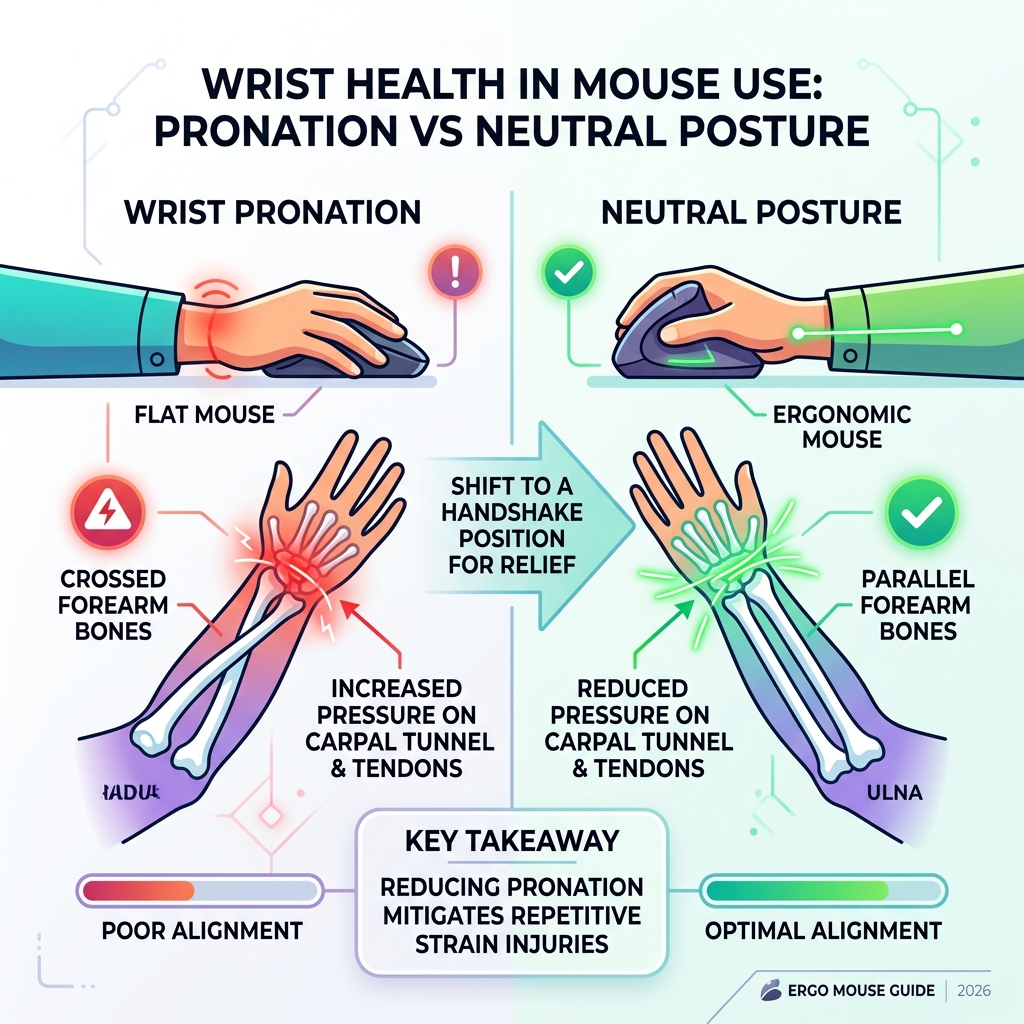
To find the best mouse for bad wrist relief, we first need to look at why standard mice cause problems. When you use a traditional “flat” mouse, your forearm undergoes “pronation.” This is a fancy way of saying your radius and ulna bones in your forearm cross over each other to keep your palm flat against the desk. Staying in this position for eight hours a day puts constant pressure on the carpal tunnel and surrounding tendons.
Scientific research on angled and vertical mice suggests that moving toward a “neutral posture” is the key to longevity. A neutral posture is essentially a “handshake” position—the way your hand naturally hangs at your side. By tilting the mouse at an angle, we can uncross those forearm bones and let the muscles relax.
Why Vertical and Sculpted Designs Matter
Vertical mice take the handshake concept to the extreme, usually featuring a 57-degree slope. This specific angle is often cited by ergonomists as the “sweet spot” because it provides enough tilt to prevent forearm twisting without making the mouse feel unstable or difficult to click.
Sculpted designs, like the famous Logitech MX series, don’t go full vertical but offer a deep thumb rest and a high arch. These are great “gateway” mice for people who find vertical mice too strange to use but still need to reduce ulnar deviation (the side-to-side bending of the wrist). By supporting the palm and giving the thumb a soft place to land, these mice prevent you from “clawing” the device, which is a major contributor to tendonitis.

Trackballs vs. Conventional Ergonomic Mice
If your wrist pain is so severe that even sliding a mouse across a pad hurts, a trackball might be your best friend. There are two main types:
- Thumb-operated: You move the cursor with your thumb while your hand stays completely still.
- Finger-operated: You use your index and middle fingers to roll a larger ball, often providing more precision.
The biggest benefit of a trackball is that it eliminates arm movement entirely. You don’t need a large desk space, and your wrist stays in one fixed, supported position. While there is a learning curve (it can feel a bit “squirrely” at first), many people with advanced RSI find they can’t work without one.
Top-Rated Ergonomic Mice for Every Hand and Budget
Choosing the best mouse for bad wrist issues depends on your specific pain points and how you work. We’ve rounded up the top performers based on weight, sensor accuracy, and ergonomic tilt.
| Feature | Logitech MX Master 4 | Hansker Productivity | Logitech MX Ergo S | Razer Basilisk V3 Pro |
|---|---|---|---|---|
| Weight | 150g | 115g | 259g (with plate) | 99g |
| Tilt Angle | Sculpted | 57° Vertical | 0° or 20° | Sculpted |
| Connection | Logi Bolt / BT | 2.4GHz / BT | Logi Bolt / BT | HyperSpeed / BT |
Best Overall: Logitech MX Master 4
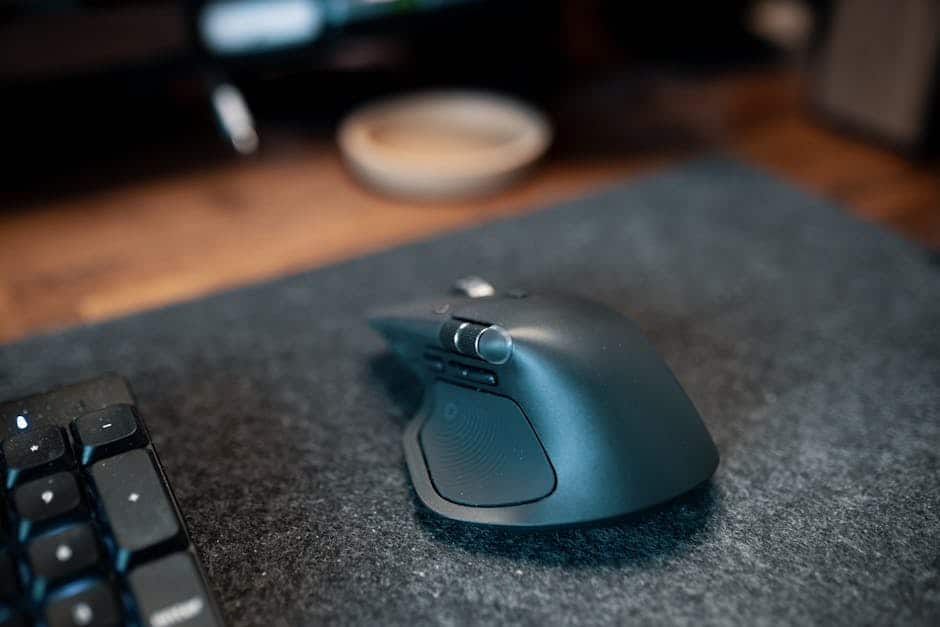
The Logitech MX Master 4 is the gold standard for office professionals. Weighing in at 150 grams—double the weight of some gaming mice—it feels incredibly solid and premium in the hand. The weight actually helps with stability, preventing jittery micro-movements that can strain small hand muscles.
Its standout feature is the MagSpeed electromagnetic scroll wheel, which can zip through 1,000 lines in a second or stop on a pixel. It also features a dedicated thumb wheel for horizontal scrolling (perfect for Excel or video editing) and works with the Logi Options+ app to remap buttons for specific software. It’s the ultimate productivity tool that happens to be very kind to your hand.
Best Vertical Mouse for Bad Wrist Support: Hansker Productivity
For those who need maximum wrist alignment, the Hansker Productivity is a top-tier vertical choice. It places your hand in a pure handshake position, which immediately takes the pressure off your carpal tunnel. It uses a reliable Pixart sensor for smooth tracking and is often recommended by ergonomists for users who are already experiencing active pain. It’s a “function over fashion” tool that prioritizes your health above all else.
Best Trackball for Wrist Immobility: Logitech MX Ergo S
The Logitech MX Ergo S is unique because it features an adjustable hinge. You can leave it flat or tilt it to a 20-degree angle. This tilt has been shown to reduce forearm muscle strain by 27%. Because it’s a trackball, your wrist never has to move. The new “S” model also includes quiet clicks, so you won’t annoy your coworkers during a long day of data entry. It charges via USB-C, making it a modern, convenient solution for total wrist support.
Best for Gaming and Work: Razer Basilisk V3 Pro 35K
Who says ergonomic mice can’t be fast? The Razer Basilisk V3 Pro 35K is designed for the person who spends eight hours in spreadsheets and two hours in Call of Duty. It features an extended thumb rest to prevent “desk drag” and a 30K optical sensor that tracks on almost any surface, including glass. The Hyperscroll technology allows the wheel to spin freely when you’re scrolling long documents or click tactilely when you’re switching weapons in a game.
Best Budget Mouse for Bad Wrist Pain: Logitech MX Master 2S
If you want pro-level ergonomics without the $100+ price tag, the Logitech MX Master 2S is still a fantastic choice. Even though it’s an older model, its sculpted shape is nearly identical to the newer versions. You still get the 4,000 DPI sensor, multi-device connectivity, and a battery that lasts up to 70 days on a single charge. It’s the smartest way to get a high-end ergonomic experience on a budget.
Key Features to Look for in a Mouse for Wrist Comfort
When shopping for the best mouse for bad wrist relief, don’t just look at the price. Consider these technical factors:
- DPI Sensitivity: High DPI (Dots Per Inch) is actually good for bad wrists. Why? Because a higher DPI means the cursor moves further on the screen with less physical movement of your hand. Look for a mouse that lets you adjust this on the fly.
- Weight Distribution: Some people prefer a heavy mouse (like the MX Master 4) for stability, while others need an ultralight mouse (like the 60g Logitech Pro X Superlight 2 Dex) to reduce the effort required to move it.
- Customizable Buttons: The more you can do with your mouse buttons (like copy/paste or switching tabs), the less you have to move your hand to the keyboard, reducing overall repetitive motion.
- Connectivity: Bluetooth is convenient, but a 2.4GHz USB dongle is often more stable and has less “lag,” which can prevent you from tensing up your hand when the cursor doesn’t move as expected.
For a truly healthy setup, the mouse is only one piece of the puzzle. Check out more info about ergonomic desk accessories to see how items like monitor arms and document holders can further reduce strain.
Beyond the Mouse: Optimizing Your Workspace for Wrist Health
Even the best mouse for bad wrist pain won’t help if your desk setup is a mess. Ergonomics is about the “system” of your body and your furniture.
First, look at your chair. You should adjust your chair height so that your elbows are at a 90-degree angle and your wrists are in a straight line with your forearms. If your chair has armrests, use them! Your elbows should rest lightly on them to take the weight of your arms off your shoulders and wrists.
Second, consider your keyboard. Pairing your mouse with an ergonomic keyboard and mouse setup ensures that both hands are in a neutral position. You might also want to look into ergonomic wrist rests for typing to keep your wrists from sagging during lulls in work.
Finally, place your mouse and keyboard close together. You shouldn’t have to “reach” for your mouse. It should be right next to your keyboard, directly in front of your shoulder. If you’re constantly reaching out to the side, you’re putting unnecessary strain on your rotator cuff and neck. To keep your head in a neutral position and avoid “tech neck,” consider using monitor stands for better posture.
Frequently Asked Questions about Ergonomic Mice
Can I use an ergonomic mouse for high-intensity gaming?
Yes, but there are trade-offs. Most “office” ergonomic mice have a polling rate of 125Hz, which might feel “slow” to a competitive gamer. However, mice like the Razer Basilisk V3 Pro or the Logitech G Pro X Superlight 2 Dex offer high-end gaming sensors (up to 44k DPI) and high polling rates in a shape that is much more comfortable than a standard flat gaming mouse.
Are there good ergonomic options for left-handed users?
Absolutely. While the market is smaller, there are great picks. The Logitech Lift has a dedicated left-handed version. For a more modular approach, the Microsoft Adaptive Mouse can be customized with 3D-printed tails to fit either hand perfectly. You can also look for “ambidextrous” mice, though these usually lack the deep thumb rests found on right-hand-specific models.
Which mice should I avoid if I have carpal tunnel?
Avoid “travel” mice that are tiny and flat. These force your hand into a “claw” grip which is terrible for carpal tunnel. You should also be wary of very cheap vertical mice with jittery sensors (like the ProtoArc EM11 NL), as a jumpy cursor will make you tense your muscles to compensate. Finally, avoid the Apple Magic Mouse if you have existing pain; its low profile and touch-sensitive top require a lot of finger-lifting and wrist-extension that can aggravate RSIs.
Conclusion
Finding the best mouse for bad wrist relief is a personal journey. What works for a tall person with large hands (like the MX Vertical) might not work for someone with smaller hands (who might prefer the Logitech Lift).
At Dims Finance, we believe workplace wellness starts with science-based ergonomics. By switching to a handshake grip, reducing repetitive motions with customizable buttons, and optimizing your desk height, you can stop the cycle of pain and get back to being productive.
Ready to complete your ergonomic transformation? Explore more info about ergonomic desk accessories to find the perfect keyboard, monitor riser, and wrist support for your home office. Your body will thank you!