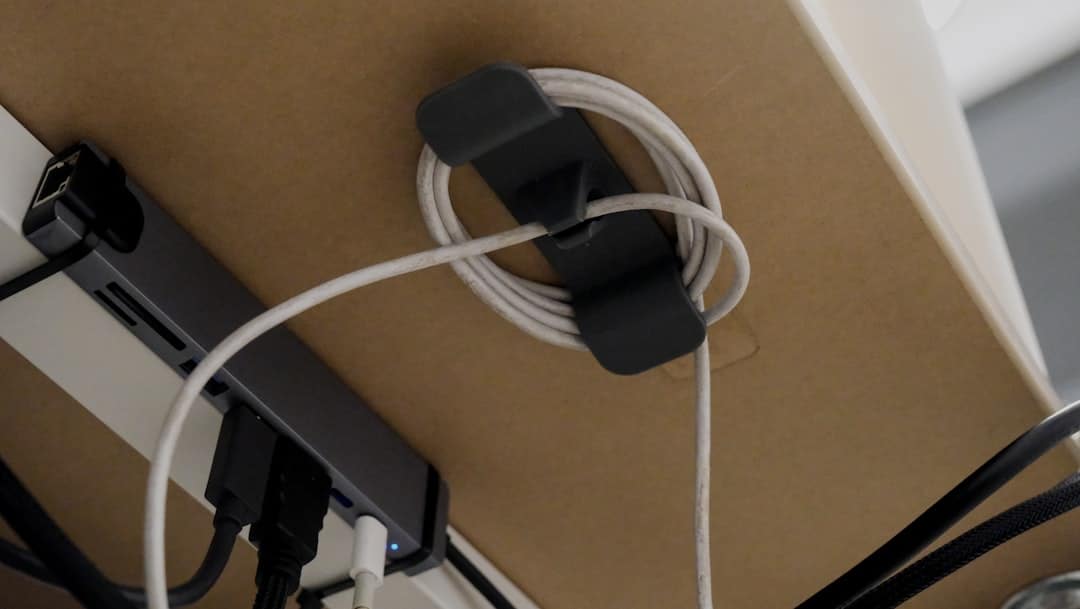
The Hidden Cost of Cable Chaos on Your Desk
A table cord organizer is a device or system that routes, bundles, and hides the cables on or under your desk — keeping your workspace clean, safe, and distraction-free.
The fastest ways to organize table cords:
- Cable clips or magnetic holders — stick to your desk surface and hold individual cables in place
- Under-desk trays or fabric slings — hide power strips, bricks, and multiple cables out of sight
- Cord boxes or enclosures — conceal messy cable bundles on top of or beside your desk
- Velcro ties or cable sleeves — bundle cables together to reduce visual clutter
- Weighted desktop organizers — sit on your desk without adhesive and wrangle charging cables
If you use a computer for hours each day, cables are everywhere. Chargers, monitors, keyboards, lamps, USB hubs — they all need power. And they all create a tangled mess that competes for your attention whether you notice it or not.
Research into workspace design consistently links visual clutter to higher stress levels and lower focus. For people already managing wrist pain, carpal tunnel, or musculoskeletal discomfort, a chaotic desk adds one more thing working against you.
The good news? The fix is simpler than you’d expect — and it doesn’t require a complete desk overhaul.

Why Every Workspace Needs a Table Cord Organizer
We’ve all been there: you’re in the middle of a deep-focus task when you realize your phone is at 2%. You reach for the charging cable, only to find it has slipped behind the desk into a “rat’s nest” of wires. By the time you fish it out, your flow state is gone.
Visual clutter isn’t just an eyesore; it’s a cognitive drain. When our environment is chaotic, our brains struggle to filter out irrelevant information, leading to increased stress. A table cord organizer acts as a mental reset button. By clearing the “spaghetti” of wires from your peripheral vision, you create a serene environment that fosters productivity.
Beyond the mental benefits, there are serious physical and safety reasons to invest in Desk Accessories that manage your cords:
- Tripping Prevention: Loose cables on the floor are a leading cause of office accidents. Tucking them into an under-desk tray keeps your walkways clear.
- Electrical Hazards: Tangled wires can overheat, especially if they are buried under dust or pressed against flammable materials. Proper organization improves airflow around power bricks.
- Dust Accumulation: A bundle of tangled cords is a magnet for dust bunnies. Once cables are lifted off the floor or tucked into a box, cleaning becomes a ten-second wipe rather than a half-hour struggle.
- Pet Protection: If you have a cat or dog who views your expensive MacBook charger as a chew toy, a cord organizer or protective sleeve is a non-negotiable safety measure.

Essential Types of Cable Management Solutions
Choosing the right table cord organizer depends on the volume of cables you have and where they are located. We generally categorize these solutions into three zones: on-desk, under-desk, and floor-to-desk.
| Type | Best For | Pros | Cons |
|---|---|---|---|
| Cable Trays | Power strips & bricks | High capacity, hides everything | Requires mounting (screws or clamps) |
| Cord Boxes | Nightstands & floors | Aesthetic, no installation | Takes up surface space |
| Adhesive Clips | Charging cables | Cheap, easy access | Adhesive can fail over time |
| Fabric Sleeves | Bundling PC cables | Flexible, hides “cable snakes” | Harder to add/remove wires quickly |
| Weighted Holders | Temporary cables | Portable, no-drill | Can only hold a few cables |
Desktop Clips and Weighted Table Cord Organizers
For the cables that live on top of your desk—like your phone charger, mouse wire, or laptop power—you need something that keeps them from falling onto the floor.
Silicone Adhesive Clips: These are the most common. They stick to the edge of your desk and have small slots to “click” your cables into. They are perfect for ensuring your USB-C cable is always exactly where you left it.
Weighted Cord Organizers: If you don’t want to stick adhesive to your beautiful wood desk, a weighted solution like the DeskBrick® Weighted Cord Organizer, Cable Wrap, Phone Stand +Multiuse – CordBrick is a fantastic alternative. These use a heavy internal core (often steel) and a non-slip silicone base to stay put. They are particularly useful because they are portable; you can move them from your desk to your nightstand without leaving a sticky residue.
Magnetic Keepers: Some premium organizers use magnetic collars that you wrap around your cable. The cable then “snaps” to a magnetic base on your desk. It feels incredibly high-end and makes cable management feel less like a chore and more like a feature of your workspace.
Under-Desk Trays for Heavy-Duty Organization
The “heavy lifting” of cable management happens under the desk. This is where your power strips, monitor bricks, and docking stations live.
- Steel Mesh Trays: These are durable and offer great ventilation. Because they are perforated, you can use zip ties or Velcro straps to anchor cables directly to the tray.
- Fabric Slings: Products like the Ascrono® CableCare Tray use fire-retardant, dust-resistant fabrics. These are often preferred for a “softer” look and are excellent at hiding large, ugly power bricks that might peek through a wire mesh tray.
- Cable Spindles: For setups with excessive cord length, a Cord Corral Cable Organizer | 6 Cord Spindles For Under Desk Organization – Great Useful Stuff allows you to wrap the slack around internal spools. This prevents the “hanging loop” look that often ruins a clean setup.
Choosing the Right Solution for Your Desk Setup
When selecting Office Furniture, most people think about the chair or the desk surface, but they forget how those pieces interact with technology. To choose the right table cord organizer, consider these four factors:
- Material Durability: If you have heavy power bricks (like those for gaming laptops or large monitors), a plastic adhesive tray might sag or fall off. Opt for powder-coated steel or reinforced fabric.
- Capacity: Count your plugs. If you have a dual-monitor setup, a laptop, a printer, and a lamp, you’ll need a tray at least 15-20 inches long to hold a full-sized power strip.
- Aesthetic Integration: Do you want the organizer to be invisible or part of the decor? Some furniture pieces, like the Modern Side Table with Cable Management | Bellwood Storage Table – Umbra, actually build the cord management into the design of the table itself, using hooks and hidden compartments.
- Sustainability: We are seeing a rise in eco-friendly options. Some premium cable managers are now made from recycled plastic bottles (often called “EcoKnit”). These perform just as well as virgin plastic but have a much lower environmental footprint.
Specialized Table Cord Organizer Options for Standing Desks
Standing desks present a unique challenge: the “cable tug.” When you raise your desk, your cables need to stretch. If they are too short or poorly managed, they can unplug your computer or, worse, damage your ports.
For these setups, we recommend:
- Cable Spines (Vertebrae): These look like a robotic spine that runs from the floor to the bottom of your desk. Each “vertebra” holds the cables, allowing them to bend and extend smoothly as the desk moves.
- Integrated Trays: A Cable Organizer|Cable Management for the Duo or Daily Desk is designed to move with the desk. By mounting everything—including the power strip—to the underside of the desktop, only one main power cable needs to travel to the wall outlet.
No-Drill vs. Permanent Installation Methods
Not everyone is comfortable taking a power drill to their desk, especially if it’s a high-end piece of furniture or a rental.
- Clamp Mounts: These use a C-clamp to grip the edge of the desk. They are incredibly sturdy and can be removed in seconds without leaving a mark. They are the gold standard for glass or metal desks where drilling isn’t an option.
- Adhesive Backing: Great for light clips, but risky for heavy trays. If you go this route, clean the surface with rubbing alcohol first to ensure a strong bond.
- Screw-in Stability: If you own your desk and it’s made of solid wood or MDF, screwing a tray into the underside is the most permanent and secure method. It allows for the highest weight capacity.
Best Practices for a Tangle-Free Setup
Installing a table cord organizer is only half the battle. To maintain a clean look over time, we suggest following these steps:
- The Great Unplugging: Start by unplugging everything. It’s impossible to organize a mess that’s already tangled.
- Label Everything: Use a label maker or masking tape to mark both ends of every cable (e.g., “Left Monitor,” “Webcam”). You’ll thank us the next time you need to swap a device.
- Group by Destination: Bundle cables that are going to the same place. For example, all the cables running from your PC to your monitors should be tucked into a single sleeve.
- Mount the Power Strip First: The power strip is the “hub.” Mount it in your tray or under your desk before you start routing individual cords.
- Use Velcro, Not Zip Ties: We strongly prefer reusable Velcro wraps over plastic zip ties. Why? Because your setup will change. Velcro allows you to add a new charging cable in five seconds, whereas zip ties require scissors and a complete redo.
- Leave Slack for Movement: If you have a monitor on a swivel arm or a standing desk, make sure there is enough “loop” in the cable to allow for the full range of motion.
Beyond the Office: Bathroom and Entertainment Setup Management
While we focus on the office, a table cord organizer is just as useful in other rooms:
- The Bathroom: Countertops are often cluttered with electric toothbrushes, razors, and hair dryers. Using a small cord box can keep these cables away from wet surfaces, reducing electrical risks.
- The Living Room: Entertainment centers are notorious “dust zones.” A simple Cord Manager can lift those HDMI and power cables off the floor, making it easier for your robot vacuum to do its job.
Frequently Asked Questions about Cable Management
How do I prevent cables from tugging on a standing desk?
The key is to mount your power strip directly to the underside of the desk using a tray or heavy-duty adhesive. This way, all your devices plug into the desk itself. The only cable that needs to be long enough to reach the floor is the single main power cord for the strip. Use a “cable spine” or a coiled cable for this main line to handle the height adjustment safely.
Are reusable Velcro ties better than plastic zip ties?
In almost every case, yes. While zip ties are cheaper and more permanent, they are “single-use.” Every time you get a new mouse or keyboard, you have to cut the zip tie and start over. Velcro ties are adjustable, reusable, and gentler on the cable insulation.
Can cord organizers prevent electrical hazards in bathrooms?
Absolutely. By using a cord box or an elevated organizer, you keep charging cables for toothbrushes and razors off the damp countertop. This prevents water from “wicking” along the cable into the outlet and reduces the risk of a short circuit.
Conclusion
At Dims Finance, we believe that a healthy workspace is a productive one. While we often talk about the importance of ergonomic chairs and split keyboards to prevent RSI (Repetitive Strain Injury), the mental health aspect of your workspace is just as vital.
A table cord organizer isn’t just a piece of plastic or steel; it’s a tool that reduces cognitive load, improves safety, and protects your expensive technology. By taking thirty minutes to route your cables properly, you aren’t just cleaning your desk—you’re investing in your long-term well-being and focus.
Ready to take the next step in optimizing your environment? Check out our other guides for More info about desk accessories and how to build a workspace that works for you.