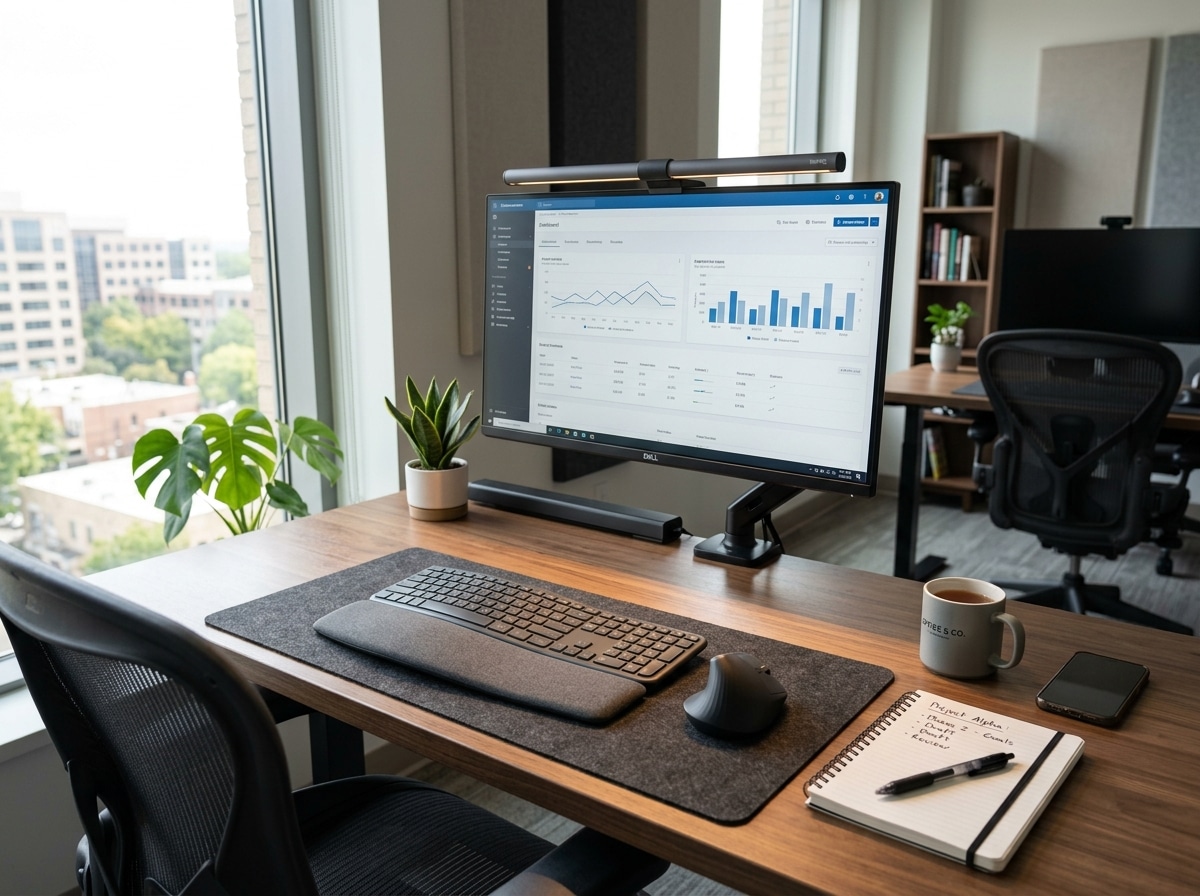
Why Computer Desk Lighting Ergonomics Affects Your Health More Than You Think
Computer desk lighting ergonomics is the practice of setting up your workspace lighting to reduce eye strain, prevent headaches, and support healthy posture at your computer.
Here’s a quick summary of what good ergonomic desk lighting looks like:
- Brightness: 300-500 lux on your task surface for general computer work
- Color temperature: 4000K-5000K (neutral to cool white) during the day; 2700K-3000K in the evening
- Glare control: Position your monitor at a 90° angle to windows; never sit with a window directly behind or in front of you
- Light layers: Use three layers — ambient (room), task (desk lamp), and bias (behind monitor)
- Lamp placement: On the opposite side of your dominant hand, angled downward at 45°, about 15-20 inches above your work surface
- Flicker-free LEDs with a CRI of 80 or higher for comfortable, accurate light
It’s 3 PM. A dull headache creeps in. Your eyes feel dry and gritty. You’re leaning closer to the screen, shoulders rounding forward. You blame the long hours — but the real problem might be right above your head.
Poor lighting is one of the most overlooked causes of discomfort for heavy computer users. It doesn’t just hurt your eyes. Bad lighting forces you into awkward postures as you squint, lean, or turn away from glare — and that’s how it becomes a direct driver of neck pain, shoulder tension, and repetitive strain injuries.
The numbers back this up. Employees in a well-lit environment report a 15% increase in focus. Good lighting can reduce neck and shoulder pain by 20% and cut errors by up to 20% as well. Meanwhile, the wrong light at the wrong time can disrupt your sleep, tank your energy the next day, and quietly erode your long-term health.
The good news? Most lighting problems are fixable with a few simple, low-cost adjustments.

The Science of Computer Desk Lighting Ergonomics
When we talk about computer desk lighting ergonomics, we aren’t just discussing how pretty your office looks. We are talking about biology. Visual fatigue occurs when your eyes are forced to work too hard to overcome poor conditions. This often manifests as “Computer Vision Syndrome” (CVS), a group of eye and vision-related problems resulting from prolonged computer use.
If your room is too dark and your screen is too bright, your pupils are constantly dilating and constricting as you look between your monitor and your keyboard. This “pupillary dance” leads to rapid fatigue. Research shows that Why Your Desk Lighting Matters More Than You Think is because it directly influences your cognitive performance; a well-lit space can minimize mistakes by up to 20%.
Furthermore, lighting is a cornerstone of how-to-set-up-workstation-ergonomically-for-peak-comfort. If you have to tilt your head at an odd angle to avoid a reflection on your screen, you are creating musculoskeletal issues in your neck and spine. Proper lighting allows you to maintain a neutral, healthy posture.
Understanding Computer Desk Lighting Ergonomics and Eye Health
Our eyes evolved to see in natural, diffused sunlight. Modern office lighting often does the opposite, providing harsh, direct light that creates high contrast. By optimizing your computer desk lighting ergonomics, you improve your contrast sensitivity. This means your brain doesn’t have to work as hard to “decode” the text on your screen.
When your lighting is balanced—meaning the area around your monitor is roughly the same brightness as the monitor itself—you prevent the sharp headaches that often strike in the late afternoon. This balance improves focus, allowing you to stay “in the zone” for longer without feeling like your eyes are burning.
Optimizing Computer Desk Lighting Ergonomics for Circadian Rhythms
Your body uses light to tell time. Specifically, blue light (found in high amounts in sunlight and computer screens) suppresses melatonin, the hormone that makes you sleepy. While this is great at 10 AM for alertness, it’s a disaster at 9 PM.
Using a detailed-guide-to-desk-lamps-for-productivity-and-focus can help you choose “tunable” lighting. During the day, cool blue-toned light (5000K) keeps you sharp. As evening approaches, switching to warm, amber tones (2700K) signals to your brain that it’s time to wind down, leading to a 6% improvement in sleep quality.
Implementing the Three Layers of Light
To achieve a professional-grade setup, we recommend a “layered” approach. Relying on a single overhead bulb is the fastest way to create shadows and glare. Instead, we want to build a lighting ecosystem.

- Ambient Light: This is the general “fill” light for the room. It should be diffused and even, ideally between 150-300 lux.
- Task Lighting: This is focused light for specific work, like reading a paper document or seeing your keyboard.
- Bias (Accent) Lighting: This is soft light placed behind your monitor to reduce the harsh contrast between the screen and the wall.
By following a guide to the top-desk-lamps-to-boost-productivity-and-focus, you can find fixtures that help you achieve a “uniformity ratio” (the ratio of the brightest spot to the dimmest spot) of greater than 0.5, which is the gold standard for visual comfort.
Mastering Task Lighting Placement
Where you put your lamp is just as important as what lamp you buy. If you are right-handed and put your lamp on the right side, your hand will cast a shadow over everything you write.
- Opposite Dominant Hand: Place the lamp on the left if you’re right-handed.
- The 45-Degree Rule: Angle the light head at 30-45 degrees from your line of sight. This ensures the light hits your desk, not your eyes.
- Height Matters: Keep the lamp head about 15-20 inches above the desk surface. If it’s too low, the light is too intense; too high, and it creates glare.
High-quality task lamps with articulated arms allow you to move the light as you change tasks, ensuring you never have to settle for “good enough” illumination.
The Benefits of Monitor Bias Lighting
Have you ever noticed how much easier it is to watch a movie in a theater when there are dim lights on the side walls? That’s the principle behind bias lighting. By placing an LED strip behind your monitor, you create a soft glow that reduces the “black hole” effect of a dark room.
This simple addition can significantly reduce eye fatigue. For the best results, use a light with a 6500K color temperature (which matches the “white point” of most monitors) and set the brightness to about 10-20% of your monitor’s peak brightness. Check out our list of ergonomic-desk-accessories-for-comfort for bias lighting recommendations.
How to Position Your Lighting to Eliminate Glare
Glare is the enemy of productivity. It’s the reflection of a light source—like a window or a bright bulb—off your screen. It forces your eyes to constantly refocus between the image on the screen and the reflection on the surface.
- Window Perpendicularity: Position your desk so the window is to your side (at a 90-degree angle). Never face a window (direct glare) or have it behind you (reflected glare).
- Diffusers and Blinds: Use sheer curtains or vertical blinds to soften sunlight.
- The “Mirror Test”: Turn off your monitor. If you can see a light source reflected in the black screen, you have a glare problem.
- Screen Tilt: Tilting your monitor slightly downward (about 5-15 degrees) can often “bounce” overhead light reflections away from your eyes.
Choosing Between Monitor Light Bars and Desk Lamps
In computer desk lighting ergonomics, there is a heated debate: light bar or desk lamp?
| Feature | Monitor Light Bar | Traditional Desk Lamp |
|---|---|---|
| Space Usage | Zero desk footprint (clips to top) | Requires desk space |
| Glare Control | Asymmetrical optics (no screen glare) | Risk of glare if poorly positioned |
| Versatility | Best for screen-focused work | Best for mixed work (reading/writing) |
| Adjustability | Fixed to monitor height | Highly adjustable via swing arms |
Monitor light bars are excellent for small or shallow desks (less than 24 inches deep) because they provide even illumination without cluttering your workspace.
Managing Overhead and Natural Light
Most office overhead lights are too bright for computer work. While paper tasks require 50-200 foot-candles, computer work only needs 20-50 foot-candles. If you can, turn off half the overhead lights or use “egg crate” louvers to redirect the light straight down rather than into your eyes.
As the sun shifts throughout the day, your lighting needs will change. What worked at 9 AM will cause massive glare at 2 PM. Be prepared to adjust your blinds and lamp brightness as the day progresses.
Measuring Success: Lux, Kelvin, and CRI
If you want to get serious about your setup, you need to measure it. You don’t need expensive equipment; many smartphone apps can give you a “good enough” lux reading.
- Lux: Measures the intensity of light on a surface.
- Kelvin (K): Measures the “warmth” or “coolness” of the light.
- CRI (Color Rendering Index): Measures how accurately a light shows colors. Aim for a CRI of 80 or higher (90+ for designers).
Using a desk-lamps-for-productivity-and-focus guide can help you find bulbs that meet these technical standards without breaking the bank.
Recommended Lux Levels for Every Task
How much light do you actually need? It depends on what you’re doing:
- General Computer Work: 300-500 lux.
- Reading Paper Documents: 500-750 lux.
- Fine Detail Work (Drawing/Crafts): 1000+ lux.
- Ambient Room Light: 150-300 lux.
If your workspace falls below 100 lux, you’re essentially working in a cave, which will lead to squinting and fatigue.
Selecting the Right Color Temperature (Kelvin)
The “vibe” of your office is determined by Kelvin.
- 2700K – 3000K (Warm White): Relaxing, cozy. Use this after 6 PM to protect your sleep.
- 3500K – 4500K (Neutral White): The “sweet spot” for most office work. It’s clean and energizing without being harsh.
- 5000K – 6500K (Daylight): Very blue. Great for high-alertness tasks or color-critical work, but avoid it in the evening.
Always look for “flicker-free” LED drivers. Cheap LEDs have an invisible flicker that can cause migraines and eye strain, even if you can’t consciously see it.
Adapting Lighting for Dynamic Workstations
Standing desks present a unique challenge for computer desk lighting ergonomics. When you raise your desk, the distance between your overhead lights and your work surface changes. Even worse, your eyes move into a different “glare zone” relative to windows.
- Clamp-on Lamps: Use a lamp that clamps directly to your desk. This ensures the light moves with you, keeping the lux levels consistent whether you are sitting or standing.
- Reach Range: Ensure your lamp has a long enough arm to reach over large monitors.
- Cable Management: Make sure your lamp cord has enough “slack” to accommodate the full height of your desk without getting snagged or unplugged.
Frequently Asked Questions about Desk Lighting
How do I know if my office lighting is too dim?
If you find yourself leaning toward the screen, squinting at your keyboard, or feeling unusually tired by noon, your lights are likely too dim. You can verify this by using a free light meter app on your phone. If the reading on your desk is below 200 lux, it’s time for a boost.
What is the best position for a desk lamp to avoid shadows?
The best position is on the side opposite your dominant hand, angled at 45 degrees. This ensures that when you write or type, your hands don’t block the light source.
Can poor lighting cause neck and shoulder pain?
Absolutely. This is called “compensatory posturing.” If there is glare on your screen, you might tilt your head to the side to see around it. If the light is too dim, you might hunch forward to see better. Over eight hours, these small movements lead to significant muscle strain.
Conclusion
At Dims Finance, we believe that ergonomics is a holistic endeavor. You can have the most expensive chair in the world, but if you’re squinting through glare and hunching in the dark, you’re still at risk for RSIs and fatigue.
By mastering computer desk lighting ergonomics, you aren’t just protecting your eyes—you’re investing in your long-term productivity and well-being. Start by clearing the glare, layering your light, and matching your color temperature to the time of day. Your eyes (and your neck) will thank you.
Ready to complete your setup? Discover more ergonomic desk accessories to build a workspace that works for you.