
Why Your Wrists Deserve Better Than a Bare Desk
A wrist rest mouse pad is a combined accessory that gives you a smooth mousing surface and a cushioned support for your wrist — all in one. If you’re looking for a quick answer, here are the top options by type:
| Type | Best For | Example |
|---|---|---|
| Gel-filled pad | All-day office use | Kensington Duo Gel Wave |
| Memory foam pad | Soft, contouring support | Kensington Mouse Wristpillow |
| Gliding wrist rest | Dynamic mouse movement | DeltaHub Carpio 2.0 |
| Beaded/bean bag | Flexible hand positions | Allsop ComfortBead |
| Integrated platform | Full keyboard + mouse setup | 3M Gel Wristrest Platform |
Long hours at a computer take a real toll. Your wrist rests on a hard surface, pressure builds up, and over time that can lead to pain, numbness, or repetitive strain injuries (RSIs) like carpal tunnel syndrome.
One Reddit user described it simply: after weeks of video editing, part of their wrist had developed a red pressed area from resting on the desk all day. It’s a small thing — until it isn’t.
The good news? A quality wrist rest mouse pad can make a real difference. But not all of them work the same way, and choosing the wrong type can actually make things worse.
This guide breaks down the best options, explains what to look for, and helps you find the right fit for your setup.
Understanding the Wrist Rest Mouse Pad: Ergonomics vs. Standard Pads
When we talk about workstation comfort, we often focus on the chair or the monitor height, but the interface between your hand and the desk is where the “micro-trauma” of office work happens. A standard mouse pad provides a smooth surface for tracking, but it does nothing to address the height disparity between your forearm and the mouse.
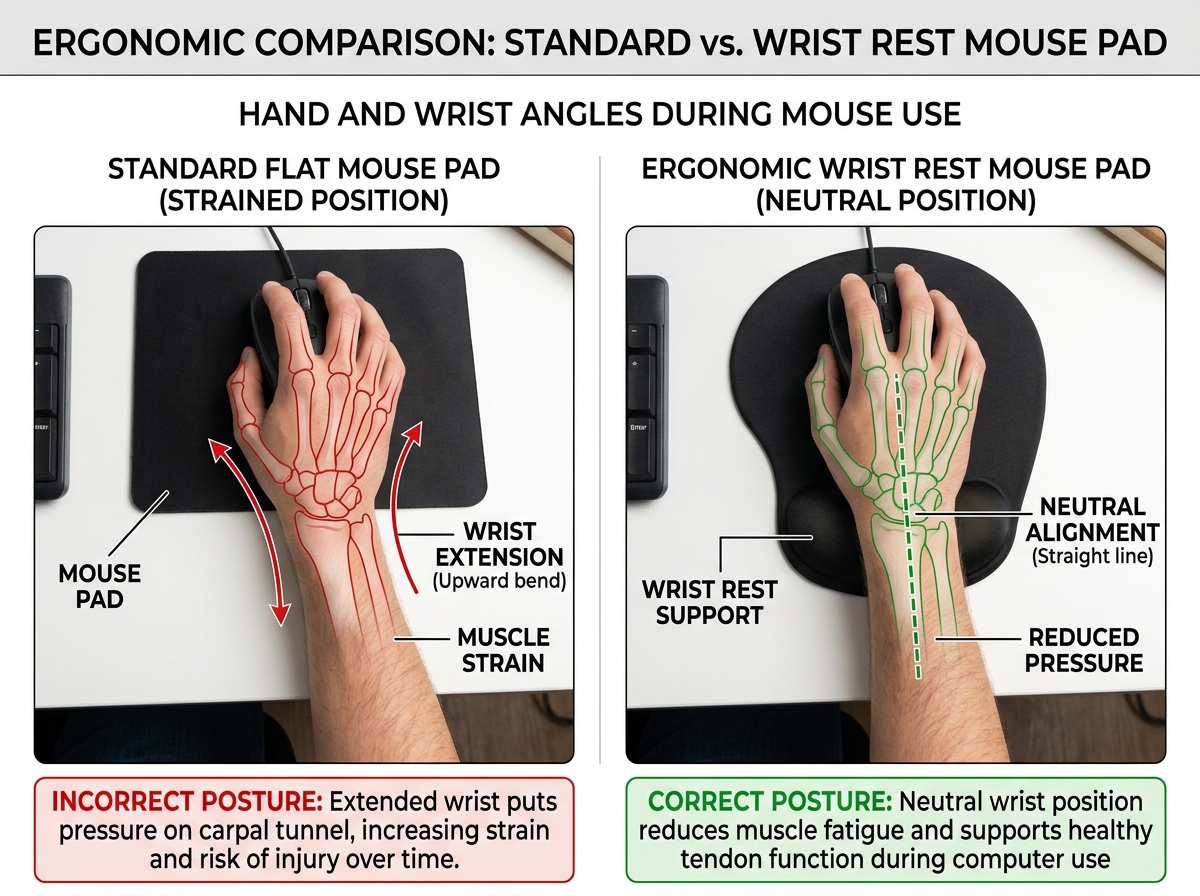
The primary goal of a wrist rest mouse pad is to facilitate a neutral position. In ergonomics, “neutral” means the wrist is straight, not bent upward (extension) or downward (flexion). When you rest your wrist on a hard desk, you often create a “pivot point” that puts direct pressure on the carpal tunnel—the narrow passageway of ligament and bones at the base of the hand.
By mastering the neutral wrist position for your keyboard setup, you ensure that the median nerve is not compressed. Unlike standard pads, an ergonomic wrist rest mouse pad distributes the weight of your hand across a larger, softer surface area, reducing the concentrated pressure that leads to that “red pressed area” many of us know too well.
The Benefits of a wrist rest mouse pad for RSI Prevention
Repetitive Strain Injuries (RSIs) aren’t just a buzzword; they are a physical manifestation of thousands of tiny, repetitive movements performed under tension. Using a wrist rest mouse pad offers several key physiological benefits:
- Strain Reduction: It fills the gap between the desk and your hand, allowing your muscles to relax rather than staying “engaged” to hold your hand at a specific angle.
- Joint Alignment: Proper support keeps the wrist, forearm, and hand in a straight line, which is essential for preventing keyboard wrist injury: when your hands go on strike.
- Improved Blood Flow: Hard desk edges can act like a tourniquet on a micro-level. A soft rest ensures blood continues to flow freely to your fingertips.
- Median Nerve Protection: By cushioning the “heel” of the palm rather than the center of the wrist, high-quality rests prevent the compression that leads to carpal tunnel syndrome.
Beyond the Pad: When to Consider a Vertical Mouse
Sometimes, a wrist rest mouse pad is only half the battle. If you still feel a “twisting” sensation in your forearm, it might be due to pronation—the act of turning your palm flat against the desk.
In these cases, we recommend looking into a vertical mouse. These devices use a “handshake grip” that keeps the bones in your forearm (the radius and ulna) from crossing over each other. Wrist management: finding the best RSI mouse for pain-free scrolling often involves combining a vertical mouse with a high-quality support surface to achieve total posture correction.
Types of Wrist Support: Finding Your Perfect Match
Not all support is created equal. The material inside your wrist rest mouse pad determines how it feels after eight hours of use.
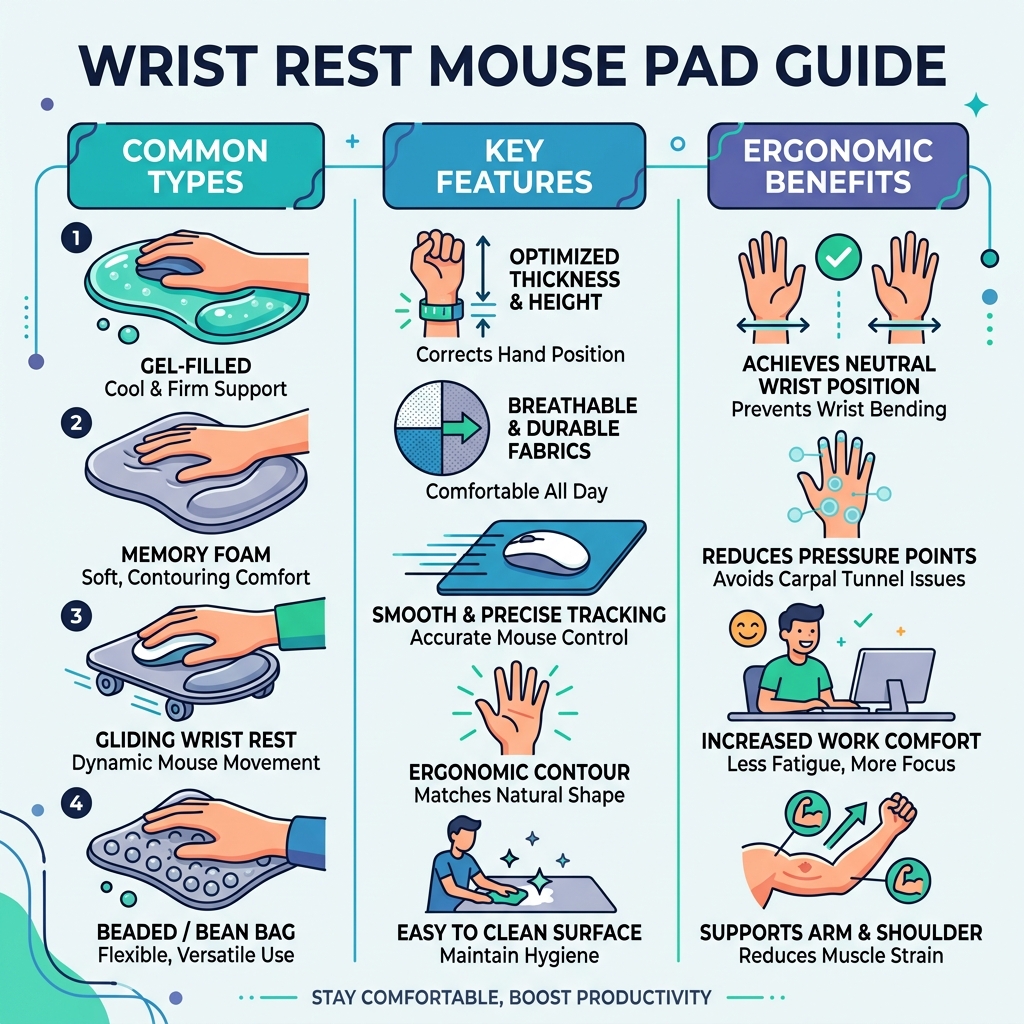
- Gel Technology: Gel is a classic choice because it provides a “squishy” feel that mimics the density of human tissue. Products like the Duo Gel Wave Mouse Pad & Wrist Rest often feature ventilation channels to keep your skin cool.
- Memory Foam: This material contours deeply to your specific shape. It’s excellent for pressure relief but can sometimes retain heat.
- Beaded Cushions: These are essentially tiny bean bags for your wrist. They are highly breathable and allow for more “micro-movements” than foam or gel.
- Gliding Rests: A newer innovation, these aren’t attached to the pad. Instead, they have PTFE (Teflon) feet that allow the rest to move with your hand as you move the mouse.
| Material | Pros | Cons |
|---|---|---|
| Gel | Cool to the touch, easy to wipe clean, durable. | Can feel “firm” in cold rooms; risk of leakage if punctured. |
| Memory Foam | Maximum contouring, very soft, “sinking” feeling. | Retains heat, harder to clean, can lose shape over years. |
| Beaded | Most breathable, very flexible, portable. | Less “stable” than fixed pads, can feel “lumpy” to some. |
Stationary vs. Gliding Designs
The traditional wrist rest mouse pad is stationary. The cushion is glued or molded to the pad. This is great for stability, but some ergonomists argue it encourages “flicking” the wrist rather than moving the whole arm.
Gliding designs, like the Carpio 2.0, are designed to move with you. By using PTFE feet, they allow for dynamic movement across the entire desk surface. This encourages arm-based motion, which uses the larger muscles of the shoulder and bicep rather than the delicate tendons of the wrist. If you find yourself doing a lot of ergonomic wrist rests for typing and mousing simultaneously, a gliding rest offers a level of freedom stationary pads can’t match.
Integrated Platforms for Full Desk Support
For those who want a unified workspace, an integrated platform might be the answer. The 3M™ Gel Wristrest Platform For Keyboard and Mouse provides a single, continuous surface for both your keyboard and mouse.
These platforms often include tilt adjustment, allowing you to create a “negative slope” where the keyboard tilts away from you—a gold standard in ergonomic circles. This setup works beautifully with desk mats for comfortable typing, creating a cohesive, professional look that prioritizes health.
Key Features to Look for in a wrist rest mouse pad
When shopping for a wrist rest mouse pad, don’t just grab the cheapest one off the shelf. Look for these specific features:
- Non-Slip Base: There is nothing more frustrating than a mouse pad that slides away while you’re trying to click. A high-quality Non-Slip Wrist Rest Mouse Pad will have a rubberized or “sticky” underside that grips your desk firmly.
- Ventilation Channels: If you’ve ever used a gel rest and ended up with a sweaty wrist, you know why this matters. A “wave” or “channel” design allows air to circulate.
- Skin Comfort: Look for materials that feel good against the skin. Lycra or specialized fabric covers are common in the best mouse pads for work from home.
- Antimicrobial Covers: Since your skin is in constant contact with the pad, bacteria can build up. Some 3M and Kensington models feature antimicrobial protection to keep things hygienic.
Choosing the Right Size wrist rest mouse pad
Size matters for two reasons: your desk space and your mouse sensitivity. If you are a “low DPI” user (meaning you move your hand a lot to move the cursor a little), you need a larger surface area.
The Wrist Protection Rest Pad for Mouse & Keyboard comes in different lengths to match various keyboard sizes (like tenkeyless vs. full-sized). When measuring, ensure the pad fits within your “neutral reach zone”—the area you can reach comfortably without leaning forward or stretching your shoulder.
Durability and Material Quality
We’ve all seen those old gel pads that have started to leak a mysterious blue goo. To avoid this, look for high-quality construction. Some professional-grade pads, like the Mouse Wristpillow Blck, use a secondary support layer and thick fabric covers to prevent punctures.
If you work in a heavy-duty environment (or just spill a lot of coffee), check for MIL-STD-810H certification. This is a military standard that ensures the product can withstand harsh cleaning solvents like alcohol or bleach without breaking down.
How to Properly Use and Maintain Your Ergonomic Setup
Buying the pad is only step one. Step two is using it correctly. A common mistake is resting the actual wrist joint (where you’d wear a watch) directly on the support. This can actually increase pressure on the carpal tunnel. Instead, you should rest the palm or the heel of the hand on the cushion.
Your elbow height is also crucial. For ergonomic keyboard and mouse setups for maximum comfort, your elbows should be at a 90-degree angle, with your forearms parallel to the floor. If your chair is too low, you’ll end up “climbing” onto the wrist rest, which creates a sharp angle at the wrist.
Maximizing Precision with Specialized Surfaces
For gamers or graphic designers, the “pad” part of the wrist rest mouse pad is just as important as the “rest” part. Specialized surfaces, like the 3M™ Precise™ Mouse Pad With Gel Wrist Rest, use a micro-textured surface that enhances the tracking of optical mice.
Interestingly, these “precise” surfaces can actually save your mouse’s battery life. Because the sensor can “see” the surface more clearly, it doesn’t have to work as hard (or use as much light/power) to track movement. This is a great tip for anyone looking for an ergonomic keyboard and mouse setup for enhanced comfort while also being tech-efficient.
Cleaning and Longevity Tips
Your wrist rest mouse pad is a magnet for dust, skin cells, and the occasional snack crumb. Regular maintenance will extend its life:
- Sanitization: Use a damp cloth with mild soap for fabric covers. For gel or plastic surfaces, an alcohol-free wipe is usually best.
- Debris Removal: A lint roller is surprisingly effective at cleaning fabric mouse pads.
- Avoid Sharp Objects: Keep pens and letter openers away from gel-filled rests to prevent leaks.
- Check for “Bottoming Out”: If you can feel the hard desk through your memory foam rest, it’s time for a replacement. Foam degradation is a natural part of the product’s lifecycle.
For more detailed maintenance, see our guide on ergonomic keyboard and mouse setup.
Frequently Asked Questions about Wrist Support
Can a wrist rest cause more harm than good?
It can if used improperly. If you put direct pressure on the carpal tunnel (the underside of the wrist), you may actually increase the risk of injury. The “floating” technique—where your wrists hover and only touch the rest during breaks—is often recommended by specialists. However, for those who find floating too tiring, a soft rest that supports the palm is a much safer alternative to a hard desk.
How do I know if I need a gel or memory foam rest?
It mostly comes down to personal preference and temperature. If you find your wrists get hot, go for a gel rest with ventilation. If you want something that feels incredibly soft and “custom-fit” to your hand shape, memory foam is the winner.
What is the difference between a wrist rest and a palm rest?
While the terms are often used interchangeably, a palm rest is designed to support the fleshy base of your hand, whereas a wrist rest is often narrower. In the wrist rest mouse pad, most designs are technically palm rests because they support the hand rather than the joint itself. Supporting the palm is generally considered safer for the carpal tunnel.
Conclusion
At Dims Finance, we believe that your workspace should work for you, not against you. Transitioning to a high-quality wrist rest mouse pad is one of the simplest and most cost-effective ways to boost your daily comfort and long-term health.
By combining science-based ergonomics with the right tools—whether it’s a cooling gel pad, a dynamic gliding rest, or a full-platform setup—you can prevent RSIs before they start. The goal isn’t just to work harder, but to work comfortably so you can enjoy your time away from the desk pain-free.
Ready to upgrade the rest of your office? Explore more ergonomic desk accessories to complete your setup.