Why Your Gaming Mouse Might Be Hurting You
Comfortable mice for gaming are one of the most overlooked tools for protecting your hands, wrists, and long-term health during extended play sessions.
Here are the top picks at a glance:
| Mouse | Best For | Weight | Grip Style |
|---|---|---|---|
| Razer DeathAdder V3 Pro | Ergonomic/All-purpose | 63g | Palm, Claw |
| Razer Viper V3 Pro | FPS/Competitive | ~80g | Claw, Fingertip |
| Logitech G502 X Plus | All-purpose/Heavy use | ~114g | Palm |
| Corsair Scimitar Elite Wireless | MMO/MOBA | 114g | Palm |
| Corsair Scimitar RGB Elite | MMO/MOBA (wired) | 148g | Palm |
Hours of gaming put real strain on your hands. Cramped fingers, aching wrists, and sore tendons are not just annoying — they can turn into lasting injuries like repetitive strain injury (RSI) or carpal tunnel syndrome.
The right mouse changes that.
Shape, weight, grip style, and sensor quality all affect how your hand feels after a long session. A mouse that fits well can reduce fatigue, improve control, and protect your joints over time.
More than 20 million gamers have chosen the Razer DeathAdder line specifically for its ergonomic form. Pro gamers consistently recommend mice under 100 grams to reduce wrist fatigue. These are not small details — they are the difference between gaming comfortably for years and dealing with chronic pain.
Finding the Most Comfortable Mouse for Gaming
Choosing a comfortable mouse for gaming isn’t just about picking the one with the most flashing lights. It is a deeply personal decision based on the geometry of your hand and the mechanics of how you move. When we look at ergonomics, we are looking at how a device can be shaped to fit the human body, rather than forcing the body to adapt to the device.
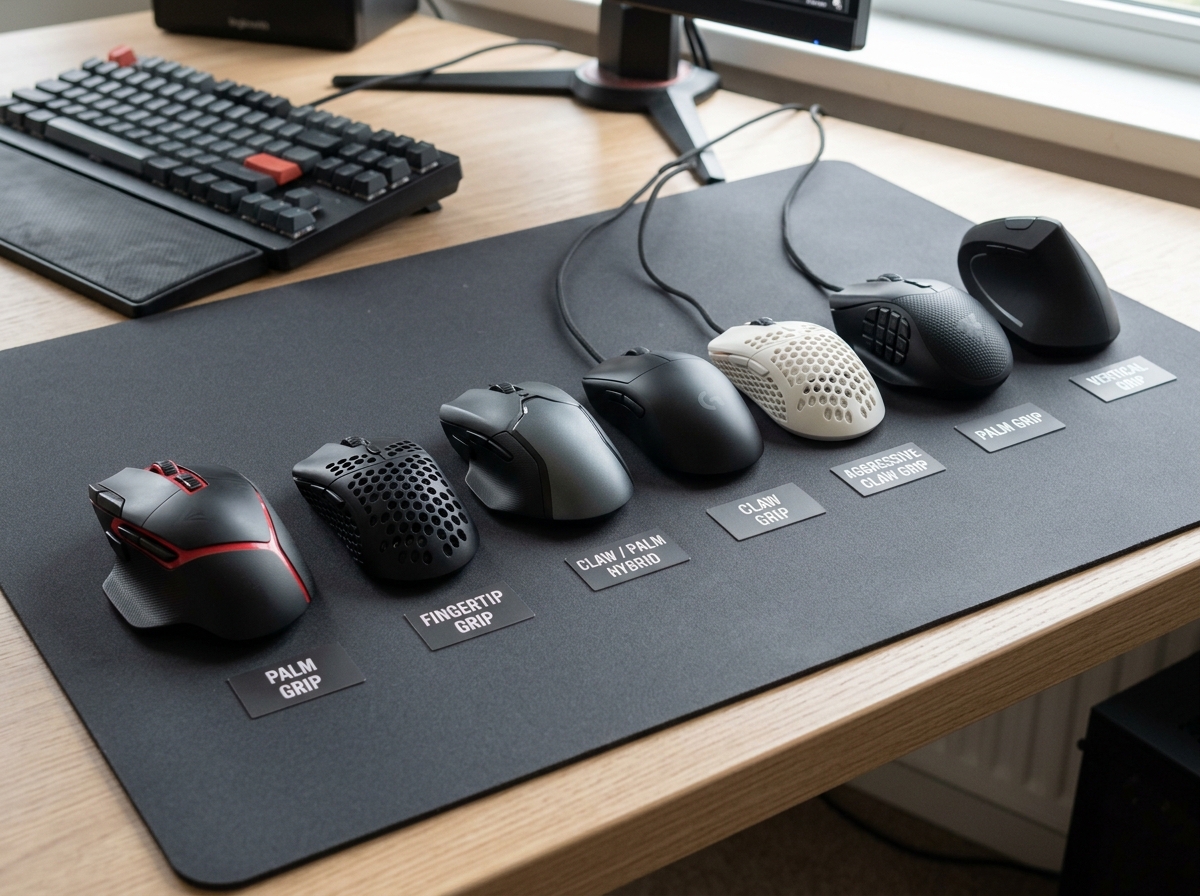
The primary factors we consider are hand size, palm support, and button placement. If a mouse is too small, your fingers will “scrunch,” leading to the dreaded claw cramp. If it is too large, you’ll strain to reach the side buttons. Proper palm support ensures that the weight of your hand is distributed across the mouse shell rather than being held up by your wrist muscles.
At Dims Finance, we emphasize that a comfortable mouse for gaming is a cornerstone of RSI prevention. Long-term health in gaming requires a setup that minimizes “static load”—the tension held in your muscles when you stay in one position for too long. By choosing a mouse that mirrors the natural resting state of your hand, you significantly reduce the risk of developing chronic inflammation.
Ergonomic Shapes: The Key to a Comfortable Mouse for Gaming
The gold standard for ergonomic gaming mice has long been the Razer DeathAdder line. With over 20 million units sold, its popularity stems from a refined right-handed design that features a distinct raised arch. This arch fills the palm, providing a “rest” for the hand that prevents the wrist from collapsing onto the desk surface.
The latest evolution, the Razer DeathAdder V3 Pro Specs, takes this further. It includes a dedicated ring finger ledge and repositioned buttons and scroll wheel to reduce the distance your fingers have to travel. These micro-adjustments might seem small, but over a six-hour session, they save your hand from thousands of unnecessary micro-strains.
Grip Styles and Hand Compatibility
How you hold your mouse dictates which shape will feel most natural. We generally categorize these into three styles:
- Palm Grip: The entire hand rests on the mouse. This style requires a larger mouse with a high back (like the DeathAdder or G502) to provide full support.
- Claw Grip: Only the palm’s base and fingertips touch the mouse. This style benefits from a “hump” toward the back of the mouse to stabilize the palm.
- Fingertip Grip: Only the fingertips touch the mouse. This requires a smaller, lighter, and often symmetrical design.
For those with medium to large hands who prefer a more aggressive competitive stance, the Razer Viper V3 Pro is a top contender. It features a symmetrical design that is optimized for claw and fingertip grips, allowing for rapid, twitchy movements without the bulk of a full ergonomic “ergo” shell.
Weight, Sensors, and Technical Performance
In professional esports, weight is arguably the most discussed metric for comfort. While a heavy mouse might feel “premium” or “sturdy,” it requires more force to start and stop moving. This inertia puts a constant strain on the small muscles in your wrist and forearm.
To complement a lightweight mouse, we also suggest looking at your surface. High-quality mouse pads for work and gaming can reduce friction, making even a mid-weight mouse feel effortless to glide.
Weight and Balance: Choosing a Comfortable Mouse for Gaming
The industry has moved toward an “ultra-lightweight” standard. Pro gamers now overwhelmingly recommend mice below the 100-gram threshold to maximize comfort and reduce fatigue. The Razer DeathAdder V3 Pro, for example, weighs a mere 63g—over 25% lighter than its predecessor.
However, weight is subjective. Some users prefer the “anchored” feel of a heavier mouse for productivity or tactical shooters. The Logitech G502 X Plus Features a design that balances this, weighing around 114g. While heavier than “honeycomb” mice, its sculpted shape and thumb rest provide a different kind of comfort by supporting the hand’s natural weight.
Sensor Precision and Polling Rates
You might wonder: “How does a sensor make a mouse more comfortable?” The answer lies in perceived effort. A high-quality sensor like the HERO 25K or the Razer Focus Pro 30K allows for sub-micron precision. When a sensor tracks flawlessly with zero smoothing or acceleration, your brain doesn’t have to “correct” for missed movements. This reduces the mental and physical tension of aiming.
Furthermore, advanced features like asymmetric cut-off allow you to set the lift-off distance (how high you lift the mouse before it stops tracking) to 26 different levels. This means you can customize the mouse to your specific movement habits, preventing “jitter” and unnecessary wrist resets. High polling rates (up to 8000Hz) and Motion Sync technology ensure that the cursor position on your screen perfectly matches your hand’s physical location, creating a seamless, “weightless” feel to your aim.
Top-Rated Designs for Different Genres
Different games require different physical actions. An FPS player needs to make wide, sweeping arm movements, while an MMO player needs to access dozens of macros without moving their hand at all.
| Genre | Recommended Mouse | Key Comfort Feature |
|---|---|---|
| FPS / Battle Royale | Razer Viper V3 Pro | Ultra-lightweight for speed |
| MMO / MOBA | Corsair Scimitar Elite | Adjustable side button panel |
| All-Purpose / RPG | Logitech G502 X Plus | Thumb rest and hybrid switches |
| Productivity/Gaming | Office Furniture Combo | Holistic ergonomic support |
The MMO Specialist: Maximum Utility
For players of World of Warcraft or Final Fantasy XIV, comfort is about “reach.” The Corsair Scimitar series is designed to put 17 programmable buttons at your thumb’s reach. The standout feature is the patented Key Slider system, which allows you to slide the entire 12-button thumb grid forward or backward to perfectly align with your thumb’s natural resting position.
The SCIMITAR ELITE WIRELESS MMO Gaming Mouse weighs 114g, which is significantly lighter than previous wired versions. This reduction in weight, combined with a sculpted shape that provides ring finger support, makes it the most comfortable mouse for gaming in the MMO category. It allows you to fire off complex rotations without the “thumb gymnastics” required by flatter mice.
The All-Purpose Powerhouse
The Logitech G502 HERO and its wireless successor, the G502 X Plus, are legendary for a reason. They feature 11 programmable buttons and a unique “sniper” button located right where your thumb rests. The G502 X Plus introduces LIGHTFORCE hybrid optical-mechanical switches, which provide the tactile click of a mechanical switch with the speed and durability of an optical one.
With up to 130 hours of battery life (with RGB off), it offers uninterrupted gameplay. For those who find most mice too “thin,” the G502’s wide body and dedicated thumb wing provide a stable platform that prevents your hand from dragging on the mouse pad.
Frequently Asked Questions about Gaming Comfort
What is the ideal weight for a gaming mouse?
While personal preference plays a role, the consensus among experts and pro gamers is that a mouse under 100 grams is ideal for competitive play. Lightweight mice (60g–80g) reduce the torque required to move the mouse, which directly correlates to lower wrist fatigue. If you find yourself “lifting” your mouse frequently to reset its position, a lighter mouse will feel significantly more comfortable over long hours.
Is wireless or wired better for comfort?
In 2025 and beyond, wireless is the clear winner for comfort. Modern 2.4 GHz wireless technology (like Razer HyperSpeed or Logitech LIGHTSPEED) has zero perceptible latency compared to wired mice. The main comfort benefit is the lack of “cable drag.” Even the best braided cables can snag on your desk or create resistance, forcing your wrist to work harder. Going wireless provides a level of freedom that makes the mouse feel like an extension of your hand.
How do I prevent wrist pain while gaming?
Preventing pain requires a multi-faceted approach. First, ensure you are using a proper ergonomic keyboard and mouse setup. Second, match your mouse to your grip style to avoid “clawing” a mouse that is too small.
Finally, even the most comfortable mouse for gaming cannot replace movement. We recommend the “20-20-20” rule: every 20 minutes, look at something 20 feet away for 20 seconds, and take a moment to stretch your wrists and fingers.
Conclusion
At Dims Finance, our mission is to provide science-based advice to help you build a setup that supports your well-being. Whether you are a professional esports athlete or a weekend warrior, the tools you use matter. A comfortable mouse for gaming is an investment in your future health, ensuring that you can continue to enjoy your favorite hobby without the shadow of chronic pain.
From the ultra-lightweight precision of the Razer DeathAdder V3 Pro to the customizable utility of the Corsair Scimitar, there is a perfect fit for every hand. If you’re looking to further optimize your space, check out our guides on ergonomic desk accessories to complete your pain-free transformation. Happy gaming!