Why Your Coding Workstation Is Slowly Hurting You (And How to Fix It)
The best ergonomic setup for programmers combines a fully adjustable chair with lumbar support, a monitor positioned at eye level 20-28 inches away, a keyboard angled at roughly 15 degrees with wrists neutral, and a sit-stand desk you actually alternate between.
Quick answer – the core elements of an ergonomic programmer setup:
| Component | Key Requirement |
|---|---|
| Chair | Adjustable lumbar, seat depth, armrests; 100-110° recline |
| Monitor | Top at eye level, 20-28 inches away, no glare |
| Keyboard | Wrists neutral, elbows at ~90°, slight negative tilt |
| Mouse | Vertical grip or trackball to reduce forearm twist |
| Desk | Sit-stand with memory presets; anti-fatigue mat |
| Lighting | 75-150 lux ambient, bias lighting behind screen |
You spend 8, 10, sometimes 12 hours a day at your keyboard. That’s 15,000+ keystrokes per hour, sustained for years.
Most programmers don’t think about ergonomics until something hurts. By then, the damage is already building. A Stack Overflow survey found that 35% of developers report some form of work-related pain – and with over 75% of developers now working remotely or in hybrid setups, the line between “work hours” and “all hours” has blurred badly.
The good news: proper ergonomics isn’t expensive or complicated. Small changes – monitor height, keyboard angle, chair adjustment – can reduce back and neck pain by up to 50% and cut eye strain by 30-40%. A well-designed workspace can also increase your productivity by up to 20% and extend your deep work sessions by 30%.
Think of ergonomics as a long-term investment in your coding career, not a luxury.
The Foundation: Choosing the Best Ergonomic Setup for Programmers
When we talk about the best ergonomic setup for programmers, we have to start with where you spend 90% of your time: the chair. Many of us make the mistake of buying “gaming chairs” because they look cool in a stream, but their bucket-seat design often fights proper posture. For serious coding, you need a chair that supports the natural S-curve of your spine.
A high-quality ergonomic chair with lumbar support is a necessity, not a luxury. When your lower back isn’t supported, you inevitably fall into the “code slouch”—shoulders rounded, neck protruding, and spine compressed. This leads to chronic lower back pain and tension headaches that can kill your focus faster than a production bug.
The goal is a neutral posture. This means your joints are naturally aligned, reducing stress on muscles and tendons. To achieve this, your chair must offer specific adjustments:
- Adjustable Lumbar Support: It should fit snugly into the curve of your lower back.
- Seat Depth: You should have 2-4 finger widths between the back of your knees and the edge of the seat.
- Armrests: These should allow your shoulders to remain relaxed while your elbows stay close to your body.
According to Scientific research on the impact of neutral posture on musculoskeletal health, maintaining these angles reduces the risk of long-term injury. If you are looking for a seat that handles 8+ hour sessions, check out our guide on best ergonomic office chairs for home or explore ergonomic chairs for long work hours to find a model that promotes trapezius muscle relaxation.
Achieving the Ideal Sitting Posture
Setting up your chair is only half the battle; you have to sit in it correctly. We recommend following a simple checklist from our ergonomic office chair buying guide:
- Feet Flat: Your feet should be flat on the floor. If they don’t reach, use a footrest. This prevents pressure on the back of your thighs.
- Thighs Parallel: Your hips should be at the same level as, or slightly higher than, your knees (a 90-100 degree angle).
- The Recline: Research suggests a slight recline of 100-110 degrees is better for your spinal discs than sitting perfectly upright at 90 degrees.
- Armrest Height: Adjust them so your elbows form a 90-110 degree angle. Your forearms should be parallel to the floor, allowing your wrists to remain neutral.
Visual Ergonomics and Screen Orientation for Coders
Your eyes are the primary interface for your work, yet visual ergonomics are often overlooked. If your monitor is too low, you’ll tilt your head down, putting immense pressure on your cervical spine. If it’s too far, you’ll lean forward and squint.
The best ergonomic setup for programmers dictates that the top of your screen should be at or slightly below eye level. This encourages a natural downward gaze of about 10-20 degrees, which is easier on the eye muscles. Use monitor stands for better posture or monitor risers for home office setup to get the height exactly right.
Key Visual Specs for Programmers:
- Distance: Keep the screen 20-28 inches (roughly an arm’s length) from your eyes.
- Lighting: Maintain ambient light between 75 and 150 lux. Harsh overhead lights cause glare, while a dark room with a bright screen causes “eye fry.”
- Bias Lighting: Placing an LED strip behind your monitor (6500K daylight color) reduces the contrast between the screen and the wall, significantly lowering visual fatigue.
- Flicker-Free Tech: Ensure your monitors use DC dimming rather than PWM to prevent invisible flickering that causes headaches.
Configuring the Best Ergonomic Setup for Programmers with Multiple Screens
Many of us use dual monitor setups that boost productivity, but poor placement can cause “tennis neck” from constant side-to-side rotation.
If you use two equal monitors, angle them in a slight “V” shape directly in front of you. If you have a primary screen, center it directly in front of your face and place the secondary screen to the side.
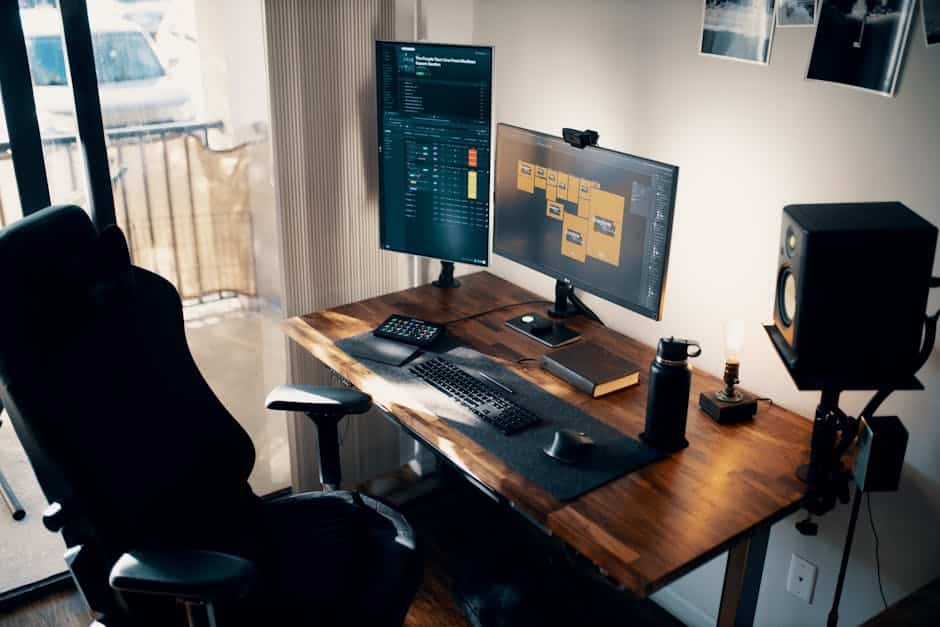
A “game-changer” for many developers is the vertical orientation. Rotating a secondary 27-inch monitor 90 degrees is perfect for documentation, Slack, or reading long files of code without constant scrolling. Just be careful not to set it too high—the top of the vertical screen should still be at eye level. If you’re working from a laptop, always use ergonomic laptop stands for a comfortable desk setup to lift that small screen to eye level while using external peripherals.
Input Precision: Keyboards and Mice for RSI Prevention
Programmers make upwards of 15,000 keystrokes per hour. Over a career, that’s millions of repetitive motions. This is where Repetitive Strain Injury (RSI) lives. A standard flat keyboard forces your wrists to bend outward (ulnar deviation) and your palms to face the floor (pronation), which compresses the carpal tunnel.
The solution is a dedicated ergonomic keyboard and mouse setup. Split keyboards are highly effective because they allow you to place the two halves at shoulder width, keeping your chest open and your wrists straight.
Pro Tips for Input Health:
- Neutral Wrist Position: Aim for a “floating” hand technique where your wrists don’t rest on the desk while typing. Check our guide on mastering the neutral wrist position for your keyboard setup for more.
- Vertical Mice: Standard mice force your forearm bones to cross. A vertical mouse keeps your hand in a natural “handshake” grip. We’ve detailed the best options in our article on wrist-management-finding-the-best-rsi-mouse-for-pain-free-scrolling.
- Keyboard Trays: If your desk is too high, keyboard trays finding the perfect height for your setup can lower your input devices to elbow height, relaxing your trapezius muscles.
Learning to stop repetitive strain injuries before they start involves switching to hardware with tactile feedback. Mechanical switches with a light actuation force (around 45g) prevent you from “bottoming out” too hard, which saves your finger joints.
Essential Peripherals for the Best Ergonomic Setup for Programmers
Beyond the big items, small accessories make a massive difference in daily comfort. While we advocate for “floating hands,” ergonomic wrist rests for typing are great for resting between bursts of coding.
Other ergonomic desk accessories for comfort include trackballs, which eliminate the need to move your arm entirely, and wireless keyboard and mouse combos for seamless work to reduce desk clutter. A keyboard wrist injury when your hands go on strike can sideline you for weeks. Invest in negative tilt—where the back of the keyboard is lower than the front—to keep your wrists in the most natural extension possible.
Dynamic Movement: Mastering the Sit-Stand Workflow
The “best” posture is always your next posture. Even the most expensive chair becomes a problem if you sit in it for six hours straight. This is why adjustable standing desks for work-from-home have become the industry standard for pro developers.
We recommend the 20/8/2 rule:
- 20 minutes of sitting (in good posture).
- 8 minutes of standing.
- 2 minutes of moving or stretching.
Standing all day is just as bad as sitting all day—it leads to varicose veins and lower back strain. The Scientific research on standing desks and back pain reduction shows that the benefit comes from the transition between the two.
When you stand, use an anti-fatigue mat to cushion your feet and keep your core engaged. An adjustable height work table with drawers can help keep your essentials within reach regardless of height. For a deep dive into the logistics, see how to set up workstation ergonomically for peak comfort.
| Benefit | Sitting | Standing |
|---|---|---|
| Metabolic | Low (sedentary) | Burns 50-100 more calories/hr |
| Spinal Pressure | Higher on lower discs | Lower, but higher on legs/feet |
| Focus | Good for deep logic | Good for meetings/emails |
| Blood Sugar | Higher spikes | Reduced by ~43% post-meal |
Don’t forget the 20-20-20 rule for your eyes: every 20 minutes, look at something 20 feet away for 20 seconds. This resets your eye’s focal length and prevents the headaches associated with long-term screen time.
Conclusion
At Dims Finance, we believe that your body is the most important piece of “hardware” you own. Career longevity in software development isn’t just about learning the latest framework; it’s about ensuring your physical foundation can handle the demands of the job.
Optimizing your setup—from font size and OS scaling to cable management—removes the “friction” from your workday. When you aren’t distracted by a clicking neck or throbbing wrists, your capacity for deep work expands. Start small: adjust your monitor height today, and perhaps look into a split keyboard next month. Your “10-years-from-now” self will thank you for the investment.
Ready to upgrade your workspace? See our full range of ergonomic desk accessories to find the tools that fit your workflow.
Frequently Asked Questions about Programmer Ergonomics
What is the ideal monitor height for coding?
The top of your screen should be at or slightly below eye level. This ensures that your neck stays in a neutral position, preventing the forward-head posture often called “tech neck.” Your eyes should naturally look slightly downward toward the center of the screen.
Can a vertical monitor improve programming productivity?
Absolutely. A vertical (portrait) monitor allows you to see significantly more lines of code, logs, or documentation at once. This reduces the need for constant scrolling and helps you maintain mental context during complex debugging sessions.
How do I prevent wrist pain while typing for 8+ hours?
The best approach is a combination of hardware and technique. Use a split keyboard to keep your wrists straight rather than bent outward. Pair this with a vertical mouse to prevent forearm twisting. Most importantly, practice “floating” your hands above the keys rather than resting your wrists on the hard desk surface while typing.