The Hidden Cost of Clicking: Why You Need to Prevent Repetitive Strain Injury Now
To prevent repetitive strain injury, follow these core steps:
- Set up an ergonomic workstation — adjust chair height, monitor level, and keyboard position
- Take regular breaks — microbreaks every 20 minutes, plus 5-10 minutes off every hour
- Use ergonomic equipment — consider split keyboards, vertical mice, and forearm supports
- Stretch and strengthen — wrist, shoulder, and neck stretches daily; resistance training weekly
- Maintain neutral posture — wrists flat, elbows at ~100°, shoulders relaxed, feet flat on floor
- Get ergonomic training — learn proper technique before symptoms appear, not after
Scroll. Scroll. Scroll. Click. Click. Click… Ouch.
Something that seems harmless — like typing or moving a mouse — can quietly damage your muscles, tendons, and nerves over months or years. That’s the nature of call repetitive strain injury (RSI): it builds up slowly, often without warning, until one day basic tasks hurt.
And in April 2026, this problem is bigger than ever. The rapid shift to digital and remote work means more people are spending longer hours at computers, often on poorly set-up desks at home. The result is a surge in work-related RSIs — injuries that don’t just cause pain, but drive up healthcare costs, fuel absenteeism, and drain productivity.
The good news? Most RSIs are entirely preventable. A few smart changes to your setup, habits, and routine can make a massive difference.
Understanding the Science: What is RSI and Why Does it Happen?
Before we can effectively prevent repetitive strain injury, we have to understand what we are fighting. According to the Cleveland Clinic, RSI is a general term describing damage to muscles, tendons, or nerves caused by repetitive motions and constant use. You might also hear them called “cumulative trauma injuries” or “musculoskeletal disorders.”
Think of your body like a high-performance machine. It’s designed for movement, but it has limits. When we subject our bodies to the same micro-movements thousands of times a day — like the tiny “click” of a mouse or the “tap” of a key — we create microscopic tears in the soft tissues.
The Primary Culprits
Research shows that three main factors contribute to these injuries:
- Repetitive Movements: Doing the same thing over and over without rest.
- Static Posture: Holding your body in one position (like sitting at a desk) for hours on end, which fatigues muscles faster than movement does.
- Excessive Force: Typing too hard or gripping your mouse like you’re trying to win a wrestling match.
Common Symptoms in Computer Users
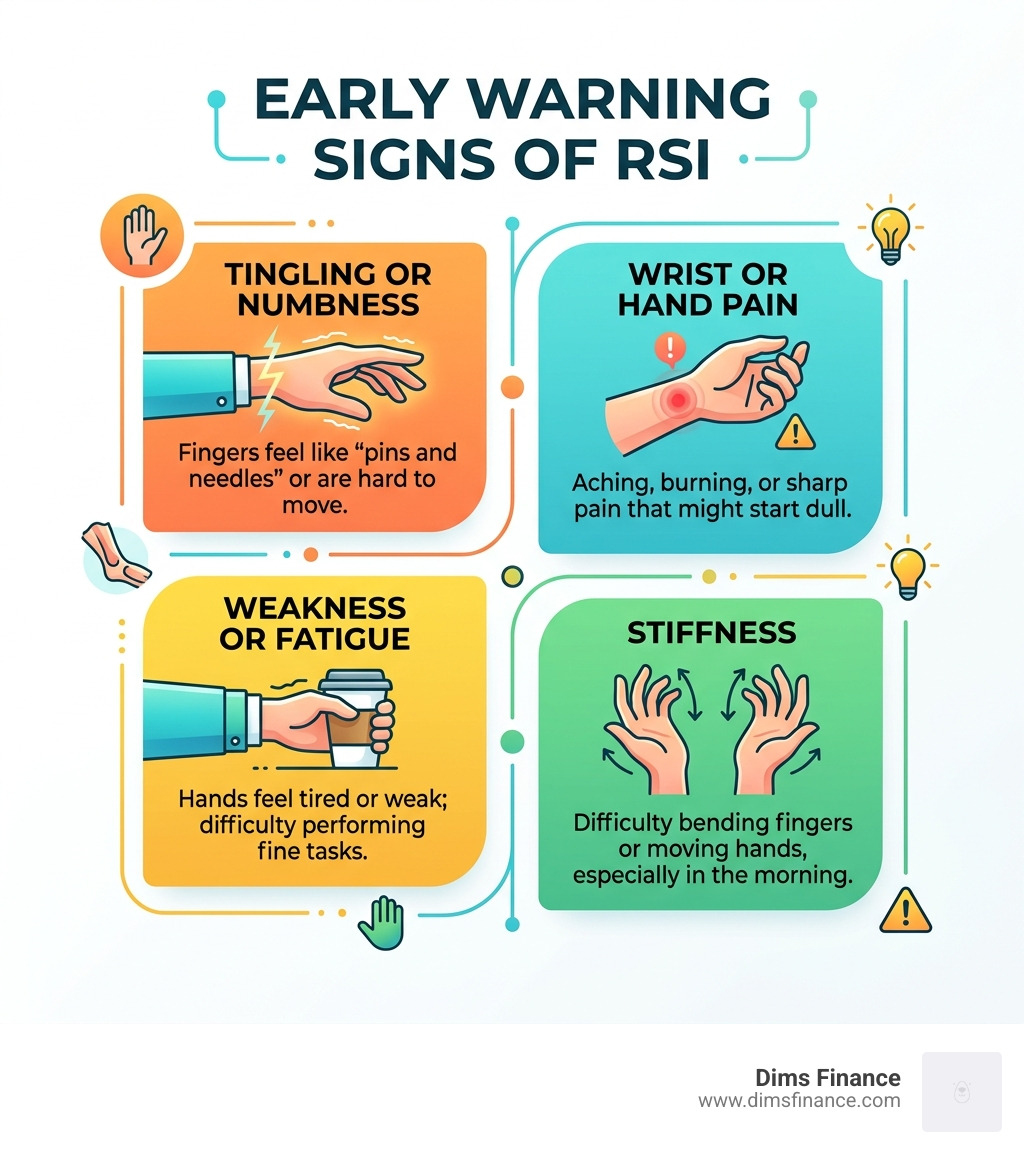
RSIs don’t usually happen overnight. They often start as a dull ache or a weird “pins-and-needles” sensation. Common symptoms include:
- Tenderness or pain in the wrist, forearm, or neck.
- Loss of grip strength (suddenly dropping your coffee mug is a red flag!).
- Throbbing or pulsating sensations.
- Tingling or numbness (often in the thumb and first two fingers).
- Localized loss of sensation or sensitivity to cold/heat.
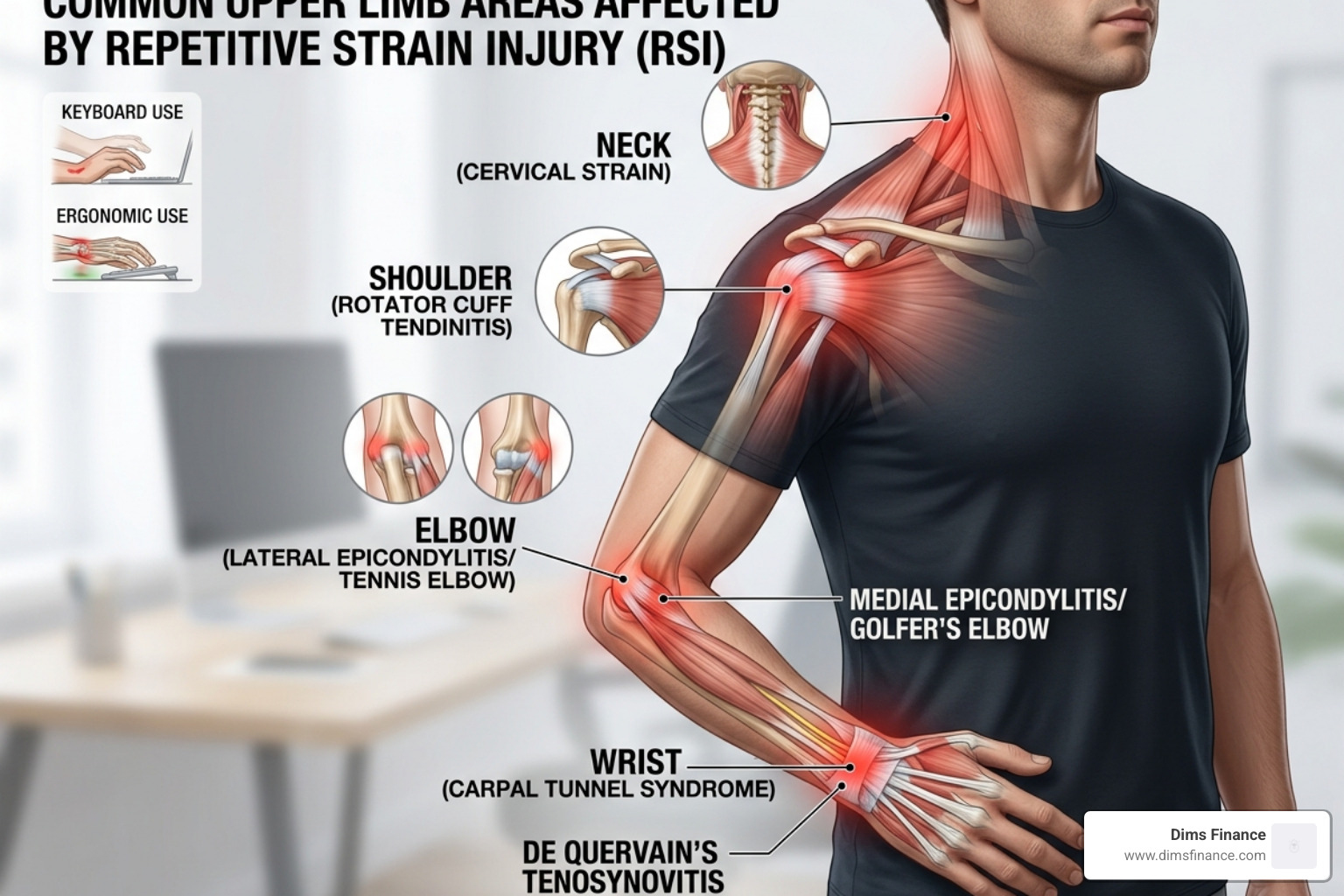
The stakes are high. Beyond the personal pain, RSIs lead to significant healthcare costs and productivity loss. In fact, work-related RSIs are the most common type of time-lost injury in many sectors. By learning how to prevent repetitive strain injury, we aren’t just saving our wrists; we’re protecting our careers and our quality of life.
Optimize Your Workspace to Prevent Repetitive Strain Injury
We believe that your desk should work for you, not against you. Personal worksite adjustments are mentioned by the greatest number of studies as the most effective specific strategy to prevent repetitive strain injury. It’s not just about buying fancy gear; it’s about how that gear is positioned.
Start with The Essential Ergonomic Checklist for Every Office Worker. If your monitor is too low, you’ll hunch. If your chair doesn’t have lumbar support, your lower back will suffer, which eventually affects how you hold your arms.
| Feature | Standard Setup | Ergonomic Intervention |
|---|---|---|
| Chair | Fixed height, no lumbar support | Adjustable height, back rest, and lumbar support |
| Monitor | Too low (looking down) | Eye-level (top third of screen at eye level) |
| Keyboard | Flat on the desk | Adjusted height or negative tilt |
| Mouse | Standard horizontal mouse | Vertical or adapted mouse |
| Feet | Dangling or crossed | Flat on the floor or on a footrest |
According to Peninsula Canada, identifying these risks early is the employer’s responsibility, but we as employees can take charge of our own space.
The Role of Ergonomic Keyboards and Mice
The standard QWERTY keyboard was actually designed to slow down typists so old typewriters wouldn’t jam. It wasn’t designed for human anatomy! To truly prevent repetitive strain injury, you might need to look at “adapted” equipment.
- Split Keyboards: These allow your hands to stay at shoulder-width, preventing “ulnar deviation” (that awkward outward bend of the wrists).
- Vertical Mice: These keep your hand in a “handshake” position, which stops the bones in your forearm from crossing over each other.
- Forearm Supports: Research shows that workstation forearm supports have a moderate level of evidence for positive effects in preventing upper extremity disorders.
- Vibration and Auditory Feedback: Some high-tech devices now provide “vibration feedback” on mouse use or “auditory feedback” to tell you when you’re typing too hard. It sounds futuristic, but it works!
If you’re struggling with pain right now, check out our guide on Solving Keyboard Wrist Pain.
Posture Hacks to Prevent Repetitive Strain Injury
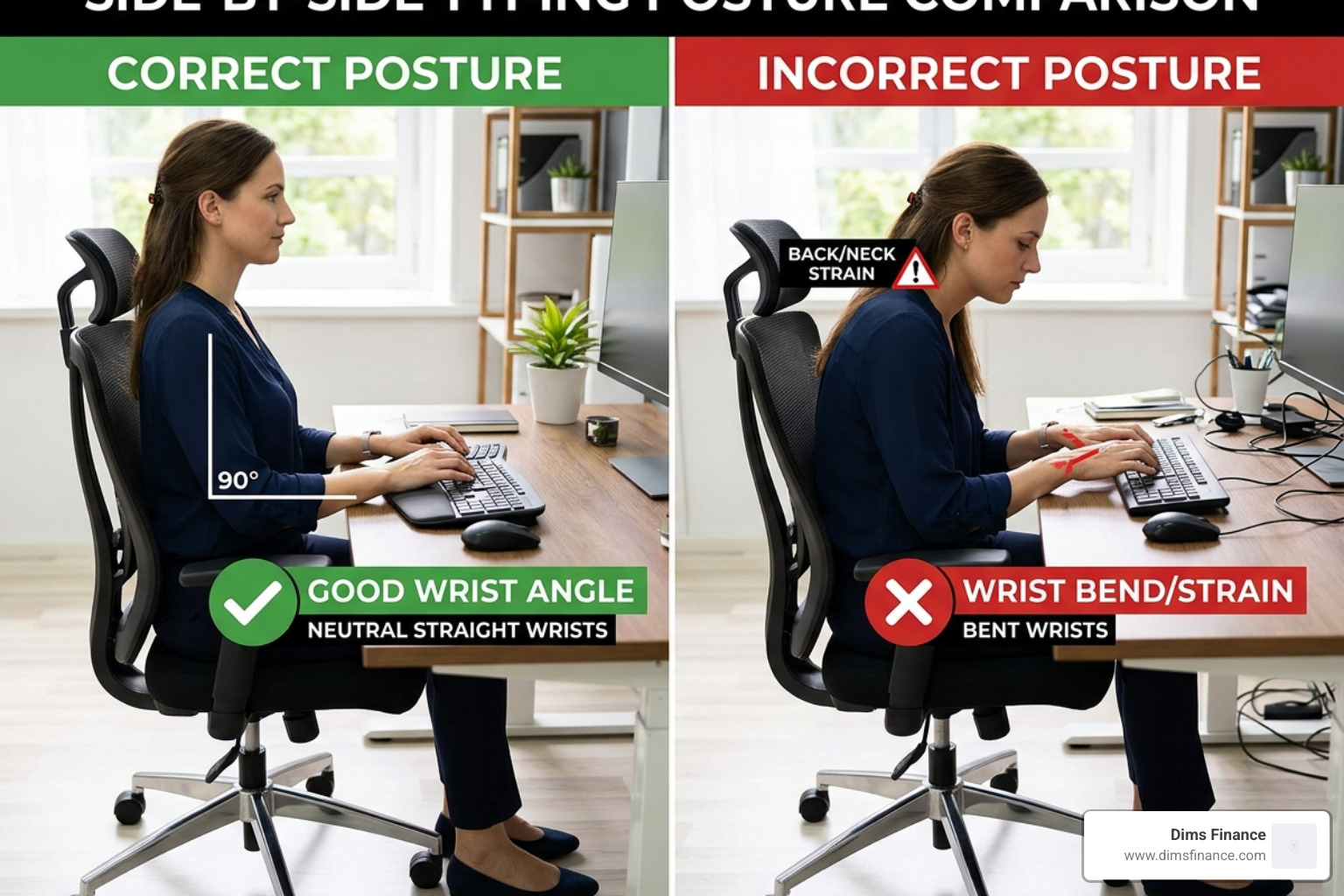
Good posture isn’t about sitting like a statue; it’s about finding a “neutral” position where your muscles do the least amount of work. Use these Typing Posture Tips to stay safe:
- The 100-Degree Rule: Keep your elbows at a slightly open angle (about 100 to 110 degrees) rather than a tight 90-degree angle. This improves circulation.
- Floating Hands: Avoid resting your wrists on a “wrist rest” while actually typing. Your hands should float freely. Use the rest only for short breaks between typing bursts.
- The “Safe Zone”: Your wrist has a safe zone of movement limited to about 15 degrees in any direction. If you’re bending your wrist further than that, you’re asking for trouble.
- Relaxed Shoulders: Avoid “shoulder hiking” (pulling your shoulders up toward your ears). If you find yourself doing this, your desk is likely too high.
The Power of the Pause: Strategic Breaks and Stretches
If there is one thing we want you to take away from this guide, it’s this: Breaks are not a luxury; they are a biological necessity.
Research in 2026 confirms that incorporating 30-second microbreaks at 20-minute intervals is more beneficial for preventing back, shoulder, and forearm conditions than taking breaks only when you feel like you need them. By the time you feel the need for a break, the damage is already starting.
According to Sunnybrook Health Sciences, we should follow a tiered break system:
- Microbreaks (1-2 seconds): Just drop your hands to your sides and shake them out.
- Meso-breaks (5-20 seconds): Stand up, look away from the screen, and take a deep breath.
- Macro-breaks (5-10 minutes): Every hour, get away from your desk entirely. Walk, stretch, or grab water.
Essential Stretches for the Office
Don’t just sit there during your break — move! Stretches were found to be the most common intervention in middle-income countries for a reason: they work.
- The Prayer Stretch: Place your palms together in front of your chest. Slowly lower your hands toward your waist, keeping your palms together, until you feel a stretch in your wrists. Hold for 15-30 seconds.
- Shoulder Rolls: Draw your shoulders up to your ears, then back, then down in a circular motion.
- Neck Tilts: Gently drop your ear toward your shoulder (don’t force it!) to release tension in the upper traps.
- Diaphragmatic Breathing: Stress makes us breathe shallowly, which tenses the neck and shoulders. Deep belly breathing helps reset your nervous system.
Advanced Prevention: Training, Habits, and Global Best Practices
To truly prevent repetitive strain injury, we need to go beyond just furniture. Scientific reviews show that the most successful workplaces use a “multi-component approach.” This means combining ergonomic gear with preventative training and promotive education.
In high-income countries, the focus is often on ergonomic equipment. However, in middle-income countries, the focus shifts toward stretching and exercise programs. We recommend doing both. The Science-Backed Guide to RSI Prevention highlights that education — like posters, workshops, and wellness teams — significantly reduces injury rates.
The Role of Biofeedback
One of the coolest trends in 2026 is the use of sEMG (surface electromyography) monitoring. This involves small sensors placed on the skin that show you exactly how much tension you are holding in your muscles. It’s like a heart rate monitor for your stress. This biofeedback helps you “unlearn” bad habits, like tensing your shoulders while reading emails.
The NHS also suggests that we shouldn’t rest for too long if we do get an injury. While initial rest is good, resting for more than a few days can make muscles weak and stiff. The goal is “active recovery.”
Building Resilience to Prevent Repetitive Strain Injury
You can’t just “ergonomic” your way out of a weak core. Building physical resilience is a key part of our 7 Proven Solutions for Typing Without the Ouch.
- Resistance Training: There is strong evidence that workplace-based resistance training (using weights or bands) helps prevent and manage upper limb symptoms.
- Core Strength: A strong core provides a stable base for your arms. If your core is weak, your neck and shoulders have to work harder to keep you upright.
- Healthy Diet and Hydration: As noted by Health.com, your tissues need nutrients and water to repair the micro-tears caused by repetitive work. A dehydrated tendon is a brittle tendon!
Frequently Asked Questions about RSI Prevention
How often should I take breaks to avoid injury?
We recommend a fixed schedule. Don’t wait for pain. Aim for a 30-second microbreak every 20 minutes. Additionally, take a 5-to-10-minute break every single hour. Research shows that fixed schedules are far more effective than “as-needed” breaks because we often get into a “flow state” and forget to listen to our bodies until it’s too late.
What are the first symptoms of a repetitive strain injury?
The early warning signs are often subtle. Look out for tingling or “pins and needles,” numbness in the fingers, a dull ache that lingers after work, or a loss of strength when opening jars or gripping tools. If you notice these, don’t “play through the pain.” That is the quickest way to turn a minor irritation into a chronic condition.
Can ergonomic equipment alone prevent RSI?
In short: No. While an ergonomic keyboard is a great tool, it won’t help if you still type for eight hours straight without moving. To effectively prevent repetitive strain injury, you need a multi-component approach: the right equipment, proper posture training, regular movement, and a healthy lifestyle.
Conclusion
At Dims Finance, we know that your ability to work is your greatest financial asset. Protecting that asset means being proactive about your health. Preventing RSI isn’t about one big change; it’s about a hundred small ones — the way you sit, the frequency of your breaks, and the equipment you choose.
Employers have a legal and moral responsibility to provide a safe workspace, but the ultimate protector of your health is you. Start today by adjusting your monitor, setting a 20-minute timer for your first microbreak, and checking out The Complete Office Ergonomics Guide to Stop RSI Before It Starts.
Your future self (and your wrists) will thank you. Now, take a deep breath, stand up, and give those hands a shake!