
The Silent Injury That Creeps Up on Desk Workers
How can employees prevent repetitive strain injuries is one of the most important workplace health questions you can ask — and the answer comes down to a few core habits done consistently.
Here’s a quick summary of what works:
- Set up an ergonomic workstation — chair, monitor, keyboard, and mouse all at the right height and angle
- Take regular breaks — a short break every 20-30 minutes, and 5-10 minutes every hour
- Stretch and move — target your wrists, forearms, shoulders, and neck throughout the day
- Vary your tasks — rotate between different activities to avoid overloading the same muscles
- Report discomfort early — don’t wait for pain to become a serious problem
- Use ergonomic tools — think vertical mice, split keyboards, and forearm supports
Repetitive strain injuries (RSIs) are not dramatic, sudden injuries. They build up slowly — one keystroke, one mouse click, one awkward wrist angle at a time.
An RSI is damage to the soft tissues of the body: your muscles, nerves, and tendons. It comes from doing the same motion over and over, often in a poor position, without enough recovery time. The result is inflammation, pain, and — if ignored — potentially permanent damage.
RSIs are among the most common workplace injuries in the world. They affect office workers, factory employees, musicians, hairstylists, and anyone else whose job involves repetitive physical tasks. According to CDC data, job-related RSIs cost an estimated $20 billion in workers’ compensation and another $100 billion in lost productivity every year.
The frustrating part? Most RSIs are entirely preventable.
Recognizing Early Warning Signs of RSIs
One of the biggest mistakes we see is the “tough it out” mentality. In ergonomics, “no pain, no gain” is a dangerous myth. Because RSIs are cumulative, the damage often starts long before you feel a sharp jab of pain.
Early warning signs are often subtle. You might notice a slight tingling in your fingertips after a long typing session or a faint numbness in your wrist that disappears once you drive home. Other common early indicators include:
- Muscle weakness: Finding it harder to grip a coffee mug or feeling “clumsy” with your mouse.
- Sensitivity to cold: Your hands or fingers feeling unusually chilly or turning white.
- Throbbing pain: A dull ache in the joints that seems to “pulse” after work.
- Loss of coordination: Making more typing errors than usual or struggling with fine motor tasks.
According to resources on Preventing Musculoskeletal Disorders and Repetitive Strain Injuries, recognizing these inflammatory processes early is the key to a fast recovery. If you catch an RSI in the “tingling” stage, a few ergonomic adjustments might be all you need. If you wait until the pain is chronic, you could be looking at months of physical therapy or even surgery for conditions like Carpal Tunnel Syndrome or De Quervain’s Tenosynovitis.
We recommend a “body scan” at the end of every shift. Ask yourself: Is there any tightness in my neck? Are my wrists feeling heavy? If the answer is yes, it’s time to look at your setup.
How Can Employees Prevent Repetitive Strain Injuries Through Ergonomics?
Ergonomics is simply the science of fitting the workplace to the worker, rather than forcing the worker to twist themselves into a pretzel to fit the desk. To answer the question of how can employees prevent repetitive strain injuries, we have to look at “Neutral Posture.”
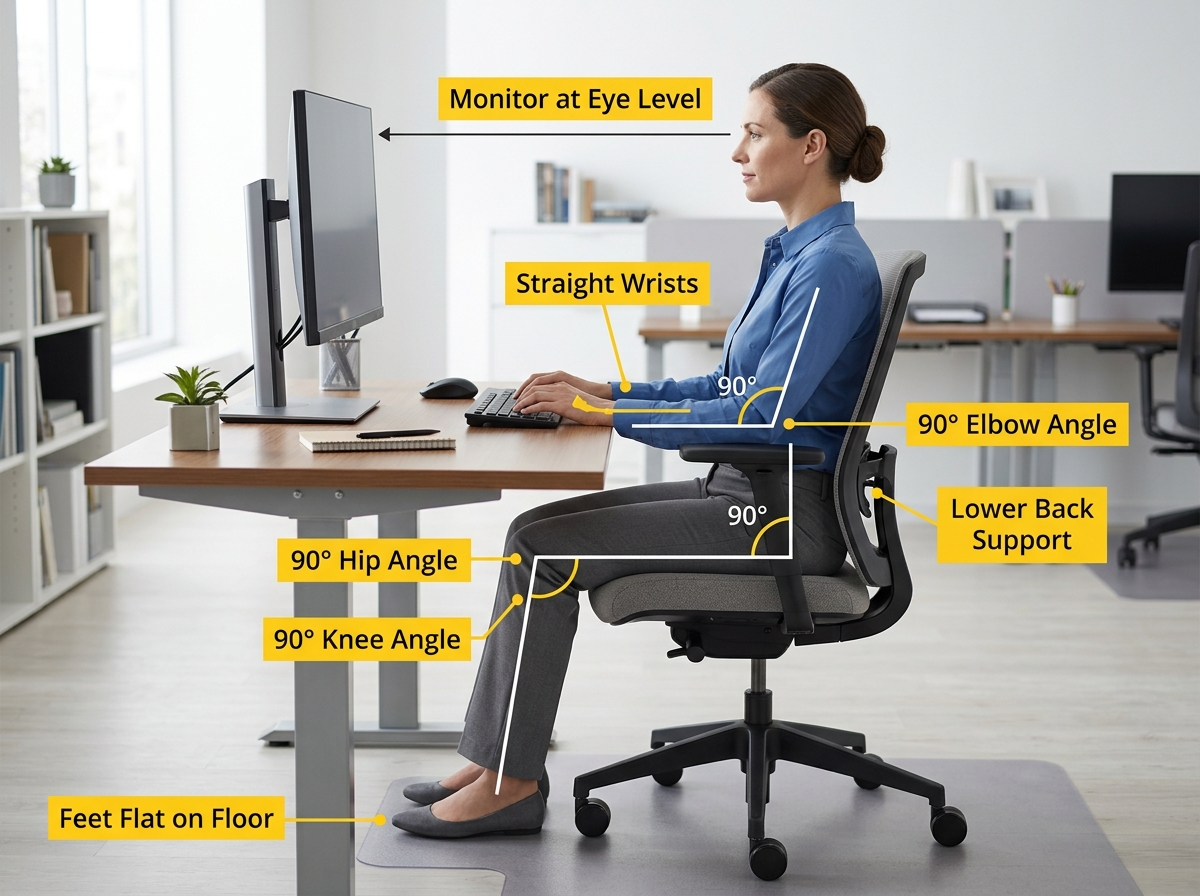
Neutral posture is the position where your body is under the least amount of stress. Think of it as your body’s “happy place.” Here is how to achieve it:
- The 90-Degree Rule: Your elbows, hips, and knees should all ideally be at roughly 90 to 100-degree angles.
- Monitor Height: The top of your screen should be at or slightly below eye level. If you use bifocals, you may need it slightly lower. You shouldn’t have to tilt your chin up or tuck it down to read.
- The Wrist “Safe Zone”: Your wrists should be straight, not bent up, down, or to the sides. Research shows that the safe zone for wrist movement is only about 15 degrees in any direction.
- Feet Flat: Your feet should be firmly planted on the floor. If they don’t reach, use a footrest. Dangling feet put immense pressure on your lower back.
- Lumbar Support: Your chair should follow the natural curve of your spine. If there’s a gap between your lower back and the chair, use a small pillow or a rolled-up towel.
A vital tip from Preventing Overuse Injuries at Work is the use of forearm support. When your arms are supported, it takes the “hanging weight” off your shoulders and neck, which significantly reduces the risk of tension headaches and upper-back RSIs.
Optimizing Your Desk: How Can Employees Prevent Repetitive Strain Injuries at Home?
Remote work has brought many perks (hello, sweatpants!), but it has also led to a spike in RSIs. Working from a sofa or a kitchen stool is an ergonomic nightmare. If you are working from home, follow these steps to “pro-ify” your space:
- Ditch the Laptop Screen: Laptops are ergonomically “broken” because the keyboard and screen are connected. If the keyboard is at the right height for your hands, the screen is too low. Use a laptop stand (or a stack of sturdy books) to raise the screen and plug in an external keyboard and mouse.
- Kitchen Chair Fixes: Most dining chairs are too low. Sit on a firm cushion to get your elbows to desk height, and put a box under your feet so your knees stay at 90 degrees.
- Manage Glare: Position your “office” so windows are to your side, not in front of or behind your screen. Straining your eyes leads to leaning forward, which ruins your posture.
- The Document Holder: If you frequently look at papers while typing, don’t lay them flat on the desk. Use a document holder placed between your keyboard and monitor to keep your neck neutral.
Essential Tools for How Can Employees Prevent Repetitive Strain Injuries
Sometimes, standard office equipment just doesn’t cut it. If you’re already feeling a bit of strain, these specialized tools can be game-changers:
- Vertical Mice: Traditional mice force your forearm to “pronate” (twist palm-down), which crosses the two bones in your arm and puts pressure on the nerves. A vertical mouse keeps your hand in a “handshake” position, which is much more natural.
- Split Keyboards: These allow your arms to stay at shoulder width rather than hunching inward to meet a tiny keyboard.
- Trackballs: If moving your whole arm to use a mouse hurts, a trackball allows you to navigate with just your thumb or fingers.
- Hands-Free Headsets: Never, ever cradle a phone between your ear and shoulder. It’s a one-way ticket to a pinched nerve.
- Smart Features: Use predictive text, autocorrect, and “StickyKeys” to reduce the number of actual keystrokes you perform. Every click saved is a win for your tendons.
Daily Habits and Movement Routines
You could have a $2,000 ergonomic chair, but if you sit in it for eight hours straight without moving, you’re still at risk. Movement is medicine for RSIs.
Static posture — staying in one position for too long — starves your muscles of oxygen and allows metabolic waste to build up. This is why we advocate for microbreaks. A microbreak is a 30-second pause every 20 minutes. Just drop your hands to your sides, shake them out, and look at something 20 feet away.
The Power of Task Variation
One of the most effective “hacks” for how can employees prevent repetitive strain injuries is job rotation. If your job involves heavy typing, try to intersperse it with phone calls, filing, or meetings. “A change is as good as a rest,” as the saying goes. By switching tasks, you use different muscle groups, giving the “typing muscles” a chance to recover while you’re still being productive.
Comparing Work Habits
To visualize the difference, look at how small changes impact your body:
| Feature | Static/Poor Habit | Dynamic/Ergonomic Habit |
|---|---|---|
| Break Frequency | Every 2-3 hours | Every 20-30 minutes |
| Mouse Usage | Excessive clicking/scrolling | Use of keyboard shortcuts |
| Hydration | Dehydration (stiff tendons) | Regular water intake (lubricated joints) |
| Posture | Slumping or “turtling” | Neutral spine/upright |
| Movement | Sitting still all day | Stretching & standing regularly |
Targeted Stretches for Upper Limbs
Stretching shouldn’t hurt. It should feel like a gentle “release.” Aim to do these 3-5 times a day:
- Wrist Flexion/Extension: Extend your arm forward, palm up. Use your other hand to gently pull your fingers down toward the floor. Switch to palm down and pull your fingers toward you.
- Shoulder Blade Squeezes: Imagine you are trying to hold a pencil between your shoulder blades. Squeeze, hold for 5 seconds, and release. This opens up the chest and counters the “hunch.”
- Neck Tucks: Sit tall and gently tuck your chin in (creating a “double chin”) without tilting your head down. This stretches the base of the skull.
- Forearm Extensions: Interlace your fingers, turn your palms away from you, and extend your arms straight out in front.
Proactive Reporting and Emerging Technologies
The future of RSI prevention is getting high-tech. We are seeing a rise in AI-driven ergonomic apps that use your webcam to analyze your posture and send a notification if you start to slouch. There are even vibration feedback mice that give a tiny “buzz” if you are clicking too forcefully.
However, technology is only a supplement to communication. If you feel persistent discomfort, report it to your employer immediately. Many companies offer free professional ergonomic assessments. Under workplace safety laws, employers are often required to provide a safe environment, which includes making reasonable adjustments to your workstation.
Don’t wait for a diagnosis. If your wrist is throbbing, ask for an adjustable keyboard tray or a different mouse. Early intervention is the difference between a one-week recovery and a lifelong struggle with chronic pain.
Frequently Asked Questions about RSI Prevention
What are the most common symptoms of a repetitive strain injury?
The most frequent symptoms include persistent pain, swelling, and stiffness in the joints. Many people also report “pins and needles” (tingling), numbness, or a loss of strength in their hands. You might also notice that your muscles feel tight or cramp up during repetitive tasks.
How often should I take breaks to prevent strain?
The “Gold Standard” is the 20-20-20 rule: Every 20 minutes, look at something 20 feet away for 20 seconds and move your body. Additionally, you should take a 5-10 minute break every hour to stand up, walk around, and get your blood flowing.
Can I treat RSI at home with the RICE method?
Yes, for mild, early-stage symptoms. RICE stands for:
- Rest: Stop the activity causing the pain.
- Ice: Apply cold packs to reduce inflammation.
- Compression: Use a light wrap if there is swelling (but don’t make it too tight!).
- Elevation: Keep the affected limb raised. However, if symptoms persist for more than a few days, you should consult a doctor or physical therapist.
Conclusion
At Dims Finance, we believe that your work shouldn’t hurt. Understanding how can employees prevent repetitive strain injuries is about more than just buying a fancy chair; it’s about building a lifestyle of movement, awareness, and proactive adjustment.
By setting up your workstation correctly, using science-based tools, and listening to your body’s early warning signs, you can stay productive and pain-free for years to come. Your health is your most valuable asset — treat it that way!
For more detailed guides on choosing the right gear, check out our resource on Ergonomic desk accessories for comfort. Stay comfortable, stay healthy, and keep moving!