When Every Click Hurts: Finding the Right Ergonomic Mouse for Index Finger Pain
The best ergonomic mouse for index finger pain depends on your symptoms and how you use your computer, but here are the top options to consider:
| Mouse Type | Best For | Example |
|---|---|---|
| Vertical mouse | General finger and wrist strain | Logitech MX Vertical, Logitech Lift |
| Thumb-wheel trackball | Offloading index finger clicks | Logitech MX Ergo S |
| Finger-operated trackball | Distributing load across fingers | Kensington Expert Mouse |
| Roller/slider mouse | Severe cases, no-grip recovery | Contour RollerMouse Red |
If your index finger aches, clicks, or locks up after a long day at the keyboard, you are not alone.
Repetitive clicking and gripping a standard mouse for hours puts serious stress on the tendons in your finger. Over time, this can lead to a condition called trigger finger (stenosing tenosynovitis) — where the tendon becomes inflamed and movement turns painful or stiff.
The good news? Switching to the right ergonomic mouse can take the pressure off your index finger almost immediately. Studies show that angled and vertical mice reduce discomfort without meaningfully hurting your accuracy or speed.
Below, we break down exactly which mouse types help most, which specific models are worth your money, and how to make the switch without making things worse.
Understanding Trigger Finger and Index Finger Pain
When we talk about an ergonomic mouse for index finger pain, we are often addressing a specific medical condition known as trigger finger, or stenosing tenosynovitis. This painful condition occurs when the finger or thumb “locks,” “catches,” or “pops” when you try to bend or straighten it. It can affect one or more fingers on either hand, and for heavy computer users, the index finger is often the primary victim.
Inside your hand, tendons connect your muscles to your bones. These tendons are surrounded by a protective sheath. When you perform repetitive or forceful movements—like clicking a mouse button thousands of times a day—the tendon can become inflamed and swollen. Long-term irritation can even lead to scarring and thickening of the sheath. This narrowing makes it difficult for the tendon to slide through, causing that characteristic snapping sensation.
Common symptoms include:
- A tender lump at the base of the finger on the palm side.
- A clicking or popping sound when moving the finger.
- Stiffness, especially in the morning.
- The finger getting stuck in a bent position, requiring you to manually straighten it.
According to scientific research on mouse angles and discomfort, using a traditional mouse forces the hand into an unnatural position that increases muscle activity and tendon tension. At Dims Finance, we emphasize that understanding your ergonomic-keyboard-and-mouse-setup is the first step toward recovery from repetitive strain injuries (RSIs).
How Standard Mice Aggravate Your Tendons
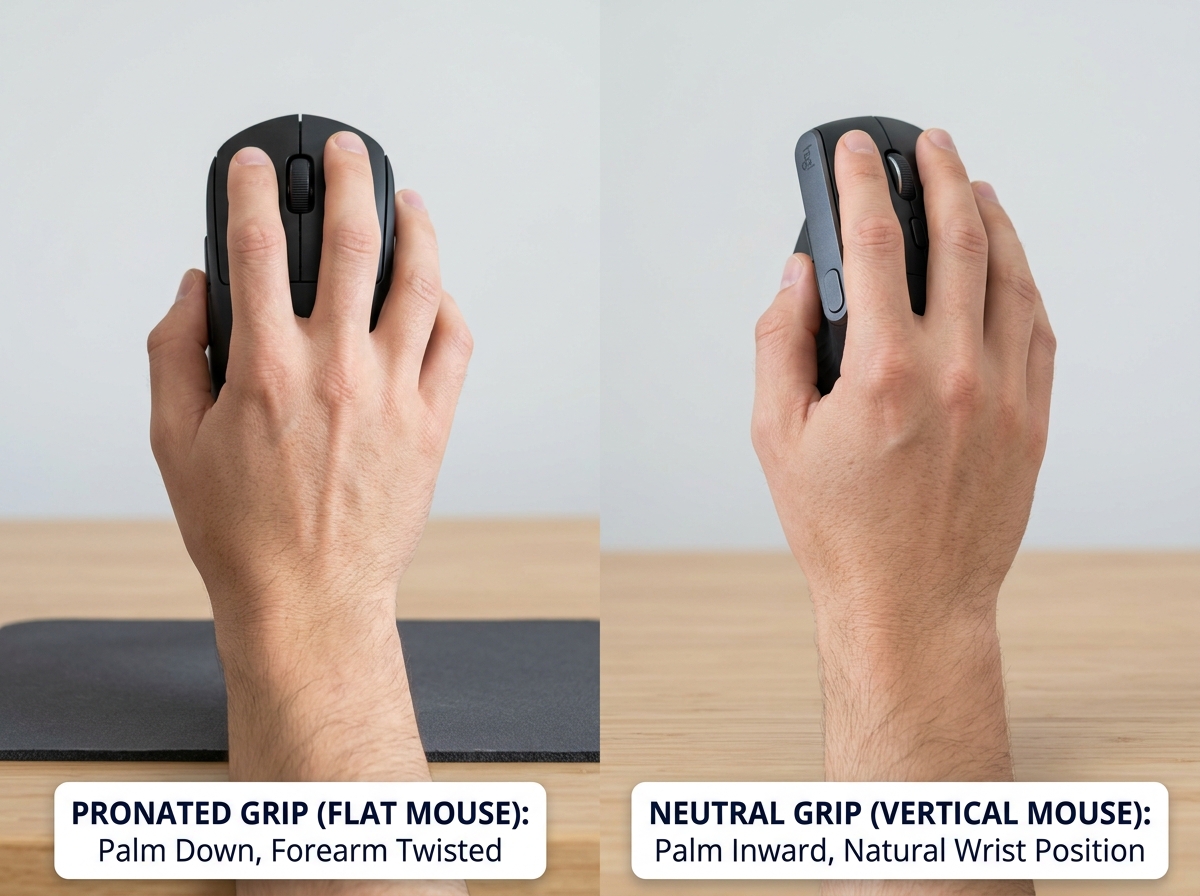
Most standard computer mice are designed with a “flat” or symmetrical shape that doesn’t account for the natural resting position of the human hand. When you place your hand flat on a traditional mouse, your forearm is forced into a “pronated” position—meaning your palm is facing down. This twist puts constant tension on the muscles and tendons in your wrist and fingers.
Furthermore, standard mice require a “pinch grip” or “claw grip” to move the device around. This constant gripping, combined with the forceful clicking of the index finger, creates a high static muscle load. Over hours of work, this tension prevents the tendons from resting, leading to inflammation.
Standard mice contribute to pain through:
- Forearm Pronation: Twisting the radius and ulna bones in the forearm.
- Forceful Clicking: Requiring significant downward pressure from the index finger.
- Grip Tension: The need to hold the mouse tightly to maintain control or lift it.
To combat this, many users find relief by using ergonomic-wrist-rests-for-typing alongside a better mouse to ensure the entire arm is supported, reducing the burden on the small tendons of the index finger.
Best Ergonomic Mouse for Index Finger Pain: Top Picks
Choosing the right mouse is a personal journey. What works for a large hand might feel like a workout for a smaller one. However, the goal remains the same: reduce muscle activity and promote a natural posture. We have tested and researched dozens of options to find the best solutions for those struggling with clicking pain.
If you are looking for a complete overhaul, you might also consider wireless-keyboard-and-mouse-combos-for-seamless-work to ensure your entire desk setup is working in harmony.
Vertical Mice for Natural Alignment
Vertical mice are the “gold standard” for general hand comfort. By tilting the mouse at an angle (usually between 57 and 90 degrees), they place your hand in a “handshake” position. This eliminates forearm pronation and allows your fingers to rest in a slightly curved, relaxed state.
- Logitech MX Vertical: This is a top-rated choice for most users. It features a 57-degree vertical angle that reduces muscle strain by 10% compared to a traditional mouse. Expert reviews from PCMag and WIRED highlight its excellent tracking precision and comfortable rubberized texture.
- Logitech Lift: If you have smaller to medium-sized hands (less than 18 cm or 7 inches), the Lift is a fantastic alternative. It offers the same ergonomic benefits as the MX Vertical but in a more compact frame. It also features “silent clicks,” which can be psychologically soothing when your fingers are sensitive.
- Hansker Productivity: A unique vertical mouse that some users find easier to lift and move without slipping, which is a common complaint with some vertical designs.
- Anker 2.4G Wireless Vertical: For those on a budget, this is a highly popular entry-point mouse. While it lacks the high-end sensors of Logitech, it has over 50,000 ratings on Amazon and provides the essential vertical tilt needed to relieve index finger strain.
Finger-Operated Trackballs to Distribute Load
Trackball mice are a game-changer for index finger pain because they eliminate the need to move your arm or wrist. Instead, you move the cursor with your fingers or thumb.
- Kensington Expert Mouse Wireless Trackball: This is a “fingertip-operated” trackball. It features a large ball in the center and a “scroll ring” around it. This allows you to use your middle or ring fingers to move the cursor, giving your index finger a much-needed rest from navigation. It is also ambidextrous, which is great if you need to switch hands during recovery.
- Elecom Deft Pro: Recommended by WIRED as a robust index-finger operated trackball. It allows for very precise movements and is designed to be robust for long-term use.
- Logitech MX Ergo S: This is a thumb-operated trackball. While it still uses the index finger for clicking, it features a unique adjustable hinge that allows you to tilt the mouse up to 20 degrees. This “tilt” reduces forearm muscle strain by 27%, which indirectly helps the tendons in your fingers feel less fatigued.
Specialized Solutions for Severe Ergonomic Mouse for Index Finger Pain
Sometimes, a traditional mouse shape—even a vertical one—isn’t enough. If your trigger finger is severe, you may need a “no-grip” solution.
- ErgoSlider Plus: This is a bar-style mouse that sits directly in front of your keyboard. You move the cursor by sliding a roller bar with your fingertips and “click” using your thumb or other fingers. It is completely ambidextrous and requires zero gripping, making it ideal for recovery from severe trigger finger.
- Contour RollerMouse Red: Similar to the ErgoSlider, this is a premium solution that allows you to navigate without ever reaching to the side. It eliminates “reaching” strain and allows you to distribute clicking tasks across both hands. It is often used in professional environments where ergonomics are the top priority.
- Thumb-Wheel Mice: Some mice, like the Logitech MX Master 4, feature a secondary wheel on the side operated by the thumb. This allows you to perform horizontal scrolling or other tasks with your thumb, offloading work from your index finger.
Tips for Transitioning to an Ergonomic Mouse for Index Finger Pain
Switching to an ergonomic mouse is like breaking in a new pair of shoes—it takes a little time for your brain and muscles to adapt. Here is how we recommend making the transition:
- Adjust Your Sensitivity (DPI): Increase your mouse sensitivity so that small movements of your hand result in larger cursor movements on the screen. This reduces the amount of physical effort required.
- Use the “Handshake” Grip: Don’t try to “palm” a vertical mouse like a traditional one. Let your hand rest naturally against the side.
- Take Micro-Breaks: Even with the best mouse, your fingers need rest. Follow the 20-20-20 rule: every 20 minutes, look at something 20 feet away for 20 seconds, and gently stretch your fingers.
- Practice Hand Stretching: Gently pull your index finger back toward your wrist to stretch the palm-side tendons, or make a soft fist and slowly open it.
- Re-evaluate Your Whole Desk: A mouse is only one part of the puzzle. Ensure your chair height allows your elbows to form a 90-degree angle. For more tips, see our guide on ergonomic-keyboard-and-mouse-setups-for-maximum-comfort.
Frequently Asked Questions about Finger Pain
What is the best ergonomic mouse for index finger pain?
For most people, a vertical mouse like the Logitech MX Vertical is the best starting point because it fixes the overall hand posture. However, if clicking is the primary trigger for your pain, a finger-operated trackball (like the Kensington Expert Mouse) or a RollerMouse is often better because they allow you to offload the clicking action to other fingers or your thumb.
Can a vertical mouse help with trigger finger?
Yes. By placing the hand in a neutral handshake position, a vertical mouse keeps the fingers in a more relaxed, straightened position. This reduces the mechanical tension on the tendon as it passes through the sheath, which can help reduce the inflammation that causes trigger finger.
How does a thumb-wheel mouse reduce index finger strain?
A thumb-wheel mouse (like the MX Master series) provides a secondary scroll wheel or customizable buttons operated by the thumb. By moving scrolling tasks—which involve repetitive, high-frequency movements—from the index finger to the thumb, you significantly reduce the daily “workload” on the index finger tendon.
Conclusion
At Dims Finance, we believe that workplace wellness starts with science-based ergonomics. Index finger pain isn’t just an annoyance; it’s a signal from your body that your current tools aren’t a good fit for your anatomy. Whether you choose a vertical mouse to correct your posture or a trackball to eliminate wrist movement, the goal is to reduce the strain on those hard-working tendons.
Investing in an ergonomic mouse for index finger pain is an investment in your long-term productivity and health. If you are ready to complete your setup, explore more ergonomic desk accessories to find the perfect balance for your home or office. Remember to start slowly, adjust your settings, and listen to your body as you transition to a pain-free way of working.