
Why Your Home Office Keyboard Tray Could Be the Most Important Thing on Your Desk
A home office keyboard tray is an under-desk platform that holds your keyboard and mouse at a lower, more natural height than your desktop surface. Here’s a quick look at the top reasons people use them and what to look for:
Top benefits at a glance:
- Reduces wrist strain by allowing a neutral or slightly negative tilt angle
- Improves posture by positioning elbows at roughly 90 degrees
- Frees up desk space for monitors, documents, and other gear
- Helps prevent RSI and carpal tunnel syndrome from long typing sessions
Most popular types:
| Type | Best For | Price Range |
|---|---|---|
| C-clamp slide-out | Most home desks, no drilling | $35 – $80 |
| Screw-mounted track | Permanent, sturdy setups | $60 – $130 |
| Articulating arm | Full ergonomic adjustability | $100 – $185+ |
If you spend more than two hours a day typing, your keyboard height matters more than most people realize. Typing on a flat desk surface often forces your wrists upward and your shoulders forward — a position your body was not designed to hold for hours at a time.
Over time, that adds up. Wrist pain, shoulder tension, and upper back fatigue are common complaints among home office workers — and a poorly positioned keyboard is frequently the cause.
The good news? A quality keyboard tray is one of the most affordable and effective fixes for your setup.
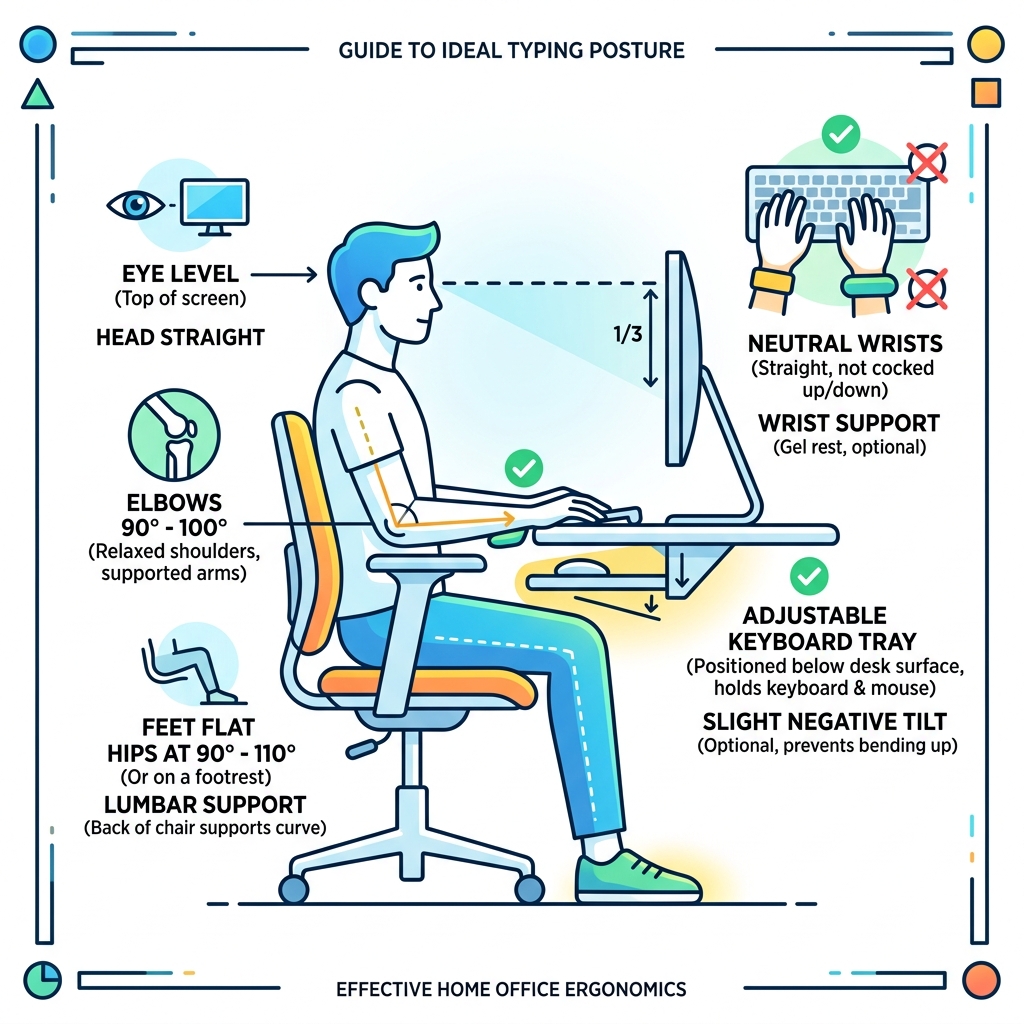
Why a home office keyboard tray is Essential for Ergonomics
At Dims Finance, we focus on the science of the workspace. While most people invest heavily in a “gaming chair” or a high-resolution monitor, the home office keyboard tray is often the most overlooked component of a healthy workstation. Why is it so critical? It all comes down to the relationship between your elbows, your wrists, and the floor.
Posture Improvement and Shoulder Fatigue
When your keyboard sits on top of a standard desk (usually 29 to 30 inches high), most users have to “reach up” to type. This causes the shoulders to shrug slightly and the upper back muscles to remain in a state of constant tension. By using an under-desk tray, you bring the typing surface down to lap height. This allows your shoulders to drop into a relaxed, neutral position, significantly reducing shoulder and neck fatigue.
Wrist Strain and the “Neutral” Position
One of the most common causes of Repetitive Strain Injury (RSI) is wrist extension—the act of bending your hands upward to reach the keys. Mastering the neutral wrist position is the primary goal of any ergonomic setup. A keyboard tray allows for “negative tilt,” where the back of the keyboard is slightly lower than the front. This keeps your wrists straight or angled slightly downward, which is the most natural position for your tendons.
Optimizing the Elbow Angle
Science-based ergonomic research, such as guidelines from the Mayo Clinic, suggests that your elbows should stay at roughly a 90-degree angle (or slightly more open, up to 110 degrees) while typing. Achieving this on a standard desk often requires raising your chair so high that your feet dangle, which cuts off circulation in your legs. A keyboard tray solves this by bringing the work to you. For more on this, check out our guide on ergonomic keyboard and mouse setup for enhanced comfort.
Types of Mounting Options and Mechanisms
Choosing the right home office keyboard tray depends largely on your desk type and how much DIY work you’re willing to do.

C-Clamp Systems (Tool-Free)
If you are renting or have a high-quality desk you don’t want to drill into, C-clamp models are the gold standard. These “clamp-on” trays use padded brackets that grip the edge of your desk.
- Pros: Installation takes five minutes; no permanent damage to the desk.
- Cons: They usually offer less height adjustability than screw-in models.
Under-Desk Tracks and Slide-Out Drawers
These are the most common “permanent” solutions. A metal track is screwed into the underside of the desktop, allowing the tray to slide in and out smoothly. Many popular models feature 360-degree swivel capabilities, allowing you to tuck the keyboard sideways if you have a tight corner.
Articulating Ergonomic Arms
For the ultimate setup, articulating arms offer the most flexibility. These allow you to adjust the height (sometimes up to 8 inches or more), the tilt, and the swivel with a single knob or a “lift-and-release” mechanism. These are ideal for users who switch between sitting and standing frequently. To keep your setup clean, these work best when paired with wireless keyboard and mouse combos for seamless work.
| Feature | Clamp-On Tray | Screw-In Track | Articulating Arm |
|---|---|---|---|
| Installation | Tool-free (5 mins) | Requires drill (20 mins) | Requires drill (30 mins) |
| Stability | Moderate | High | High |
| Adjustability | Limited | Slide only | Height, Tilt, Swivel |
| Desk Damage | None | Screw holes | Screw holes |
Key Features to Look for in a Home Office Keyboard Tray
Don’t just buy the first tray you see on a best-seller list. To truly protect your health, look for these specific features:
Negative Tilt Adjustment
As mentioned, the ability to tilt the keyboard away from you is vital for keyboard wrist injury prevention. A tray that only slides out horizontally is a space-saver, but not necessarily an ergonomic tool. Look for models that offer at least -15 to -20 degrees of tilt.
Platform Dimensions and Materials
A standard tray is usually between 25 and 27 inches wide. This is enough space for a full-sized keyboard and a mouse.
- Steel: Extremely durable and stable, but heavy.
- Bamboo/Wood: Eco-friendly and aesthetically pleasing, though often more expensive.
- Phenolic/Ultra-Thin: These are very thin (about 0.25 inches) but incredibly strong, maximizing the knee clearance under the tray.
Integrated Wrist Rests and Mouse Platforms
Some trays come with built-in gel or foam pads. While helpful, ensure they are removable or low-profile so they don’t force your wrists into an awkward “hump.” You can learn more about choosing the right support in our article on ergonomic wrist rests for typing. Additionally, some high-end trays feature an “independent” mouse platform that can be tilted or leveled separately from the keyboard.
Weight Capacity and Cable Management
Most quality trays are rated for about 4.4 lbs to 11 lbs. While a keyboard and mouse are light, you don’t want a tray that “bounces” while you type. Look for sturdy steel tracks and integrated cable routing to keep your wires from getting pinched in the sliding mechanism.
How to Choose the Right Size and Fit for Your Desk
Before you click “buy,” you need to grab a tape measure. The most common reason for returns is a lack of clearance under the desk.
Under-Desk Clearance and Obstructions
Look under your desk. Is there a metal crossbar? Is there a drawer in the way?
- The Track Length: Most slide-out trays require a flat surface of at least 14 to 18 inches deep to mount the track.
- Spacer Brackets: If your desk has a support beam (common on height-adjustable desks), you may need a “spacer bracket” to drop the track below the beam.
- Corner Sleeves: If you have an L-shaped desk, you can’t easily mount a straight track in the corner. A “corner sleeve” is a specialized attachment that bridges the 90-degree gap, creating a flat surface for the tray.
Desktop Thickness
Clamp-on trays usually have a maximum desk thickness they can grip (often up to 1.5 or 2 inches). Conversely, if you are screwing into the desk, ensure your desktop is at least 5/8″ to 3/4″ thick so the screws don’t poke through the top! For those with thin desks, we recommend using shorter screws or shims for safety.
Standing Desk Compatibility
Using a home office keyboard tray with a standing desk can be tricky. Because standing desks already move up and down, a tray might feel redundant. However, many users find that the tray allows them to keep the monitor at eye level while keeping their hands at the correct typing height—something that is hard to achieve with a single flat surface. For more tips on this, see our guide on ergonomic keyboard and mouse setups for maximum comfort.
Frequently Asked Questions about Keyboard Trays
Can I install a home office keyboard tray on a glass desk?
Generally, we do not recommend drilling into glass (for obvious reasons!). However, some C-clamp models can work on tempered glass desks if the glass is thick enough (usually 1/4 inch or more) and the clamps are well-padded. Always check the manufacturer’s weight limits, as glass is more prone to stress fractures under localized pressure.
Do home office keyboard tray models work with standing desks?
Yes, but with caveats. You must ensure the mounting track does not interfere with the desk’s lifting motor or crossbars. Many standing desk users prefer “ultra-thin” trays to ensure they don’t hit their knees when sitting. If your standing desk is wobbly, a keyboard tray may amplify that vibration, so look for “heavy-duty” models with reinforced tracks.
How does a keyboard tray reduce carpal tunnel risk?
Carpal tunnel syndrome is often caused by pressure on the median nerve. When you type on a high surface, you likely rest the “heel” of your palm on the desk edge, creating a “pressure point.” A tray allows you to type with a neutral wrist alignment, moving the pressure away from the carpal tunnel and allowing blood to flow freely to your fingers.
Conclusion
At Dims Finance, we believe that your workspace should work for you, not against you. A home office keyboard tray is more than just a place to put your gear; it is a foundational tool for long-term health. By lowering your typing height, enabling negative tilt, and freeing up valuable desk real estate, you can boost your productivity while significantly reducing the risk of chronic pain.
Whether you choose a simple clamp-on model for a quick fix or a professional-grade articulating arm for a permanent ergonomic upgrade, the investment in your body will pay off for years to come. Ready to complete your setup? Explore our full range of desk accessories to find the science-based solutions your home office deserves.