
Why Standard Keyboards Hurt Small Hands (And What to Do About It)
Finding the right ergonomic keyboard for small hands can be the difference between pain-free productivity and chronic wrist strain. If you just want the quick answer, here are the top picks:
Best ergonomic keyboards for small hands:
| Keyboard | Best For | Key Advantage |
|---|---|---|
| Kinesis Freestyle2 | Best overall | Adjustable split, low 43 gf actuation force |
| Logitech MX Keys Mini | Low-profile & wireless | Compact 11.65″ width, spherically-dished keys |
| Logitech Wave Keys | Easiest transition | Only 14.8″ wide, gentle wave curve |
| Arteck Ergonomic Wired | Budget pick | Ultra-short 1.78 mm key travel, quiet typing |
Standard keyboards were designed around average hand sizes — which means if your hands are smaller than average, you’re likely stretching, straining, and overreaching every single time you type.
That constant reaching puts stress on your tendons and wrists. Over time, it can lead to repetitive strain injuries (RSI), carpal tunnel syndrome, and general fatigue that builds up through the workday.
The problem is real. Testing has shown that some highly ergonomic keyboards — like the MoErgo Glove80, which scores an impressive 9.0/10 for overall ergonomics — can actually score as low as 2/10 for comfort among small-handed users, because their deep concave key wells require even more reaching for shorter fingers.
In other words: not all “ergonomic” keyboards are ergonomic for you.
The good news is that compact, low-profile, and split keyboard designs can genuinely reduce strain — you just need to know which features actually help smaller hands, and which ones make things worse.
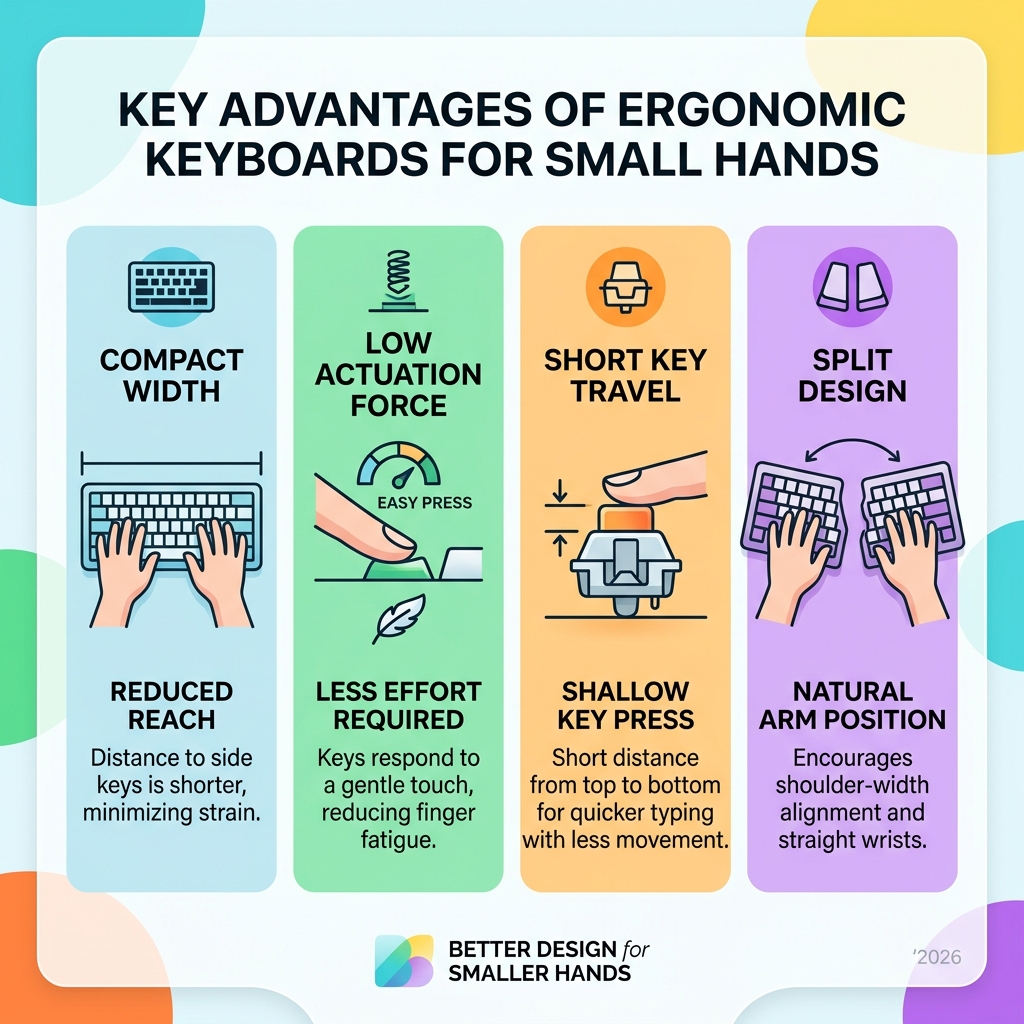
What Makes an Ergonomic Keyboard for Small Hands Different?
When we talk about an ergonomic keyboard for small hands, we aren’t just talking about a “shrunken” version of a standard board. It’s about the geometry of movement. For those with smaller hand anthropometrics, the distance between the home row and the function keys or the far edges of the board can feel like a marathon for the fingers.
Traditional keyboards often force small-handed users into “reach zones” that exceed their natural range of motion. This leads to excessive wrist extension and ulnar deviation (bending the wrist toward the pinky). By choosing a design that respects smaller proportions, we can significantly reduce the risk of keyboard wrist injuries that occur when your hands essentially go on strike from overwork.
Key Spacing and Reach in an Ergonomic Keyboard for Small Hands
One of the most significant hurdles for petite hands is key spacing. Standard staggered rows—the layout we’ve used since the typewriter era—force fingers to move diagonally, increasing the travel distance.
More advanced ergonomic designs use columnar layouts, where keys are arranged in straight vertical columns to match the natural motion of your fingers. However, there is a catch: some “high-end” ergonomic boards use concave wells (bowls where the keys sit). While these are great for average hands, they can be a nightmare for small hands. In our research, the MoErgo Glove80, despite its technical brilliance, received a dismal 2/10 comfort score from small-handed testers. The deep pockets meant shorter fingers had to “climb” out of the wells to reach the top rows, causing more strain than a flat board would.
Why an Ergonomic Keyboard for Small Hands Needs Low Operating Force
If you have smaller hands, you likely have less muscular leverage than someone with a larger frame. This makes actuation force—the amount of pressure needed to make a key register—critical.
A heavy key switch might not seem like much for one click, but over 10,000 keystrokes a day, it adds up to massive muscle fatigue. The Kinesis Freestyle2 is a standout here, requiring only 43.26 grams of force (gf). This delicate actuation allows for a “feather-touch” typing style, which is essential for mastering the neutral wrist position and preventing tendon strain. When you don’t have to hammer the keys, your hands stay relaxed and pain-free.

Essential Features for Petite Typing Comfort
Choosing the right ergonomic keyboard for small hands requires looking past the marketing fluff and focusing on the physical specs. We’ve found that three main factors dictate success: layout type, tenting capability, and palm support.
| Feature | Impact for Small Hands | Recommended Spec |
|---|---|---|
| Width | Reduces shoulder strain | Under 15 inches |
| Key Travel | Minimizes finger lifting | 1.5 mm to 2.0 mm |
| Tenting | Prevents forearm twisting | 5 to 15 degrees |
| Split Design | Aligns wrists and shoulders | Adjustable modules |
To get the most out of these features, we recommend checking out our full ergonomic keyboard and mouse setup guide to ensure your entire workstation is aligned.
Compact Layouts and Shoulder Alignment
The “hidden” danger of a standard keyboard isn’t just the keys—it’s the number pad. A full-sized keyboard is usually 17-18 inches wide. For a person with a smaller frame, this forces the mouse way out to the right, causing the shoulder to rotate externally.
The Logitech Wave Keys addresses this by being only 14.8 inches wide. This “tenkeyless” or compact approach brings the mouse into the “easy-reach zone.” By keeping your mouse closer, you reduce ulnar deviation and shoulder fatigue. If you find your wrists still feel unsupported, adding ergonomic wrist rests can bridge the gap between the desk and the keys, ensuring your hands don’t “drop” at the wrist.
Low-Profile Keys and Travel Distance
Key travel refers to how far the key actually moves down when pressed. For small hands, high-profile mechanical keys (which often have 4mm of travel) can feel like stepping over hurdles.
The Arteck Ergonomic Wired Keyboard is a fantastic example of low-profile efficiency, featuring just 1.78 mm of travel. This allows your fingers to glide across the surface rather than lifting high for every stroke. When paired with comfortable desk mats, these low-profile boards create a sleek, low-impact typing environment that mimics the ease of a high-end laptop but with much better ergonomic support.
Best Ergonomic Keyboard for Small Hands: Lab-Tested Reviews
We’ve analyzed the data, looked at the actuation forces, and considered the feedback from real-world testers with smaller hands. Here are our top-ranked recommendations for a more comfortable workday. For a broader look at how these fit into a complete desk overhaul, see our guide on ergonomic keyboard and mouse setups for maximum comfort.
Best Overall: Kinesis Freestyle2
The Kinesis Freestyle2 remains a gold standard because of its sheer versatility. It isn’t a single block of plastic; it is two separate modules connected by a cable (up to 20 inches of separation).
- Why it works for small hands: You can position the modules exactly at your shoulder width.
- The “Secret Sauce”: We highly recommend the VIP3 Kit accessory. It adds adjustable tenting (tilting the keyboard upward) and integrated palm rests.
- Stats: With a 43.26 gf operating force, it’s the lightest touch we’ve tested, making it perfect for those looking to reduce finger strain.
Best Low-Profile: Logitech MX Keys Mini
If you prefer a modern, minimalist aesthetic without sacrificing performance, the Logitech MX Keys Mini is an elite choice. It is specifically designed to be “smaller, smarter, and mightier.”
- Spherically-Dished Keys: The keys have a slight circular indentation that “cups” your fingertips, which helps with accuracy—a common struggle for small hands on flat keys.
- Ergonomic Alignment: Because it lacks a numpad, your mouse stays close to your side. This keeps your shoulders in a natural, neutral position.
- Connectivity: It’s a wireless powerhouse, featuring Logitech MX Keys Mini Business Wireless Keyboard security with Logi Bolt technology for stable office use.
Best Budget: Arteck Ergonomic Wired Keyboard
You don’t have to spend hundreds of dollars to save your wrists. The Arteck Ergonomic Wired Keyboard provides a surprisingly premium experience at a fraction of the cost.
- Compact Footprint: It’s thin, light, and doesn’t take up unnecessary space.
- Quiet and Precise: It registered a low 40 dBa noise level in testing, making it ideal for shared office spaces.
- The Trade-off: While it offers great value for posture improvement, it lacks the deep customizability of the Kinesis or the “smart” features of the Logitech range. However, for a simple, plug-and-play ergonomic keyboard for small hands, it’s unbeatable.
Overcoming Challenges and Learning Curves
Switching to an ergonomic layout—especially a split or columnar one—can feel like learning to type all over again. In our research, even fast typists (80+ WPM) saw their speed drop to under 40 WPM on their first day with a columnar board like the MoErgo Glove80.
Small-handed users often face a unique challenge with “layers.” Since the board is smaller, many symbols (like brackets or math signs) are hidden behind “Function” or “Layer” keys.
- Be Patient: It typically takes 1–2 weeks for muscle memory to adapt.
- Practice Accuracy: Focus on hitting the center of the keys to avoid accidental presses, which are common when your fingers are stretching.
- Wrist Management: Don’t forget that your mouse matters too. Proper wrist management involves pairing your new keyboard with a mouse that doesn’t force your hand into a “claw” position.
Frequently Asked Questions about Small-Hand Ergonomics
Why do concave key wells often fail for small hands?
While concave wells are designed to reduce the distance a finger travels, they are modeled on average finger lengths. For small hands, the “bowl” is often too deep. Instead of the finger moving naturally, the user has to stretch their hand to reach the keys at the top of the “rim,” leading to a comfort score as low as 2/10 in our testing.
Are wireless ergonomic keyboards reliable for office work?
Absolutely. Modern options like the MX Keys Mini Wireless Keyboard use Bluetooth Low Energy and Logi Bolt technology to ensure zero lag. Most offer impressive battery life—up to 10 days with backlighting or 5 months with it turned off.
How do I properly position a compact keyboard?
- Width: Align the “G” and “H” keys with your belly button.
- Height: Your elbows should be at a 90-degree angle, with your wrists flat (neutral).
- Mouse Proximity: Keep your mouse as close to the side of the keyboard as possible to prevent “winging” your arm out.
Conclusion
At Dims Finance, we believe that your tools should fit your body—not the other way around. Choosing an ergonomic keyboard for small hands is a science-based investment in your long-term health. By prioritizing compact widths, low actuation forces, and manageable reach zones, you can eliminate the “reach-and-strain” cycle that leads to injury.
Whether you opt for the versatile Kinesis Freestyle2, the sleek MX Keys Mini, or the budget-friendly Arteck, the goal is the same: a neutral posture that lets you work without pain.
Ready to complete your ergonomic transformation? Explore our full range of ergonomic desk accessories to find the perfect mouse, wrist rest, and desk mat to pair with your new keyboard.