Why Your Choice of Mouse Matters for Long-Term Health
The best ergonomic mouse can be the difference between a pain-free workday and months of wrist discomfort that snowballs into a serious injury. If you want the short answer, here are the top picks:
Top Ergonomic Mice at a Glance:
| Pick | Best For | Price |
|---|---|---|
| Logitech MX Master 4 | Best overall | $119.99 |
| Razer Pro Click V2 Vertical | Wrist strain relief | $119.99 |
| Kensington Expert Mouse Wireless | Fingertip trackball | $95.00 |
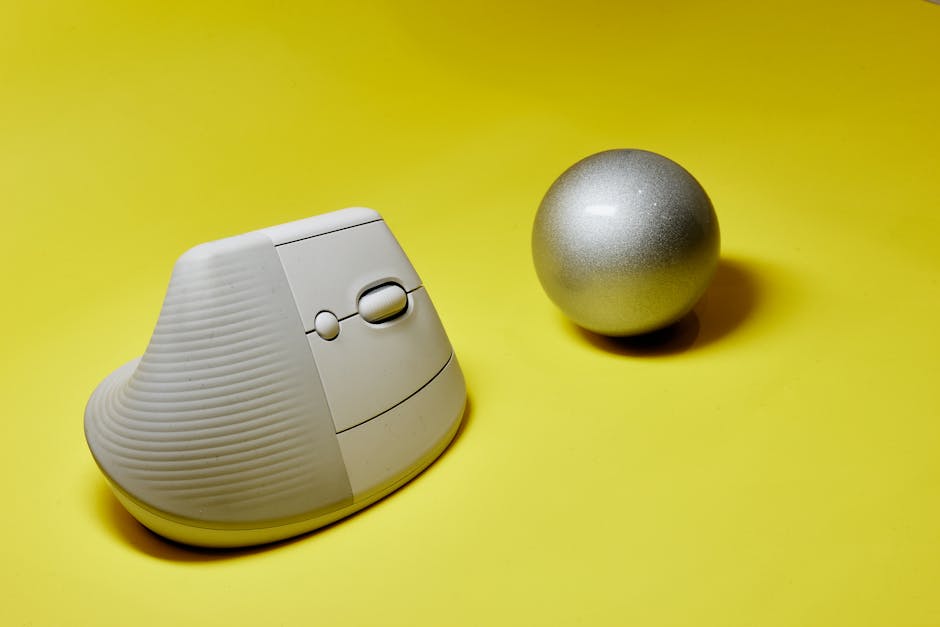
| Logitech Lift | Smaller hands / vertical | $79.99 |
| Microsoft Adaptive Mouse | Accessibility | $69.99 |
| Contour Design RollerMouse Red | Premium roller bar | $374.00 |
Around 67% of office workers report wrist or hand pain from daily computer use. That’s not a coincidence. Standard mice force your forearm to rotate downward into an unnatural position, putting constant pressure on tendons and muscles. Over time, that adds up to repetitive strain injuries (RSIs) — things like carpal tunnel syndrome, tendonitis, and chronic wrist pain.
Ergonomic mice are designed to fix exactly that. They keep your hand, wrist, and forearm in a more natural position — closer to a relaxed handshake than a flat, palm-down grip.
The right mouse won’t just reduce pain. It can prevent it from developing in the first place.

When we spend eight or more hours a day clicking and dragging, our bodies pay the price. Standard symmetrical mice require “pronation”—the act of turning your palm flat against the desk. This twists the two bones in your forearm (the radius and ulna) and compresses the median nerve. This is the primary recipe for Carpal Tunnel Syndrome.
By switching to the best ergonomic mouse for your specific hand shape, you reduce muscle fatigue. Modern research suggests that even a slight tilt can significantly lower the electrical activity in your forearm muscles, meaning they aren’t working nearly as hard just to hold the mouse. We believe that workplace ergonomics isn’t just a luxury; it’s a fundamental part of maintaining your health and productivity.

Understanding the Different Types of Ergonomic Mice
Not every “ergonomic” mouse looks the same. In fact, some look like they belong in a sci-fi movie rather than an office. Here is a breakdown of the primary categories we’ve identified:
- Vertical Mice: These are tilted at an angle (usually between 57 and 70 degrees). They place your hand in a “handshake” position. Scientific research on how vertical mice reduce muscle strain shows that this orientation minimizes the pressure on the carpal tunnel area.
- Trackball Mice: These stay stationary on your desk. Instead of moving the whole mouse, you move a ball with your thumb or fingers. This is a lifesaver for those with shoulder pain or limited desk space.
- Conventional Sculpted Mice: These look like “normal” mice but feature deep thumb rests and non-symmetrical arches that follow the natural curve of a resting hand.
- Roller Bar Mice: These sit directly in front of your keyboard. You use a rolling bar to move the cursor, allowing you to keep your hands within the “comfort zone” of the home row.
Choosing between these often comes down to where you feel the most strain. If your wrist hurts, a vertical mouse is usually the first recommendation. If your shoulder is the culprit, a trackball might be the answer. For more detail on how these fit into a total workstation, check out our guide on ergonomic keyboard and mouse setups.
The Best Ergonomic Mouse Picks for 2026
To find the best ergonomic mouse for 2026, we looked at expert testing data covering hundreds of models. We prioritized factors like sensor resolution (DPI), weight, and how long the battery lasts between charges. High DPI is actually an ergonomic feature; the more sensitive the sensor, the less you have to physically move your arm to move the cursor across the screen.
Comparison of Top Ergonomic Models
| Model | Weight | Connectivity | Battery Life |
|---|---|---|---|
| Logitech MX Master 4 | 5.2 oz | Bluetooth / Logi Bolt | 70 Days (Rechargeable) |
| Razer Pro Click V2 | 5.8 oz | Wireless / Bluetooth | 6 Months |
| Kensington Expert | 15.98 oz | Wireless / Bluetooth | AA Batteries (Long Life) |
| Logitech Lift | 4.4 oz | Bluetooth / Logi Bolt | 24 Months (1x AA) |
| Microsoft Adaptive | 2.5 oz (base) | Bluetooth | Rechargeable |
Logitech MX Master 4: The Best Ergonomic Mouse Overall
The Logitech MX Master 4 is the undisputed heavyweight champion of productivity. While it isn’t a “vertical” mouse, its heavily sculpted shape drapes the hand in a way that prevents the “claw” grip common with smaller mice. It weighs in at 5.2 ounces, giving it a premium, stable feel on the desk.
One of its standout features is the MagSpeed electromagnetic scroll wheel, which can zip through 1,000 lines per second or stop on a single pixel. For those of us working across multiple monitors, its multi-device pairing and haptic “Actions Ring” make navigation seamless. If you are looking to build a full setup, this mouse pairs perfectly with wireless-keyboard-and-mouse-combos-for-seamless-work.
Pros:
- 8000 DPI sensor works on glass.
- Incredible thumb rest with gesture controls.
- Quiet clicks that won’t annoy coworkers.
Cons:
- Right-handed only.
- Too large for very small hands.
Razer Pro Click V2: Best Ergonomic Mouse for Reducing Wrist Strain
If you want a vertical mouse that doesn’t compromise on high-end specs, the Razer Pro Click V2 Vertical is our top recommendation. It features a sophisticated 30K optical sensor—specs usually reserved for competitive gaming—which means it is incredibly accurate.
The vertical tilt is designed to alleviate the pressure on the median nerve. It offers up to six months of battery life and a refined grip that feels soft yet secure. This is the best ergonomic mouse for someone who wants the health benefits of a vertical mouse with the performance of a high-end gaming peripheral. You can See it on Amazon.
Kensington Expert Mouse Wireless: Top Fingertip-Operated Trackball
The Kensington Expert Mouse is a classic for a reason. It uses a massive, fingertip-operated trackball surrounded by a “scroll ring” that is widely considered one of the best ways to navigate long documents.
Because it is ambidextrous, it’s a great choice for lefties or people who like to switch hands throughout the day to distribute the workload. It’s heavy (nearly 16 ounces), meaning it won’t slide around your desk while you’re spinning the ball.
Key Feature: The detachable wrist rest provides a flat, supportive surface that keeps your hand in a neutral plane.
Logitech Lift: Best Vertical Option for Smaller Hands
The “big brother” to this mouse, the MX Vertical, is often too large for people with small to medium hands. The Logitech Lift solves this by shrinking the footprint while keeping the 57-degree vertical angle.
It is rated for a staggering 24 months of battery life on a single AA cell. We love the silent clicks and the soft-touch rubber grip. For a deeper look at how to pair this with a compact keyboard, see our article on ergonomic-keyboard-and-mouse-setups-for-maximum-comfort.
Microsoft Adaptive Mouse: Ideal for Accessibility Needs
The Microsoft Adaptive Mouse represents a breakthrough in inclusive design. It is a modular system that allows users to add thumb supports, tail extensions, or even 3D-printed components to create a mouse that fits their specific physical needs.
While the base is small and portable, the ability to customize the physical shape makes it the best ergonomic mouse for anyone who finds standard designs restrictive or uncomfortable due to accessibility requirements.
Contour Design RollerMouse Red: Premium Roller Bar Comfort
The RollerMouse Red is a different beast entirely. It sits in front of your keyboard, eliminating the need to reach to the side. This prevents “reaching” strain in the shoulder and neck.
Made of solid aluminum, it features a textured roller bar for cursor movement and a series of buttons for clicking and scrolling. It’s an expensive investment at $374, but for those with chronic RSI, it is often the only solution that truly works. Check price at Amazon.
Key Factors to Consider When Choosing Your Next Mouse
Finding the best ergonomic mouse isn’t just about picking the one with the most stars. It’s about fitting the tool to the hand.
- Hand Size: If the mouse is too big, your fingers will strain to reach the buttons. If it’s too small, your hand will cramp into a “claw.” Measure from the base of your palm to the tip of your middle finger.
- Handedness: Most ergonomic mice are right-handed. If you are a lefty, your options are more limited, but models like the Kensington Expert or the left-handed version of the Logitech Lift are excellent choices.
- Connectivity: Wireless is generally better for ergonomics as it removes “cable drag,” which can add resistance to your movements.
- DPI (Sensitivity): Look for a mouse with an adjustable DPI button. Higher sensitivity allows you to move the cursor across the screen with tiny wrist movements rather than large arm sweeps.
According to scientific research on proper mouse usage, the goal is to keep your muscles as relaxed as possible. This involves not just the mouse, but your whole desk height and chair position. For more tips on setting up your space, see our guide on ergonomic-keyboard-and-mouse-setup-for-enhanced-comfort.
Frequently Asked Questions About Ergonomic Mice
How does a vertical mouse prevent carpal tunnel?
A vertical mouse prevents the “twisting” of the forearm. When your palm is flat on a desk, the bones in your forearm cross over each other, which can compress the carpal tunnel. The vertical “handshake” position keeps those bones parallel and open, reducing pressure on the nerves.
Is a trackball better than a standard mouse for wrist pain?
For many people, yes. Because a trackball is stationary, you don’t have to move your wrist at all to move the cursor. This completely eliminates the repetitive “flicking” motion that often causes wrist strain. However, there is a learning curve, and some people find their thumbs get tired initially.
How long do wireless ergonomic mouse batteries typically last?
It varies wildly. High-performance rechargeable mice like the MX Master 4 last about 70 days. Mice that run on AA batteries, like the Logitech Lift, can last up to 24 months. Generally, the more features (like RGB lighting or high polling rates) a mouse has, the shorter the battery life.
Elevate Your Workspace Comfort
At Dims Finance, we are dedicated to helping you build a healthier, more productive work environment. We know that the right tools can make or break your well-being. Whether you’re dealing with existing pain or looking to prevent it, choosing the best ergonomic mouse is a vital first step.
Our science-based advice is designed to reduce RSIs and boost your daily comfort. Don’t wait until the pain starts to take your desk setup seriously. Find your perfect ergonomic keyboard and mouse setup today and start working toward a pain-free future.