Why Your Wrists Are Screaming for a Palm Rest
The Science Behind Keyboard Palm Rest Benefits
#
The keyboard palm rest benefits are real, measurable, and worth knowing about — especially if you spend hours a day at a keyboard. Here’s a quick summary:
Top keyboard palm rest benefits at a glance:
- Reduces wrist extension by 10 to 15 degrees, keeping your wrists in a safer, neutral position
- Cuts wrist discomfort by up to 30% with proper use
- Protects the median nerve by reducing pressure on the carpal tunnel area
- Lowers muscle fatigue in the arms during long typing sessions
- Prevents RSIs like carpal tunnel syndrome and tenosynovitis over time
- Supports the heel of your palm during typing breaks, so your hands stay relaxed
Think about what your wrists go through on a typical workday. Eight hours of typing. Wrists bent upward to reach the keys. No support. No breaks. Just grinding.
It adds up fast.
Repetitive strain injuries (RSIs) make up roughly 50% of all workplace injuries in the United States. Typing is one of the leading causes. And yet, most people’s desks look exactly the same as they did 20 years ago — hard surface, no support, wrists paying the price.
A palm rest is one of the simplest fixes you can make. But there’s a catch: most people use them wrong. There’s also a lot of confusion about what a palm rest actually does versus what a wrist rest does — and that difference matters more than you might think.
This guide breaks it all down.
At Dims Finance, we believe that your physical health is your most valuable asset. If you can’t type, you can’t work, and if you can’t work, your financial goals take a back seat. Understanding the science of keyboard palm rest benefits starts with looking at how our bodies interact with a desk.
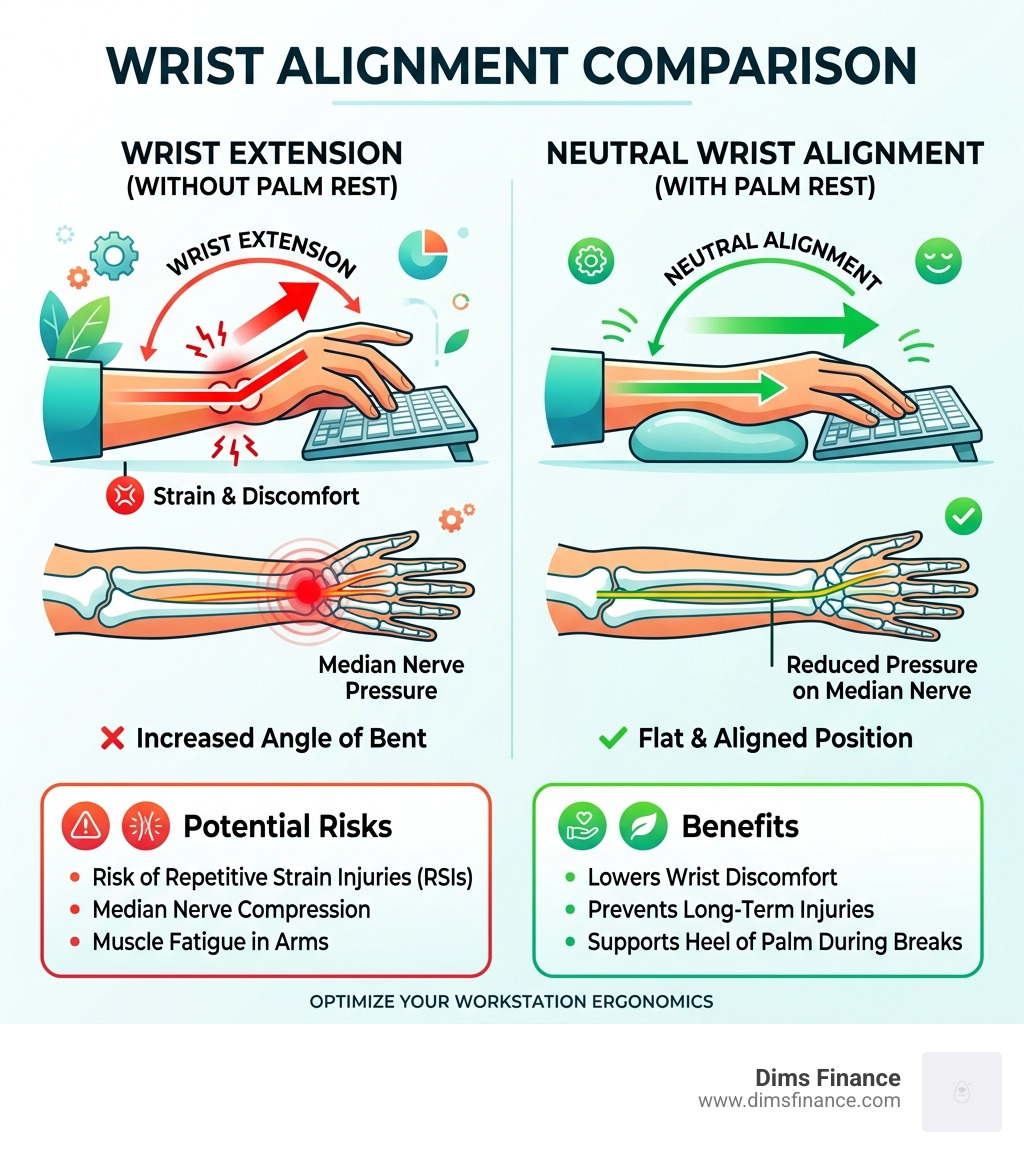
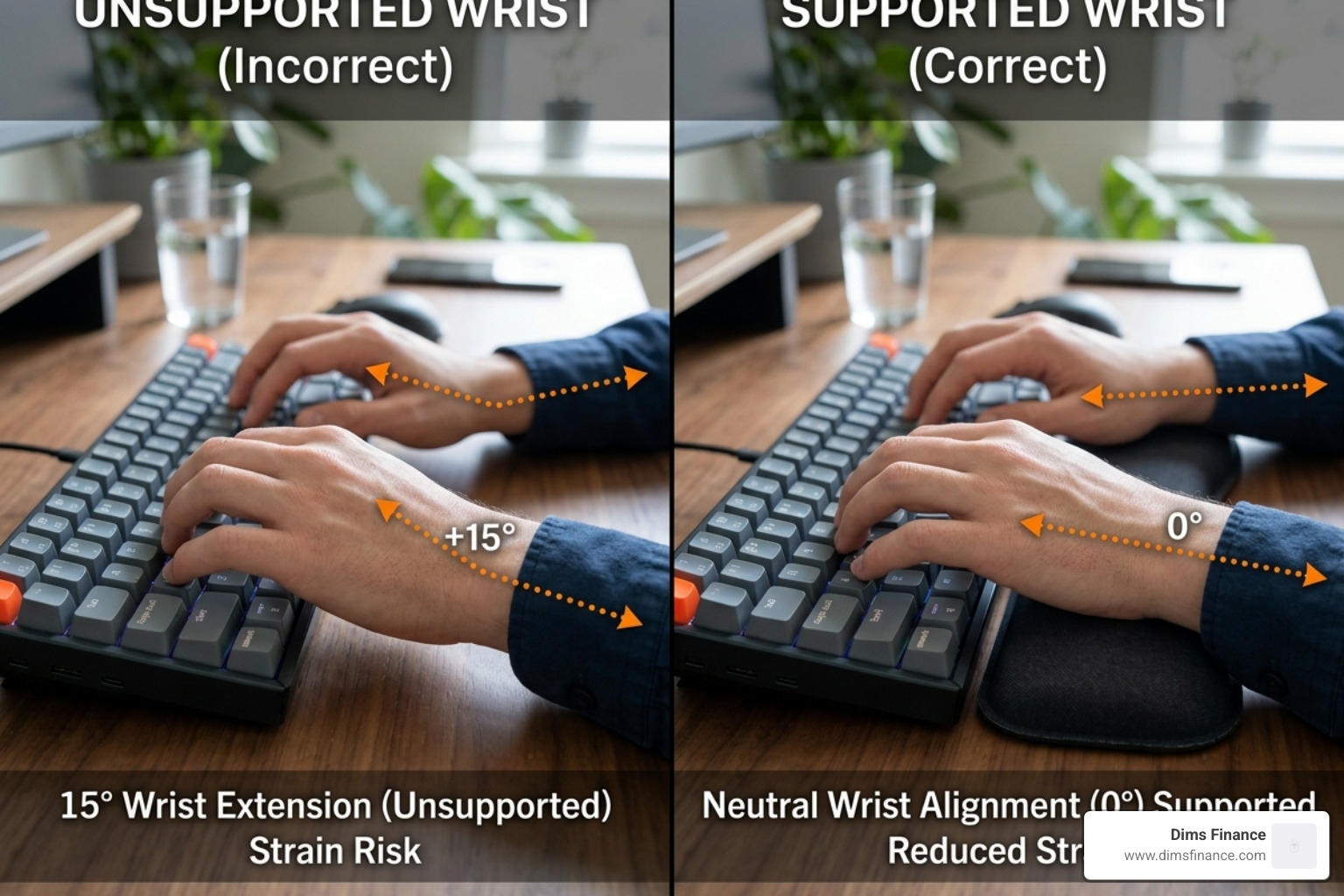
When you type on a standard keyboard without support, your wrists often perform a “bend” known as wrist extension or dorsiflexion. This is where your hands are angled upward relative to your forearms. Research shows that a well-designed support can reduce these harmful extension angles by 10 to 15 degrees. By flattening that angle, you achieve “neutral alignment,” which is the gold standard of ergonomics.
The physiological impact is significant. A 2018 study found that using these supports can specifically reduce fatigue in the biceps brachii muscle during prolonged typing sessions. While it might seem strange that a wrist accessory helps your biceps, it’s all connected; when your wrists are poorly positioned, your entire arm must work harder to stabilize your hands.
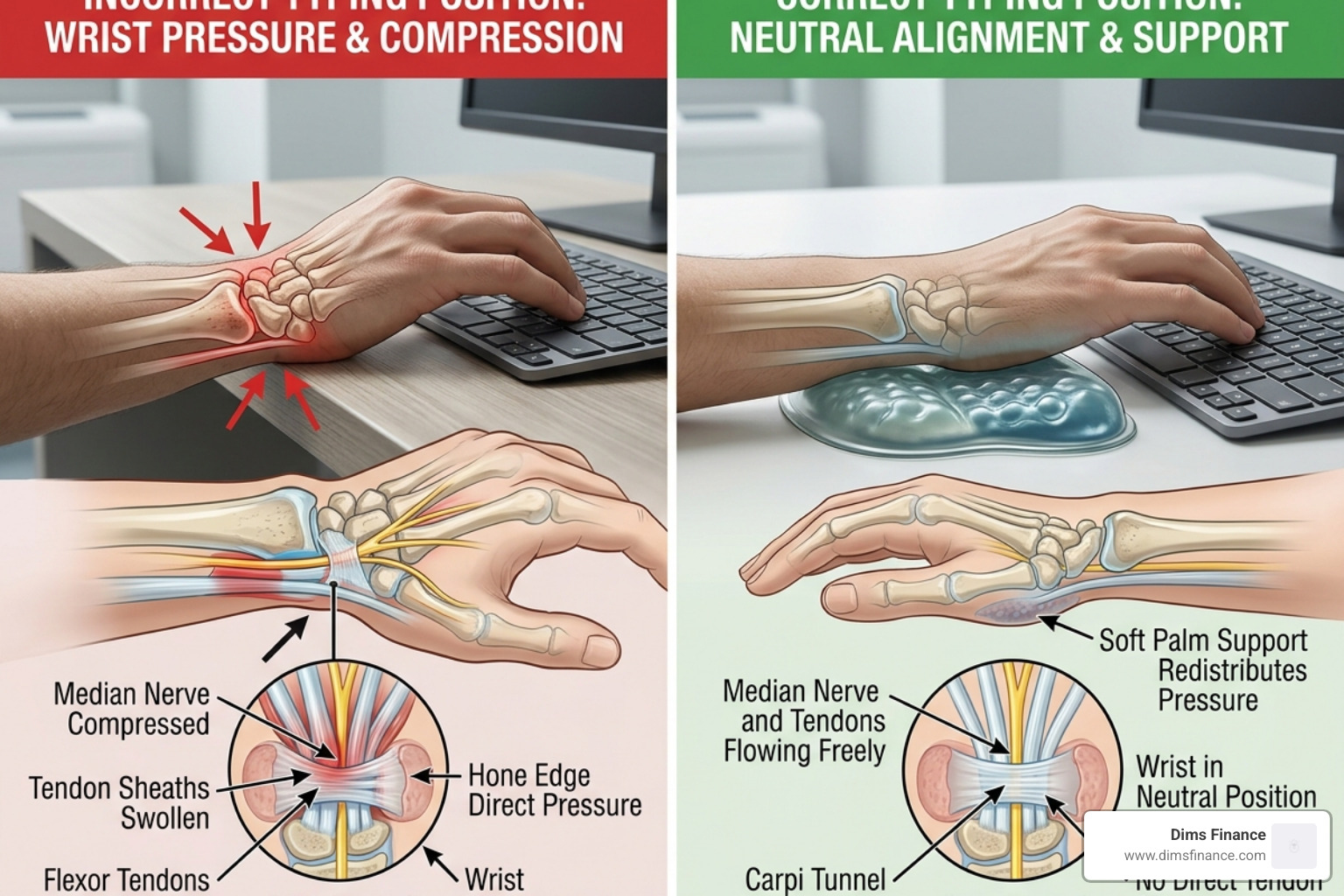
Furthermore, scientific research on wrist rest efficacy suggests that proper use can lead to a 30% reduction in reported wrist discomfort. This is largely because the support prevents the “anchoring” of the wrist against the hard, sharp edge of a desk. When you anchor your wrist, you compress the carpal tunnel and the median nerve. This compression is a primary driver of the tingling and numbness associated with Why Your Current Keyboard Is A Pain In The Wrist/. By moving the pressure point to the fleshy heel of the palm, you maintain better blood circulation and keep that median nerve protected.
Palm Rest vs. Wrist Rest: A Critical Distinction
We need to clear up a massive misconception that even some manufacturers get wrong. Despite the names being used interchangeably, there is a “right” way and a “wrong” way to support your hands.
A wrist rest implies you are resting your actual wrist — the area with the delicate tendons, blue veins, and the carpal tunnel — directly on the pad. According to OSHA guidelines for workstation components, this is actually a recipe for disaster. Pressing the underside of your wrist into a pad can double the internal pressure in the carpal tunnel, potentially leading to tenosynovitis or carpal tunnel syndrome.
A palm rest, however, is designed to support the “heels” or the fleshy base of your palms. This area is much more resilient to contact stress. When you use the Top 10 Wrist Support Pads To Save Your Joints/, the goal is to provide a landing pad for your palms during those micro-breaks between typing bursts.
Maximizing Keyboard Palm Rest Benefits Through Proper Technique
To truly unlock the keyboard palm rest benefits, you have to master “hover typing.” Imagine a concert pianist; they don’t drag their wrists along the piano frame. Their hands float.
When you are actively typing, your hands should ideally hover just above the keys. This allows for a full range of motion and prevents ulnar deviation (bending the wrist sideways toward the pinky finger). The palm rest is your “safety net.” When you stop to read an email or think of your next sentence, you drop the heels of your palms onto the rest.
If you use a Split Keyboard Wrist Relief Top Rated Supports/, this technique is even more vital. Tented or split keyboards often sit higher off the desk, making a matched palm rest essential to prevent your wrists from “dropping” into a steep extension. Always aim for a 90-degree elbow angle with your forearms parallel to the floor.
Material Matters for Keyboard Palm Rest Benefits
Not all supports are created equal. The material you choose impacts both your immediate comfort and the long-term keyboard palm rest benefits.
- Memory Foam: Great for personalized contouring. It absorbs pressure well but can retain heat.
- Cooling Gel: Excellent for those who find their wrists getting “sweaty” during long sessions. It provides a firmer, more immediate bounce-back than foam.
- Hardwood (Walnut/Oak): Popular in the mechanical keyboard community. While it sounds counterintuitive, a firm surface prevents “sinking,” which can inadvertently put pressure back on the wrists.
- Resin and Silicone: These offer a middle ground, providing durability and a unique aesthetic while being easy to clean.
If you are also looking for mouse support, checking out a Soft Landing Top Mouse Pads With Wrist Support For Your Desk/ can help ensure your mousing hand gets the same hypoallergenic and ergonomic treatment as your typing hand.
Choosing the Right Support for Your Setup
The market for these accessories is booming, projected to grow from USD 300 million to USD 450 million by 2033. With so many options, how do you pick? The most important factor is height matching.
If you use a high-profile mechanical keyboard, you need a thicker rest (usually around 0.75 to 1 inch). If you use a low-profile “chiclet” style keyboard, a thick rest will actually force your wrists into a negative angle, which is just as bad as extension.
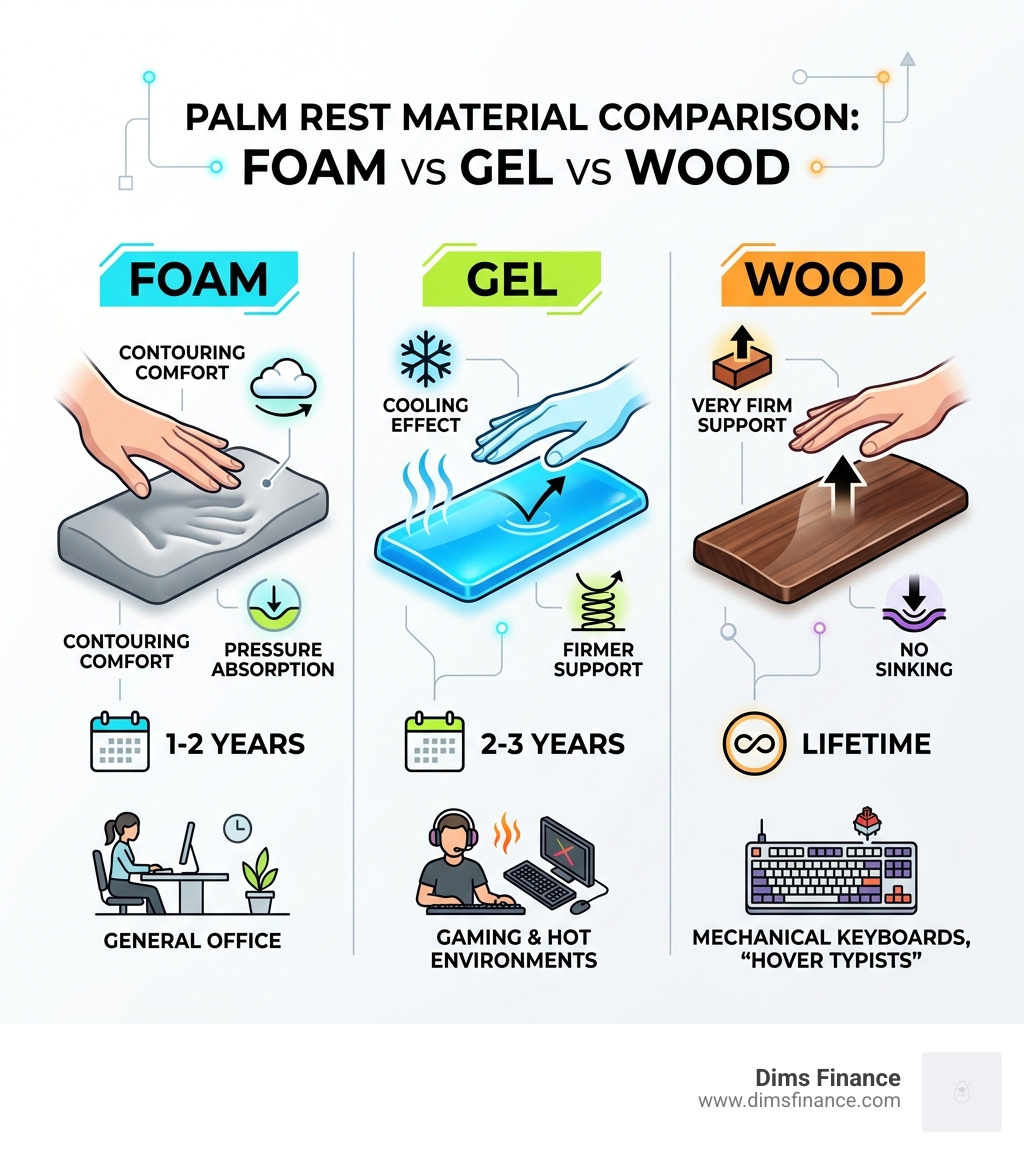
| Material | Support Level | Durability | Best For |
|---|---|---|---|
| Memory Foam | High (Contouring) | 1-2 Years | General office work, comfort seekers |
| Cooling Gel | Medium | 2-3 Years | Hot environments, gamers |
| Hardwood | Very High (Firm) | Lifetime | Mechanical keyboards, “hover” typists |
| Silicone | Medium | 5+ Years | Easy cleaning, durability |
When browsing Your Wrists New Best Friend Top Ergonomic Supports For 2026/, ensure the depth is at least 1.5 inches (3.8 cm). This provides enough surface area so your palms don’t slip off the edge. Also, look for a non-slip backing; a rest that slides around the desk is a frustration you don’t need.
Customizing Your Setup for Keyboard Palm Rest Benefits
A palm rest shouldn’t work in isolation. To get the full ergonomic advantage, look at your entire “workstation ecosystem.”
- Keyboard Tilt: Stop using the retractable feet on the back of your keyboard! This creates a steep upward slope that forces wrist extension. Keep the keyboard flat.
- Desk Height: If your desk is too high, you’ll naturally rest your wrists on the edge to compensate for the weight of your arms. Adjust your chair so your elbows stay at that 90-degree sweet spot.
- Laptop Users: Laptops are ergonomic nightmares because the keyboard and screen are joined. If you must use one, consider a separate Mouse Pad With Wrist Rest Review Comfort For Your Clicker/ and an external keyboard with a palm rest to save your joints.
Avoiding Common Ergonomic Pitfalls
Even with the best gear, bad habits can negate all keyboard palm rest benefits. The most common mistake we see is the “wrist-press.” This happens when a user treats the rest like a pillow for their actual wrist joint while typing.
Other pitfalls to avoid:
- Worn-out Padding: Foam and gel rests aren’t forever. They typically have a replacement cycle of 1-2 years. Once they develop a permanent “dent,” they no longer provide the support needed to maintain a neutral angle.
- Improper Height Matching: If the rest is higher than the keyboard frame, you are creating a new problem. The top of the rest should be flush with the front edge of your keyboard casing.
- Ignoring Skin Irritation: Some cheap materials can cause contact dermatitis. Opt for hypoallergenic fabrics or natural wood if you have sensitive skin.
If you find yourself still struggling with pain despite a good keyboard setup, you might need to look at your mouse. Wrist Relief Is Here With The Best Ergonomic Mouse Pads/ can provide the missing piece of the puzzle.
Frequently Asked Questions about Palm Rests
Do palm rests prevent carpal tunnel syndrome?
While no single tool can “guarantee” prevention, palm rests are a major preventative measure. They work by promoting a neutral wrist position and reducing contact stress. By preventing the compression of the median nerve, they significantly lower the risk factors that lead to carpal tunnel syndrome.
Should my wrists touch the rest while I am actively typing?
No. Your wrists should hover. The rest is for the heels of your palms and should primarily be used during pauses in typing. If you press your wrists into the pad while typing, you restrict the movement of your fingers and increase internal wrist pressure.
How do I choose the correct height for my keyboard type?
Measure the height of your keyboard’s front frame (not the keys). Your palm rest should be almost exactly that height. If you have a mechanical keyboard, you’ll likely need a “High Profile” rest. For slim, Apple-style keyboards, look for a “Slim” or “Low Profile” support.
Conclusion
Investing in your ergonomic setup is one of the smartest “finance” moves you can make. At Dims Finance, we’ve seen how chronic pain can derail a career and lead to mounting medical costs. The keyboard palm rest benefits—from a 30% reduction in discomfort to long-term RSI prevention—make this a high-ROI purchase for anyone who works at a computer.
As we move through 2026, the workplace wellness movement continues to grow. Don’t wait for the “screaming” in your wrists to become a permanent injury. Take the time to align your workstation, master the hover-typing technique, and choose a support that matches your gear.
Ready to transform your desk into a pain-free productivity hub? Explore the best ergonomic office furniture for 2026 and give your wrists the relief they deserve.