
Why Keyboard Wrist Pain Affects More Desk Workers Than You Think
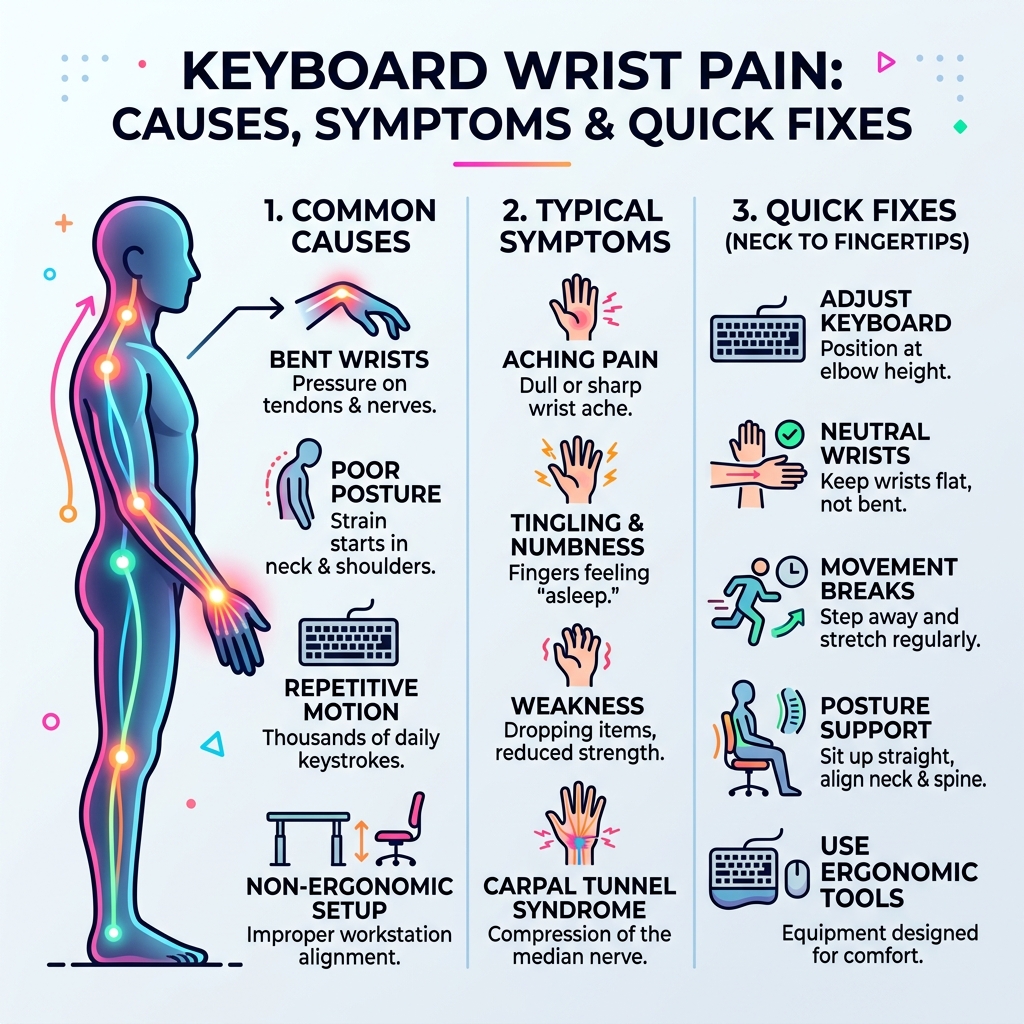
Keyboard wrist pain is soreness, tingling, or aching in the wrist and hand caused by repetitive typing, poor posture, and non-ergonomic workstation setups.
Quick answers:
- Main cause: Holding wrists in a bent or twisted position while typing puts pressure on tendons and nerves
- Most common condition: Carpal tunnel syndrome — compression of the median nerve in the wrist
- Key symptoms: Aching, tingling, numbness, or weakness in the hand and fingers
- Top fixes: Neutral wrist position, keyboard at elbow height, regular movement breaks, ergonomic keyboard
- When to see a doctor: If pain lasts more than 1-2 weeks, keeps returning, or comes with numbness or weakness
Your fingers are flying across the keyboard — emails, reports, spreadsheets. It feels like nothing. But your wrists? They’re keeping score.
The numbers are striking. Six out of ten office workers in the US report wrist pain. Among those with a repetitive strain injury (RSI), over 69% point to their wrists as the source.
And the problem often starts somewhere you wouldn’t expect. Pain in your wrists can actually trace back to tension in your neck or shoulders — like a kink in a garden hose that blocks flow all the way down to your fingertips. Fix the kink upstream, and the downstream pressure eases too.
This guide breaks down exactly what’s happening, what’s making it worse, and what you can do about it.
What Causes Keyboard Wrist Pain?
When we think about keyboard wrist pain, we often blame the act of typing itself. However, research suggests that typing isn’t inherently hazardous; rather, it’s the way we type and the equipment we use that creates the perfect storm for injury. Repetitive keystrokes over an eight-hour workday add up to thousands of micro-impacts. If your joints or soft tissues are already under stress, these repetitions exacerbate underlying issues.
According to the Mayo Clinic, wrist pain can stem from sudden impacts, but for office workers, it is most commonly a result of long-term repetitive stress. We have identified five specific biomechanical risk factors that contribute to this discomfort:
- Ulnar Deviation: This occurs when you bend your wrist outward toward your pinky finger. Standard keyboards often force this position because they are too narrow for the average person’s shoulder span.
- Forearm Pronation: Most of us type with our palms facing flat against the desk. This requires the two bones in the forearm to cross over each other, which increases pressure on the muscles and reduces blood circulation.
- Wrist Extension: This is the “upward bend” of the wrist. If your keyboard has a positive slope (those little plastic feet at the back are popped up), you are likely holding your wrists in extension, which significantly increases pressure within the carpal tunnel.
- High Activation Force: Some keyboards require a lot of “oomph” to register a keypress. Over time, “bottoming out” on heavy keys creates micro-trauma in the fingertips and tendons.
- Mouse Overreach: If you use a full-sized keyboard with a numeric keypad on the right, you have to reach further for your mouse. This puts strain on the shoulder and pulls the wrist out of alignment.

Understanding Carpal Tunnel Syndrome and Typing
One of the most discussed topics in office health is whether typing actually causes carpal tunnel syndrome (CTS). The Mayo Clinic notes that while extensive computer use is often linked to CTS in the public mind, the scientific evidence is more nuanced. Mouse use may actually be more closely linked to CTS than keyboard use.
Regardless of the direct cause, CTS occurs when the median nerve—which runs from your forearm through a narrow passageway in your wrist (the carpal tunnel)—becomes compressed. This compression is often due to swelling of the surrounding tendons.
According to the NHS, common symptoms include:
- A dull ache or pain in the hand, fingers, or arm.
- Numbness or a “pins and needles” sensation.
- A weak thumb or difficulty gripping objects (like a coffee mug).
- Symptoms that worsen at night or wake you from sleep.
If you find yourself “shaking out” your hands in the morning to get the feeling back, your carpal tunnel may be under significant stress.
Upstream Posture and Keyboard Wrist Pain
We often focus solely on where it hurts, but the human body is an interconnected chain. As MedlinePlus points out, wrist pain can be a secondary symptom of issues occurring in the neck, shoulders, or elbows.
Think of your nerves like electrical wires. If there is a “pinch” at the neck because you are hunching forward to see your monitor, the signal traveling down to your wrist is already compromised. Similarly, shrugging your shoulders or keeping your elbows too far away from your body creates tension that travels down the arm. To solve keyboard wrist pain, we must look at the whole body, not just the hands.
Ergonomic Fixes for Your Workstation
Prevention is the most effective “cure” for repetitive strain injuries. Creating a science-based workstation helps keep your body in a neutral, relaxed state. At Dims Finance, we emphasize that small, consistent changes are often more effective than expensive, one-time overhauls.
The goal is a “neutral” posture. This means:
- Elbow Height: Your keyboard and mouse should be at a height where your elbows are bent at roughly a 90-degree angle, tucked close to your sides.
- Monitor Level: Your eyes should be level with the top third of your screen to prevent neck strain.
- Feet Flat: Your feet should be flat on the floor (or a footrest) to support your lower back.
- Furniture: High-quality Office Furniture is an investment in your long-term productivity.
Choosing the Right Keyboard for Wrist Pain Relief
If you are already experiencing discomfort, a standard flat keyboard might be working against you. Modern Desk Accessories offer several features designed to reduce strain:
- Split Keyboards: These allow you to separate the left and right halves of the keyboard. This keeps your wrists straight (avoiding ulnar deviation) by aligning the keys with your shoulders.
- Tenting: This elevates the thumb side of the keyboard. By tilting the keyboard between 5 and 30 degrees, you reduce forearm pronation and allow your hands to rest in a more natural, “handshake” position.
- Negative Slope: Contrary to popular belief, the back of your keyboard should often be lower than the front. This prevents the upward wrist extension that closes off the carpal tunnel.
- Mechanical Switches: Opting for low-force mechanical switches (requiring only 35g to 45g of force) can prevent the fatigue that comes from “heavy” keys.
Mouse Placement and Key Force
The Cleveland Clinic highlights that the mouse is often a hidden culprit in keyboard wrist pain. If your keyboard is too wide, your mouse sits too far to the right, forcing your shoulder into an awkward rotation.
Consider a “tenkeyless” keyboard (one without the number pad) to bring the mouse closer to your center. If you do a lot of data entry, a separate, movable numeric keypad allows you to place the numbers on the left or tucked away when not in use. Additionally, focus on a light touch. We often “bash” the keys when we are stressed, but training yourself to use minimal force can significantly reduce the impact on your finger joints.
Exercises and Habits to Prevent Injury
Even with the best equipment, the human body wasn’t designed to sit still for eight hours. Movement is medicine. We recommend the “30-minute rule”: every half hour, take a 30-second “micro-break” to stand, stretch, and reset your posture.
To help you manage your time, Productivity Software can provide automated reminders to move. Research shows that frequent, short breaks are far more effective at preventing RSI than one long break in the middle of the day.
| Feature | Frequent Micro-Breaks | Long Infrequent Breaks |
|---|---|---|
| Muscle Recovery | Continuous; prevents lactic acid buildup | Intermittent; muscles fatigue between breaks |
| Circulation | Stays high; keeps nerves nourished | Drops during long sitting sessions |
| Mental Focus | Refreshed every 30-60 minutes | Declines significantly before the break |
| RSI Risk | Significantly Lower | Higher due to static loading |
Daily Stretches to Relieve Keyboard Wrist Pain
Incorporating specific stretches into your day can help glide the tendons and nerves through the carpal tunnel, preventing them from getting “stuck” or inflamed. The Cleveland Clinic and other experts recommend the following:
- The Wave: Start with your hands in front of you, fingers pointing up. Slowly bend your hands down so fingers point to the floor, then back up. Repeat smoothly.
- Wrist Rotations: Gently roll your wrists in circles, clockwise and then counter-clockwise.
- Finger Fans: Make a tight fist, then splay your fingers out as wide as they can go.
- The Fist Open-Close: Repeatedly make a fist and then straighten your fingers completely. This helps “pump” fluid out of the hand.
- Forearm Flexor Stretch: Extend one arm out in front, palm up. Use your other hand to gently pull your fingers back toward your body until you feel a stretch in the forearm.
Home Remedies and Professional Treatment
If you are already feeling a “pinch,” there are several home-based strategies to manage mild keyboard wrist pain.
- RICE Method: Rest, Ice, Compression, and Elevation. Applying an ice pack for 10-15 minutes every hour during an acute flare-up can reduce swelling.
- Night Splints: Many people sleep with their wrists curled tightly. Wearing a neutral wrist splint at night keeps the carpal tunnel open and allows the median nerve to recover while you sleep.
- OTC Anti-inflammatories: Short-term use of ibuprofen or paracetamol can help manage pain, but remember these mask the symptoms rather than fixing the cause.
- Heat Therapy: For chronic stiffness (rather than acute swelling), a warm soak or a heating pad can improve blood flow to the area.
When to Seek Medical Help
While ergonomics and stretching can solve many issues, some symptoms require professional intervention. MedlinePlus suggests contacting a healthcare provider if:
- The pain persists for more than two weeks despite home treatment.
- You experience persistent numbness or “deadness” in the fingers.
- You are dropping things or have a noticeably weak grip.
- The pain is accompanied by a fever (which could indicate an infection).
- Your wrist appears misshapen or is significantly swollen.
A physical therapist can provide a personalized assessment, identifying whether your pain is coming from your wrist, your elbow, or even your neck.
Frequently Asked Questions about Keyboard Wrist Pain
Can typing all day cause permanent carpal tunnel?
While typing itself is rarely the sole cause, long-term repetitive strain in poor positions can lead to chronic nerve compression. If left untreated, the median nerve can suffer permanent damage, leading to a loss of sensation and muscle wasting at the base of the thumb. Early intervention with ergonomic changes usually prevents this.
How do I know if my wrist pain is from typing or arthritis?
Arthritis typically involves joint stiffness (especially in the morning) and swelling in the knuckles or the base of the thumb. Typing-related pain (RSI) usually flares up during or after the activity and often involves tingling or “electric” sensations associated with nerves. A doctor can use X-rays or nerve conduction tests to be sure.
Do wrist rests actually prevent injury?
Wrist rests are a bit of a misnomer. You should never actually rest your wrists on them while typing, as this puts direct pressure on the carpal tunnel. Instead, they should be used to support the “heel” of your palm during breaks. Your wrists should ideally “float” in a neutral position while you are actively typing.
Conclusion
At Dims Finance, we believe that your work shouldn’t hurt. Keyboard wrist pain is a signal from your body that your current setup or habits need an adjustment. By implementing science-based ergonomic fixes—like neutral wrist alignment, split keyboards, and regular movement snacks—you can significantly reduce your risk of Repetitive Strain Injuries.
Don’t wait for the pain to become a permanent fixture of your workday. Start with small changes today: drop your keyboard height, un-pop those keyboard feet, and take a stretch break every 30 minutes. Your wrists will thank you.
For more tips on optimizing your workspace, check out our guides on desk accessories and ergonomic setups.