
Why Wrist Pain From Typing Is a Problem You Shouldn’t Ignore
Wrist pain typing solutions are something millions of desk workers need but rarely act on fast enough. If your wrists ache after a long day at the keyboard, you’re not alone — and the fix is often simpler than you think.
Here are the 7 proven solutions covered in this guide:
- Master the neutral wrist position — keep wrists flat, not bent up or down
- Float your hands above the keys and use a light touch
- Switch to ergonomic hardware — split keyboards and vertical mice reduce strain significantly
- Optimize your workstation — chair height, monitor level, and elbow angle all matter
- Take micro-breaks every 30 minutes — short, frequent breaks beat one long rest
- Do targeted wrist stretches and exercises — finger flexion, wrist circles, and nerve gliding help
- Run simple self-tests at home — Phalen’s maneuver and Tinel’s sign can catch problems early
Typing feels harmless. You’re just pressing keys. But your body tells a different story after 8,000+ keystrokes a day.
The pain you feel in your wrist often doesn’t start there. Think of your body like a garden hose. A kink anywhere along the line — your neck, shoulder, or elbow — reduces flow and creates pressure downstream at your wrist. Poor posture, awkward angles, and zero breaks compound the problem fast.
Left unchecked, that dull ache can develop into conditions like carpal tunnel syndrome, tendinitis, or other repetitive strain injuries (RSI) that affect your ability to work — and live — comfortably.
The good news? Most wrist pain from typing responds well to simple, consistent changes. No surgery required.

1. Master the Neutral Wrist Position and Technique
The foundation of any wrist pain typing solutions strategy is the “neutral position.” Most of us type with our wrists extended upward (cocked back) or deviated to the side. This is a recipe for disaster.
When your wrist extension is greater than 20-30°, it drastically increases muscle exertion on the top side of your forearm. This leads to earlier fatigue and tissue irritation. Scientific research on avoiding typing troubles suggests that keeping your wrists straight — as if they are a natural extension of your forearms — is the single most important adjustment you can make.
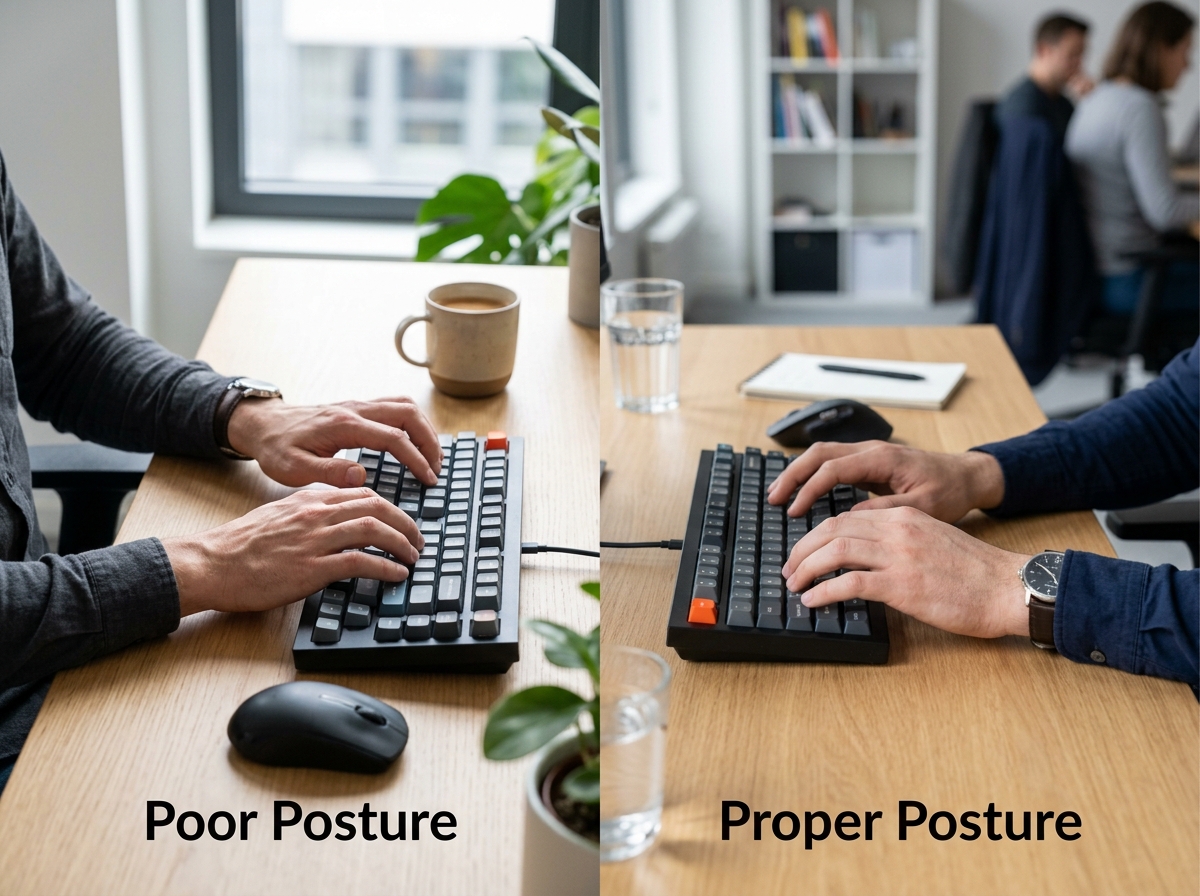
We often see people resting the heels of their hands on the desk while reaching for keys. This creates “ulnar deviation,” where the hands flare outward toward the pinky side. This pinches the nerves and tendons on the outer wrist. By mastering the neutral wrist position for your keyboard setup, you ensure that the carpal tunnel remains open and under the least amount of pressure possible.
Floating Hands and Light Touch
Think of your hands like a concert pianist’s. They don’t drag their wrists across the piano; they float. When you “hover” your hands above the keyboard, you use your whole arm to move, rather than straining the tiny tendons in your fingers and wrists.
This technique helps flush out metabolic waste and prevents static loading. Furthermore, modern keyboards require very little force. If you find yourself “hammering” the keys, you’re sending unnecessary shockwaves into your joints. A light, rhythmic touch is much more sustainable for long-term health. If your hands feel like they’re failing, you might be dealing with a keyboard wrist injury when your hands go on strike, which is usually a sign that your technique needs an overhaul.
Avoiding Hard Desk Edges
One of the silent killers of wrist health is “contact stress.” When you rest your wrists on the sharp, hard edge of a desk, you are essentially creating a tourniquet for your blood flow and nerves. This pressure point can lead to numbness and tingling over time.
If you must rest your hands, ensure you are using ergonomic wrist rests for typing. However, a word of caution: these should support your palms, not your actual wrists. Pressing down on the soft underside of the wrist can actually increase pressure on the median nerve, worsening carpal tunnel symptoms.
2. Upgrade to Ergonomic Hardware Solutions
Sometimes, no matter how hard we try to maintain good form, our equipment fights against us. Standard flat keyboards and traditional mice force our bodies into unnatural positions like forearm pronation (palms facing down), which twists the two bones in the forearm and tightens the surrounding muscles.
Investing in hardware designed for human biology can be a game-changer. You can find many of these tools in our guide to wireless-and-painless-the-best-ergonomic-keyboards-for-mac-and-pc.
Finding the Best RSI Mouse for Wrist Pain Typing Solutions
The standard mouse is a major culprit for right-sided wrist pain. To use it, you have to twist your forearm flat. A vertical mouse, however, keeps your hand in a “handshake” position. This neutralizes the forearm and takes the pressure off the ulnar nerve.
If moving your whole arm is painful, trackball options are another excellent choice. They allow you to navigate the screen using only your thumb or fingers, keeping the wrist completely stationary. We have broken down the top choices in our article on wrist management: finding the best RSI mouse for pain-free scrolling.
Choosing Keyboards as Wrist Pain Typing Solutions
A split keyboard is perhaps the most effective hardware upgrade. By separating the two halves of the keyboard, you can keep your hands at shoulder-width, preventing that hunched-over “T-Rex” posture.
- Tenting: Many ergonomic keyboards allow you to “tent” the middle, raising it so your hands sit at an angle. This reduces pronation.
- Negative Tilt: Using a keyboard tray that tilts the back of the keyboard downward helps maintain that elusive neutral wrist position.
- Ortholinear Layouts: These keyboards align keys in straight vertical columns, reducing the awkward finger travel required by traditional staggered layouts.
For a deep dive into these features, check out our guide on ergonomic keyboard and mouse setup for enhanced comfort.
3. Optimize Workstation Ergonomics and Posture
You could have the most expensive keyboard in the world, but if you’re slouching on a couch, your wrists will still pay the price. Posture is a chain reaction. If your lower back isn’t supported, your shoulders roll forward. If your shoulders roll forward, your elbows flare out. If your elbows flare out, your wrists bend.
| Feature | Standard Setup (The “Ouch”) | Ergonomic Setup (The “Ahhh”) |
|---|---|---|
| Elbow Angle | Less than 90 degrees (reaching) | 90 to 110 degrees (relaxed) |
| Monitor Height | Looking down at a laptop | Top of screen at eye level |
| Wrist Position | Cocked back or resting on desk | Straight and floating |
| Feet Position | Dangling or tucked under chair | Flat on the floor or footrest |
Maintaining a proper ergonomic keyboard and mouse setup ensures that your body stays in its strongest, most efficient alignment. When your monitor is at the correct level, you avoid the “neck kinks” that lead to the garden hose effect we mentioned earlier.
The Impact of Sitting vs. Standing
Static loading — staying in one position for too long — is the enemy of circulation. This is why we often recommend sit-stand desks. Switching positions every hour encourages blood flow and changes the muscle groups being used.
However, standing isn’t a magic bullet. If you stand but still hunch over your keyboard, you’re just swapping back pain for wrist pain. Ensure your ergonomic keyboard and mouse setups for maximum comfort are adjusted every time you change the desk height.
4. Implement Stretches, Breaks, and Self-Testing
We often forget that typing is an athletic activity. Office workers perform roughly 8,000 to 11,000 keystrokes a day. To put that in perspective, professional esports players perform 10-15 movements per second! While we might not be playing for a championship, the repetitive strain is real.
Learning how employees can stop repetitive strain injuries before they start usually comes down to one word: breaks. We recommend the 20-20-20 rule: every 20 minutes, look 20 feet away for 20 seconds, and give your hands a gentle shake.
Essential Wrist Exercises and Stretches
Stretching isn’t just about flexibility; it’s about “nerve gliding.” This helps the nerves move smoothly through the tunnels in your wrist and elbow without getting snagged on inflamed tissue.
- Wrist Circles: Gently rotate your wrists in both directions to improve mobility.
- Finger Flexion/Extension: Make a tight fist, then splay your fingers as wide as possible.
- The Prayer Stretch: Place your palms together in front of your chest and slowly lower them toward your waist until you feel a stretch.
- Wrist Deviation: Gently tilt your hand toward your thumb, then toward your pinky.
Clinical Self-Tests for Early Detection
How do you know if your ache is just fatigue or something more serious? You can perform these clinical self-tests at home to check for early signs of carpal tunnel syndrome:
- Phalen’s Maneuver: Press the backs of your hands together (fingers pointing down) for 60 seconds. If you feel tingling or numbness in your thumb, index, or middle finger, it’s a positive sign for nerve compression.
- Tinel’s Sign: Use your finger to lighty tap the middle of your inner wrist. A “shock” sensation or tingling suggests the nerve is irritated.
- Durkan Compression Test: Apply firm pressure with your thumb to the center of your wrist for 30 seconds. Numbness or pain indicates potential carpal tunnel issues.
If you “fail” these tests, it’s time to take your wrist pain typing solutions more seriously and perhaps consult a professional.
Frequently Asked Questions about Wrist Pain Typing Solutions
When should I see a doctor for persistent wrist pain?
You should seek medical advice if the pain is severe, keeps you awake at night, or if you notice a significant loss of grip strength (like dropping your coffee mug). Persistent numbness that doesn’t go away after a break is also a red flag. Modern treatments like UltraGuideCTR (a minimally invasive carpal tunnel release) allow patients to return to normal activities in just 3-5 days, which is much faster than traditional surgery. Physical therapy is also a fantastic first step for non-invasive recovery.
Are ergonomic keyboards worth the investment for office workers?
Absolutely. While there is an adaptation period (it can take 1-2 weeks to get back to full speed on a split or ortholinear keyboard), the long-term health benefits far outweigh the temporary frustration. Think of it as an insurance policy for your career. Preventing an RSI today is much cheaper and less painful than treating one five years from now.
How does poor posture contribute to wrist issues?
It’s the “garden hose” effect! When you slouch, your shoulders roll forward, which can compress the nerves in your neck and chest (thoracic outlet). This compression limits the signals and blood flow reaching your hands. Often, “wrist pain” is actually a symptom of a problem located much higher up the arm.
Conclusion
At Dims Finance, we believe that your work shouldn’t hurt. Achieving a pain-free workstation isn’t about one single “magic” product; it’s about a holistic approach to workplace wellness. By combining the right hardware, proper posture, and proactive habits like stretching and taking breaks, you can keep your hands healthy for decades to come.
Don’t wait for the tingling to become a permanent fixture of your workday. Start implementing these wrist pain typing solutions today and give your body the support it deserves.
Explore our full range of ergonomic desk accessories to find the tools you need to build your perfect, pain-free setup.