Why an Office Ergonomics RSI Guide Could Save You From Chronic Pain
An office ergonomics rsi guide helps you set up your workstation — chair, desk, monitor, keyboard, and mouse — so your body stays in a neutral, low-stress position throughout the day, reducing your risk of developing a Repetitive Strain Injury (RSI).
Quick answer: The core steps to prevent RSI at your desk:
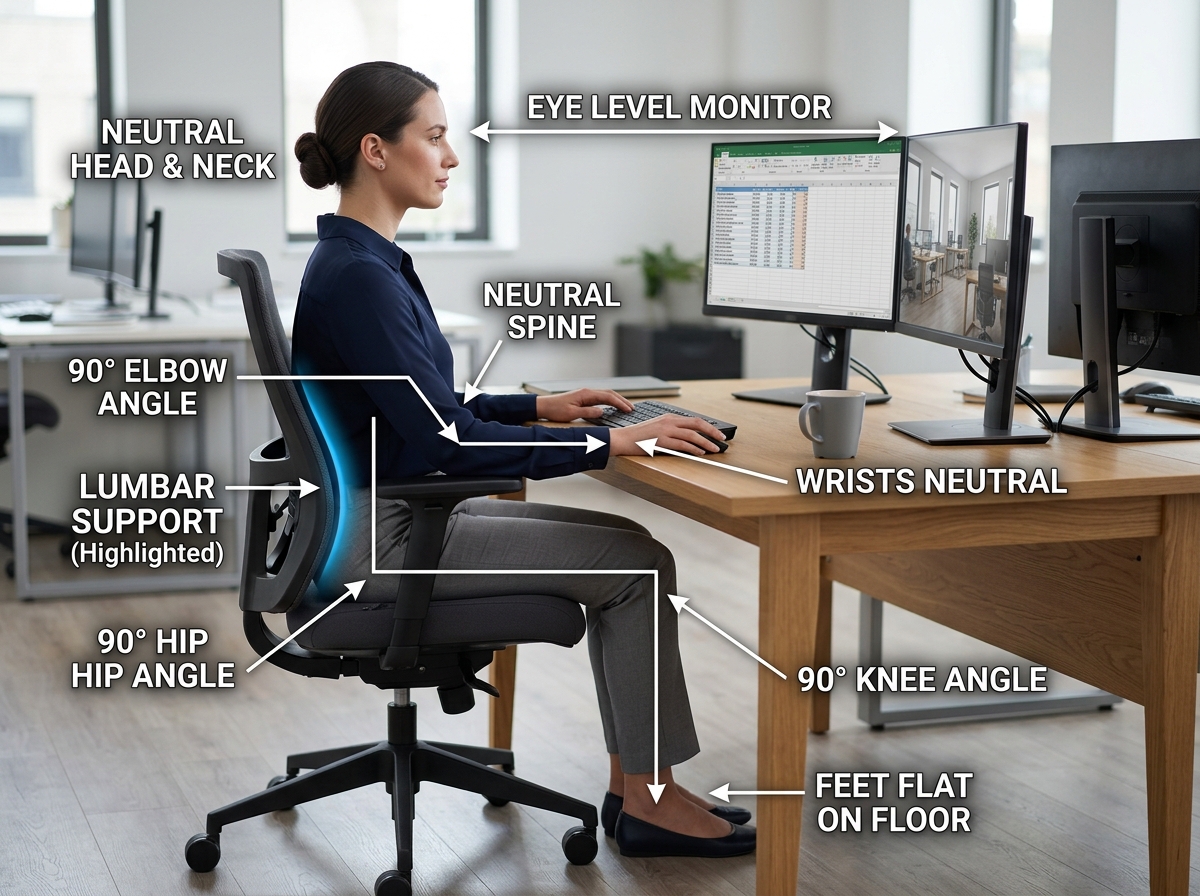
- Chair – Feet flat on the floor, knees at 90°, lumbar support in place
- Desk – Forearms parallel to the floor, elbows at roughly 90°
- Monitor – Top of screen at or just below eye level, about an arm’s length away
- Keyboard – Directly in front of you, wrists straight (not bent up or down)
- Mouse – Right next to the keyboard, same surface height
- Breaks – Move for 2-5 minutes every 30-60 minutes
Here’s the uncomfortable truth: most desk workers don’t think about ergonomics until something already hurts.
Over 450,000 UK workers currently live with upper limb RSI, and an estimated 5 million working days are lost every year because of it. That’s not a small problem.
RSI doesn’t strike suddenly. It builds up slowly from thousands of tiny repetitive movements — typing, clicking, scrolling — done in slightly wrong positions, day after day. By the time most people notice the tingling in their fingers or the ache in their wrists, the damage has been building for months.
The good news? The majority of RSI cases are preventable. Small, deliberate changes to your workspace and daily habits can make a significant difference — and you don’t need to spend a fortune to make them.
Understanding Repetitive Strain Injuries (RSIs) in the Modern Workplace
When we talk about Repetitive Strain Injuries (RSIs), we are describing a family of conditions that affect the muscles, nerves, and tendons. These are often categorized as musculoskeletal disorders or cumulative trauma disorders. Unlike a broken bone that happens in a split second, an RSI is the result of “micro-trauma”—tiny bits of wear and tear that add up over weeks, months, or years.
In an office setting, these injuries usually target the upper body: the neck, shoulders, elbows, wrists, and hands. Common conditions include:
- Tendonitis: Inflammation of the tendons that connect muscle to bone.
- Carpal Tunnel Syndrome: Compression of the median nerve in the wrist.
- Cubital Tunnel Syndrome: Pressure on the ulnar nerve at the elbow (often from leaning on hard surfaces).
- De Quervain’s Disease: Painful inflammation of tendons on the thumb side of the wrist.
The Office Ergonomics | MSD Prevention Guideline for Ontario highlights that these issues stem from three main culprits: repetition, awkward postures, and static load (holding one position for too long). When we force our bodies to adapt to a poorly designed workspace, our soft tissues eventually pay the price.
Identifying Early Warning Signs of RSI
One of the biggest mistakes we see is people ignoring the “whispers” of their body until they become “screams.” RSI symptoms often start subtly. You might feel a dull ache at the end of a long Tuesday, or perhaps your hands feel unusually cold.
Keep a close eye out for these early red flags:
- Grip weakness: Finding it harder to open jars or hold a heavy coffee mug.
- Stiffness: A feeling of “tightness” in the hands or wrists when you first start work.
- Tingling or Numbness: That “pins and needles” sensation, especially in the thumb and first two fingers.
- Burning sensations: A localized heat or “zinging” feeling in the forearm or wrist.
If your hands feel like they are “going on strike,” it is time to take action. You can read more about identifying these specific sensations in our guide on keyboard-wrist-injury-when-your-hands-go-on-strike/.
Common Causes and Risk Factors
Why is this happening to so many of us? The statistics are staggering: 1 in 50 UK workers has reported an RSI condition. The modern workplace is a perfect storm for these injuries.
The primary risk factors include:
- Repetitive Tasks: Typing 60 words per minute for eight hours equals thousands of keystrokes.
- Awkward Postures: Reaching too far for a mouse or hunching over a laptop.
- Static Load: Sitting perfectly still for hours causes muscles to fatigue because blood flow is restricted.
- Excessive Force: “Hammering” on the keys or gripping the mouse too tightly.
When these factors combine, the body can’t repair the micro-damage faster than it’s being created. This is why a comprehensive office ergonomics rsi guide focuses on neutralizing these risks before they lead to chronic pain.
Step-by-Step Office Ergonomics RSI Guide for Your Workstation
Setting up an ergonomic workstation is all about finding your “neutral posture.” This is the position where your body is under the least amount of stress. Think of it as the “path of least resistance” for your joints.
The Foundation: Your Chair
Everything starts with the chair. If your base is wrong, your neck and wrists will try to compensate, leading to a domino effect of pain.
- Feet Flat: Your feet should be flat on the floor. If they aren’t, use a footrest. This takes the pressure off your lower back.
- The 90-Degree Rule: Your knees should be at a 90-degree angle, with a 2-4 inch gap between the back of your knees and the seat pan.
- Lumbar Support: Your chair must support the natural curve of your lower spine. If it doesn’t, a rolled-up towel can work in a pinch. For long-term health, we recommend looking into office-chairs-with-lumbar-support/.
Optimizing Your Monitor and Desk for RSI Prevention
The “body follows the eyes.” If your monitor is too low, you will slouch. If it’s too far away, you will crane your neck forward (the dreaded “turtle neck”).
- Eye Level: The top third of your screen should be at eye level. This keeps your neck in a neutral, upright position.
- Arm’s Length: Your monitor should be about 20 to 40 inches away—roughly an arm’s length.
- Glare Reduction: Position your screen perpendicular to windows to avoid glare, which causes you to squint and lean into awkward positions.
- Height Adjustment: If your monitor isn’t adjustable, use monitor-stands-that-improve-posture-and-health/ to bring it to the correct height.
Mastering the Ergonomic Keyboard and Mouse Setup
This is where most RSIs are won or lost. Your wrists should never be bent up, down, or to the sides while you work.
- Elbow Height: Your keyboard should be at a height where your elbows are at a 90-degree angle and your forearms are parallel to the floor.
- The Neutral Wrist: Aim for a straight line from your forearm to your hand. Avoid “planting” your wrists on a hard desk edge, which creates contact stress.
- Proximity: Keep your mouse as close to the keyboard as possible. Reaching out to the side puts unnecessary strain on your shoulder and rotator cuff.
- Advanced Tools: Consider a split keyboard to keep your shoulders open or a vertical mouse to prevent forearm twisting. For a deep dive, check out our resource on mastering-the-neutral-wrist-position-for-your-keyboard-setup/.
Essential Tools and Habits to Reduce RSI Risk
Sometimes, standard office equipment just doesn’t cut it for the human frame. Investing in a few key tools can drastically lower your risk profile.
| Tool | Standard Version | Ergonomic Benefit |
|---|---|---|
| Keyboard | Flat/Fixed | Split/Tented: Keeps wrists straight and shoulders open. |
| Mouse | Horizontal | Vertical/Trackball: Reduces forearm pronation and wrist movement. |
| Desk | Fixed Height | Sit-Stand: Allows for postural variation throughout the day. |
| Document Holder | Flat on desk | In-line holder: Keeps documents at eye level to prevent neck twisting. |
If you are working from home, a dedicated adjustable-standing-desks-for-work-from-home/ can be a game-changer, allowing you to alternate between sitting and standing every 30 minutes.
The Role of Movement and Stretching in an Office Ergonomics RSI Guide
Even the most perfect ergonomic setup can’t protect you if you stay frozen in place. Movement is medicine for your joints. The Office ergonomics: Your how-to guide from the Mayo Clinic emphasizes that shifting your position is just as important as the chair you sit in.
We recommend three types of breaks:
- Micro-breaks (Every 20-30 mins): 30 seconds to shake out your hands and look 20 feet away (the 20-20-20 rule).
- Meso-breaks (Every 60 mins): 5 minutes to stand up, stretch your chest, and do some shoulder blade squeezes.
- Macro-breaks (Lunch): At least 30 minutes away from your screen to reset your system.
Try this: Nerve Gliding. Gently extend your arm out to the side, palm up, and tilt your head away from that arm. This helps keep the nerves in your arm sliding smoothly through their pathways, preventing the “stickiness” that leads to carpal tunnel symptoms.
Lifestyle Factors for Joint and Hand Health
Ergonomics doesn’t end when you log off. Your overall health plays a massive role in how resilient your tendons and nerves are.
- Hydration: Tendons are made largely of water. Dehydration makes them less elastic and more prone to inflammation.
- Sleep Quality: This is when your body repairs the micro-trauma from the day. Poor sleep equals poor recovery.
- Core Strength: A strong core supports your spine, making it easier to maintain good posture without fatiguing.
- Stress Management: High stress levels cause us to tense our muscles (especially in the neck and shoulders), which exacerbates RSI symptoms.
Employer Responsibilities and the Business Case for Ergonomics
If you are a business owner or manager, ergonomics isn’t just a “nice to have”—it is a strategic investment. The ROI on ergonomic interventions is often massive, seen through reduced absenteeism, lower insurance premiums, and higher employee morale.
In many jurisdictions, employers have a legal obligation to provide a safe working environment. This includes making “reasonable adjustments” for employees who develop RSIs. A proactive approach, such as using an Ergonomic Checklist for Office Workers, can help identify hazards before they turn into costly workers’ compensation claims.
Adapting the Office Ergonomics RSI Guide for Remote Work
The shift to remote work has seen a spike in RSI cases, often because people are working from couches, kitchen stools, or beds. If you are working from home, you need to be your own “facilities manager.”
- Laptop Risers: Never work directly on a laptop for hours. The “screen-attached-to-keyboard” design is inherently un-ergonomic. Use a riser to bring the screen to eye level and connect an external keyboard and mouse.
- Dedicated Space: Even a small corner with a proper chair is better than a “makeshift” setup on the sofa.
- Home Office Audits: Regularly check your setup against the neutral posture rules. For those starting from scratch, we have a list of the best-ergonomic-office-chairs-for-home-use/ to get you started.
Frequently Asked Questions about RSI Prevention
What are the first signs of RSI I should look for?
The very first signs are usually “fleeting” discomfort. You might feel a slight tingling in your fingers after a long typing session, or a dull ache in your forearm that goes away overnight. If you notice you are frequently rubbing your wrists or “shaking out” your hands, your body is sending you a warning signal. Don’t wait for the pain to become constant before you adjust your setup.
How often should I take breaks to prevent RSI?
We recommend the “30-30-30” approach: every 30 minutes, take a 30-second break to look 30 feet away and move your hands. Additionally, aim for a 5-minute movement break every hour. Standing up to take a phone call or walking to get water are easy ways to build this into your routine.
Can I prevent RSI while working exclusively on a laptop?
It is very difficult to maintain good ergonomics using only a laptop because if the screen is at the right height, the keyboard is too high; if the keyboard is at the right height, the screen is too low. The best solution is to use a laptop riser (or a stack of books) to lift the screen and use an external keyboard and mouse. This allows you to separate the two components and place them at their respective ergonomic heights.
Conclusion
At Dims Finance, we believe that your work shouldn’t hurt. By following this office ergonomics rsi guide, you are taking a science-based approach to protecting your most valuable tools: your hands and your health.
Preventing RSI isn’t about one big change; it’s about a dozen small ones. It’s about the height of your chair, the angle of your wrists, and the frequency of your breaks. Whether you are an employer looking to protect your team or a freelancer working from a home office, being proactive is always cheaper and more effective than seeking a cure later.
Ready to upgrade your comfort? Explore our curated list of ergonomic-desk-accessories-for-comfort/ and start building a workspace that supports your well-being and your productivity. Your future self—and your wrists—will thank you.