Your Wrists Are Paying the Price — Here’s How to Fix It
The best comfortable mouse for work depends on your hand size, how long you type each day, and whether you already have wrist pain. Here’s a quick look at the top options:
| Mouse Type | Best For | Top Pick |
|---|---|---|
| Vertical | Wrist pain, RSI prevention | Logitech MX Vertical |
| Trackball | No wrist movement, small desks | Logitech MX Ergo S |
| Traditional ergonomic | All-around comfort + performance | Logitech MX Master 3S / 4 |
| Budget vertical | Cost-conscious users | TeckNet Rechargeable Ergonomic Vertical |
If you use a computer for hours every day, your mouse is working against you — and you may not even realize it.
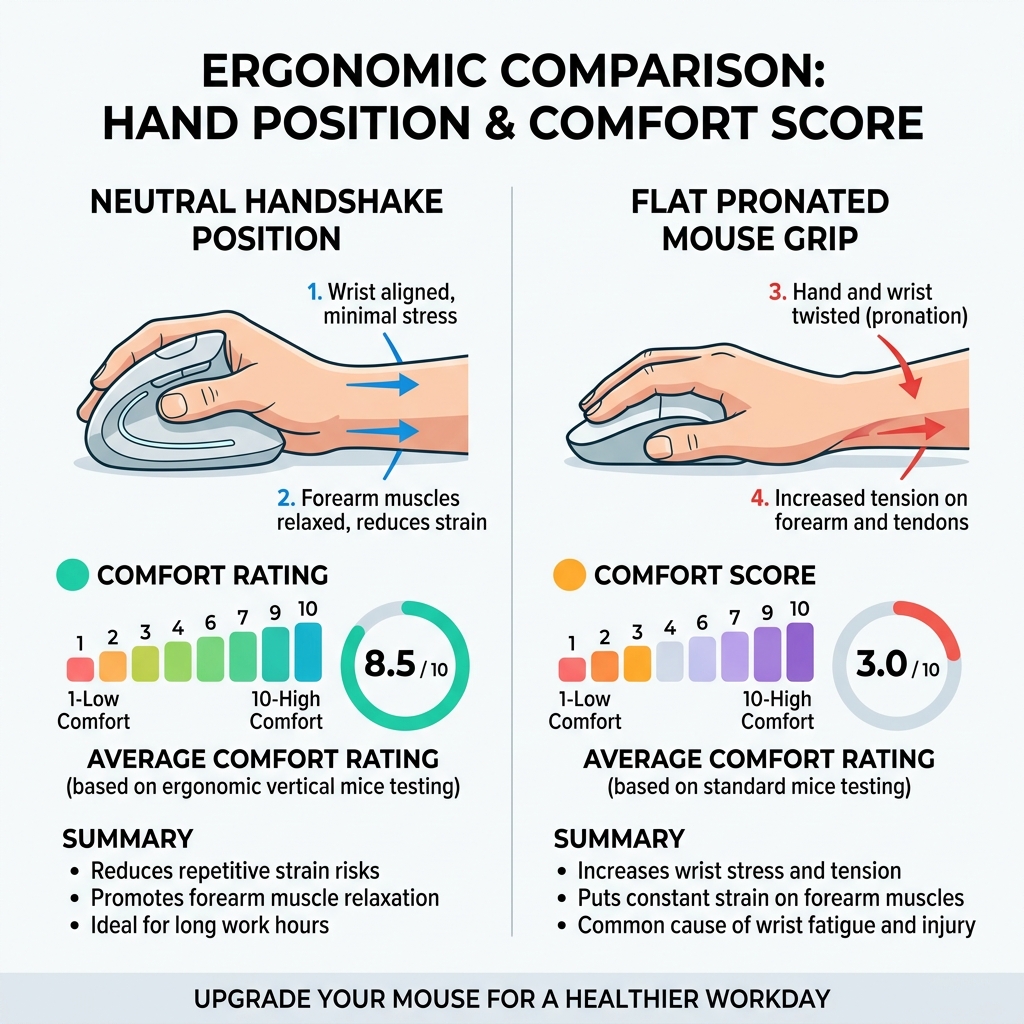
A standard mouse forces your hand into a flat, palm-down position. That twist in your forearm is called pronation, and holding it for hours puts constant stress on your tendons and muscles. Over time, that stress builds into real injury: wrist pain, carpal tunnel syndrome, or other repetitive strain injuries (RSIs).
The good news? The right mouse can change all of that.
Ergonomic mice are designed to put your hand in a more natural position — like a handshake — so your muscles aren’t fighting gravity all day. Lab testing of 14 ergonomic mice found that vertical designs scored an average comfort rating of 8.5 out of 10, and testers consistently reported less wrist fatigue compared to standard mice.
Whether you’re already in pain or just want to stay healthy, switching to a comfortable work mouse is one of the easiest upgrades you can make.
Why Ergonomics Matter for Office Productivity
We’ve all been there: it’s 3:00 PM, and your forearm feels like it’s been through a meat grinder. You start shaking your wrist, stretching your fingers, and trying to find a position that doesn’t ache. This isn’t just a minor annoyance; it’s a signal from your body that your workstation setup is failing you.

When we talk about “forearm pronation,” we’re talking about the act of turning your palm to face the floor. In a natural, relaxed state, your palm faces your thigh. By forcing it flat to use a traditional mouse, you compress the median nerve and strain the tendons in your carpal tunnel. Over an eight-hour workday, this leads to micro-traumas that eventually manifest as chronic pain.
Scientific research shows that using a comfortable mouse for work can lead to significant improvements in comfort scores. For instance, the Logitech MX Vertical earned a staggering 8.5/10 comfort rating in independent lab tests specifically because it mimics that natural handshake posture. By reducing muscle strain, you aren’t just “feeling better”—you’re staying focused. It’s hard to crush a spreadsheet when your wrist is throbbing.
At Dims Finance, we believe that a comprehensive ergonomic keyboard and mouse setup is the foundation of a long, healthy career. RSI prevention isn’t just about buying a gadget; it’s about aligning your tools with your biology.
Choosing the Right Comfortable Mouse for Work
Choosing a mouse isn’t like buying a stapler; it’s more like buying a pair of shoes. If it doesn’t fit your hand size and grip style, it won’t matter how many features it has.
Hand Size and Grip
Hand size is perhaps the most critical metric. A mouse that is too large will force you to overextend your fingers to reach the buttons, while a mouse that is too small will cause your hand to “scrunch” into a claw, leading to cramping.
How to measure your hand for a mouse:
- Use a ruler or tape measure.
- Measure from the base of your palm (the first crease at your wrist) to the tip of your middle finger.
- Small: Under 17.5 cm (approx. 6.9 inches)
- Medium: 17.5 cm to 19.0 cm (6.9 to 7.5 inches)
- Large/XL: Over 19.0 cm (7.5 inches)
Comparison of Ergonomic Designs
| Feature | Vertical Mouse | Trackball Mouse | Traditional Ergonomic |
|---|---|---|---|
| Primary Benefit | Reduces forearm twisting | Eliminates wrist movement | Familiar feel + high tech |
| Learning Curve | Low to Medium | High | Very Low |
| Desk Space | Requires room to move | Stationary (Space-saver) | Requires room to move |
| Best For | Carpal tunnel, wrist strain | Shoulder pain, tight desks | Productivity, precision |
Best Vertical Options for a Comfortable Mouse for Work
Vertical mice are the “gold standard” for those looking to flip their grip. By tilting the mouse at an angle—usually around 57 degrees—the design places your hand in a neutral handshake position.
- Logitech MX Vertical: This is our top pick for medium to large hands. It features a premium rubberized texture and a dedicated thumb rest. In testing, it scored a 9.9/10 for tracking precision, ensuring that you don’t trade performance for comfort.
- Razer Pro Click V2: A fantastic hybrid that offers gaming-grade precision (30K optical sensor) with a sophisticated vertical tilt. It’s excellent for those who need to move between creative work and high-intensity tasks.
- Logitech Lift: If you have smaller hands, the MX Vertical might feel like a mountain. The Logitech Lift is specifically designed for small-to-medium hands, offering the same 57-degree angle in a more compact, approachable frame.
- TeckNet Rechargeable Ergonomic Vertical: Proving that a comfortable mouse for work doesn’t have to cost a fortune, this budget-friendly option provides a natural stress-free position and excellent tracking for a fraction of the price of premium models.
Integrating one of these into an ergonomic keyboard and mouse setup for enhanced comfort can lead to a measurable reduction in muscle activity in the forearm, effectively “resting” your arm while you work.
Trackball Designs: A Comfortable Mouse for Work Alternative
If moving your wrist at all is painful, a trackball is your best friend. Instead of sliding the mouse across a pad, the mouse stays stationary, and you move the cursor using a ball controlled by your thumb or fingers.
- Logitech MX Ergo S: Our favorite thumb-operated trackball. It features a unique adjustable hinge that allows you to tilt the mouse by 20 degrees. This reduces forearm pronation even further than flat trackballs. It earned an 82 overall score in testing, excelling in comfort for all hand sizes.
- Kensington Expert Mouse: For those who prefer fingertip control, this model features a large, center-mounted ball and a scroll ring. It’s a favorite for “power users” who want to eliminate wrist movement entirely.
- Logitech M575S: This is a great entry-point into trackballs. It’s affordable, wireless, and incredibly durable. Because it doesn’t move, it’s the perfect comfortable mouse for work if you have a cluttered desk or work from a small coffee shop table.
Advanced Features for Long Workdays
Modern office mice are packed with technology designed to make your life easier. When you’re working 40+ hours a week, these “small” features add up to massive time savings and reduced physical strain.
Scrolling Technology
The scroll wheel is often a hidden source of strain. Flicking a wheel thousands of times a day can lead to “scroll finger.”
- MagSpeed Electromagnetic Scrolling: Found on the MX Master 3S and 4, this wheel can scroll 1,000 lines per second. It’s nearly silent and can shift from ratcheted (line-by-line) to hyper-fast (infinite) scrolling automatically.
- 4D Tilt Wheels: Some mice, like the Logitech M720 Triathlon, allow you to tilt the wheel left and right. This is a lifesaver for finance professionals navigating wide Excel spreadsheets.
Precision and Customization
- 8K DPI Sensors: High-resolution sensors allow the cursor to move further on the screen with less physical movement of your hand. Models like the MX Anywhere 3S can even track on glass surfaces, which is vital if your “office” is a glass-topped kitchen table. Pair this with one of the best mouse pads for work from home for the smoothest experience.
- Programmable Buttons: Reducing repetitive tasks is key to ergonomics. By mapping “Copy,” “Paste,” or “Undo” to side buttons, you reduce the number of times you have to reach for your keyboard.
- Silent Click Technology: In shared offices or quiet homes, the constant click-click-click can be a distraction. Newer models like the Signature M650 reduce click noise by 90%, allowing you to stay in the “flow” without bothering your housemates.
Frequently Asked Questions about Ergonomic Mice
How do I know if a vertical mouse will help my wrist pain?
If you feel a “burning” or “tight” sensation on the top of your forearm or a sharp pain in your wrist when moving the mouse side-to-side, a vertical mouse is likely to help. By placing your hand in the handshake position, it moves the strain away from the carpal tunnel and onto the larger muscles of your arm. Most users report a noticeable difference within the first two days of use.
Can I switch between different mouse types during the day?
Actually, we highly recommend it! Our lead testers are strong advocates for “ergonomic rotation.” Using a vertical mouse in the morning and a trackball in the afternoon uses different muscle groups, preventing any single muscle from becoming over-fatigued. It’s the same principle as using a sit-stand desk—movement is medicine.
Are trackball mice difficult to learn for office work?
There is a learning curve, usually taking about 3 to 5 days to build the muscle memory in your thumb. At first, you might feel slightly less precise when “dragging and dropping” files. However, once you master it, many users find they are actually faster and more accurate than they were with a traditional mouse.
Conclusion
At Dims Finance, our mission is to provide science-based ergonomics to help you work smarter, not harder. Investing in a comfortable mouse for work isn’t just about luxury; it’s about career longevity. Whether you choose the handshake grip of the MX Vertical or the stationary precision of the MX Ergo S, your body will thank you.
A mouse is only one part of the puzzle. To truly boost your well-being and productivity, you should look at your entire workstation. Browse our recommended desk accessories to find the perfect keyboard, wrist rest, and mouse pad to complete your setup. Your health is your greatest asset—protect it!