Why Your Wrist Pain Might Be Your Mouse’s Fault
The most comfortable vertical mouse you can buy right now depends on your hand size — here’s a quick breakdown:
| Hand Size | Top Pick | Why |
|---|---|---|
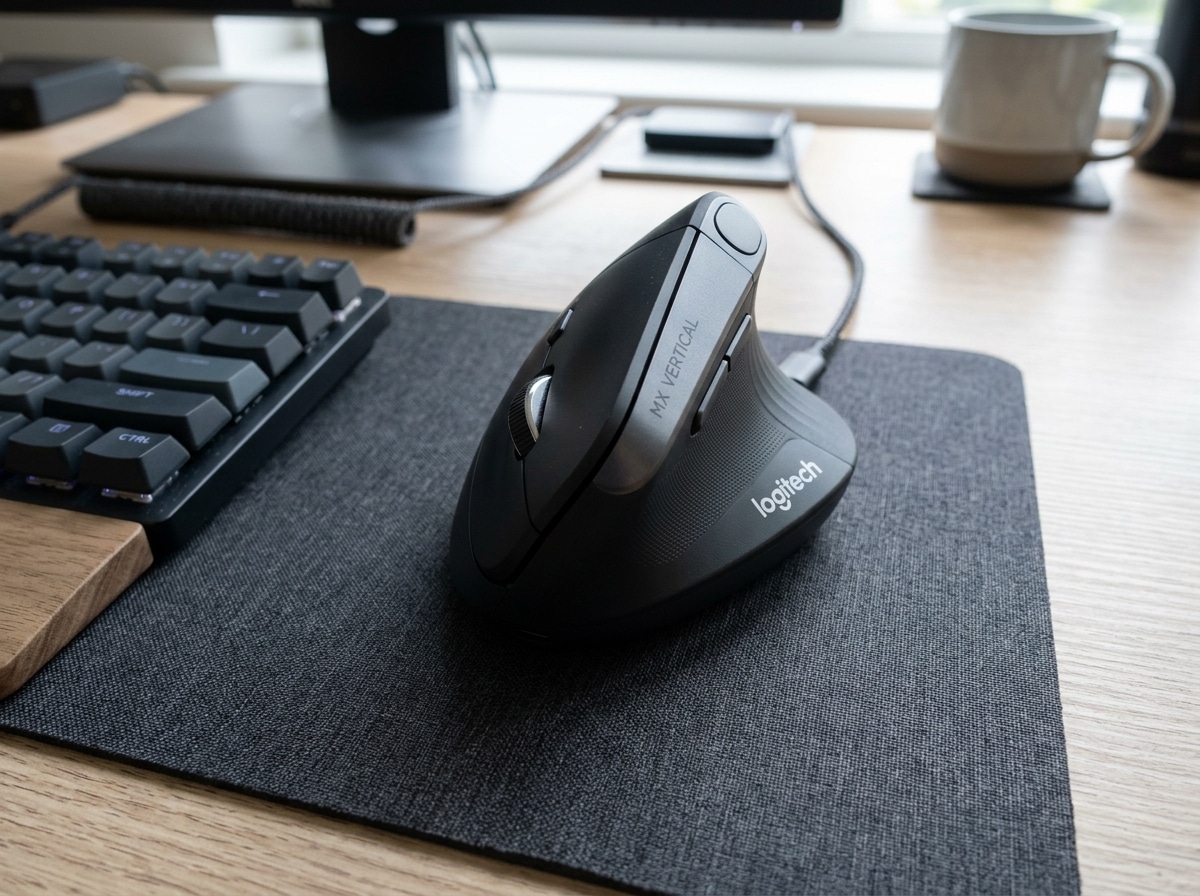
| Large | Logitech MX Vertical | 57° angle, ergonomist-approved, premium grip |
| Small to Medium | Logitech Lift | Compact design, 24-month battery, quiet clicks |
| Budget-conscious | TeckNet Rechargeable Vertical | ~$26, solid comfort for the price |
| Premium productivity | Razer Pro Click V2 Vertical | 30K sensor, 6-month battery, AI shortcuts |
| Left-handed | Goldtouch Semi-Vertical Wireless | Detachable hand rest, ergonomic shape |
If you use a computer for hours every day and your wrist aches by noon, your mouse is likely the problem — not your posture.
Here’s why: a standard horizontal mouse forces your forearm to rotate palm-down. This causes the two forearm bones — the radius and ulna — to cross over each other. That position pinches nerves, strains muscles, and over time can cause real damage.
A vertical mouse fixes this by letting you hold it like a handshake. Your forearm stays in a neutral, upright position. The bones don’t cross. The strain largely disappears.
Logitech’s own data shows the MX Vertical’s 57° angle reduces muscular strain by 10% compared to a traditional mouse. It also means 4x less hand movement needed to move the cursor the same distance.
That might not sound dramatic. But over an 8-hour workday, it adds up fast.
The good news: there are now more comfortable vertical mouse options than ever — across every price point, hand size, and use case.
What Makes a Vertical Mouse the Most Comfortable Vertical Mouse?
When we talk about the most comfortable vertical mouse, we aren’t just talking about a soft coating or a cool shape. True comfort is rooted in biomechanics. Traditional mice require a movement called “pronation”—flipping your palm flat against the desk. This isn’t a natural resting state for the human body. If you let your arms hang at your sides, your palms naturally face your thighs. That is your neutral posture.
A vertical mouse respects this anatomy. By tilting the buttons and scroll wheel to a vertical or semi-vertical angle, these devices allow for a “handshake grip.” This position significantly reduces ulnar deviation (tilting the wrist side-to-side) and prevents the compression of the carpal tunnel.
Scientific insights on ergonomic posture suggest that even a slight tilt can alleviate the pressure on the median nerve. When you combine a vertical mouse with a proper ergonomic keyboard and mouse setup for enhanced comfort, you create a workstation that works with your body rather than against it. The goal is to minimize the micro-movements that lead to Repetitive Strain Injuries (RSIs). By elevating the wrist off the desk surface, many vertical models also eliminate “desk friction,” which is a common source of skin irritation and localized wrist pressure.
Best Most Comfortable Vertical Mouse for Large Hands
For those with larger hands (typically 19cm or longer from the base of the palm to the tip of the middle finger), the Logitech MX Vertical is widely considered the gold standard. It features a precise 57-degree vertical angle, which was found by researchers to be the “sweet spot” between ergonomic relief and the familiar feeling of a traditional mouse.
What makes it the most comfortable vertical mouse for a larger grip? It’s the sheer scale and the premium textured rubber grip. Your hand doesn’t feel cramped; instead, it rests fully supported. It also packs a high-precision 4000 DPI sensor. This is crucial because a higher DPI means you can move the cursor across the entire screen with just a tiny twitch of your hand, further reducing the need for large, straining arm movements.
Best Most Comfortable Vertical Mouse for Small to Medium Hands
One of the biggest mistakes we see people make is buying an ergonomic mouse that is too big for them. If your hand is less than 17.5cm long, a large mouse will actually cause more strain as you struggle to reach the buttons.
The Logitech Lift was specifically designed to solve this. It’s essentially a “shrunken” version of the MX Vertical, optimized for small to medium hands. It swaps the rechargeable internal battery for a single AA battery that lasts a staggering 24 months. It also features “SilentTouch” technology, making the clicks almost whisper-quiet—perfect for shared office environments or late-night sessions at home. Pairing this with other ergonomic desk accessories for comfort can transform a cramped workspace into a productivity haven.

Top Vertical Mouse Recommendations for Every Budget
You don’t always have to break the bank to save your wrists. While premium models offer better sensors and materials, entry-level options can still provide the necessary vertical tilt to stop the pain.
When choosing, we recommend looking at wireless reliability and customizable buttons. Being able to map “Copy” and “Paste” to your thumb buttons can save you hundreds of keyboard reaches per day. For a truly seamless experience, many users opt for wireless keyboard and mouse combos for seamless work, ensuring their desk remains clutter-free.
Premium Productivity: Advanced Vertical Mouse
If your work involves high-resolution displays, graphic design, or complex spreadsheets, you might need more than just a comfortable shape. The Razer Pro Click V2 Vertical is a heavy hitter in the premium category.
It stands out with a Razer Focus Pro 30K Optical Sensor. While 30,000 DPI might seem like overkill for an office, it allows for flawless tracking on nearly any surface—including glass. It also introduces “AI Prompt Master” functionalities, allowing you to trigger AI shortcuts directly from the mouse. With a 6-month battery life and the ability to pair with up to five devices simultaneously, it’s built for the power user who refuses to compromise on performance or health.
Best Value and Specialized Comfort
For those who want to dip their toes into the vertical world without spending $100, the TeckNet Rechargeable Vertical mouse is a fantastic value. It provides a solid handshake grip and a rechargeable battery for roughly the price of a few fancy coffees.
We also have to consider specialized needs. The Goldtouch Semi-Vertical Wireless Mouse is a standout for left-handed users, who are often ignored by the ergonomic industry. It features a unique 60-degree tilt and a detachable hand rest to prevent the “pinky rub” against the desk. If you still find yourself resting your wrist heavily on the table, we suggest looking into ergonomic wrist rests for typing to provide a soft landing zone.
Overcoming Common Issues and Adaptation Challenges
Switching to the most comfortable vertical mouse isn’t always instant bliss. There is an adaptation period. Because you are using different muscles to move the mouse, your aim might feel a bit “floaty” for the first few days. We usually tell people it takes about a week to feel 100% confident.
One common issue to watch out for is the “pinky pinch.” This happens when the bottom edge of your hand drags on the mouse pad. Models with a flared base or an integrated thumb rest height that keeps the hand slightly elevated are the best defense against this.
Precision clicking can also be a challenge at first. In a traditional mouse, you click downward toward the desk. In a vertical mouse, you click sideways. If the mouse is too light or the feet are too slick, you might accidentally “push” the mouse when you click. This is where a high-quality surface comes in; checking out the best mouse pads for work from home can help provide the right amount of friction to keep your clicks steady.
While vertical mice are generally built for productivity, some users find they work well for casual gaming. However, for high-speed FPS gaming, the “handshake” grip can make rapid “flick” shots more difficult compared to a standard gaming mouse. It’s a trade-off: maximum performance vs. maximum long-term health.
Frequently Asked Questions about Vertical Mice
How long does it take to adapt to a vertical mouse?
Most users find that the “weird” feeling goes away within 2 to 3 days. However, regaining your full muscle memory for precision tasks like photo editing or gaming usually takes about a week of consistent use. Our tip: don’t switch back and forth between your old mouse and the new one during the first week; go cold turkey to speed up the process.
Are vertical mice better than trackballs for long-term comfort?
This is a classic ergonomic debate! Vertical mice are generally easier to learn because you still move the device with your arm. Trackballs stay stationary, and you move the cursor with your thumb or fingers. Trackballs are excellent for people with limited desk space or severe wrist pain, but they can cause thumb strain for some. A vertical mouse is often the “safest bet” for the average user looking for RSI relief.
Which vertical mice offer the quietest clicks for office use?
The Logitech Lift is the reigning champion for silence. Its buttons use a dampened switch that feels tactile but makes almost no sound. The TeckNet models also tend to be relatively quiet, whereas premium “pro” models like the Razer Pro Click V2 have a more distinct, audible “click” that provides feedback but might be noticeable in a very quiet library setting.
Conclusion
At Dims Finance, we believe that your tools should never be the cause of your pain. Investing in the most comfortable vertical mouse for your specific hand size and budget is one of the most effective ways to prevent long-term injury and boost your daily well-being.
By prioritizing science-based ergonomics and a neutral handshake position, you aren’t just buying a peripheral—you’re protecting your career and your health. Whether you choose the premium features of the MX series or a budget-friendly alternative, the shift to vertical is a move your future self will thank you for. Ready to upgrade the rest of your workstation? Explore our full range of ergonomic desk accessories to find more ways to work smarter and feel better.