
The Hidden Cost of Desk Work: Why RSI Prevention Matters
Repetitive strain injury prevention in the workplace is one of the most important — and most overlooked — parts of staying healthy at a desk job.
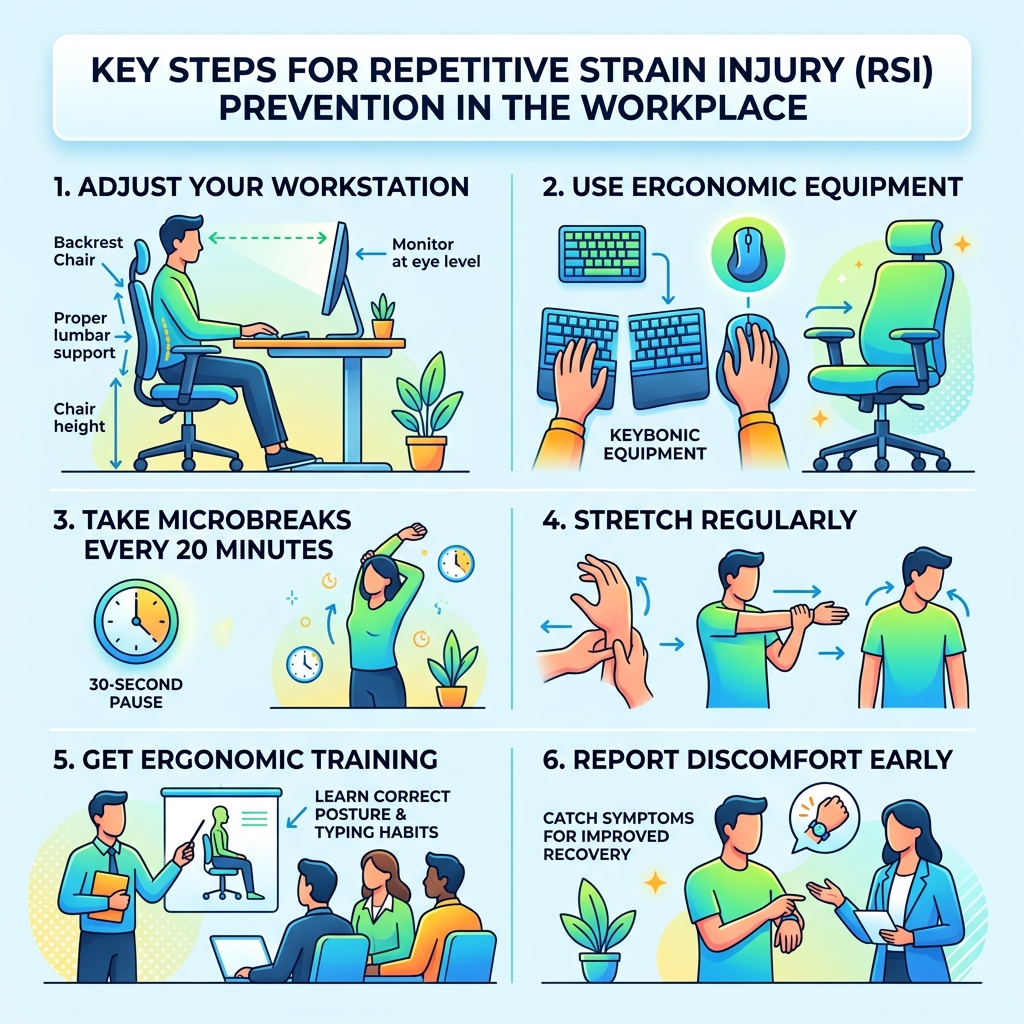
Here’s a quick summary of the most effective prevention strategies:
- Adjust your workstation — chair height, armrests, lumbar support, and monitor position
- Use ergonomic equipment — split keyboards, vertical mice, and forearm supports
- Take microbreaks every 20 minutes — even a 30-second pause helps
- Stretch regularly — focus on wrists, forearms, and shoulders
- Get ergonomic training — learn correct posture and typing habits
- Report discomfort early — catching symptoms early dramatically improves recovery
Every day, millions of office workers sit down at a desk and do the same motions over and over — typing, clicking, scrolling. It doesn’t feel dangerous. But over time, those small repeated movements add up.
The result? Pain, tingling, stiffness, and sometimes lasting damage to muscles, tendons, and nerves. These are repetitive strain injuries, or RSIs — and they’re the number-one cause of lost-time workplace injuries in many countries.
Rapid digitalization means more people are spending more hours at computers than ever before. Static postures and repetitive movements put constant stress on the upper body, especially the wrists, forearms, shoulders, and neck. According to Statistics Canada, RSIs affect roughly 15% of Canadians. In the US, about 9% of adults reported experiencing an RSI in a recent three-month period.
The good news? Most RSIs are entirely preventable with the right setup, habits, and awareness.
Understanding Repetitive Strain Injury Prevention in the Workplace
When we talk about repetitive strain injury prevention in the workplace, we are looking at a broad category of conditions often called musculoskeletal disorders (MSDs) or upper limb disorders. These aren’t usually caused by one big accident; instead, they are the result of “micro-traumas”—tiny bits of damage to your soft tissues that happen over weeks, months, or years.
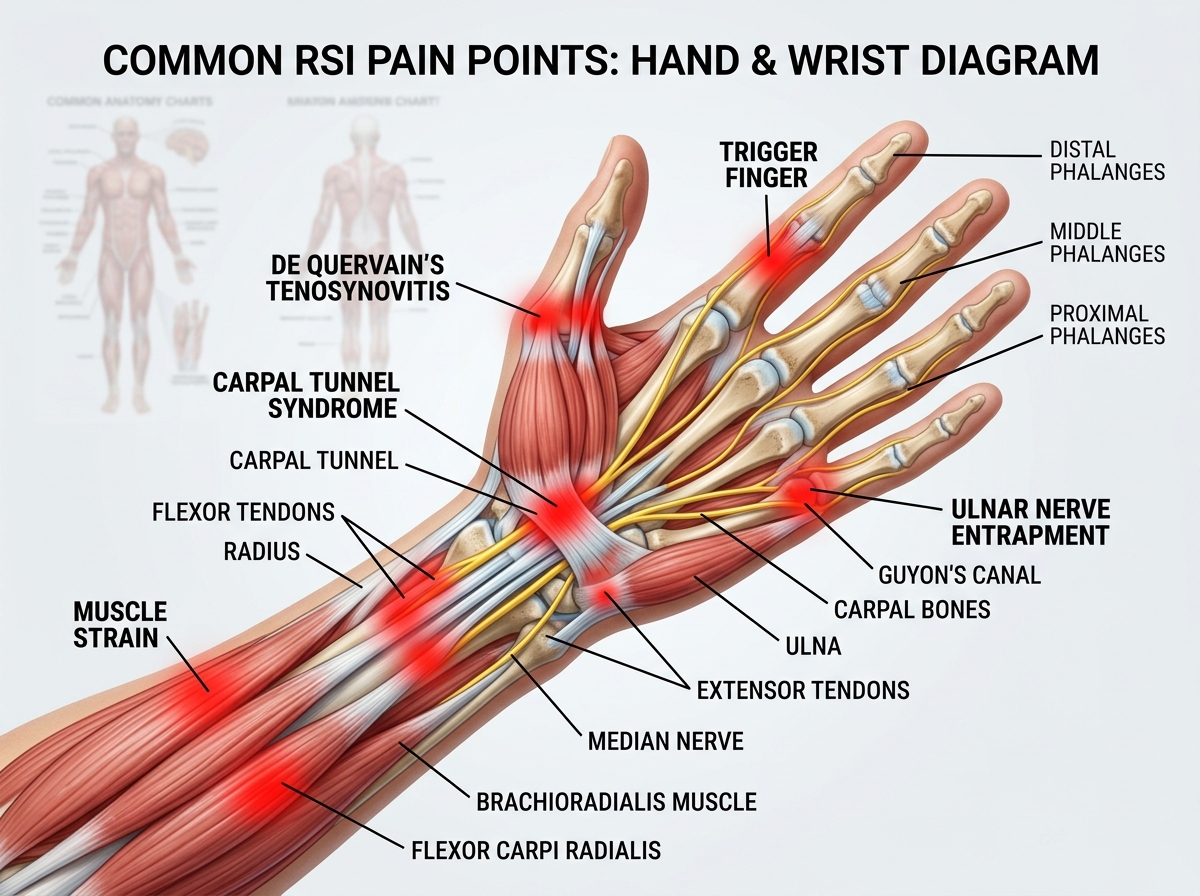
Common conditions falling under the RSI umbrella include carpal tunnel syndrome, tendonitis, bursitis, and even “tennis elbow” (lateral epicondylitis), which can happen to office workers just as easily as athletes. According to the Repetitive Strain Injury (RSI): Causes, Symptoms & Treatment guide, these injuries involve damage to muscles, tendons, or nerves caused by repetitive motions and constant use.
The trickiest part about RSIs is that they often develop insidiously. You might not feel pain immediately. It starts as a dull ache or a bit of stiffness at the end of the day that goes away by morning. But if the underlying cause isn’t addressed, that inflammatory process can lead to secondary conditions like ganglion cysts, stress fractures, or permanent nerve damage.
Primary Risk Factors for Upper Limb RSIs
To master repetitive strain injury prevention in the workplace, we first need to identify the “villains” in our cubicle jungle. Research highlights several primary risk factors:
- Repetitive Motion: Performing the same movement (like clicking a mouse) thousands of times a day without rest.
- Awkward Postures: Working with your wrists bent upward, your neck tilted, or your shoulders hunched.
- Static Posture: Staying in one position for too long. Your muscles fatigue faster when they don’t get a break, and blood circulation slows down.
- Forceful Exertion: Gripping a mouse too tightly or “bottoming out” keys with too much force while typing.
- Vibration: While more common in construction, some low-level vibrations from office machinery can contribute to nerve sensitivity.
- Psychological Stress: Stress causes us to tighten our muscles (especially in the neck and shoulders), which exacerbates physical strain.
As noted by Preventing Musculoskeletal Disorders and Repetitive Strain Injuries | Ergonomics, muscles fatigue significantly faster in static positions because blood flow—which carries oxygen to the muscles and removes waste—is restricted.
Common Symptoms in Computer Users
If you are a heavy computer user, you should be on the lookout for early warning signs. According to the Repetitive strain injury (RSI) – NHS resource, symptoms usually develop gradually and can include:
- Burning, aching, or throbbing pain in the affected area.
- Tingling or “pins and needles” (often a sign of nerve compression).
- Numbness or loss of sensation in the fingers or palm.
- Muscle cramps or tightness that persists even after work.
- Joint stiffness or a decreased range of motion.
- Weakness or loss of grip strength (e.g., struggling to open a jar).
If these symptoms start becoming constant or keep you awake at night, it’s a sign that the injury is progressing and requires immediate intervention.
Essential Ergonomic Equipment for RSI Prevention
We often think we can just “sit better,” but the truth is that our environment dictates our posture. If your desk is too high, you will hunch your shoulders. If your mouse is too far away, you will strain your rotator cuff.
Investing in an ergonomic keyboard and mouse setup for enhanced comfort is one of the most effective ways to lower your risk. In fact, scientific reviews show that ergonomic equipment is the most common and successful intervention strategy for preventing upper limb RSIs.
Standard vs. Ergonomic Equipment Comparison
| Feature | Standard Equipment | Ergonomic Equipment | RSI Prevention Benefit |
|---|---|---|---|
| Keyboard | Flat, rectangular | Split or tented design | Keeps wrists in a neutral, straight line. |
| Mouse | Horizontal, palm-down | Vertical or trackball | Reduces forearm pronation (twisting). |
| Monitor | Fixed height on desk | Height-adjustable stand | Prevents neck strain and “tech neck.” |
| Chair | Basic padding | Lumbar support & adjustable | Maintains the natural S-curve of the spine. |
Optimizing Your Keyboard and Mouse for Repetitive Strain Injury Prevention
Your hands are your primary tools. When they “go on strike,” your productivity vanishes. To prevent a keyboard wrist injury when your hands go on strike, you need to focus on the neutral wrist position.
A neutral position means your wrist is straight, not bent up, down, or to the side. Most standard keyboards force your wrists into “ulnar deviation” (pointing toward your pinky fingers). Mastering the neutral wrist position for your keyboard setup usually involves using a split keyboard, which allows your arms to point straight ahead rather than angling inward.
For the mouse, consider a vertical design. Standard mice require you to twist your forearm so your palm is flat against the desk. This “pronation” puts pressure on the nerves and tendons in the forearm. A vertical mouse allows you to use a “handshake” grip, which is much more natural. If you’re already feeling pain, wrist management and finding the best RSI mouse for pain-free scrolling can be a total game-changer for your daily comfort.
Monitor and Chair Adjustments for Better Posture
Your chair and monitor act as the foundation for your posture. If your monitor is too low, you’ll develop a forward-head posture that puts immense pressure on your neck and upper back. Using monitor stands that promote better posture and comfort ensures that the top third of your screen is at eye level, keeping your neck in a neutral position.
When it comes to your chair, “one size fits all” is a myth. You need to adjust the seat height so your feet are flat on the floor and your knees are at a 90-degree angle. Check out an ergonomic office chair buying guide to look for features like adjustable lumbar support, which fills the gap in your lower back, and armrests that allow your shoulders to stay relaxed.
Behavioral Strategies: Breaks, Stretches, and Training
You can have a $5,000 ergonomic setup, but if you sit perfectly still for eight hours straight, you’re still at risk. Behavior is just as important as equipment for repetitive strain injury prevention in the workplace.
Research indicates that incorporating stretches and resistance training can have a moderate to strong effect on reducing discomfort. In middle-income countries, where high-end ergonomic gear might be less accessible, stretching is actually the most common prevention strategy.
Effective Desk Stretches
- Wrist Extension: Extend one arm in front of you, palm up, and gently pull your fingers back toward your body.
- Wrist Flexion: Extend your arm, palm down, and gently push the back of your hand toward you.
- Shoulder Rolls: Roll your shoulders up, back, and down in a circular motion to release tension.
- Neck Tilts: Gently tilt your ear toward your shoulder (don’t shrug!) to stretch the side of your neck.
As noted in How To Prevent and Manage Repetitive Stress Injuries, strengthening your core and upper body through resistance training can also help your body better handle the demands of a long workday.
Implementing Effective Breaks for Repetitive Strain Injury Prevention
We recommend the 20-20-20 rule: Every 20 minutes, look at something 20 feet away for 20 seconds, and use that time to wiggle your fingers and roll your shoulders. These are “microbreaks.”
Evidence shows that microbreaks of just 30 seconds every 20 minutes are more beneficial for preventing back, shoulder, and forearm conditions than taking one long break in the middle of the day. For those who get “in the zone” and forget to move, using software reminders or break-timer apps can be a literal lifesaver.
Taking a 5-to-10-minute “meso-break” every hour to stand up and walk around is also vital. This helps reset your blood circulation and prevents the static muscle fatigue that leads to injury. As the experts at Prevent repetitive strain injury at work suggest, businesses should encourage these short, frequent pauses as part of a healthy work culture.
Employer Responsibilities and Program Implementation
While individual habits matter, the responsibility for repetitive strain injury prevention in the workplace also falls on the employer. In many regions, including Canada and the UK, employers are legally required to provide a safe working environment, which includes protecting workers from RSIs.
According to How to Prevent Repetitive Strain Injuries at Work, a proactive employer should:
- Conduct Risk Assessments: Identify jobs that involve high repetition, force, or awkward postures.
- Consult Health and Safety Committees: Work with employees to find systemic issues.
- Implement Job Rotation: Varying tasks throughout the day so that different muscle groups are used, preventing any one area from becoming overstressed.
- Provide Training: Educate staff on ergonomic setup, early symptom recognition, and proper lifting techniques.
- Encourage Early Reporting: Create a culture where workers feel safe reporting discomfort before it becomes a full-blown injury.
Employers should also realize that prevention is a smart financial move. RSIs lead to lost productivity, high workers’ compensation claims, and the cost of hiring and training replacements. Investing in a proactive ergonomic policy is much cheaper than dealing with chronic injuries.
Frequently Asked Questions about RSI Prevention
What are the first signs of a repetitive strain injury?
The earliest signs are usually subtle: a slight tingling in the fingers, a dull ache in the wrist that appears at the end of the day, or a feeling of “heaviness” in the forearm. You might also notice that your hands feel cold or that you have a sudden urge to massage your shoulders frequently.
How often should I take breaks to prevent RSI?
The most effective schedule is a “microbreak” every 20 minutes (for about 30 seconds) and a longer break (5–10 minutes) every hour. Consistency is more important than the total length of the break; your body needs frequent resets to prevent muscle fatigue.
Does ergonomic equipment really work for long-term prevention?
Yes! Scientific reviews consistently find that ergonomic equipment is the most effective strategy for preventing upper limb RSIs. By placing your body in a “neutral” position, you eliminate the mechanical stress that causes tissue damage in the first place.
Conclusion
Navigating the cubicle jungle doesn’t have to result in chronic pain. By combining the right gear with smart habits, you can stay productive and pain-free. Repetitive strain injury prevention in the workplace is a marathon, not a sprint. It’s about the small adjustments you make every day—the way you sit, the tools you use, and the moments you take to breathe and stretch.
At Dims Finance, we are dedicated to providing science-based advice to help you build a healthier workspace. Whether you are looking for more info about ergonomic desk accessories or trying to fix a specific pain point, early intervention is key. Don’t wait for the pain to become permanent—take action today to protect your most valuable tools: your hands and your health.