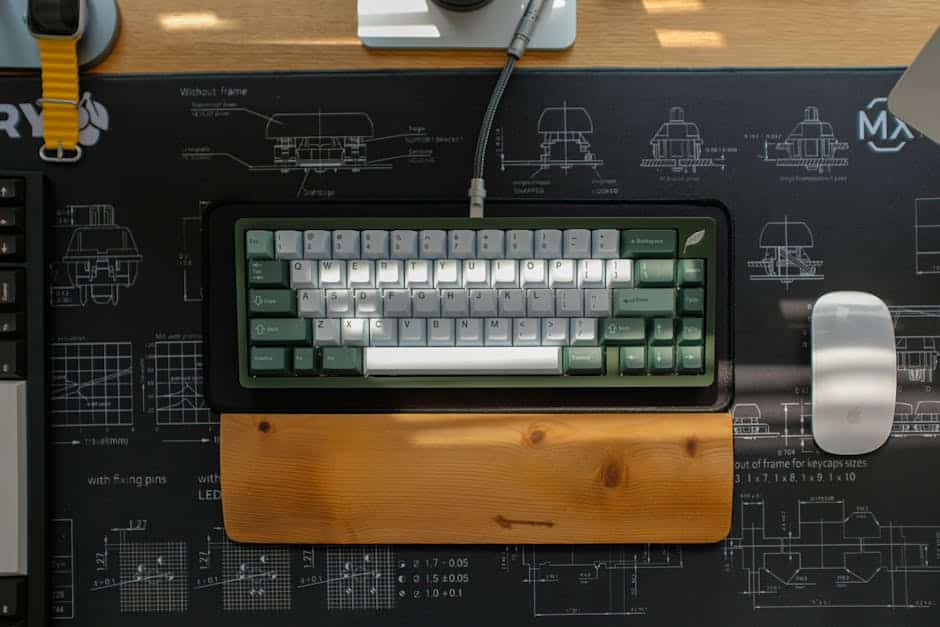
Understanding the Wrist Rest for Keyboard: Purpose and Function
A wrist rest for keyboard is one of the most searched ergonomic accessories for good reason — millions of office workers and heavy computer users deal with wrist pain, fatigue, and repetitive strain injuries every day.
Quick answer: Top keyboard wrist rest types at a glance
| Type | Best For | Material |
|---|---|---|
| Memory foam | All-day typing comfort | Soft foam + leatherette or cloth |
| Cooling gel | Long gaming or work sessions | Gel-infused foam |
| Hardwood | Durability + sweat resistance | USA-sourced hardwood |
| Silicone pad (gliding) | Dynamic mouse + keyboard use | Silicone + PTFE feet |
These supports sit in front of your keyboard and cushion the area where your hands rest between keystrokes. The goal is to keep your wrists in a neutral position — not bent up, not bent down — so the tendons and nerves inside your wrist stay under as little pressure as possible.
But here’s the thing: using one the wrong way can actually make things worse.
One Reddit user described the sensation after hours of typing as feeling like “fire ants spreading through their wrists” — only to find relief once they started properly supporting the heel of their hand instead of the wrist itself.
That distinction — palm support vs. wrist pressure — is at the heart of everything you need to know about this accessory.
At Dims Finance, we focus on the science of ergonomic keyboard and mouse setup to help you stay productive without the “fire ants.” The primary function of a wrist rest for keyboard is to prevent “wrist extension”—that awkward upward bend that happens when your keyboard is thicker than your desk surface. By filling that gap, the rest allows your hand to move in a straight line from your forearm.
To maximize comfort, we often recommend pairing a quality rest with desk mats for comfortable typing. This creates a stable, cushioned environment for your entire workstation.
Are Wrist Rests Genuinely Ergonomic or a Health Risk?
This is the million-dollar question in the ergonomics world. Is a wrist rest for keyboard a lifesaver or a hidden danger? The answer depends entirely on how you use it.
The term “wrist rest” is actually a bit of a misnomer. In professional ergonomic circles, they are often called “palm rests” or “heel rests.” Why? Because your wrist contains the carpal tunnel—a narrow passageway for the median nerve and several tendons. If you press down directly on this soft area for hours, you risk nerve compression, reduced blood flow, and the very keyboard wrist injury you are trying to avoid.
Traditional ergonomic advice often suggests “floating” your hands at a 90-degree angle, where your wrists never touch the desk. However, many users find this exhausting. As one forum member noted, “My arms would get lazy if I float them… especially after a full day of work.”
The risk arises when a rest is used as a permanent “crutch” during active typing, which can lead to static loading. The benefit comes when the rest provides a soft landing spot for “micro-rests” between bursts of activity. To stay safe, you must prioritize mastering the neutral wrist position for your keyboard setup. When used correctly—supporting the fleshy heel of the palm rather than the delicate wrist joint—these tools can significantly reduce the strain on your shoulders and traps by allowing your arms to relax periodically.
Different Types of Supports: Materials and Designs
When shopping for a wrist rest for keyboard, you aren’t just choosing a brand; you’re choosing a material science that will interact with your skin for 8+ hours a day.
| Material | Feel | Pros | Cons |
|---|---|---|---|
| Memory Foam | Soft/Plush | Contours to hand shape; high comfort | Can trap heat over time |
| Cooling Gel | Squishy/Cool | Reduces heat build-up; great for gaming | May lose “cool” feeling after hours |
| Hardwood | Firm/Solid | Extremely durable; sweat-resistant | No “give” or cushioning |
| Silicone | Rubberized | Easy to clean; often used in “gliding” designs | Less plush than foam |
For those who prioritize a premium feel, the Razer Ergonomic Wrist Rest Pro for Full-sized Keyboards is a standout. It features cooling gel-infused memory foam wrapped in heat-transfer fabric, specifically designed to prevent that “sweaty wrist” feeling during intense sessions.
On the other end of the spectrum is the Glorious Wooden Keyboard Wrist Rest. Crafted from USA-sourced hardwood, it provides a unique aesthetic and a firm surface that doesn’t erode from skin oils or sweat. It’s a favorite for mechanical keyboard enthusiasts who prefer a consistent, unyielding height.
Selecting the Right Size wrist rest for keyboard
Size matters—a lot. If your rest is shorter than your keyboard, your hands will frequently “fall off” the edge, creating uneven pressure.
- Full-size: Usually around 17.5 inches (44cm). Best for keyboards with a dedicated number pad.
- Tenkeyless (TKL): Around 14 inches (36cm). Perfect for those who have ditched the number pad to save desk space.
- Compact (60%/65%): Around 12 inches (30cm). Designed for minimalist setups.
The Glorious Padded Ergonomic Keyboard Wrist Rest is a great example of a product that offers all three sizes. It also features dual-lock stitching to prevent the edges from fraying, which is a common issue with cheaper cloth pads.
The Best wrist rest for keyboard Materials
If you’re looking for the gold standard in office comfort, the MX Palm Rest is widely considered one of the best. It uses a firm yet comfortable memory foam that is stain-resistant and easy to clean. Unlike some bulky options, it has a low profile that fits perfectly with thinner, modern keyboards.
For those who prefer a more “locked-in” feel, ABS plastic bases with rubberized feet are essential. You don’t want your support sliding away while you’re in the middle of an important email or a high-stakes gaming match.
How to Correctly Use a Wrist Rest to Prevent Injury

We cannot stress this enough: Do not rest your wrists on the rest.
To get the most out of your wrist rest for keyboard, follow these steps for an ergonomic keyboard and mouse setup for enhanced comfort:
- Support the Heel: Place the fleshy part of your palm (the heel) on the support. This keeps the pressure off the carpal tunnel.
- Aim for Neutrality: Your hand, wrist, and forearm should form a relatively straight line. If your hand is angled upward, your rest is too high (or your keyboard is too low).
- The “Micro-Rest” Rule: Use the rest when you are not typing. When you are actively typing, try to lift your hands slightly to allow for free movement.
- Check Your Elbows: Ensure your elbows are at a 90-degree angle. If your chair is too low, you’ll find yourself putting too much weight on the wrist rest, which increases pressure.
For more advanced setups, you might even consider keyboard trays to find the perfect height that complements your chosen support.
Innovative Ergonomic Solutions: Beyond Static Padding
While traditional rectangular blocks are common, a new wave of “dynamic” supports is changing the game. These are designed for people who don’t just stay in one spot but move their hands between the keyboard and mouse constantly.
The most famous example is the Carpio 2.0. Unlike a static bar, this is a small, contoured pad that glides with your hand.
- 3D Hand Scans: Designed using scans of real hands and prototypes tested with reconstructive surgeons.
- MRI Testing: Developed with medical experts to ensure it doesn’t compress the carpal tunnel.
- PTFE (Teflon) Feet: It features the same “gliders” found on high-end gaming mice, allowing it to slide across your desk mat effortlessly.
With over 300,000 setups enhanced worldwide and a 4.9 customer satisfaction rating, this type of ergonomic wrist rest for typing represents a shift toward “active” ergonomics. It encourages the arm to move as a single unit rather than forcing the wrist to do all the work through intense, small movements.
Frequently Asked Questions about Keyboard Supports
Should I rest my wrists or my palms on the support?
Always aim for the palms (the heel of the hand). Resting the actual wrist joint puts direct pressure on the median nerve, which can lead to numbness and long-term injury. Think of it as a “palm rest” rather than a “wrist rest.”
Can a wrist rest help with existing carpal tunnel pain?
It can help by preventing further irritation from poor posture, but it is not a “cure.” If you are already experiencing “fire ants” or numbness, we recommend a wrist management approach that includes consulting a professional and perhaps switching to an RSI-friendly mouse.
Do I need a different support for a mechanical keyboard?
Yes, usually. Mechanical keyboards are often much taller than standard membrane or laptop keyboards. You will likely need a thicker wrist rest for keyboard (about 0.75 to 1 inch thick) to bridge the height gap and maintain a neutral position.
Conclusion
At Dims Finance, we believe that your workspace should work for you, not against you. Incorporating a wrist rest for keyboard into your setup is a fantastic step toward a more comfortable, productive day—provided you use it with the right technique.
Whether you choose the plush comfort of memory foam, the cooling sensation of gel, or the high-tech glide of a dynamic support, the goal remains the same: science-based wellness and RSI prevention. By supporting the heel of your palm and maintaining a neutral wrist angle, you can keep your hands in top shape for years to come.
Ready to upgrade the rest of your desk? Find the best ergonomic desk accessories for your setup and join the thousands of professionals who have ditched the pain for a better way to work.