
Why Most People Set Up Their Keyboard Tray Wrong (And How to Fix It)
An adjustable keyboard tray setup done correctly can eliminate wrist pain, reduce shoulder tension, and prevent long-term injury. Here’s the quick version:
Quick Setup Steps:
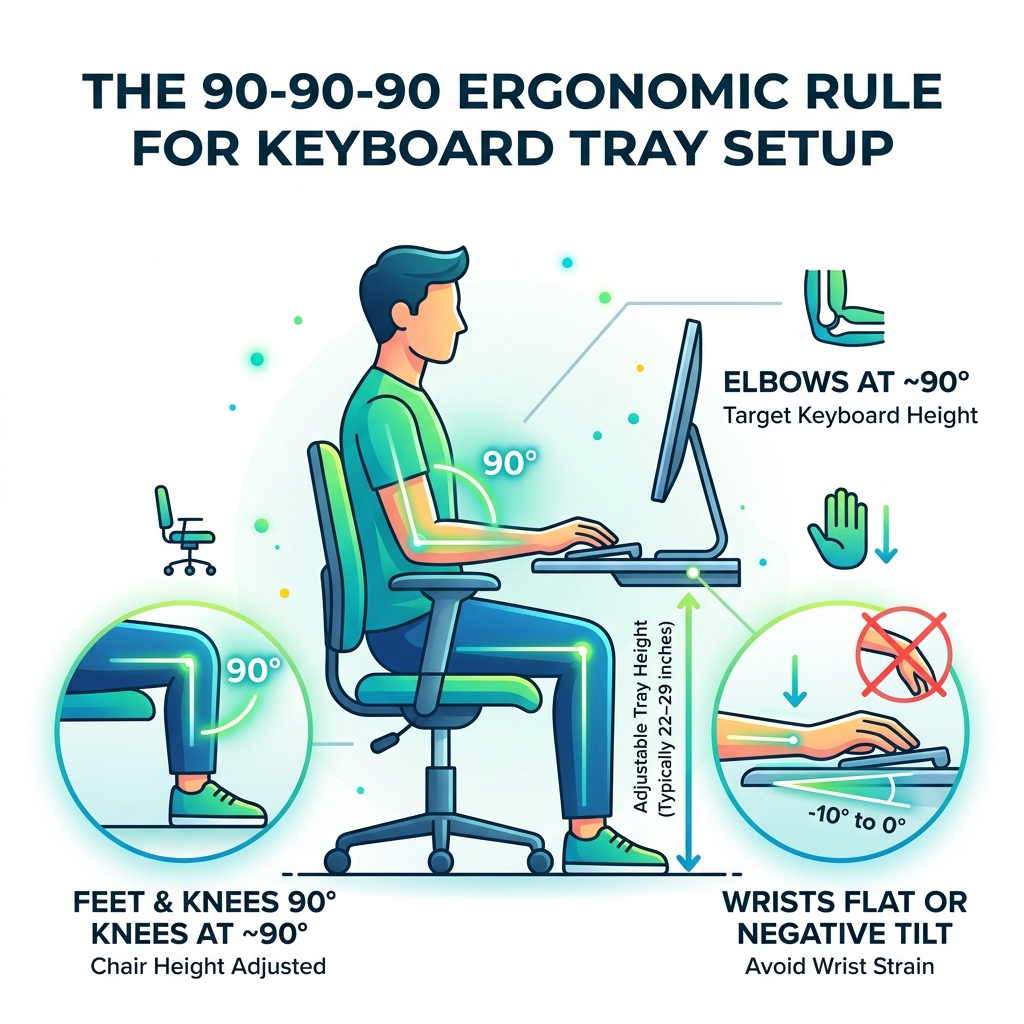
- Set your chair height so your feet are flat on the floor and knees are at ~90°
- Let your arms hang naturally, then bend your elbows to 90° — that’s your target keyboard height
- Position the tray so the keyboard surface aligns with that elbow height (typically 22–29 inches from the floor)
- Set a slight negative tilt (0° to -10°) so your wrists stay flat or slope gently downward
- Place your mouse on the same level as the keyboard, within 10–20 cm of it
Here’s the problem most people run into: they install a keyboard tray, assume the job is done, and then wonder why the wrist and neck pain hasn’t gone away.
The tool isn’t broken. The setup is.
Standard desks are 29–30 inches tall — a height designed for writing with a pen, not typing on a keyboard. When you type at that height, your shoulders creep up, your wrists bend back, and your muscles work harder than they should just to hold a static position. Over hours and hours of work, that silent strain adds up into something called a musculoskeletal disorder (MSD) — the kind of chronic pain that doesn’t announce itself until it’s already serious.
An adjustable keyboard tray solves this by decoupling your keyboard height from your desk height. But only if it’s tuned to your body, not just placed wherever feels roughly right at a glance. Visual estimation is surprisingly unreliable when it comes to ergonomic positioning.
This guide walks you through every step — from installation to daily use — so your setup actually works the way it’s supposed to.
Why an Adjustable Keyboard Tray Setup is Essential for Ergonomic Health
When we talk about ergonomics, we are really talking about “neutral posture.” This is the state where your joints are naturally aligned, reducing the stress on your muscles and tendons. Without a proper adjustable keyboard tray setup, most users fall into the trap of “static muscle loading.” This happens when you hold your arms or shoulders in an unnatural position for hours, restricting blood circulation and causing metabolic waste products to build up in your tissues.

One of the biggest culprits of office-related pain is wrist extension—the act of bending your hands upward to reach a keyboard that is too high. This position increases carpal tunnel pressure and can lead to ulnar deviation (twisting the wrist toward the pinky finger). By using a keyboard tray as an “engineering control,” you bring the equipment to your body rather than contorting your body to the equipment.
To dive deeper into the mechanics of your hands, check out our guide on mastering the neutral wrist position for your keyboard setup. Proactively managing these angles is the most effective way to ensure Repetitive Strain Injury (RSI) prevention. Your shoulders shouldn’t be shrugging; they should be relaxed and dropped. If your keyboard is on the desktop, you’re likely shrugging without even realizing it.
Step-by-Step Guide to Your Adjustable Keyboard Tray Setup
Setting up your tray isn’t just about screwing it into the wood and calling it a day. It requires a bit of “tuning.” We recommend a data-driven approach combined with personal feel.
Achieving the Perfect Height Adjustment
The most common mistake we see is setting the tray too high. To find your “elbow-neutral” height, follow the “Measure by Feel” technique:
- Sit in your ergonomic chair with your feet flat and back supported.
- Close your eyes and let your arms hang loosely at your sides.
- Bend your elbows until your forearms are parallel to the floor (or sloping slightly downward).
- Open your eyes. The height of your hands is your target tray height.
For most adults, the target tray height ranges from 22 to 29 inches from the floor. This usually places the tray 1–2 inches below the actual desktop surface. Maintaining an elbow angle of 90 to 120 degrees ensures that your forearms are aligned properly. You can find more tips on this in our article on ergonomic keyboard and mouse setups for maximum comfort.
Mastering the Negative Tilt for Wrist Health
The “tilt” of your keyboard is arguably more important than the height. Most keyboards come with little “feet” at the back to prop them up. Do not use them. This creates a positive tilt, which is an ergonomic nightmare.
Instead, your adjustable keyboard tray setup should utilize a negative tilt of 0° to -10° (some experts even suggest up to -15°). A negative tilt means the side of the keyboard closest to you is higher than the side facing the monitor. This allows your wrists to stay in a perfectly straight, neutral line. Most trays have a knob underneath or a lever system to adjust this. For a closer look at why this matters, read about keyboard wrist injury prevention.
Optimizing Your Adjustable Keyboard Tray Setup for Sit-Stand Desks
Sit-stand desks are fantastic for reducing total sitting time—by as much as 84 to 116 minutes a day, according to research. However, they introduce the “Sit-Stand Paradox.” When you raise the desk to stand, the relationship between your eyes and your hands changes. This can lead to “parallax error,” where your monitor is at the right height, but your keyboard is too high, or vice-versa.
An adjustable keyboard tray setup on a standing desk allows you to decouple these two heights. You can keep your monitor at eye level while keeping your keyboard at elbow level, regardless of whether you are sitting or standing. For more on this, see our guide on ergonomic keyboard and mouse setup.
Managing Cables and Clearance
When using a tray with a moving desk, cable management is vital.
- Vertical Travel Margin: Ensure your cables have 10–15 cm of extra slack so they don’t snag or pull when the desk moves.
- Track Length: Most trays use an 11-inch or 21-inch track. If your desk has a central support crossbar, you may need a “track spacer” to allow the tray to slide over the obstruction.
- Interference: Check that the tray mechanism doesn’t hit your knees when you sit down.
Maintaining Posture During Transitions
As you move between sitting and standing, your elbow-neutral height will shift slightly. Use the 20-8-2 rule: sit for 20 minutes, stand for 8 minutes, and move or stretch for 2 minutes. Every time you transition, take five seconds to re-verify your tray height. Your core should be engaged while standing to prevent leaning on the tray, which usually has a weight limit (often around 10 lbs). If you’re struggling with mouse-related pain during these transitions, consider our advice on wrist management and RSI mouse selection.
Overcoming Installation Challenges and User-Specific Needs
Not every body is built the same, and not every desk is a flat slab of wood. Your adjustable keyboard tray setup must account for these variables.
Solutions for Tall and Petite Users
| User Type | Challenge | Solution |
|---|---|---|
| Petite (5th Percentile) | Standard desks are too high; feet dangle. | Use a tray to bring the surface down to 22–24 inches; use a footrest. |
| Tall (95th Percentile) | Lack of legroom; tray hits thighs. | Ensure the tray has a thin profile; use a chair with deep seat adjustment. |
For petite users, a keyboard tray is often the only way to reach the keyboard comfortably while keeping feet flat on the floor. For tall users, the challenge is ensuring the mounting hardware doesn’t eat up all the knee clearance.
Dealing with Desk Obstructions
If you have a desk with a “crossbar” or a curved “ergo edge,” installation gets tricky.
- Crossbars: Use a track spacer kit to drop the track below the metal bar.
- Curved Edges: Mount the track at least 1.5 inches back from the front edge to ensure the screws have enough “meat” to grab onto.
- Shipping Pins: Most professional trays ship with a “shipping pin” or plastic tie that keeps the spring-loaded mechanism locked. You must attach the tray board before pulling this pin; the weight of the board provides the leverage needed to adjust the height for the first time.
When installing, always drill pilot holes (1/8″ diameter, 1/2″ deep) to prevent splitting the wood. If you’re using a wrist rest, ensure it’s made of a firm but supportive material. See our recommendations on ergonomic wrist rests for typing.
Common Mistakes in an Adjustable Keyboard Tray Setup
Even with the best equipment, small errors can lead to big pain.
- Asymmetrical Shoulder Loading: This happens when your keyboard is on the tray, but your mouse is up on the desk. You end up reaching upward and outward with one arm, causing neck strain. Fix: Ensure your tray is wide enough (usually 25–27 inches) to hold both the keyboard and mouse on the same level.
- The “Reach” Problem: Your mouse should be within 10–20 cm of your keyboard. If you have to reach out to the side, you are straining your rotator cuff.
- Visual Estimation: Don’t trust your eyes. Use the “Measure by Feel” technique mentioned earlier.
- Monitor Height Misalignment: Once your keyboard is lowered, people often forget to lower their monitors. The top line of text on your screen should be at or slightly below eye level.
- The Adaptation Period: Your body has likely spent years compensating for a bad setup. When you switch to a truly neutral adjustable keyboard tray setup, it might feel “weird” for 1–2 weeks. Stick with it!
Frequently Asked Questions about Keyboard Tray Setup
What is the most critical measurement for keyboard height?
The most critical measurement is your sitting elbow height. With your shoulders relaxed and arms at your sides, bend your elbows to 90 degrees. The distance from the floor to the underside of your forearm is your “elbow-neutral” height. Your keyboard tray should be adjusted so the home row of keys sits exactly at or slightly below this point.
How should the mouse be positioned relative to the keyboard?
The mouse should be on the same platform as the keyboard, at the same height and tilt. It should be placed as close to the side of the keyboard as possible (within 10–20 cm) to prevent “winging” your arm out to the side, which causes shoulder and neck tension.
Is standard desk height suitable for typing without a tray?
Generally, no. Most standard desks are 29–30 inches high, which is optimized for writing or reading. For the average person, this height forces the shoulders to shrug and the wrists to extend upward. Unless you are exceptionally tall, a standard desk is almost always too high for ergonomic typing.
Conclusion
At Dims Finance, we believe that professional productivity shouldn’t come at the cost of your physical health. A science-based adjustable keyboard tray setup is one of the most effective “engineering controls” you can implement in your workspace. By decoupling your keyboard from your desk, mastering the negative tilt, and respecting the “neutral reach zone,” you move from a state of constant muscle strain to one of effortless alignment.
Investing the time to tune your workstation today pays dividends in focus, comfort, and long-term well-being. Once you’ve perfected your tray height, why stop there? Explore more ergonomic desk accessories to complete your high-performance setup.