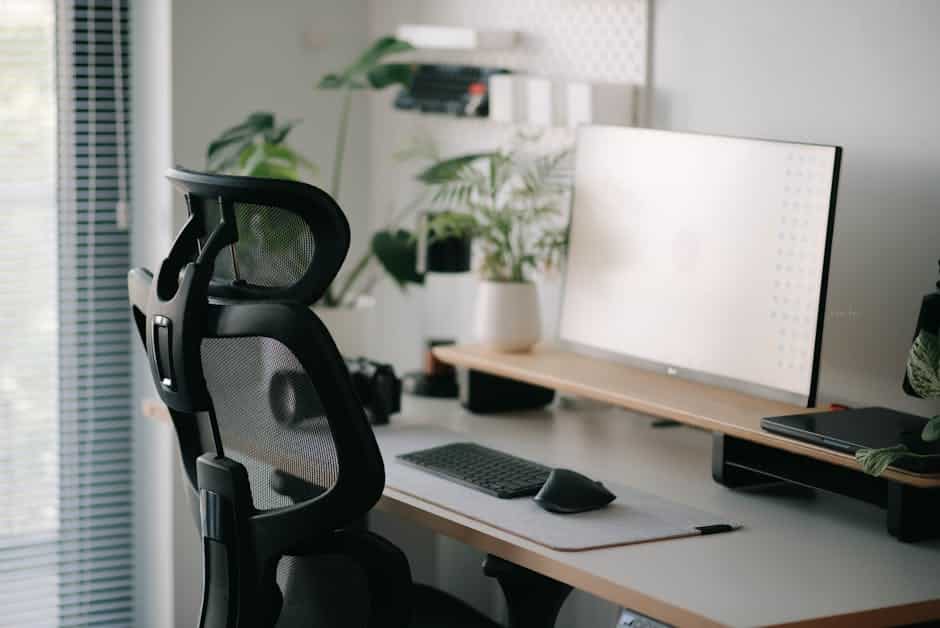
Why the Best Chair for Sitting Can Make or Break Your Workday
The best chair for sitting long hours isn’t a luxury — for anyone dealing with back pain, RSI, or carpal tunnel syndrome, it’s a necessity.
Here’s a quick look at the top picks to match your needs:
| Chair | Best For | Price Range | Warranty |
|---|---|---|---|
| Herman Miller Embody | Overall back support | ~$1,880+ | 12 years |
| Steelcase Gesture | Heavy users, 400 lb capacity | ~$1,499 | 12 years |
| Boulies OP180 | 8+ hour productivity | Mid-range | N/A |
| Branch Ergonomic Chair Pro | Best value under $500 | ~$499 | 7 years |
| LeanRite Elite | Active posture, back pain relief | Mid-range | Lifetime |
Most people spend 8 or more hours a day in their chair. That’s more time than they spend in their bed. Yet most people spend far more on a mattress than a chair.
Poor seating doesn’t just cause discomfort. It contributes to real health problems — compressed spinal discs, reduced circulation, and repetitive strain injuries that can sideline you for weeks.
The good news? The right chair changes everything. Users who switch to proper ergonomic seating consistently report less tension, fewer aches, and more productive workdays.
This guide breaks down the 10 best options so you can find the right fit for your body, your budget, and your workday.
What Defines the Best Chair for Sitting for 8+ Hours?
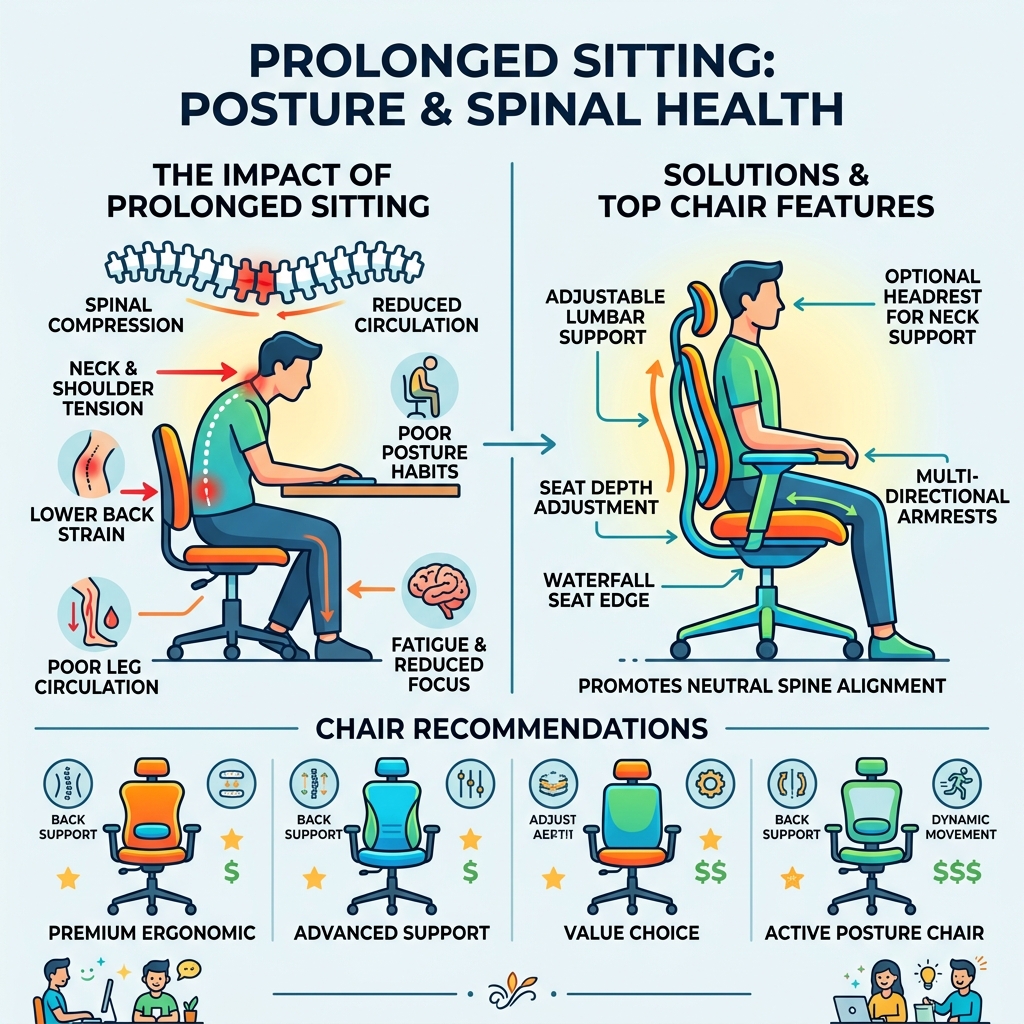
When we talk about the best chair for sitting, we aren’t just looking for soft padding. We are looking for a tool that mimics the natural movement of the human body. If a chair forces you into a static, “perfect” posture, it actually does more harm than good by cutting off circulation and fatiguing your muscles.
The science of ergonomics tells us that the best chairs prioritize four key areas:
- Dynamic Lumbar Support: Your spine has a natural S-curve. A great chair fills the gap in your lower back and, more importantly, moves with you as you shift from typing to reclining.
- Seat Depth Adjustment: This is often overlooked. You should have 1 to 2 inches of space between the edge of the seat and the back of your knees. If the seat is too deep, it cuts off circulation; if it’s too shallow, your thighs aren’t supported.
- Synchro-Tilt Mechanism: This allows the backrest and seat to tilt at a synchronized ratio (usually 2:1). This opens up your hip angle when you lean back, which is vital for spinal decompression.
- 4D Armrests: To prevent carpal tunnel and shoulder strain, armrests should adjust in height, width, depth, and angle. This ensures your elbows stay at a 90-degree angle regardless of the task.
Research into spinal alignment and pressure distribution suggests that “pixelated” support—where the chair responds to micro-movements—can significantly reduce the physical stress of a long workday.
10 Best Chairs for Sitting Through Your Longest Workdays
Finding the right chair is a personal journey. We’ve tested and researched dozens of models to identify the top performers across different categories, from high-end icons to budget-friendly workhorses.
Herman Miller Embody: The Gold Standard for Back Support
The Embody is often cited as the pinnacle of ergonomic design. Developed by Bill Stumpf and Jeff Weber, it features a “matrix of pixels” in the seat and back that automatically conforms to your body’s micro-movements. This eliminates pressure buildup and encourages blood flow. Its narrow back design allows your shoulders to move freely, which is a game-changer for those who find traditional wide-back chairs restrictive. It is specifically designed for performance and long-term health.
Boulies OP180: Best Chair for Sitting and Productivity
For those who spend 8 to 10 hours in deep focus, the Boulies OP180 is a standout. It features a unique forward-tilt mechanism (up to 2 degrees) that keeps your pelvis in a neutral position while you lean into your work. Combined with cold-cured foam—which maintains its shape much longer than standard foam—and a 160kg (352 lbs) weight capacity, it’s a durable choice for serious professionals.
Steelcase Gesture: The Interface Master
The Gesture was designed after Steelcase studied 2,000 people in 11 countries. They discovered that new technologies (like tablets and smartphones) have created new sitting postures. The Gesture’s armrests move like a human arm, supporting you in any position. With a 400 lb capacity and a 12-year warranty, it’s a “buy it for life” investment.
Branch Ergonomic Chair Pro: The Value King
At around $499, the Branch Pro offers features usually reserved for chairs double its price. It includes a 3D knit back for breathability and a robust 7-year warranty. It supports up to 275 lbs and provides a clean, modern aesthetic that fits perfectly in home offices.
LeanRite Elite: The Active Choice
If traditional chairs leave you with a stiff back, the LeanRite Elite offers a different approach. Developed with orthopedic surgeons, this chair allows you to sit, stand, or “lean.” It encourages an open hip angle and core activation. It’s particularly effective for those dealing with sciatica or lower back pain.
Herman Miller Aeron: The Iconic Mesh Classic
The Aeron is the most famous office chair in the world for a reason. Its 8Z Pellicle mesh offers eight zones of varying tension to cradle your body. It’s available in three sizes (A, B, and C) to ensure a perfect fit for everyone from petite to tall users.
Steelcase Karman: The Lightweight Mesh Contender
The Karman is Steelcase’s answer to the Aeron. It uses a proprietary textile that responds to your movements without the need for heavy mechanical adjustments. At only 29 lbs, it’s incredibly light but supports up to 350 lbs.
Haworth Fern: The Flexible Spine
The Fern is inspired by the structure of a fern leaf. Its “Stem” and “Fronds” create a backrest that is incredibly flexible, supporting every inch of your back as you twist and reach across your desk. It’s widely considered one of the most comfortable “out of the box” chairs available.
Branch Ergonomic Chair: Best Under $350
The standard Branch Ergonomic Chair is a favorite for those on a budget. It features a double-layered mesh back and a high-density foam seat. While it lacks some of the high-end adjustments of its “Pro” sibling, it’s a massive upgrade over basic big-box store chairs.
Humanscale Freedom: The Intuitive Recliner
The Freedom chair does away with manual knobs and levers. It uses a weight-sensitive recline mechanism that automatically adjusts the tension based on your body weight. If you hate fiddling with settings, this is the chair for you.
Finding the Best Chair for Sitting Based on Body Type
One of the biggest mistakes people make is buying a “one size fits all” chair. If you are 6’4″ or 5’1″, your needs are vastly different.
- For Petite Users: Look for chairs with a low minimum seat height (around 14-16 inches) and a shallow seat depth. The Herman Miller Aeron (Size A) and Herman Miller Sayl are excellent choices.
- For Big & Tall Users: You need a high weight capacity and a wide seat pan. The Steelcase Gesture (400 lbs) and Boulies Elite Series (150kg/330 lbs) are designed for larger frames.
- For Tall Users: Ensure the backrest is high enough to support your shoulders. The Herman Miller Cosm (High Back) and the Boulies OP300 offer the vertical real estate needed for those over 6’2″.
Quick Body Size Guide:
- Petite (< 5'4"): Herman Miller Aeron (Size A), Steelcase Amia.
- Average (5’5″ – 6’0″): Most chairs, including Branch Pro and Herman Miller Embody.
- Tall (> 6’1″): Herman Miller Aeron (Size C), Haworth Fern, Steelcase Gesture.
- Heavy (> 250 lbs): Steelcase Gesture, Boulies OP180.
How to Adjust Your Chair for Maximum RSI Prevention
Even the best chair for sitting won’t help if it’s adjusted incorrectly. At Dims Finance, we emphasize that your chair is the foundation of your entire ergonomic ecosystem.
- The 90-Degree Rule: Your elbows, hips, and knees should all be at approximately a 90 to 100-degree angle.
- Feet Flat: Your feet must be flat on the floor. If they aren’t, you’re putting undue pressure on your thighs and lower back. Use a footrest if your desk is too high.
- Eye Level: The top third of your monitor should be at eye level. This prevents “tech neck” and shoulder tension.
- Armrest Alignment: Position your armrests so your shoulders are relaxed and your wrists are neutral. For more tips on setting up your workspace, check out our guide to office furniture and ergonomics.
Material Science: Mesh vs. Foam for Long-Term Comfort
The material of your chair affects more than just “feel”—it impacts your body temperature and skin health.
Mesh (e.g., Herman Miller Aeron, Steelcase Karman)
- Pros: Incredible breathability (no “swamp back”), even pressure distribution, modern look.
- Cons: Can feel “firm” or cold in winter; low-quality mesh can sag over time.
- Best For: Hot sleepers and people who prefer a “weightless” sensation.
Foam (e.g., Steelcase Gesture, Boulies OP180)
- Pros: Traditional “couch-like” comfort, better for those who like to sit cross-legged, warmer.
- Cons: Can trap heat; cheap foam loses its shape (look for “cold-cured” foam for longevity).
- Best For: Users who want a plush, supportive feel and don’t mind a bit of extra warmth.
Hybrid Materials Chairs like the Herman Miller Lino use “Duo Suspension”—a breathable composite of different thread strengths—to offer the benefits of mesh with the targeted support of a traditional backrest.
Frequently Asked Questions about Ergonomic Seating
Can I use my FSA/HSA for an ergonomic chair?
Yes, in many cases! If you have a diagnosed medical condition like sciatica or chronic back pain, you can often use your FSA or HSA funds. You will typically need a Letter of Medical Necessity (LMN) from your doctor. Once you have that, you can pay with your card or submit the receipt for reimbursement.
What is the difference between mesh and leather for long hours?
Leather (and high-quality PU hybrid leather) offers a premium feel and is very easy to clean. However, it lacks the breathability of mesh. For 8+ hour sessions, mesh or breathable fabric is generally recommended to prevent heat buildup, which can cause discomfort and skin irritation.
How often should I check my chair’s bolts and casters?
We recommend a quick “tune-up” every 3 to 6 months. Check the bolts under the seat and the armrests to ensure they haven’t loosened from daily movement. Also, check your casters for hair or debris. If you have hardwood floors, consider upgrading to “rollerblade style” rubber casters to prevent scratches and noise.
Maintenance Checklist for 8-10 Hour Daily Use:
- Every 3 Months: Tighten all visible bolts.
- Every 6 Months: Clean mesh with a vacuum/compressed air; wipe down leather with a damp cloth.
- Yearly: Inspect gas cylinder for leaks (if the chair “sinks” on its own, it’s time for a replacement).
- As Needed: Replace casters if they stop gliding smoothly.
Conclusion
Choosing the best chair for sitting is one of the most significant investments you can make in your health and career longevity. Whether you opt for the pixelated support of the Herman Miller Embody or the active posture of the LeanRite Elite, the goal is the same: to reduce the physical toll of your workday.
At Dims Finance, we believe that workplace wellness is built on a foundation of science-based ergonomic choices. A great chair is just the beginning—pairing it with the right keyboard and mouse setup is essential for full RSI prevention.
Ready to upgrade your entire workstation? Explore our comprehensive office furniture guides to find the tools that will help you work smarter, not harder. Your back (and your productivity) will thank you.