
Why Your Wrist Pain at the Desk Is More Common Than You Think
A vertical mouse for wrist health is one of the most effective upgrades a desk worker can make to reduce daily wrist strain — and if you’re already feeling discomfort, you’re not alone.
Quick answer: What does a vertical mouse do for your wrists?
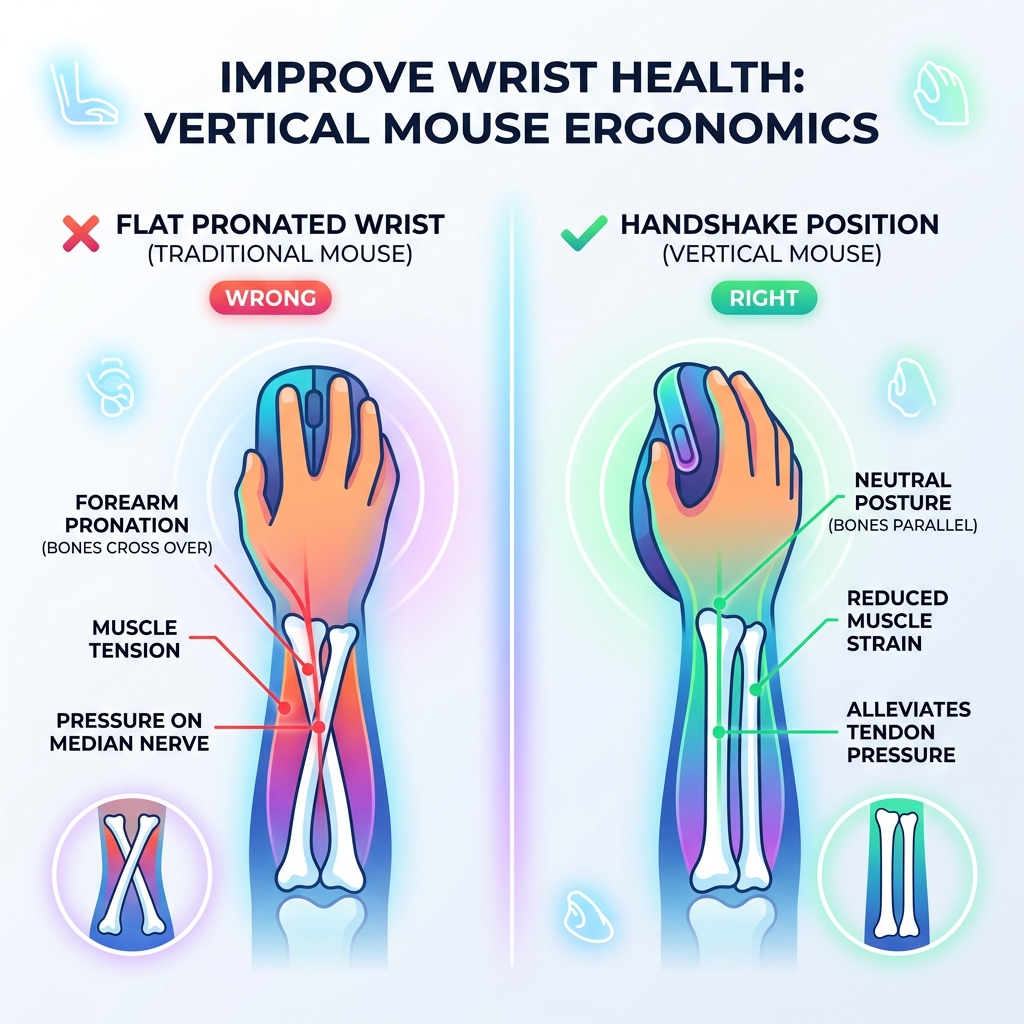
- Holds your hand in a natural “handshake” position instead of forcing your forearm to twist flat
- Reduces pressure on the wrist and surrounding tendons
- Lowers muscle strain during long hours of computer use
- Can help relieve symptoms linked to carpal tunnel syndrome and repetitive strain injuries (RSI)
- Most users report noticeable comfort improvement within 3-5 days
Think about how your arm feels when it’s fully relaxed at your side. Your palm faces inward, not downward. Now picture what a standard flat mouse forces you to do — rotate your entire forearm so your palm faces the desk. That unnatural rotation, held for hours every day, puts constant stress on the muscles, tendons, and nerves in your wrist and forearm.
Office workers rack up thousands of repetitive hand movements every single day. Over time, that load adds up. Wrist pain, tingling, and stiffness are often the first signs that something needs to change at your workstation.
A vertical mouse is designed to fix exactly that — by letting your hand rest upright, the way it naturally wants to sit.
Why a Vertical Mouse for Wrist Health is a Game Changer
When we talk about a vertical mouse for wrist health, we aren’t just talking about a cool-looking gadget. We are talking about a fundamental shift in how your body interacts with your computer. The primary culprit behind most desk-related wrist pain is a movement called “pronation.” This is the fancy anatomical term for turning your palm downward to face the floor.
When you pronate your forearm to use a traditional mouse, the two bones in your forearm—the radius and the ulna—cross over each other. This creates tension in the surrounding muscles and puts pressure on the median nerve, which is the main highway for sensations in your hand. By switching to a “handshake” position, you uncross those bones and return your arm to a neutral posture.
This neutral alignment is the “North Star” of ergonomics. We’ve discussed mastering the neutral wrist position for your keyboard setup before, and the same logic applies to your mouse. When your wrist is neutral, the carpal tunnel—the narrow passageway on the palm side of your wrist—is at its most open. This provides significant carpal tunnel relief because there is less physical compression on the nerves.
Furthermore, vertical mice help prevent “ulnar deviation.” This happens when you flick your wrist side-to-side (toward your pinky or thumb) to move the cursor. Because a vertical mouse encourages you to move from your elbow and shoulder rather than just your wrist, it keeps the joint stable. For a deeper dive into how this impacts your daily workflow, check out our guide on wrist management finding the best RSI mouse for pain-free scrolling.
Selecting a Vertical Mouse for Wrist Health for Small vs. Large Hands
One size definitely does not fit all when it comes to ergonomic gear. If you choose a mouse that is too large for your hand, you’ll end up overstretching your fingers to reach the buttons. If it’s too small, your hand will “claw” around it, creating new types of tension.
For those of us with larger paws, the Logitech MX Vertical Ergonomic Wireless Mouse is often the gold standard. It is specifically sculpted for medium-to-large hands, providing a substantial surface area that supports the entire palm. The thumb rest is positioned so that your thumb sits naturally, preventing “thumb tucking” which can lead to strain at the base of the hand.
Conversely, if you have smaller hands, a massive mouse can feel like trying to navigate with a baked potato. This is where the Lift Vertical Ergonomic Mouse | Logitech shines. It offers the same 57-degree ergonomic benefits but in a more compact frame. It even comes in a left-handed version, which is a breath of fresh air for the “sinister” workers among us. You can read more about options for lefties in our article on the best left-handed wireless mouse for sinister comfort.
The Long-Term Impact of a Vertical Mouse for Wrist Health on RSI Prevention
Repetitive Strain Injury (RSI) is like a slow-moving storm. It doesn’t happen overnight; it’s the result of thousands of tiny stresses building up over months or years. Traditional mice contribute to this by causing constant forearm twisting and high tendon stress.
By using a vertical mouse for wrist health, you are effectively lowering the “cost” of every click. Research shows that vertical designs can reduce muscle activity in the forearm by up to 10-15%. While that might seem small, consider that an office worker might perform 11,000 keystrokes and thousands of mouse clicks a day. Over a year, that 10% reduction in strain adds up to a massive decrease in wear and tear.
We often see keyboard wrist injury when your hands go on strike, but the mouse is an equal partner in crime. Proactive changes are essential. As we highlight in our guide on how employees can stop repetitive strain injuries before they start, the goal is to reduce the load on your tissues before they reach their breaking point.
The Science of Ergonomics: How Vertical Mice Reduce Strain
Why 57 degrees? You’ll see this specific number cited frequently, especially by brands like Logitech. Their research, developed with leading ergonomists, suggests that a 57-degree vertical angle is the “sweet spot.” It is vertical enough to prevent forearm pronation but tilted enough that you don’t feel like you’re holding a joystick.
This specific angle improves posture by encouraging a more upright sitting position. When your hand is flat, your shoulder tends to rotate inward and “hunch.” When your hand is vertical, your shoulder naturally opens up. This ripple effect means that a vertical mouse for wrist health isn’t just helping your wrist—it’s helping your neck and shoulders too.

| Feature | Traditional Mouse | Vertical Mouse (57°) |
|---|---|---|
| Forearm Position | Pronated (Twisted) | Neutral (Handshake) |
| Wrist Pressure | High (Compression) | Low (Decompressed) |
| Muscle Strain | Elevated in forearm | Reduced by ~10% |
| Movement Style | Wrist-heavy flicking | Arm and shoulder-led |
| Posture Impact | Internal shoulder rotation | Open, neutral shoulder |
Scientific studies and physical therapists often point out that while ergonomics is vital, it’s part of a larger ecosystem. Pairing a vertical mouse with other adjustments, such as those found in ergonomic keyboard and mouse setups for maximum comfort, creates a workstation that supports your body’s natural mechanics.
Top-Rated Vertical Mice: A Comparative Roundup
If you’re ready to make the switch, there are a few heavy hitters in the market that consistently top the charts for performance and comfort.
1. Logitech MX Vertical
This is the “pro” choice. It features a high-precision 4000 DPI sensor, which means you have to move your hand four times less to get the same cursor movement on the screen. It’s rechargeable via USB-C and lasts about four months on a full charge. Its premium build quality and ergonomist-approved design make it a top contender for office professionals.
- Best for: Medium to large hands, office work.
- Link: Logitech MX Vertical Ergonomic Wireless Mouse
2. Razer Pro Click V2 Vertical Edition
Razer took their gaming expertise and applied it to productivity. This mouse has a 71.7-degree tilt—even more vertical than the Logitech—and a staggering 30K optical sensor. It’s incredibly precise, making it a favorite for graphic designers and architects who need pixel-perfect accuracy without the wrist pain.
- Best for: Precision work, high-performance needs.
- Link: Razer Pro Click V2 Vertical Edition Productivity Mouse | Razer United States
3. Logitech Lift
The “little sibling” to the MX Vertical, the Lift is designed for small-to-medium hands. It uses a single AA battery that lasts up to two years and features whisper-quiet clicks—perfect for open offices or late-night sessions.
- Best for: Small hands, quiet environments.
- Link: Lift Vertical Ergonomic Mouse | Logitech
4. LEKVEY Vertical Wireless Mouse
For those on a budget, the LEKVEY is a highly popular entry-level option. It has over 15,000 positive ratings and offers a rechargeable battery and adjustable DPI. While it lacks the advanced software of Razer or Logitech, it provides the essential “handshake” grip at a fraction of the price.
Choosing the right model is the first step in an ergonomic keyboard and mouse setup for enhanced comfort.
Beyond the Mouse: Exercises and Habits for Total Comfort
We have to be honest with you: even the best vertical mouse for wrist health isn’t a magic wand. Physical therapists often note that ergonomics and posture only account for about 10-20% of the solution for chronic wrist pain. The rest comes down to “Demand vs. Capacity.”
Think of your hands like a marathon runner. If you ask them to run 26 miles (10 hours of clicking) but they only have the strength for 5 miles, they will get injured. A vertical mouse reduces the “demand,” but you still need to build the “capacity” of your muscles.
Recommended Habits for Wrist Health:
- The 20-20-20 Rule: Every 20 minutes, look 20 feet away for 20 seconds, and give your hands a gentle shake.
- Strengthening: Use light resistance bands or grip trainers to strengthen your forearm extensors. Stronger muscles can handle more repetitive load.
- Movement from the Shoulder: Stop “planting” your wrist on the desk. Use your whole arm to move the mouse. This distributes the work to larger muscle groups like the biceps and deltoids.
- Wrist Rests: While a mouse might stand up, your keyboard still needs support. Using ergonomic-wrist-rests-for-typing can keep your wrists from sagging during lulls in activity.
By combining a vertical mouse with a proper ergonomic-keyboard-and-mouse-setup, you create a comprehensive defense against RSIs.
Frequently Asked Questions about Vertical Mice
How long is the adjustment period for a vertical mouse?
Most users find that it takes about 3 to 5 days to get used to the new grip. At first, your brain might feel a little “disconnected” from the cursor, and your precision might take a slight hit. This is just your muscle memory rewriting itself. By the end of the first week, most people find it so comfortable they never want to go back to a flat mouse.
Are vertical mice better than trackballs for carpal tunnel?
It depends on your specific pain. A vertical mouse still requires arm movement, which is great for the wrist but might be tiring for the shoulder. A trackball is stationary; you move the cursor with your thumb or fingers. If your pain is strictly in the wrist joint, a vertical mouse is usually the first recommendation. If you have severe limited mobility in your arm, a trackball might be better.
Can I use a vertical mouse for high-precision gaming?
Yes, but there’s a caveat. While models like the Razer Pro Click V2 have high-end sensors, the vertical shape makes “lift-off” movements (common in low-DPI FPS gaming) more difficult. However, for MMOs, RPGs, or casual gaming, a vertical mouse for wrist health is perfectly suitable and much more comfortable for long raids. Esports players, who perform up to 15 movements per second, are increasingly looking at ergonomic alternatives to extend their careers.
Conclusion
At Dims Finance, we believe that your workspace should work for you, not against you. Investing in a vertical mouse for wrist health is more than just a purchase; it’s a commitment to your long-term well-being. By realigning your wrist into a natural handshake position, you are taking a science-based step toward a pain-free professional life.
The best ergonomic setup is one that evolves with your needs. Combine your new mouse with regular movement, strengthening exercises, and a mindful workstation layout to boost your productivity and health simultaneously.
Ready to complete your ergonomic transformation? Explore our full range of ergonomic desk accessories to find the perfect tools for your setup.