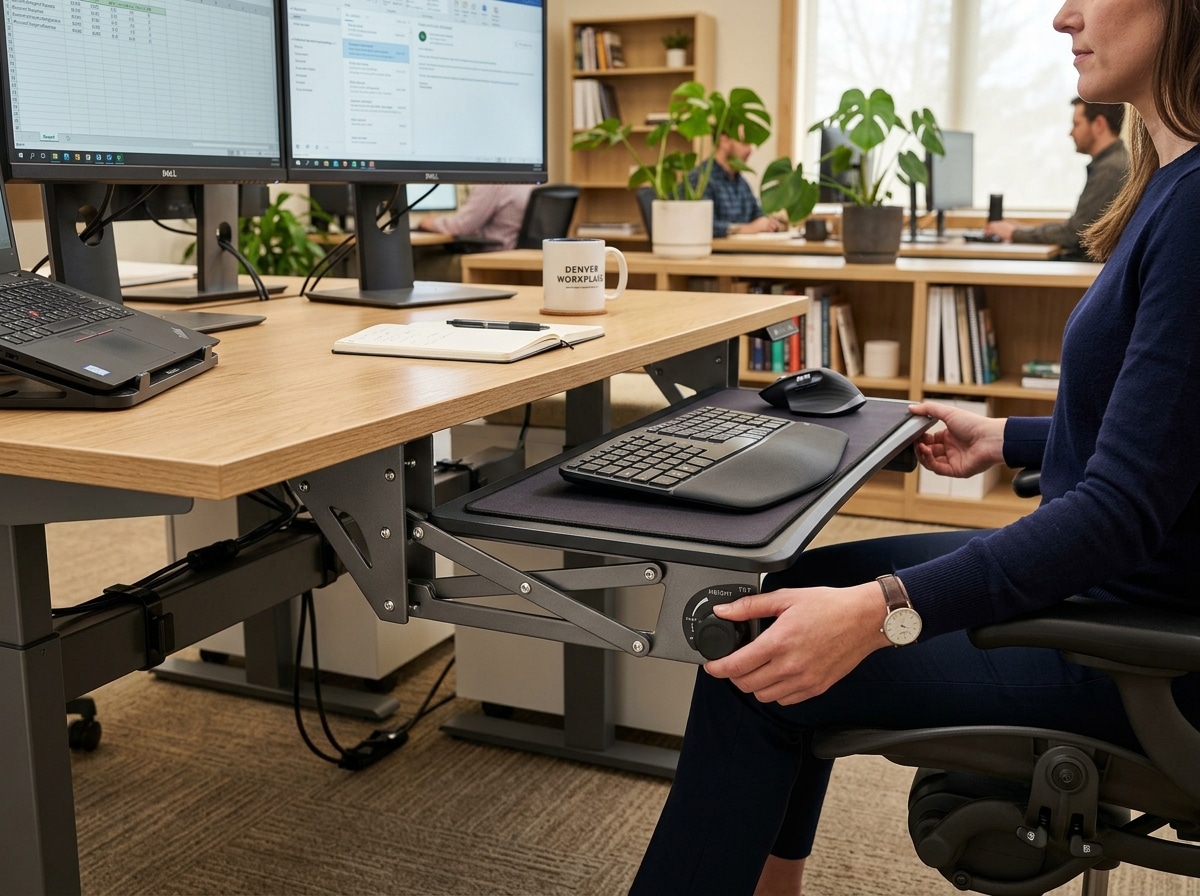
The Best Adjustable Height Keyboard Trays at a Glance
Adjustable height keyboard trays are one of the most effective upgrades you can make to a computer workstation if you’re dealing with wrist pain, shoulder tension, or early signs of repetitive strain injury (RSI).
Here are the top picks to consider:
| Tray | Best For | Price Range |
|---|---|---|
| VIVO MOUNT-KB05E | Best overall / most reviewed | From $49.99 |
| VIVO MOUNT-KB05HB | Height-focused under-desk use | $69.99 |
| Uncaged Ergonomics KT2 | Standing desk users | $129.99 |
| Uncaged Ergonomics KT4 | No-drill clamp-on install | $59.99 |
| iMovR Stowaway | Premium ergonomic performance | $275.00 |
| Ergomart WR-S2S | Sit-stand with max range | Contact for price |
Most people spend 6–8 hours a day typing at a keyboard that’s simply too high. That forces your wrists to bend upward, your shoulders to creep up, and your elbows to flare out — a recipe for chronic discomfort over time.
A quality adjustable height keyboard tray moves your keyboard below desk level and tilts it slightly downward (called negative tilt). This lets your wrists stay flat and your arms hang naturally at your sides — the position your body actually wants.
One VIVO user with fused vertebrae in their neck put it plainly: the ability to quickly shift keyboard height throughout the day — whether sitting, standing, or using an under-desk bike — was the difference between working with pain and working without it.
That experience isn’t unusual. It’s exactly why over 11,900 people have reviewed the VIVO MOUNT-KB05E alone, giving it 4.4 out of 5 stars on Amazon.
This guide breaks down every major type of adjustable keyboard tray, what features actually matter, and which models are worth your money.
Why You Need an Adjustable Height Keyboard Tray
We often think of the desk surface as the “correct” height for typing, but for most people, standard desks are built too high. When you place your keyboard on top of the desk, you are forced to lift your shoulders and bend your wrists upward to reach the keys. This position is a leading cause of Repetitive Strain Injuries (RSIs).
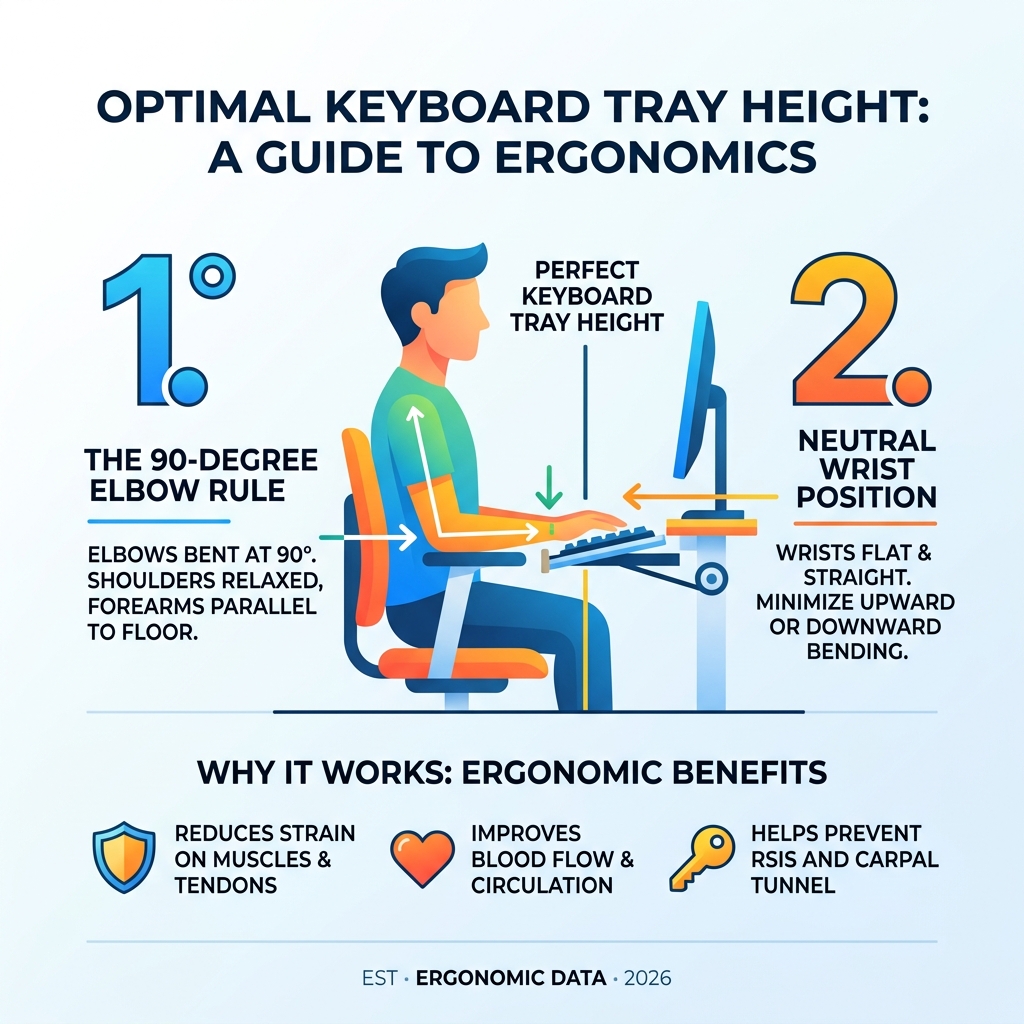
By using an adjustable height keyboard tray, you bring the keys to your natural resting hand position. This setup encourages a neutral wrist position, where your wrists are straight rather than angled up or down. This is critical for preventing carpal tunnel syndrome, as it reduces pressure on the median nerve.
Beyond the wrists, a tray allows your shoulders to relax. When your keyboard is at the proper height, your elbows should sit at approximately a 90-degree angle, allowing your upper arms to hang naturally. This prevents the “shrugging” motion that leads to neck and shoulder tension.

Scientific research highlights that the ability to alternate postures is vital for long-term health. For those utilizing affordable standing desks for small spaces, a tray provides the fine-tuning necessary to ensure that whether you are sitting or standing, your typing posture remains perfect. Proper ergonomic keyboard and mouse setup isn’t just about comfort; it’s about career longevity and well-being.
Types of Adjustable Keyboard Trays for Every Desk
Not every desk is built the same, which is why there are several mounting styles for an adjustable height keyboard tray. Choosing the right one depends on your desk material, your available space, and whether you are allowed to drill holes into your furniture.
Under-Desk Track Mounts
These are the “gold standard” for professional offices. A metal track is screwed into the underside of the desk, allowing the tray to slide in and out. Models like the VIVO MOUNT-KB03B (which has over 2,500 reviews) use this system to provide a stable, “wobble-free” experience. These often feature articulating arms that allow for significant height and tilt adjustments.
Clamp-On Systems
If you live in a rental or have a glass desk where drilling isn’t an option, a Clamp-on Keyboard Tray with Swinging Height Adjustment is the perfect solution. These use heavy-duty C-clamps to attach to the edge of the desk. The VIVO MOUNT-KB05E is a best-seller in this category because it’s incredibly easy to install and move if you change workstations.
Wall-Mount Options
In tight spaces like medical clinics, server rooms, or retail POS stations, a wall-mounted tray is often the only way to go. The LeverLift Compact Height Adjustable Folding Keyboard Tray is designed for these scenarios. It can fold up to within 4 inches of the wall when not in use, making it ADA-compliant and incredibly space-efficient.
Sit-Stand Solutions and Retrofit Systems
For those who want to convert a standard fixed-height desk into a sit-stand workstation without buying a whole new desk, retrofit systems are a lifesaver.
The Quicklift Sit Stand Elevation Keyboard Tray Lift is a vertical travel system that installs between an existing keyboard arm and the tray. It adds up to 9 inches of vertical range, allowing you to raise the keyboard high enough to type while standing.
Alternatively, “scissor lift” platforms like the Adapt Scissor Lift sit directly on top of the desk. These require no installation and are ideal for tall users (over 6 feet) who need their keyboard positioned higher than a standard desk allows. They use a spring-loaded mechanism—simply squeeze a handle to glide the platform to your desired height.
Key Features of a High-Quality Adjustable Height Keyboard Tray
When shopping for an adjustable height keyboard tray, it’s easy to get overwhelmed by specs. However, certain features are non-negotiable for true ergonomic benefit.
- Height Range: Look for a tray that offers at least 6 inches of vertical travel. High-end models like the Ergomart WR-S2S offer a massive 22.75 inches of adjustment, allowing the tray to go 16 inches above the desk and 6 inches below.
- Weight Capacity: Most trays handle between 10 and 25 lbs. While a keyboard and mouse are light, you want a sturdy arm that won’t bounce while you type.
- Swivel and Rotation: A 360-degree swivel allows you to swing the tray out of the way when you need to get closer to your desk for paperwork.
- Track Length: Ensure your desk has enough depth to accommodate the track. Standard tracks are about 21 to 23 inches long. If you have a shallow desk, you may need a “short track” version (around 17 inches).
Essential Adjustments for an Adjustable Height Keyboard Tray
The most important adjustment is negative tilt. Most “cheap” trays only slide out or tilt upward (positive tilt). However, ergonomic experts agree that a negative tilt—where the back of the keyboard is higher than the front—is the only way to achieve a truly neutral wrist position.
The FlexiSpot Computer Keyboard Tray With Height and Tilt Adjustment offers a tilting range of 16 to 20 degrees, which helps eliminate the wrist extension that causes pain. Some premium models, like the iMovR Stowaway, even include a “battleship grid” readout on the arm. This allows you to remember your exact preferred settings, which is incredibly helpful if you share a workstation with others.
Choosing the Right Adjustable Height Keyboard Tray Dimensions
Size matters. If your tray is too small, you won’t have room for your mouse, forcing you to reach up onto the desk—a movement that causes shoulder strain.
| Feature | Standard Requirement | Why It Matters |
|---|---|---|
| Tray Width | 25″ – 27″ | Must fit keyboard + mouse comfortably |
| Track Length | 17″ – 22″ | Determines if tray can fully retract under desk |
| Platform Material | Phenolic or Wood | Thin (0.25″) phenolic maximizes knee clearance |
| Mouse Platform | Independent | Allows mouse to be at a different tilt than keys |
We recommend using wireless keyboard and mouse combos with your tray to avoid cable tangles as you adjust the height. Also, consider the thickness of the platform. A thin phenolic platform provides the most “knee clearance,” ensuring you don’t hit your legs on the tray while sitting.
Installation and Maintenance for Long-Term Performance
Installing an adjustable height keyboard tray can range from a five-minute clamp-on job to a more involved drilling project.
For under-desk mounts, you will typically need a drill and a Phillips-head screwdriver. Many modern desks, like those from iMovR, come with pre-drilled pilot holes, making the process much smoother. If you are drilling into a solid wood or laminate desk yourself, be sure to measure twice to ensure the track is centered and perfectly straight.
Maintenance is often overlooked but essential for a “wobble-free” experience. Over time, the screws holding the track can loosen due to the vibrations of typing. We suggest checking and tightening these every six months. If the sliding motion becomes “sticky,” a small amount of silicone-based lubricant on the track will restore the smooth glide.
For those using adjustable standing desks for work from home, ensure your cable management has enough “slack.” You don’t want your keyboard or mouse cables to pull tight and disconnect when you raise the desk to a standing position.
Frequently Asked Questions about Keyboard Trays
How do I determine the ideal height for my keyboard tray?
The “90-degree rule” is your best guide. Sit (or stand) with your shoulders relaxed and your upper arms hanging naturally at your sides. Bend your elbows to 90 degrees. Your keyboard should be positioned so that your hands rest on the home row keys while your wrists remain perfectly flat. If you have to reach up, the tray is too high; if you have to reach down, it’s too low.
Can I install an adjustable tray on a glass or thin desk?
You should not drill into a glass desk. For glass, a clamp-on model is the only safe choice. For thin desks (less than 0.75 inches thick), ensure the screws provided with the tray won’t poke through the top of your desk. You may need to use shorter screws or add a small wooden “spacer” block underneath to give the screws more material to bite into.
What is the difference between positive and negative tilt?
Positive tilt is when the top of the keyboard (the side furthest from you) is lower than the bottom. This is generally bad for your wrists. Negative tilt is when the top of the keyboard is higher than the side closest to you. This allows your hands to “slope” downward, mirroring the natural angle of your arms and keeping your wrists in a neutral, strain-free position.
Conclusion
At Dims Finance, we believe that a small investment in your workspace can lead to a massive improvement in your quality of life. An adjustable height keyboard tray is more than just a place to put your peripherals; it is a tool for injury prevention and long-term health.
By moving your setup into a neutral typing zone, you can eliminate the “shrugged” shoulders and bent wrists that lead to chronic pain. Whether you choose a heavy-duty under-desk mount or a flexible clamp-on system, the key is to find a solution that allows for frequent, easy adjustments throughout the day.
For more tips on creating a pain-free office, check out our guide on ergonomic keyboard and mouse setups for maximum comfort or explore more info about ergonomic desk accessories to complete your workstation transformation. Your body will thank you!