Why the Neutral Wrist Position Keyboard Setup Could Save You From Chronic Pain
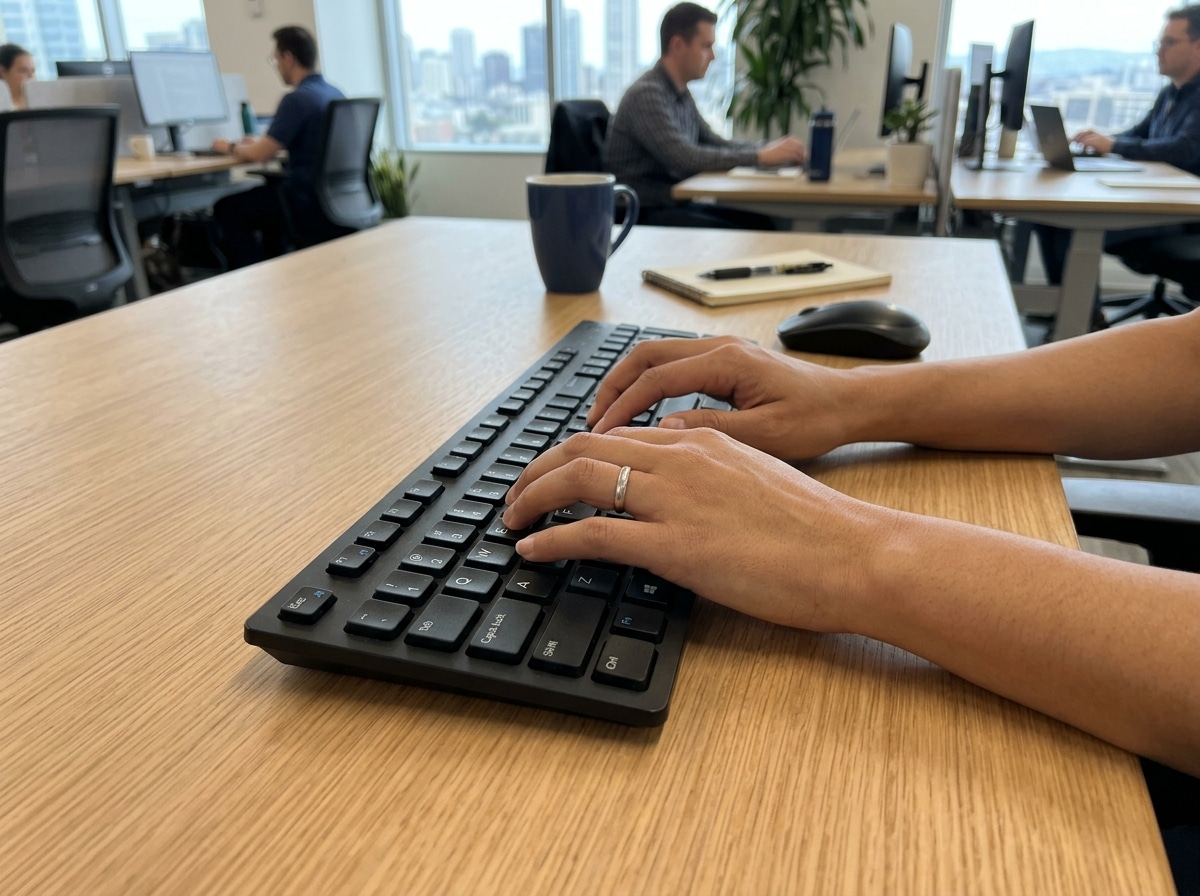
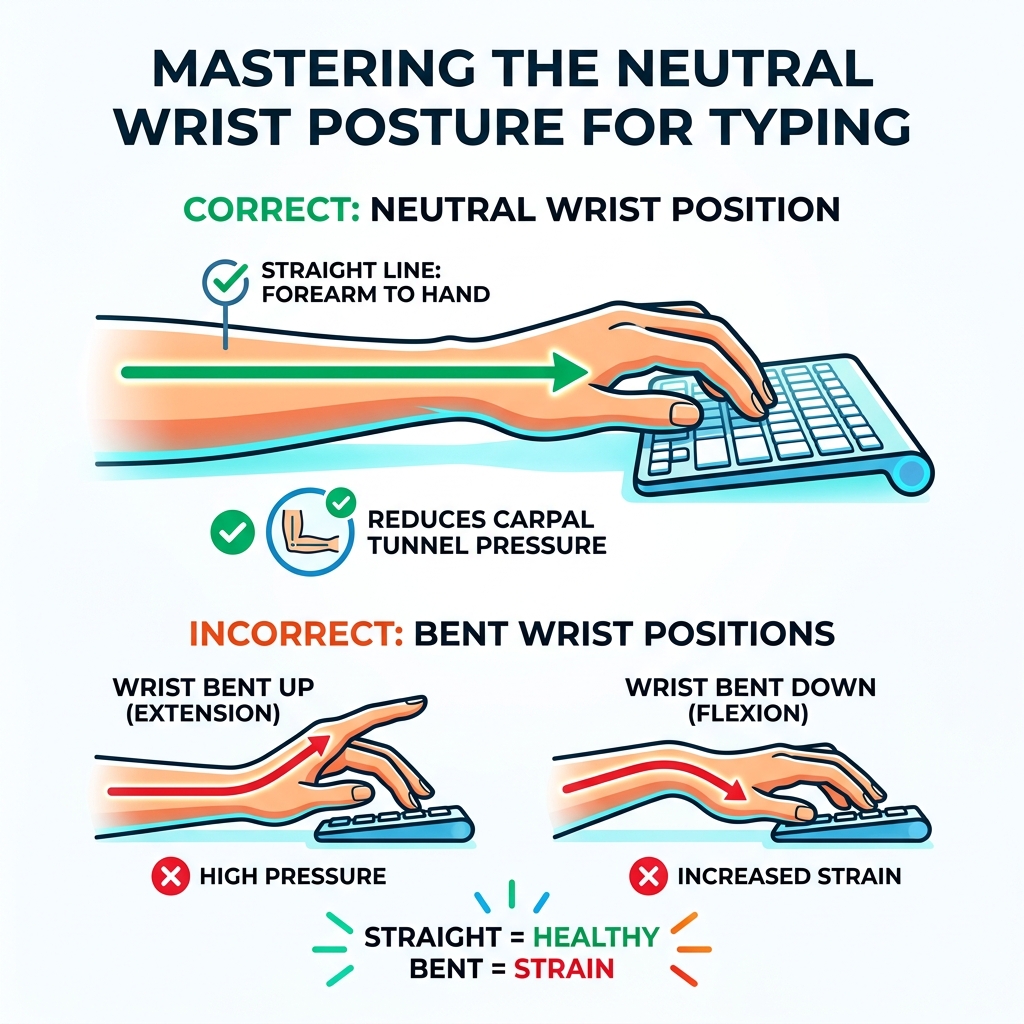
Neutral wrist position keyboard use means keeping your hand and forearm in a straight line — no bending up, down, or sideways — while you type.
Here’s what that looks like in practice:
- Wrist straight: A flat, unbroken line from your elbow to your knuckles
- Palm facing down: Not angled toward the screen
- Hands floating or lightly supported: Not pressing down on a hard surface
- Shoulders relaxed: Arms hanging naturally at your sides
- Elbows at 90–110°: Forearms roughly parallel to the floor
This single adjustment — keeping your wrists neutral — is the foundation of healthy typing ergonomics.
It might not seem like a big deal. But for office workers who type for three, five, or eight hours a day, wrist position is everything.
Repetitive strain injury (RSI) affects up to 3 million workers annually in the UK alone. Poor wrist posture is one of the leading causes. Bending your wrist upward during typing can increase pressure inside the carpal tunnel by three to four times compared to a neutral position — and that pressure, repeated thousands of times a day, is what leads to pain, numbness, and long-term injury.
The good news? Most of this is preventable. And it starts with understanding what your wrists are actually doing while you type.
Understanding the Neutral Wrist Position Keyboard Setup
To truly master your workspace, we need to look at the geometry of your body. Think of your arm as a garden hose. When the hose is straight, water (or in this case, blood flow and nerve signals) moves freely. When you “kink” the hose by bending your wrist up or to the side, you create resistance.
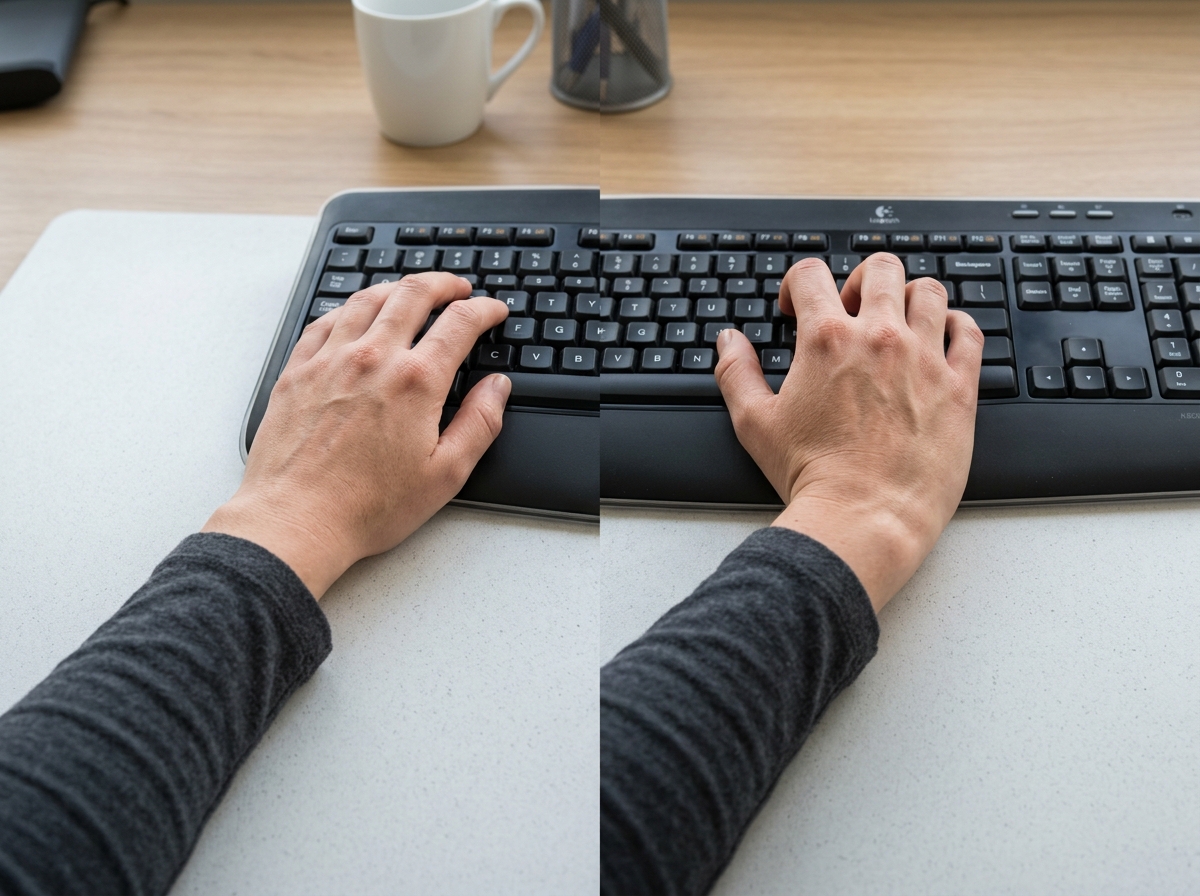
A neutral wrist position keyboard setup ensures that your forearm, wrist, and hand form a continuous, straight line. This means your palm should be oriented toward the floor, not tilted toward the monitor. When we maintain this continuity, we minimize the mechanical stress on the joints and soft tissues.
For those looking to dive deeper into the hardware side of things, check out our guide on ergonomic keyboard and mouse setups to see how specific gear can facilitate this alignment.
Defining the Neutral Wrist Position Keyboard Goal
The ultimate goal is a “zero-degree bend.” In ergonomics, we often talk about three types of problematic wrist movements:
- Extension: Bending the hand upward (like a “stop” sign).
- Flexion: Bending the hand downward.
- Ulnar/Radial Deviation: Bending the wrist side-to-side toward the pinky or thumb.
Scientific research on neutral posture typing shows that keeping the wrist within a very small range of “straightness” allows muscles to stay relaxed. When you deviate from this, your muscles must work overtime just to hold your hands in place, leading to rapid fatigue.
Why Your Current Keyboard Might Be Sabotaging You
If you look at the bottom of almost any standard keyboard, you’ll find two little plastic “feet.” Warning: These are usually the enemy.
Flipping those legs up creates a “positive tilt,” which forces your wrists into constant extension. This “cocked back” position pinches the nerves and tendons in the carpal tunnel. Furthermore, resting the weight of your arms directly on the hard edge of a desk creates “contact stress,” which can impede circulation. We’ve found that many people benefit from learning more about ergonomic keyboard and mouse setups for maximum comfort to break these old habits.
The Anatomy of Typing: Why Neutral Alignment Matters
Your wrist isn’t just a hinge; it’s a crowded subway tunnel. The carpal tunnel is a narrow passageway of ligament and bone at the base of your hand. Inside, you’ll find nine tendons that move your fingers and the median nerve, which provides sensation.
When you type in a non-neutral position, these tendons rub against the walls of the tunnel like a rope fraying over a sharp edge. This friction leads to microtrauma and inflammation, commonly known as tendonitis. If the swelling gets bad enough, it squeezes the median nerve, leading to Carpal Tunnel Syndrome. According to Verywell Health, symptoms like throbbing, stiffness, and weakness are early warning signs that your tendons are struggling.
Pressure and the Carpal Tunnel
As noted by the Canadian Centre for Occupational Health and Safety (CCOHS), bending the wrist upward (extension) or downward (flexion) physically narrows the space inside the carpal tunnel.
Imagine trying to slide a thick cable through a pipe that is being bent in half. The cable (your nerve) gets pinched. Over 3-4 hours of typing in this state, the pressure can cause significant nerve compression, leading to that “pins and needles” feeling many office workers know all too well.
The Kinetic Chain: From Monitor to Wrist
Ergonomics is like a game of Jenga — if one piece is off, the whole tower shifts. This is known as the “kinetic chain.”
If your monitor is too low, you naturally lean forward (forward head posture). This causes your shoulders to shrug and your elbows to flare out. To compensate and still hit the keys, your wrists are forced into an upward bend. OSHA eTools on monitor placement recommends keeping the top of your screen at or slightly below eye level. This aligns your neck and shoulders, creating a relaxed path for your arms and making a neutral wrist position keyboard setup much easier to maintain.
Engineering Your Workspace for a Neutral Wrist Position
You don’t need a million-dollar lab to fix your posture. You just need to apply a few engineering principles to your desk.
The foundation of any setup is the relationship between your chair and your desk. If your desk is too high, you’ll be forced to “reach up” to type, immediately breaking that neutral line. We often suggest looking into ergonomic desk accessories for comfort to bridge the gap between your body and your furniture.
Adjusting Desk and Chair Height
According to the Safe Work Australia Workstation Guide, you should follow these steps:
- Feet: Should be flat on the floor. If they don’t reach, use a footrest.
- Thighs: Parallel to the ground.
- Elbows: At a 90–110 degree angle, hanging comfortably at your sides.
- Keyboard Height: The keys should be at or slightly below elbow height.
The Power of Negative Tilt for a Neutral Wrist Position Keyboard
One of the best-kept secrets in ergonomics is the “negative tilt.” Instead of the keyboard sloping up toward the back, it should slope down and away from you.
Research from Cornell University suggests that a negative slope of -7 to -15 degrees is the gold standard for a neutral wrist position keyboard. This allows your hands to fall naturally into a straight line with your forearms. Guidelines from BIFMA G1-2013 emphasize that this position minimizes both static and dynamic muscle loads.
Ergonomic Tools: Keyboards and Supports for Wrist Health
Standard keyboards are designed for manufacturing efficiency, not human anatomy. Because they are one solid block, they force your wrists to bend outward (ulnar deviation) to keep your fingers on the home row.
Modern solutions like split keyboards allow you to place the two halves of the keyboard at shoulder width, keeping your arms straight. You might also consider wireless keyboard and mouse combos that offer more flexibility in placement.
Palm Rests vs. Wrist Rests
There is a huge misconception about “wrist rests.” Despite the name, you should never rest your wrists on them while actively typing.
Doing so puts direct pressure on the carpal tunnel. Instead, they should be used as palm rests to support the fleshy “heels” of your hands during brief pauses. OSHA’s eTools on Wrist/Palm Supports suggests that while typing, your hands should “float” above the keys like a concert pianist. If you do use a support, ensure it is the same height as the front of your keyboard. For more on this, see our breakdown of ergonomic wrist rests for typing.
Choosing the Right Keyboard Size for a Neutral Wrist Position Keyboard
Size matters when it comes to the “reach.”
- Full-Size: Includes a number pad, which often pushes your mouse hand far to the right, causing shoulder strain.
- TKL (Tenkeyless): Removes the number pad, allowing the mouse to sit closer to your body.
- 60% Layouts: Very compact, keeping all movements within a tight, ergonomic “strike zone.”
By reducing the distance your hand has to travel to reach the mouse, you prevent ulnar deviation and keep your shoulders open. To protect your desk and provide a soft surface for your forearms, check out desk mats for comfortable typing.
Dynamic Ergonomics: Stretches and Habits for Long-Term Comfort
Even the most perfect neutral wrist position keyboard setup can become harmful if you stay frozen in it for hours. Static loading occurs when muscles stay contracted to hold a limb in place, which reduces blood flow.
The WHO 2020 Guidelines emphasize that breaking up sedentary behavior is vital for musculoskeletal health. We recommend the “20-20-20 rule”: every 20 minutes, look at something 20 feet away for 20 seconds. This gives your eyes and your posture a much-needed reset.
Essential Stretches for Typists
To keep your “garden hose” from kinking, incorporate these micro-stretches:
- Tendon Glides: Slowly curl your fingers into various fist positions to keep tendons sliding smoothly.
- Prayer Stretch: Press palms together in front of your chest and slowly lower them until you feel a stretch in your wrists.
- Wrist Rotations: Gently roll your wrists in circles to release tension.
ISO 11226:2000 warns that even “correct” postures can be harmful if held too long. Movement is medicine!
The 20-8-2 Rhythm
A great way to manage your day is the 20-8-2 rhythm:
- 20 Minutes Sitting: In your neutral posture.
- 8 Minutes Standing: Using a standing desk if possible.
- 2 Minutes Moving: Walking, stretching, or grabbing water.
Using a HSE Display Screen Equipment Checklist can help you audit your habits and ensure you aren’t falling into the “static trap.”
Frequently Asked Questions about Neutral Wrist Positioning
Should my keyboard be flat or tilted?
Ideally, it should be flat or tilted away from you (negative tilt). Avoid using the “feet” at the back of the keyboard, as these force your wrists into an upward bend (extension), which is a primary cause of carpal tunnel strain.
Is it better to use a wrist rest or float my hands?
Floating your hands while typing is the most ergonomic method as it prevents “contact stress” on your carpal tunnel. Use a palm rest only during breaks to support the heels of your hands, not the soft underside of your wrists.
When should I see a doctor for wrist pain?
If you experience persistent numbness, tingling (especially at night), or a loss of grip strength, it’s time to seek professional help. These can be signs that nerve damage is progressing beyond what simple ergonomic changes can fix.
Conclusion
At Dims Finance, we believe that your workspace should work for you, not against you. Mastering the neutral wrist position keyboard setup isn’t just about buying a fancy new gadget; it’s about understanding the science of your own body. By aligning your chair, desk, and keyboard to support a straight-line posture, you can drastically reduce your risk of RSIs and boost your daily productivity.
Don’t wait for the ache to become a injury. Take a few minutes today to flatten those keyboard legs, adjust your chair height, and let your hands float. Your wrists will thank you for years to come. Master your setup at Dims Finance and join our community dedicated to health and productivity.